What if someone could modify a trusted app you downloaded on your Mac so that it steals your password and accesses your files and data? Researchers from Mysk “accidentally” discovered a way to do this.
While Apple has dismissed the Mysk app swap vulnerability, deeming it social engineering and not a technical bug, we got curious anyway. So, we decided to call in some experts to explain how all of this works, how serious it is, and more importantly, what you can do about it.
Turns out that swapping an app on your Mac is far too easy
Replacing apps that you trust on your Mac for malicious versions is nothing new. Stealers like AMOS, Odyssey, and others can replace cold wallet apps with fake crypto wallet password-grabbing pages. These stealers will also copy entire folders from apps like Telegram to steal your session without needing to type a password to log in.
Additionally, other Mac threats and malware often lure users as trusted apps, impersonating known brands, which is one reason why you should download your stuff from the official Apple App Store.
Mysk researchers recently found another Mac app swap vulnerability, which conceptually does the same despite using a different technical route.
As mentioned, Apple dismissed this vulnerability on social engineering grounds. And when Apple dismisses an exploit for it being social engineering, it means it is up to you, the Mac user, to learn how the threat works and avoid being digitally tricked into installing malware or giving away your passwords.
How the app swap vulnerability works
The simplicity of the Mysk app swap vulnerability is interesting. But certain specific conditions need to be met. It goes something like this.
You download an app like Signal, and then you install the app. Your Mac security Gatekeeper checks to verify that the app is legitimate and safe, and gives it the green light. At this point, in theory, someone who already has access to your Mac, remotely or in person, could modify the executable file of this app (its core engine) with malicious code.
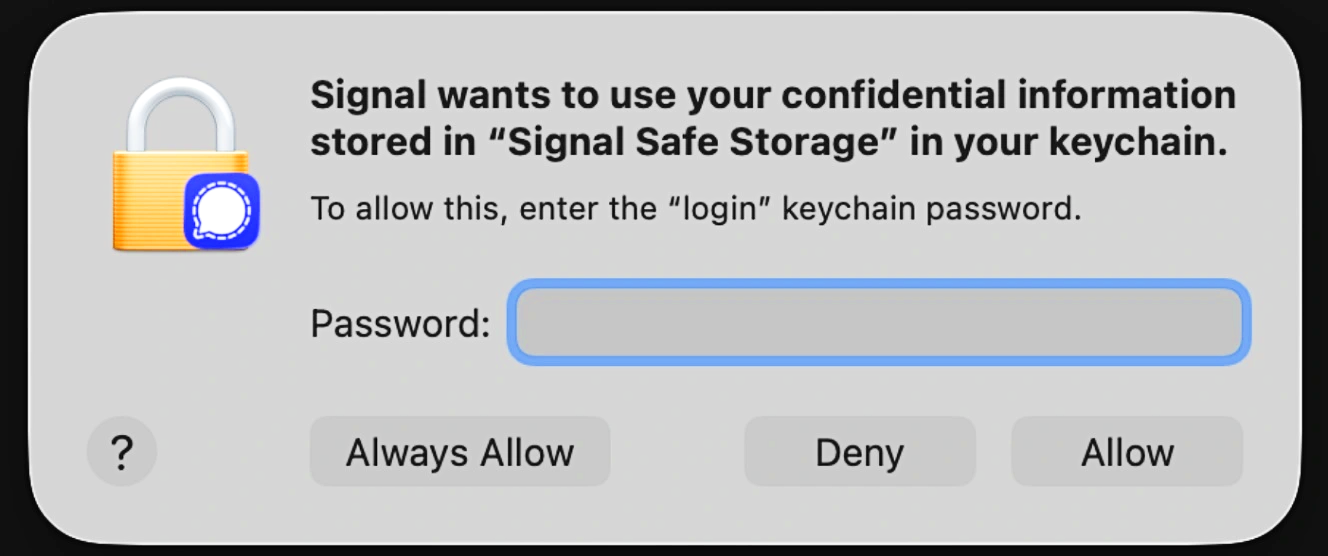
When you relaunch the app, no security warning is issued because your Mac only checks apps for malware once (and the app is ad hoc signed). The modified app then asks you for permissions to access your files, your password, or your keychain password, leaving your data wide open for the taking.
How serious is this app replacement vulnerability?
So, how serious is this? Is it something that can ruin your day? Experts answer.
“Honestly, the technique is clean, and the finding is fair, but on its own, it’s not something that hacks anyone,” Viktor Bulanek, Founder & CTO, Penetrify, an AI penetration testing platform, told us.
“It needs the attacker to already be running code as the user, so it sits in the post-compromise part of an attack, not at the front door,” said Bulanek.
“Real gap, low practical ceiling,” Raphael Peyret, formerly of Bitdefender and Google, and Founder of SHA/RP, a leadership and AI cybersecurity advisory company for startups, told us.
Peyret agreed that having user-level access to a Mac, which is the precondition to replacing or modifying an app, “is already the hard part of any attack.” Someone who has user-level access can go about many ways to steal your data.
George Gerchow, Faculty at IANS Research, a cybersecurity research and advisory company, disagreed on the severity of the vulnerability, although he understands why Apple dismissed it.
“The thing Mysk found is not a privilege escalation; it is a consent integrity problem, and that is worse in a way the severity rating does not capture,” Gerchow said.
“On likelihood, I would rate it high, with a caveat,” said Gerchow. That caveat, as other experts noted, is that this exploit requires someone who already has user-level access to your Mac.
How is the Mysk app swap different from what stealers do with cold wallets?
Gerchow noted that Mac stealers could incorporate this technique.
“Running as the user with no elevation is not an exotic prerequisite on macOS; it is the single most common outcome of every infostealer campaign of the last 3 years,” said Gerchow. “What they (stealers) did not have until now was a clean way to keep that access — this hands it to them.”
As mentioned, Mac stealers can replace apps with trojanized web loaders to steal your passwords or seed phrases. However, stealers today do not swap apps on your Mac; instead, they simply delete the existing legit cold wallet app and replace it with something that looks like it but is actually a web loader.
Think of a web loader as a web browser without the upper toolbar, inside an app. These fake web loaders connect to malicious password-grabbing sites that impersonate cold wallet brands like Ledger or Trezor.
In concept, the Mysk vulnerability does the exact same thing, despite reaching the objective through a different route.
“Archiving the application bundle with tar, deleting the original, and extracting the archive back into /Applications changes this behavior,” Mysk notes regarding how to modify application bundles, which, by default, your Mac does not allow modifications to.
“The restored app launches normally, despite being a different copy of the original bundle,” said Mysk.
Why does Gatekeeper have no Zero Trust?
All this app swapping leaves us with one big question: Why doesn’t Gatekeeper, your Mac’s built-in security system, flag this? The answer is that Gatekeeper only checks for apps to see if they are free from malware once, during install. After that, if the modified app is ad hoc signed, Gatekeeper will not check it.
What is “ad hoc signed,” in a nutshell? Basically, an app can be ad hoc signed using a few lines of code on your Mac terminal. This is common, for example, among developers testing software or apps on their Macs that might act up or have not yet been notarized and signed to pass Gatekeeper checks.
Beyond ad hoc signed apps, which have exclusive permissions given by users, checking things only once and never again, from a cybersecurity standpoint, is the exact opposite of Zero Trust, a security concept where things are checked over and over again, not just a one-and-done deal.
Should Gatekeeper have a Zero Trust core design and check apps more than once?
“Yes, in principle, though I would not put the fix in Gatekeeper,” Gerchow from IANS told us. “What is missing sits one layer above (Gatekeeper): Nothing revalidates the bundle after that first check, and the consent decision is bound to the wrong thing,” said Gerchow.
Should Apple issue a security patch?
For average users who only install an app once, the risk is significantly lower than for enterprises with IT departments that install dozens or hundreds of apps on workers’ Macs.
“It needs a fix, just not the one people are asking for,” said Gerchow. “Not a CVE and a patch, a design change in how consent is presented and revalidated.”
Bulanek said that having Gatekeeper recheck the signature of an app on every launch would hurt the performance of users’ Macs, taking up processing power and impacting battery life. However, Bulanek said, “Revalidating when the bundle contents actually change is reasonable and cheap.”
Peyret said no security patch is needed to fix this issue, “just re-verification on every launch instead of a permanent quarantine flag.”
“The archive-delete-restore trick proves the scope (of Gatekeeper) is too narrow,” said Peyret.
What can you do about Mac vulnerabilities?
From vulnerabilities that no one has discovered yet (zero-days), to those Apple dismisses or leaves unpatched, there is no such thing as software, apps, or code that is totally free of bugs and weak spots, or 100% safe. The more apps, the more code, the higher the number of vulnerabilities.
How can you stay safe from all of this? There are several things you can do.
Get Moonlock. Its constantly updated malware database deals with new vulnerabilities.
The Moonlock security app was built to deal with emerging threats, malware, and new vulnerabilities. The Malware Scanner and Real-Time Protection run on a constantly updated malware database. This allows the Moonlock app to flag new malware, threats, and exploits even before a security update is rolled out.

To add more layers of security, the Moonlock app ships with a built-in Scam Detector that can help you check emails and other texts for scams and phishing, and a VPN for safe browsing.
Moonlock can also scan your Mac settings and guide you on how to turn those up. And through Security Advisor, the Moonlock app will help you build safe digital habits at your own pace to counter evolving threats.
You can check out and test-drive Moonlock for free for 7 days.
Vulnerability tips from a Quantum industrial security engineer (a bit of an overkill, but useful)
The following are more things you can do to stay safe from vulnerabilities. A top expert shares some insights.
“The single biggest thing is don’t run untrusted apps or scripts, and avoid pirated or cracked apps, and random .dmg files; that’s where these footholds come from,” Shujaatali Badami (Ali), Quantum-IoT Research Engineer, specializing in quantum-resilient security for IoT and critical infrastructure, and IEEE Senior Member, told us.
Be suspicious of permission prompts that show up at weird times, such as an app suddenly asking for Desktop, Documents, or Keychain permission, especially when you didn’t do anything that needs passwords. Deny and look closer, Badami explained.
“Keep the list of apps with broad access like full disk access small, and audit it under System Settings > Privacy & Security now and then,” Badami added.
“If an app re-prompts for a permission it already had, treat that as a possible tell that the binary underneath changed,” Badami added. “On the business side, Endpoint Detection and Response (EDR) can flag executable-hash changes inside app bundles and will catch this pattern.”
Final thoughts
There are many kinds of vulnerabilities; most are low priority, while some require sophisticated skills or specialized hardware. However, others like this one offer a look at weak spots inside your Mac and how cybercriminals can use them.
Follow the tips from experts in this report, and strive to learn more about how your tech works to strengthen your security awareness and live a calmer, more private life.
This is an independent publication, and it has not been authorized, sponsored, or otherwise approved by Apple Inc. Mac and macOS are trademarks of Apple Inc.