

Objective-See, the most well-known NGO focused on macOS cybersecurity, released a report on yet another Mac stealer. This one, which looks a lot like the AMOS stealer, is part of a broader wave of cyberattacks being driven by increased stealer activity.
In this report, we talk to the author of the new Objective-See report, along with cybersecurity experts, to explain why MacSync and AMOS are the biggest threats to your Mac.
New AMOS campaign impersonating Claude and n8n
On April 1, Cybersecurity Engineer Pablo Redondo Castro reported a new stealer on Objective-See. The stealer, which Castro analyzed, had some unique elements. The malware was distributed as a trojan, impersonating legitimate software updates on Mac-force.squarespace[.]com, a domain used by AMOS stealer operators before.

Moonlock will stop AMOS and MacSync
The stealer impersonated Claude and n8n, a workflow automation platform headquartered in Berlin, Germany. The method of distribution was ClickFix.
What caught our attention is that the script used in this new ClickFix AMOS campaign is very similar to another AMOS ClickFix campaign we reported on in December, 2025. In that campaign, cybercriminals were leveraging ChatGPT and Grok shareable chat features, promoting those on Google ads, and tricking users into running AMOS on their Macs.

Red flags, and why 2 ClickFix scripts from different AMOS campaigns look so much alike
For the past weeks, we have been looking into ClickFix attacks, especially scripts used by cybercriminals, to identify easy-to-spot red flags to share with users. For example, we noticed that ClickFix scripts usually end with the command base64 — decode, which is why you see a ClickFix script as a random string of letters and numbers.
Finding 2 AMOS ClickFix scripts that looked so similar naturally piqued our curiosity. We asked the author of the Objective-See report, Castro, about these similarities.
“This probably assures that both samples come from the same actors,” said Casto. “When strings/domains/techniques are shared, the IoCs can be correlated to the same actors.”
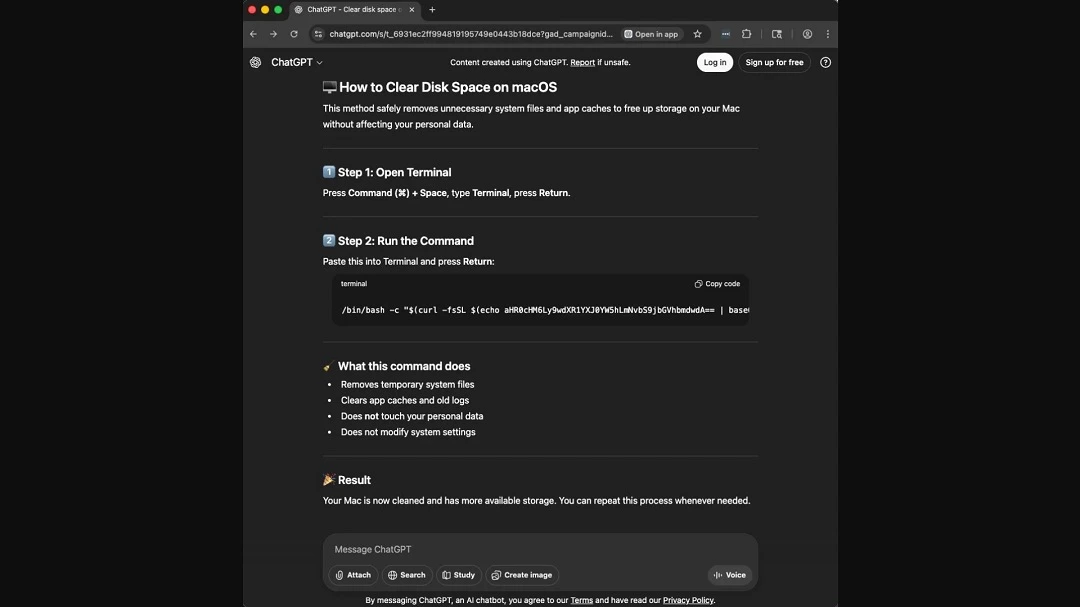
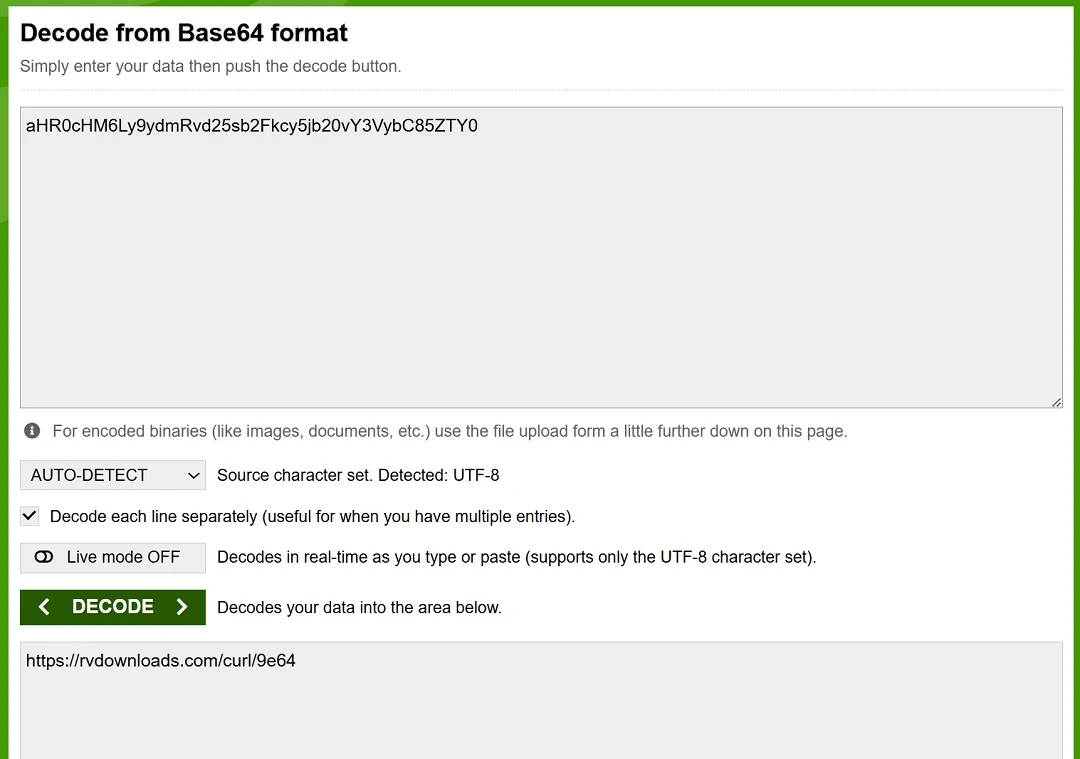
As shown in the image below, both AMOS ClickFix scripts fetch payloads from rvdownloads[.]com, another site flagged by cybersecurity companies as “known to host malware.” When you copy and paste these scripts into your Mac terminal, your Mac will connect to that domain to begin the cyberattack.
Looking into new AMOS capabilities and updates
We asked Casto if the AMOS sample he analyzed had been updated with new capabilities.
“I don’t think it’s a different sample from what’s been out there in the last months, but I think a few years ago, they didn’t have persistence mechanisms,” said Castro.
“(AMOS) stole and disappeared, but now, since 2025, AMOS is trying to install a launch agent to run on each boot,” he added.
By executing a launch agent on every bot, AMOS developers are looking to ensure that the malware automatically restarts and maintains backdoor access every time you boot up your Mac.
As a reminder, stealers like MacSync and AMOS will:
- Harvest passwords, cookies, and auto-fill data to hijack online accounts
- Target cryptocurrency wallets and keychain data to steal funds
- Often come with a modular backdoor for remote commands
- Have persistence and security tool evasion mechanisms
“I think people must be careful, more than ever,” Castro said. “Mac has gained a lot in both professional and domestic markets since they moved the computers to their own CPUs, so there are a lot of new targets out there for Mac malware, and people must start refusing the idea of macOS being invincible against malware.”
Why are MacSync and AMOS so dangerous?
As previously mentioned, the AMOS sample that Castro analyzed is part of a much bigger cybersecurity trend of stealers targeting Mac users. We spoke with experts from ShadowDragon and Lunar about this worrying criminal hype.
“MaсSync and AMOS’s popularity among the criminals is what makes it worrying,” Amy Mortlock, Vice President of Marketing at ShadowDragon, told us.
“They spread fast and stay updated to dodge the defensive system,” said Mortlock. “They steal browser data, crypto wallets information, and details of the cloud login from macOS, which may turn a single infection into account takeovers.”
“MacSync and AMOS are 2 of the biggest current threats because they combine 3 things unusually well: broad criminal availability, effective social engineering, and high-value data theft,” said Ran Geva, CEO at Lunar.
MacSync and AMOS are 2 of the biggest current threats because they combine 3 things unusually well: broad criminal availability, effective social engineering, and high-value data theft.
Ran Geva, CEO at Lunar
MacSync is sold as a malware-as-a-service offering, which means multiple operators can run it at once, and researchers say it infected hundreds of machines quickly after appearing in 2025, Geva explained.
“AMOS has shown similar scale economics for longer, with SentinelOne describing it as one of the most complete macOS crimeware packages,” he said.
So, why are they so dangerous?
“They target the data that matters most after login: browser credentials, cookies, Keychain contents, crypto wallets, and increasingly developer and cloud secrets such as SSH keys, AWS credentials, and Kubernetes configs,” said Geva.
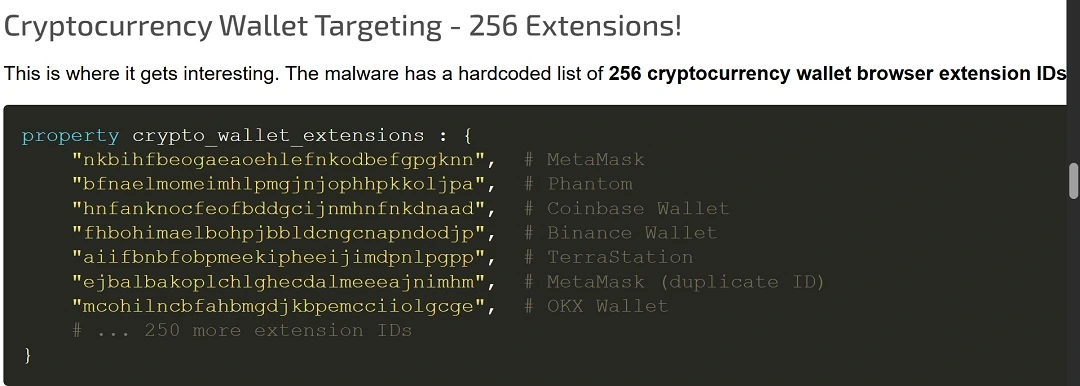
“That means one infected Mac can become an entry point for account takeover, financial theft, or even intrusion into production infrastructure,” he said.
Stealers have shifted from standalone files to multi-stage loaders: Here’s why it matters to you
The architecture of malware and how it’s packaged may sound like a bit of a technical concept for social engineering security awareness. However, knowing the “structure” of a piece of malware can help you red-flag a threat before it even breaches your Mac.
In the case of stealers, the cybersecurity community has noted that they have shifted from being heavy standalone files to multi-stage payloaders.
Standalone files try to trick users into downloading fake legitimate software. However, updates in your Mac’s security features now prevent users from executing any type of software installation if it is not “notarized” and “signed.”
While cybercriminals still distribute standalone malware files, usually signed with stolen developer credentials, a new trend has emerged to find a way around the security updates your Mac has had. This new trend is notable in ClickFix techniques, which have increased dramatically in the past 2 years.
How the ClickFix stealer process works
ClickFix stealer malware is a multi-stage loader. This means that there is no single malware file that users download. There’s just a script, which is written in macOS native language. Once you copy and paste the malicious script on your Mac, a domino effect of commands will fetch different payloads from malicious sites. All of this happens without users knowing it. The commands run silently, hidden in the background.
Because there is no software installer, and cybercriminals use native macOS programming languages, these new multi-stage loaders are agile and difficult to detect. Consequently, they are becoming a cybersecurity nightmare.
“The system of multi-stage payloads is gaining traction among peers, while some are still to adopt it,” said Mortlock from ShadowDragon. “These campaigns are using small ‘harmless-looking’ bootstrap scripts or AppleScripts to get the payload from remote servers to help them evade static detection and let operators change the payload on the go.”
“MacSync and AMOS are dangerous not only because they steal passwords, but because they industrialize Mac compromise,” said Geva. “They are scalable and easy for criminals to deploy, and they increasingly target the exact credentials that unlock cloud accounts, developer pipelines, and crypto assets.”
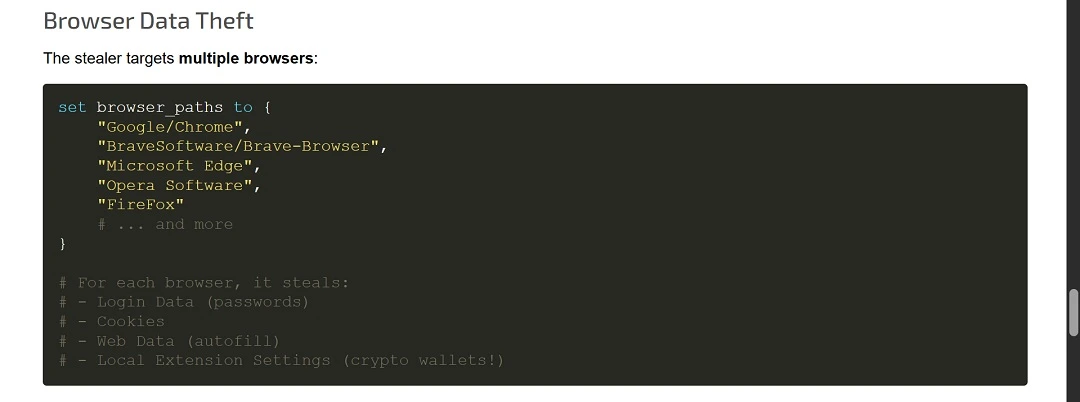
“Not all active macOS stealers moved from standalone files to multi-stage payload downloads,” said Geva.
The trend is clearly toward multi-stage and fileless delivery, but it wouldn’t be accurate to say all active macOS stealers have moved there, Geva explained.
“There are still active macOS stealers delivered as classic trojanized apps, DMGs, or even raw binaries,” said Geva.
Here’s how you can stay safe from macOS stealers
The “how to stay safe” section of our reports is always one of our favorites to write. This is because, no matter how advanced threat actors may be, and no matter what new tricks or technology they throw at you, there are always simple yet highly effective tips and advice that can help you avoid the threats.
So, here it goes: another section on how to stay safe.
Get Moonlock. It can flag, isolate, and remove stealer malware that breaches your Mac seamlessly.
Moonlock’s in-house team of cybersecurity experts, collaborating with the broader cybersecurity community, is constantly updating the Moonlock app’s malware database so that it can detect new threats as they emerge in the wild. These updates include macOS stealer variants.
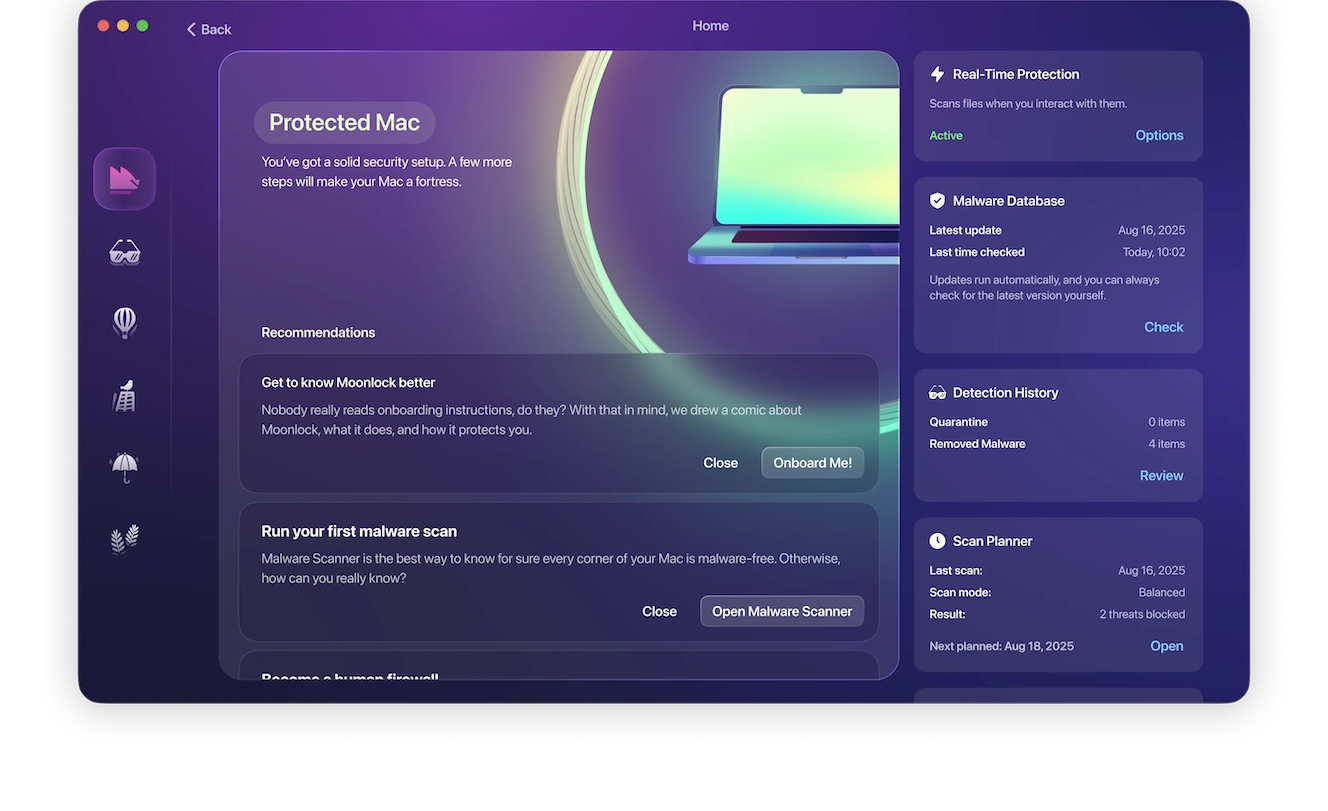
The Moonlock app will not interrupt you unless it detects suspicious activity or a known malicious signature on a file. Even then, it will only notify you and automatically move it to Quarantine, where the threat is completely isolated.
You can check out Quarantine anytime you want to learn more about the threats your Mac encountered. Then, you can choose to remove them completely from your Mac with ease.
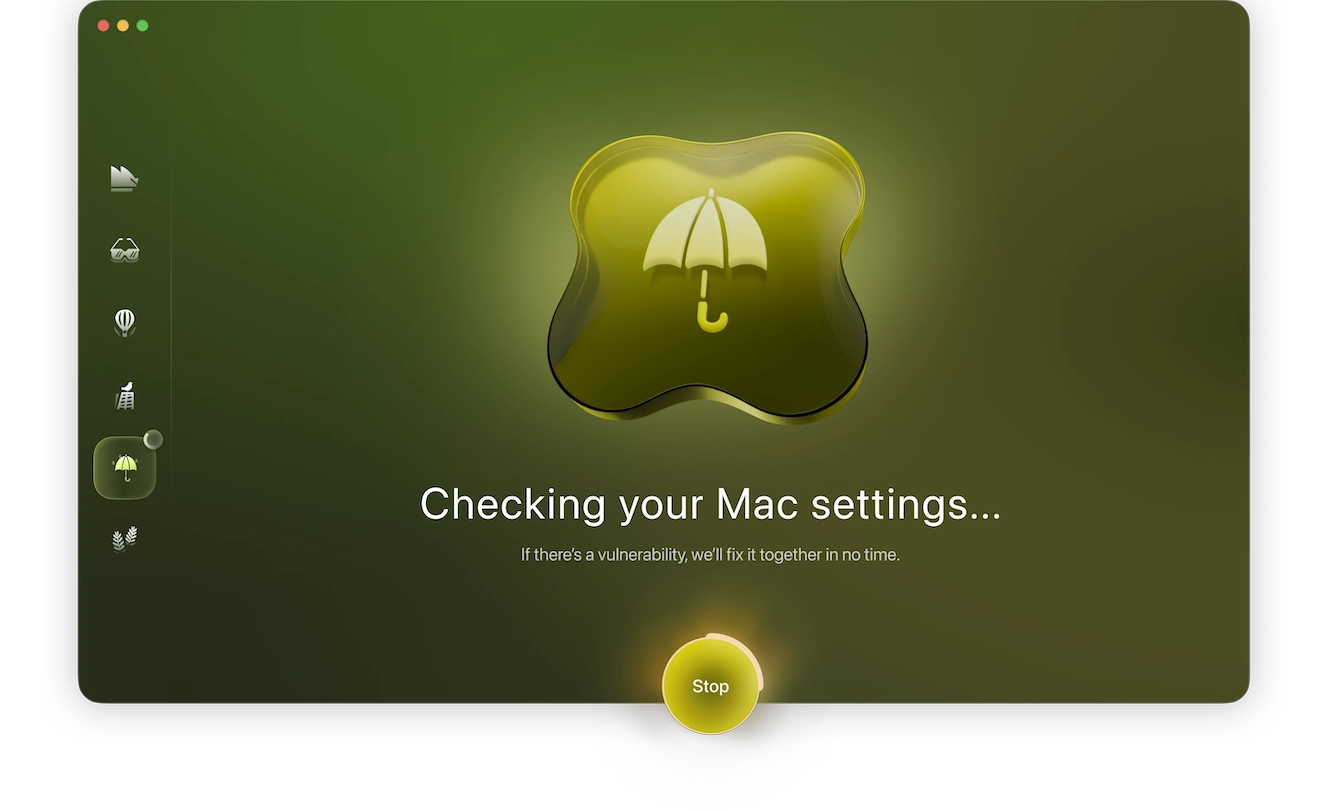
Moonlock also comes with a VPN for safe browsing, can run scheduled deep scans, and offers you advice on how to build better digital habits and turn up your Mac security settings to the highest level. You can test-drive all of these protection features for free by getting a free trial.
Watch out for ClickFix script red flags
Whether you’re an average user or a technical one, experts explain that there are several red flags you can spot on scripts used in ClickFix attacks.
“If the (ClickFix) instruction includes ‘copy this exactly,’ ‘paste into Terminal,’ ‘right-click Open to bypass a warning,’ or ‘disable security to continue,’ those are major red flags,” said Geva.
For more technical users, the safest workflow is to inspect the script before execution, ideally offline or locally.
“If the command uses curl … | sh, curl … | bash, or curl … | zsh, do not pipe it straight into a shell,” said Geva. “Fetch it (the script) as text first, inspect it, and only then decide whether it is legitimate.”
The biggest red flags are:
- curl or wget piped directly into sh, bash, or zsh
- Base64 blobs, gzip compression, or eval
- Writing into /tmp and immediately executing
- osascript, dscl-authonly, or fake password prompts
- Removing quarantine attributes
- Redirecting output to /dev/null
- Hardcoded IPs, random domains, or suspicious user-agent strings
“The safest way to validate a Terminal script is to refuse any command you cannot translate into plain English,” said Geva. “The moment you see curl piped into bash, Base64 blobs, eval, osascript, or a password prompt that was not expected, treat it as hostile until proven otherwise.”
A safe way to decode a script is to do local decoding on the Mac, said Geva. Check out the link above to learn how to do that.
Stealers do not exploit Mac vulnerabilities. They exploit your trust.
Stealers distributed via ClickFix attacks are not actually hacking your Mac. Rather, they are tricking you, and your Mac, into doing all the heavy lifting. In other words, you install the stealer, and because it uses Mac-native programming language, it weaponizes your computer to act against your interests. It’s Social Engineering 101.
“You should know that social engineering is doing as much or more damage as exploits on macOS,” said Mortlock. “Attackers are using ‘productivity fixes’ like ClickFix, so normal users and power users both need (to develop) the same habit, which is to never run a script that you do not fully understand, even if you are getting the code from a reputable blog or GitHub repo.”
Final thoughts
While new macOS stealer variants and versions continue to emerge, experts explain why this type of malware is the biggest threat to your Mac, what to look out for, and how to stay safe. To help you better protect against stealers, you can also keep up with cybersecurity news from time to time, and learn more about how to have a more hands-on approach to your digital safety and well-being.
This is an independent publication, and it has not been authorized, sponsored, or otherwise approved by Apple Inc. Mac and macOS are trademarks of Apple Inc.





