




MacSync, the new macOS stealer in town, is back with new tricks. This time, instead of using ClickFix techniques, the stealer impersonates a legitimately signed and notarized Apple app. This technique allows the stealer to bypass Gatekeeper, macOS’s built-in anti-malware, while tricking users with greater speed. Let’s dive into the new developments and what you need to know to keep your Mac safe.
The new MacSync stealer is a heavyweight and comes as an Apple code-signed app
Recently, Jamf Threat Labs reported that they came across a new version of the MacSync stealer. This new version appears to have the same stealer capabilities but comes with 2 significant technical changes and impersonates an online messaging platform app.
The first change in this MacSync version is how the stealer breaches your Mac. Instead of using complex ClickFix vectors of attack, this MacSync comes as a code-signed and notarized Swift application.

Stop MacSync stealer in its tracks
What is an Apple code-signed and notarized Swift application, and why do cybercriminals use them?
Swift is Apple’s official programming language, and every macOS app must be digitally signed with a developer certificate. If an app is not signed with a developer certificate, your Mac will flag it and warn you that the app is a risk because it comes from an “unidentified developer.”
Cybercriminals can get their hands on Swift developer certificates by stealing them, buying developer accounts, or setting up bogus developer companies using fake identities.
By presenting itself as a code-signed and notarized Swift application, MacSync manages to trick your Mac’s security and avoids the hassle of convincing victims to go through more complex ClickFix techniques. ClickFix techniques are those in which cybercriminals try to convince you to copy code into your terminal, right-click on a file to download and install it, or drag it into your terminal.
This simplification of the vector of infection is a notable change for MacSync.

Is MacSync getting bloated or gaining muscle?
The second biggest change in this new MacSync variant is that it is no longer a lightweight piece of malware.
Previous versions of MacSync were agile and fast, mostly because they did not run directly on your Mac disc. The malware was coded to download modular payloads and run them in your Mac’s memory. However, Jamf described this version of MacSync as noteworthy for the “unusually large size of the disk image (25.5MB)”.
Those behind this new MacSync version campaign are (or were) impersonating and abusing the site for zk-Call, a company listed on LinkedIn as an Estonia-based call, messenger, and AI platform provider. We contacted the company for comments, but by the time this report was filed, we had received no response.
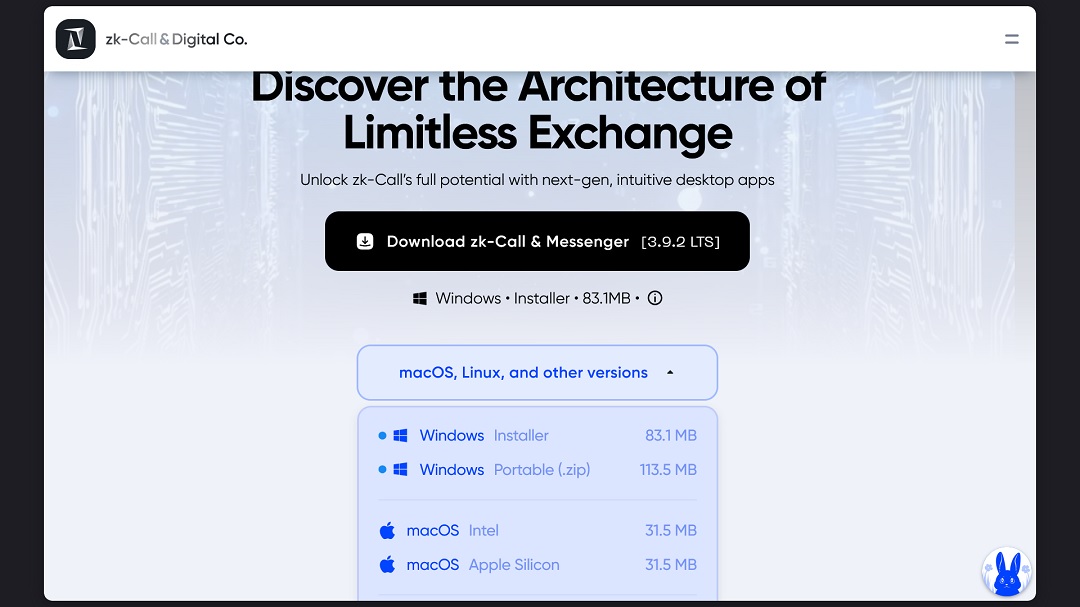
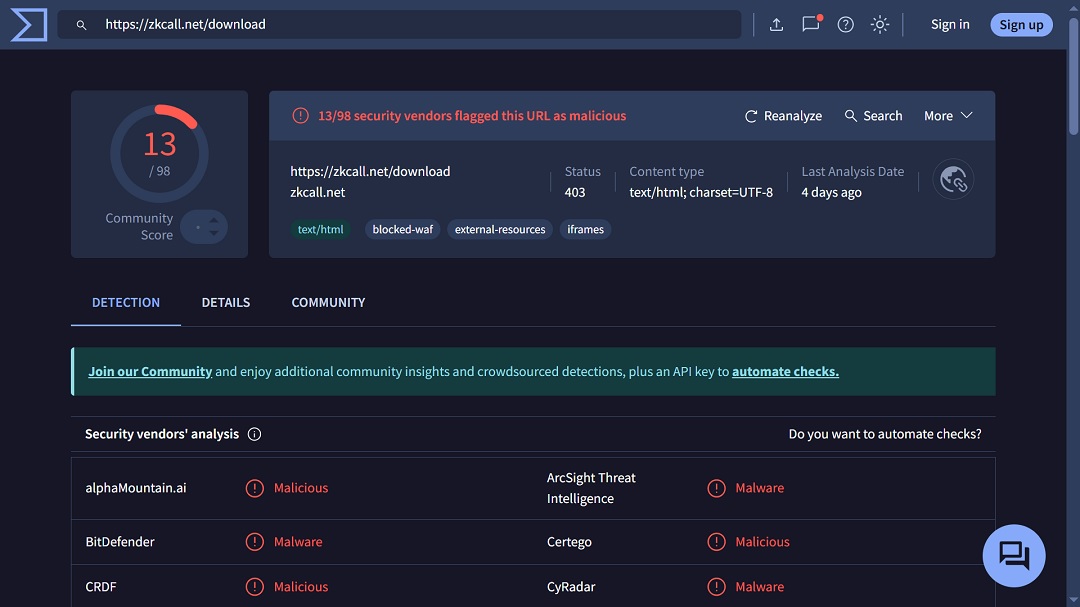
The way in which threat actors are directing potential victims to https://zkcall[.]net/download is unclear. We did a rapid search on Google Transparency Ad Center for any ad directing users to this link and came up empty-handed.
This does not mean that this new version of MacSync is not abusing ad platforms to cast a wide net and lure Mac users. Other possible vectors of distribution may include social media, search engine manipulation, or even more sophisticated spear phishing tactics.
A quick reminder of the damage MacSync can do
As a reminder, MacSync can (among other things):
- Install a backdoor to remotely control your Mac
- Steal data saved on your Mac
- Steal and extract browser data
- Go after your crypto wallet information
- Remain hidden on your Mac
Jamf also lists the site focusgroovy[.]com in its indicators of compromise (IoC) list. The site is used by this version of MacSync to fetch payloads and is flagged by web browsers for “suspected phishing.”
How to stay safe from the new MacSync macOS stealer
There are several ways you can stay on top of the threat of this new MacSync and other macOS stealers. While none of these techniques are 100% foolproof, they increase your security posture dramatically, giving you a major advantage in the Mac threat landscape.
The following tips are simple but effective, combining good digital habits with cutting-edge technology.
Use Moonlock to flag, shut down, and remove MacSync and other malware
Moonlock’s anti-malware technology uses a continually updated malware database to keep your Mac clear. It can flag, shut down, and remove stealer malware and different versions of MacSync. The Moonlock app runs silently in the background and will catch any suspicious file you interact with or encounter.
Moonlock can give you a seamless and significant advantage. Once it detects malware or suspicious files, it will flag them, warn you, and move them to quarantine. There, you can, on your own timeline, learn more about the threats your Mac encountered and remove them completely from your system.
You can try out the Moonlock 7-day free trial or choose a plan.
Know the vectors of infection
A good approach to security is prevention, and being aware of the vectors of infection is a must. Vectors of infection, also known as vectors of attack, are the strategies cybercriminals use to deliver their malware and scams.
Vectors change, with some becoming more popular as various cybercriminal trends emerge. Currently, the top vectors include manipulated search engine results, fake ads on search engines and social media platforms, contacts via social media channels, email phishing, SMS, and impersonating known brands or abusing legitimate sites, including AI and apps. If you know where the attack chain begins, you can shut the front door and rest assured that no one is coming in.
Stay on top of Mac cybersecurity news
This is advice we often repeat because it is so important. Cybersecurity is always changing. Malware improves over time, and scamming scripts evolve. The only way to stay on top of what cybercriminals are doing is by reading news from trusted, reliable, and verified cybersecurity sites. Pick your favorite and make it a habit to stay informed at least once a week.
Watch out for apps and browser extensions
In the past month, we have seen cybercriminals and other threat actors using shady or malicious browser extensions and fake macOS apps to steal data and passwords. While it is too early in the game to say if this is the start of a new trend, it is a good idea to think twice before installing a browser extension or an app. Check reviews, company reputation, and developer contact information. If something looks off, do not install it.
Know the risks of fake job interviews and online messenger apps
Finally, if someone contacts you offering a job opportunity and asks you to download an online messaging app from a specific link, be wary. Fake job offers and malicious messenger apps are common tactics used by cybercriminals. Even if the app is well-known, refrain from downloading online messaging apps from platforms other than the official Apple App Store or, if you are in the EU, safe alternative stores you trust.
Final thoughts
MacSync rose to popularity on the dark web because it was lightweight and cheaper than other stealers like AMOS. The lower price means that more threat actors have their hands on this malware, and variations of the stealer are expected. In this new campaign, MacSync operators are trying to find a quicker way into your Mac by abusing Apple’s own security guardrails. Fortunately, you can stay safe by following a few cybersecurity guidelines and staying knowledgeable about known threats.
This is an independent publication, and it has not been authorized, sponsored, or otherwise approved by Apple Inc. Mac and macOS are trademarks of Apple Inc.





