




Someone is building a new macOS stealer. And while this new stealer is not yet fully functional and, at the time, does a rather bad job at evading detection, its existence means one thing: The stealers currently being sold on the dark web are not enough. Cybercriminals are building new ones.
Meet MonetaStealer: New macOS malware going in a different direction
Recently, security researchers at Iru came across a new suspicious file targeting Mac users. After taking a closer look, they found that the file was a new stealer in a very early stage of development. Iru researchers named the malware MonetaStealer.
Another Mac stealer? How many more should we expect?
At the time, it is unclear why cybercriminals continue to build new macOS stealers despite the existence of fully functional ones capable of breaching Macs being sold on the dark web. Perhaps the $1,000 price tag that comes with a cheap stealer like MacSync is still too high, or maybe new threat actors are trying to break into the malware-as-a-service black market industry.
Whatever the reason may be, as a Mac user, you are somewhat stuck in the middle, so let’s break down the information on MonetaStealer to see how you can keep safe.
MonetaStaler is a standalone, self-contained Mac malware
The MonetaStealer takes several noteworthy directions compared to other stealers. First of all, at this time, the macOS-targeting malware is self-contained. This means it is just one file and does not work with other malware to fetch additional payloads or malware modules while it is being executed.
Self-contained, standalone malware is not the predominant direction in which Mac stealers have been evolving. However, recent cases of standalone, heavy malware files, as we reported with a MacSync campaign, do exist.
The differences between modular, dropper stealer payloads and standalone malware are important for Mac users to understand.
Modular droppers are more agile and require less user interaction, as the malware downloads the file. However, because the malware is reaching out to websites and infrastructure to download payloads, it can be flagged more easily by security tools.
On the other hand, standalone malware may be heavier, but once a criminal tricks you into installing it on your Mac, it can pretty much stay there undetected, making less noise and raising fewer red flags.
A .exe on a Mac? Can that even run on a Mac?
Another interesting turn of events with the MonetaStealer is that from a Mac user’s perspective, when they download the malware—thinking it is a legitimate software or app—the file they see is an .exe file, a file type that can only run on Windows.
Iru explained that the malware is actually not an .exe file but a .pyc file, which is a compiled version of a Python script. This type of file can be (and is) used legitimately to install software on your Mac. Note that a compiled version of a Python script on macOS is typically a Mach-O file.
Because the .pyc malware file is compressed and only unbundles after you click on it to install it, the malware manages to “bypass basic static file scanners” that only inspect the surface-level Mach-O structure.
The malware “presents itself as a deceptive .exe extension to mislead macOS users,” said Iru.
Will MonetaStealer evolve and break into the dark web market?
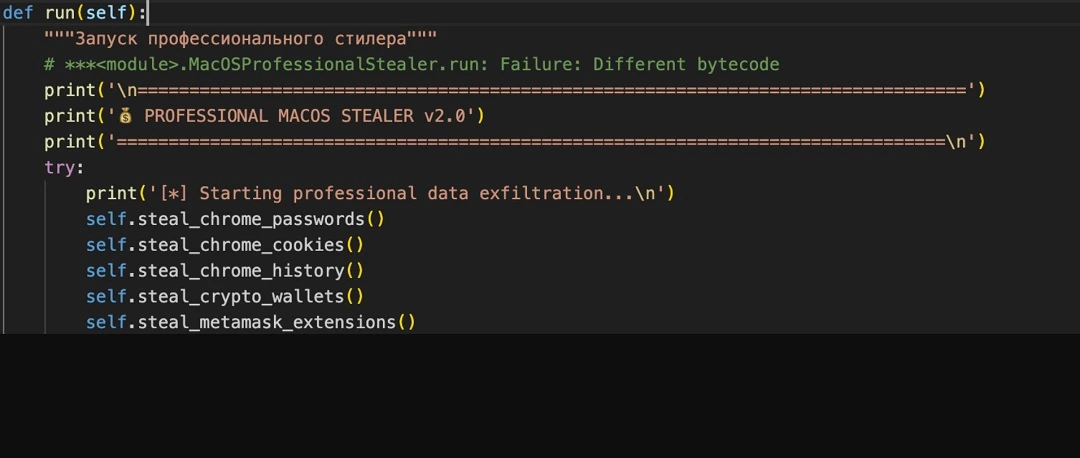
Analysis of the file shows that the code is heavily commented on in “several Russian-language comments.” The comments that Iru shared, shown in the image below, align with the content, style, and techniques used by malware developers who sell macOS malware on the dark web.
Iru’s investigation shows that the MonetaStealer stealer is far from being fully operational. At the time of this writing, it only targets Chrome and looks for files and financial data on your Mac, including cryptowallets.
Several functions of the malware trigger system password requests, something that Iru described as too much “noise,” as they raise repeated warnings for users.
These features may be enhanced in the future. Iru’s investigation mentions that MonetaStealer developers are likely using AI to code this malware.
What can MonetaStealer do?
As mentioned, MonetaStealer’s most advanced coding is that which extracts data from Chrome. The malware also searches for your Chrome passwords, Chrome cookies, and Chrome history.
To search for your cryptocurrencies, the malware looks into:
- ~/Library/Application Support
- ~/.config
- ~/Documents
- ~/Desktop
- ~/Downloads
It also looks for the following wallets:
- Exodus
- Electrum
- Atomic.wallet
- Metamask
- Phantom
- Trust.wallet
- Ledger
- Lrezor
- Coinbase.wallet
- Binance.wallet
- Metamask extensions
MonetaStealer can also:
- Search for seed and key patterns
- Steal your Wi-Fi credentials
- Scrape sensitive data directly from the macOS system clipboard
In its quest for financial data, MonetaStealer crawls into your ~/Documents, ~/Downloads, and ~/Desktop directories and reads files there that end with .pdf, .txt, .doc, .xls, and .xlsx. It does this to find the first 5,000 characters that contain any of the following keywords:
- Invoice
- Statement
- Bill
- Receipt
- Payment
- Bank
- Card
- Credit
- Debit
- Transaction
To find credit or debit card data, it uses the following “regex”:
\\b\\d{4}[-\\s]?\\d{4}[-\\s]?\\d{4}[-\\s]?\\d{4}\\b
This regex will return all results that match the exact format of 16 numeric characters, in a series of 4 and separated with a hyphen, natural to all credit and debit cards, as in the following format:
1234-1234-1234-1234.
Using the Telegram API to extract your data
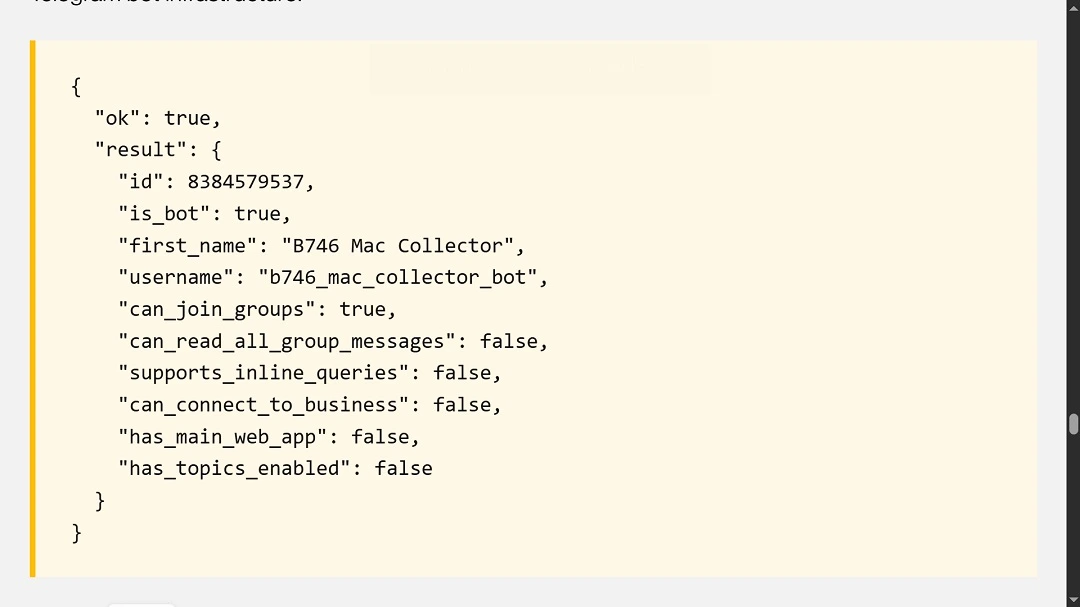
To finish its work, MonetaStealer collects all the data it scraped from your Mac, compresses it into a zip file—which the black hat hackers creatively call “STOLEN{sessionID}.zip”—and stages the file in the ~/Desktop directory.
To get that file out of your Mac, MonetaStealer uses the api.telegram.org for exfiltration.
How to stay safe from MonetaStealer
Here are a few tips to protect your data and funds from stealer malware.
Get the Moonlock antivirus app
The Moonlock app will check your Mac 24/7 for suspicious malware activity through live background scans. It will let you know when it finds a threat and will then move it to Quarantine. There, you can remove the malware threat from your Mac. Moonlock’s research team keeps a close eye on stealer malware, so you can be sure of its defense capabilities.
You can check out Moonlock with a 7-day free trial.
Watch what you download
Standalone malware usually spreads as a trojan, impersonating legitimate software. To stay safe from this type of malware distribution, stay away from cracked and/or pirated software and apps, and any software that is not developed by respected developers. Check reviews and cross-reference sites for official download domains.
Stealers in development, like the MonetaStealer, will raise repeated red flags when running on your Mac. If you get several password requests in a session, it is likely that something is off. Be on the lookout for any system notifications, and run scans on your computer using trusted Mac anti-malware like Moonlock.
Final thoughts
Just because stealers have become popular among cybercriminals doesn’t mean they should be underestimated. Any malware or scam can have critical negative consequences if you are affected. Follow the tips in this report and subscribe to the Moonlock blog to stay up to date and learn more about emerging Mac threats and what you can do to stay safe.
This is an independent publication, and it has not been authorized, sponsored, or otherwise approved by Apple Inc. Mac and macOS are trademarks of Apple Inc.





