
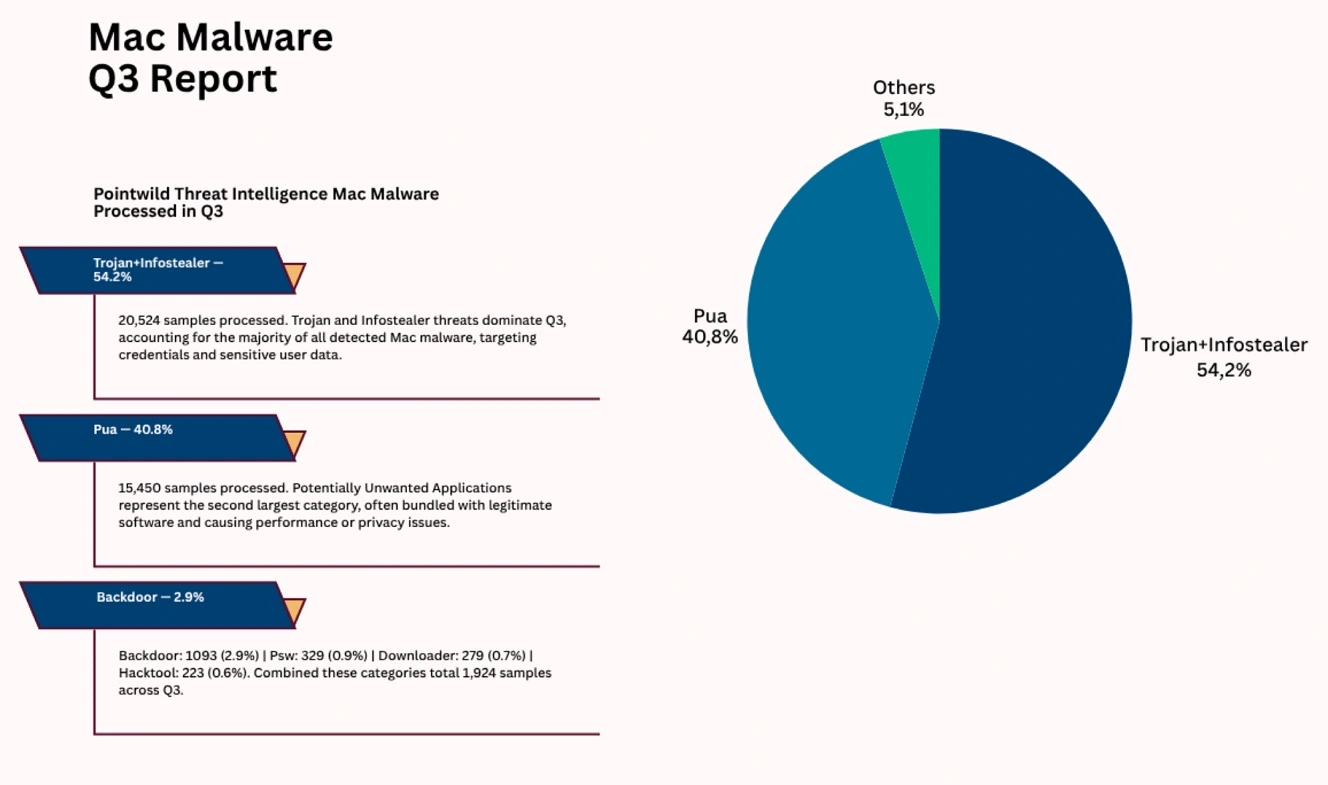
A new report from Point Wild analyzed hundreds of thousands of Mac malware samples. Their conclusion? Trojans and infostealers account for more than half (54.2%) of all Mac malware today. Potentially unwanted applications followed with 40.8%, and backdoors came in third with 2.9%.
In this report, we talk to Point Wild’s Head of the Lat61 Threat Intelligence Team and experts from ImpersonAlly to get the inside story.

Protect your Mac from trojans and stealers
Why do trojans top the Mac malware list… and which trojans are they?
Point Wild’s Mac Malware Trend Report found the lines between macOS and Windows malware have blurred as attackers adopt cross-platform campaigns. ClickFix techniques continue to be the most popular technique used by cybercriminals to trick you into installing malware on your Mac
Point Wild processed 37,898 macOS malware samples during Q3 2026. Trojan and infostealer threats were the single largest category at 54.2% (20,524 samples).
For readers who have been following macOS threat campaigns, hearing that trojans rank side by side with stealers may be a little confusing. Are these trojans the first-stage stealers? Or are they something else?
“The Trojan itself is disguised to install malware,” Dr. Zulfikar Ramzan, Chief Technology and AI Officer at Point Wild and Head of the Lat61 Threat Intelligence Team, told us.
Trojans represent a broad category of malware aimed at implanting themselves onto a system, Dr. Ramzan said. “There are different categories of Trojans, of which infostealers are among the most likely substrate,” Dr. Ramzan added.
“These are not ‘first-payload’ trojans,” said Dr. Ramzan. “Rather, they are more of a final payload. Our numbers reflect the trending malware samples we processed, which were actual payloads we encountered this quarter.”
Jamf’s Mac Security 360: Annual Trends Report also found that Trojans account for half of all Mac malware (50.40%). The report describes a trojan as malware disguised as a legitimate application. Various trojan samples are commonly used as a backdoor for other attacks.
“From what we see on the delivery side, the ‘trojan’ is very often just the first step,” said Shlomi Beer, Co-Founder and CEO of ImpersonAlly, “a fake installer or a one-line terminal command whose job is to get past the user and pull down the real payload, typically an infostealer.”
“The trojan gets in, the stealer monetizes,” said Beer.
ClickFix still leads. Why? Aren’t users already aware of ClickFix?
ClickFix techniques, ranging from “copy this script to your terminal” to “right-click to install,” “drop this app into your Mac Terminal,” and other variations, have been popular among macOS cybercriminals for the past couple of years. They emerged in 2024 and picked up real speed in 2025 and 2026.
Countless reports, including mainstream TV news reports, have explained what ClickFix is and how users can steer clear of cyberattacks. So, why is it still successful and so widely used?
“Even though there may be increased knowledge of these techniques, many users continue to be unaware of them,” said Dr. Ramzan.
“Threat actors likely continue to use them because they are highly effective.”
ClickFix attacks mimic legitimate user workflows, exploit psychological urgency, and can bypass traditional security layers, Dr. Ramzan said.
Impersonating trusted brands and going after Mac users
Beer from ImpersonAlly, a company that helps businesses deal with impersonation attacks, explained that ClickFix lures are often found in sponsored search results or cloned download pages for popular tools. “Sometimes (they) even surface in an LLM answer,” said Beer.
“We also see this in Typosquatting domains, and we documented this with Cursor and have seen the same pattern around ChatGPT Atlas, Ahrefs, Google Ads, and more,” said Beer.
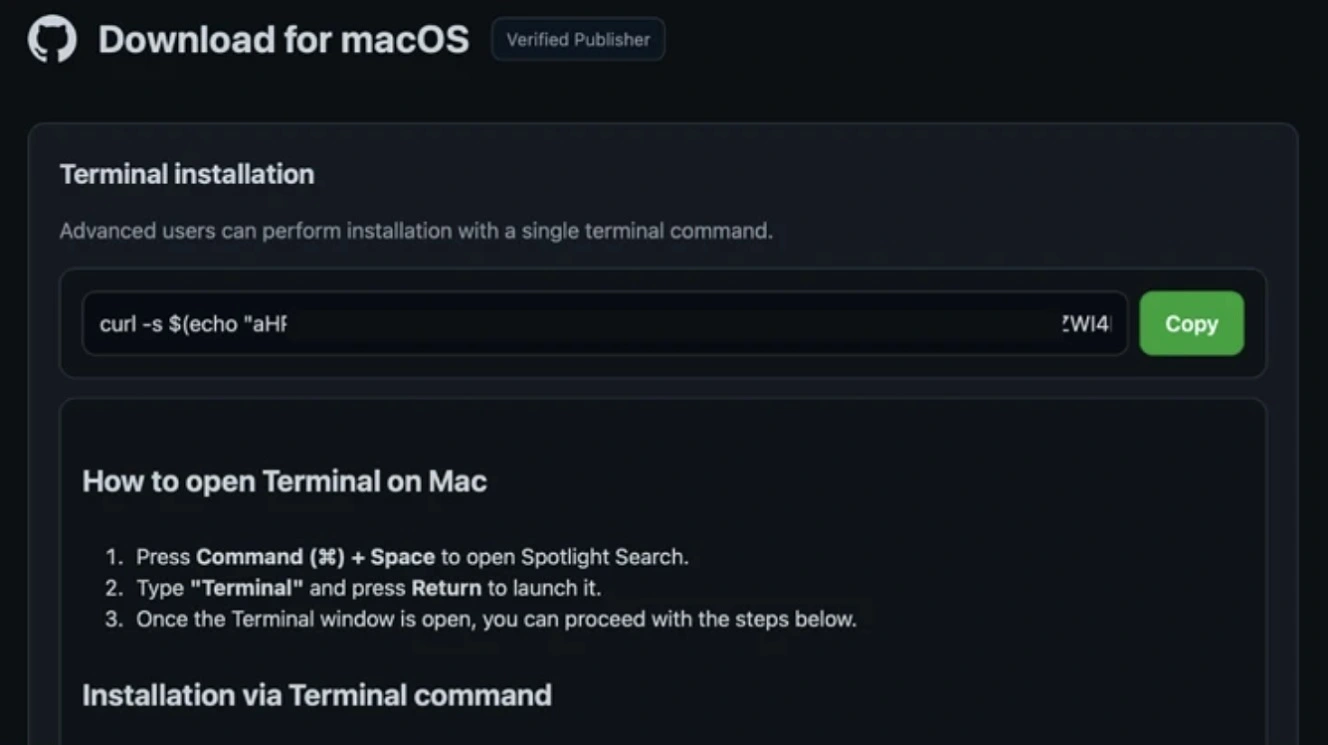
“The targets are developers, marketers, and early adopters who paste terminal commands every day, so the action itself raises no red flag,” said Beer.
“Knowing the technique doesn’t help much when the context looks legitimate and the user initiated the search,” said Beer.
Threat actors exploit a vulnerability that disables security tools. Is that a new trend?
The Point Wild report highlights vulnerability CVE-2026-39118, which allows attackers to silently disable Kandji and CrowdStrike, weakening defenses. Naturally, any exploit that would allow attackers to shut down your security tools is of concern to you. Should you expect this to be a trend?
“We believe this is an emerging trend,” said Dr. Ramzan. The more important trend is that attackers are increasingly targeting the security controls themselves, rather than only trying to evade or bypass their detections, Dr. Ramzan said.
“Our research demonstrates that a standard macOS user could abuse a chain of legitimate macOS behaviors to disable CrowdStrike Falcon and Kandji, without administrator credentials or a kernel exploit. Kandji’s case was assigned CVE-2026-39118,” said Dr. Ramzan.
As a note, Kandji, from the company Iru, works with over 6,000 companies. It is used by IT teams to manage workers’ devices, mobile devices and computers alike, whether they are company-owned or BYOD.
Devs, creatives, and knowledge work professionals. Why are they top targets?
Point Wild found that certain Mac users are being targeted and hit the most: developers, creatives, and knowledge professionals.
Cybercriminals know that developers have credentials (GitHub tokens, npm tokens, cloud keys, SSH keys) that unlock infrastructure well beyond a single laptop, Point Wild says. Meanwhile, creative and knowledge work professionals hold corporate data and admin sessions inside enterprise networks on their Macs.
“For developers, the risk isn’t carelessness on their part,” said Dr. Ramzan. “Instead, it’s that a single compromised credential can unlock tremendous access.”
Dr. Ramzan spoke of the ChainDrop incident, in which a large-scale npm supply chain attack affected more than 400 packages, explaining one of the techniques hackers use to breach Mac developers’ environments.
“There are several concrete habits worth adopting,” said Dr. Ramzan. “First, treat curl | bash with real suspicion even when it feels routine, and second, use scoped, short-lived tokens instead of long-lived PATs for GitHub/npm/cloud.”
Developers can also, where possible, keep the Mac holding production/cloud credentials separate from the one used for general browsing and software trials, Dr. Ramzan explained.
Dr. Ramzan explained that creative and knowledge workers are targeted when their Macs hold client data and admin sessions. The risk is higher when they work in companies that still assume Mac users aren’t really targeted.
“To address these issues, it’s crucial that Macs aren’t treated like second-class citizens from a cybersecurity perspective,” said Dr. Ramzan. “The practices that apply to Windows systems should apply equally to Macs.” This includes the use of tools such as anti-malware technology, Endpoint Detection and Response (EDR), mobile device management, and proper patching cadence.
Beer from ImpersonAlly added that both groups are targeted for what their Mac can unlock, not for the Mac itself. Beer’s advice for users is to never install anything from an ad or a search result. And treat any page asking you to paste a command into Terminal as hostile unless it’s official documentation you navigated to on your own.
“Companies should monitor ads and lookalike domains impersonating the tools their teams rely on, because that’s where the chain starts,” said Beer.
What else can you do to stay safe? Get Moonlock.
Besides the tips and advice shared by experts, average Mac users can take simple steps to strengthen their cybersecurity and privacy posture. This includes building up your tech stack, digital habits, knowledge, and awareness.
The Moonlock antivirus for Mac was designed to help you build layers of Mac defense. Once you install the app, Real-Time Protection will run in the background, checking everything you interact with. This includes emails, files you download, and even Terminal scripts.

If Real-Time Protection finds anything amiss, it will let you know what it is and why it is dangerous and move it to Quarantine. You can then check out Quarantine in your own time to learn more about the threats your Mac encountered. From there, you can remove them completely from your Mac.
Moonlock ships with a customizable Malware Scanner for depth and speed, a built-in VPN for safe browsing, and other features like a Security Advisor, which can help you build safe digital habits at your own pace. Plus, the Scam Detector can check any email or text for phishing and scams in just a couple of clicks.
You can check out and test-drive Moonlock for free for 7 days.
Final thoughts
As new reports on Mac malware place trojans, stealers, unwanted apps, and backdoors back in the spotlight, users and businesses have a chance to level up their security efforts. Building awareness and combining know-how with security tools can help users navigate the current Mac threat environment.
This is an independent publication, and it has not been authorized, sponsored, or otherwise approved by Apple Inc. Mac and macOS are trademarks of Apple Inc.