
Whether you have a Mac with Apple Silicon or an older Mac with Intel, the new PamStealer can steal your data and crypto if it breaches your computer.
PamStealer is relatively new in the macOS stealer landscape, but certain things about it prove that it means business. This may not be good news if you come across it, so here’s the basic lowdown to help you stay clear of it and keep safe.

Stop PamStealer in its tracks
PamStealer can now breach new and old Macs
About 3 months after PamStealer was first spotted, the malware is back with an update. As Iru reports, this update allows PamStealer operators to target more Mac users than before. And not just Silicon Macs, but older Intel Macs, too.
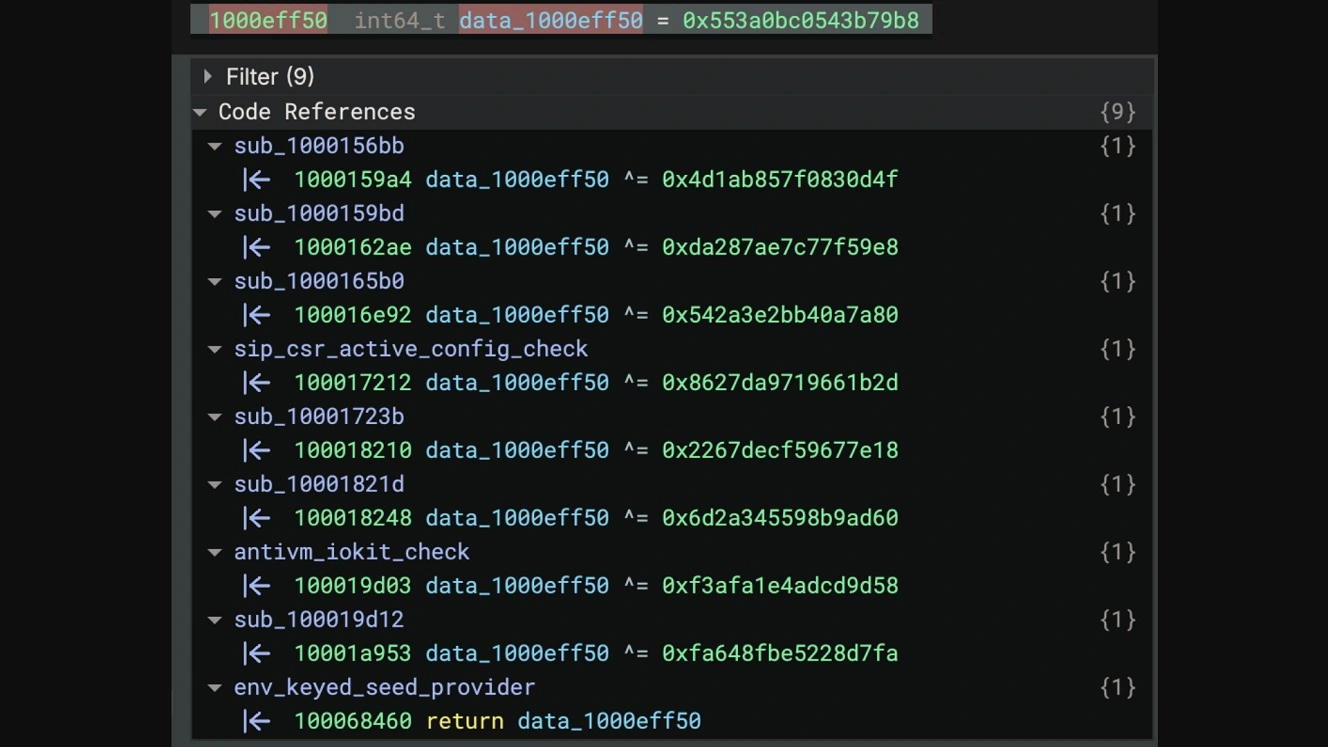
Older Intel Macs are more popular than new models in several countries due to pricing. They are also used by companies that lease macOS bare-metal services.
Besides that, PamStealer also has the sort of info-stealing capabilities that most other stealers have. This includes accessing your disk, files, notes, clipboard, Keychain, and crypto wallet. It can also go into your browser to steal data.
The Iru report does not mention whether the new PamStealer will extract your crypto browser extension wallet database, but Jamf Threat Lab’s report, which first discovered and analyzed PamStealer, says it does have that capability. At this point, PamStealer does not appear to have cold wallet app swap features (Ledger and Trezor) that stealers like AMOS and MacSync have.
PamStealer uses your Mac’s built-in tech to steal your password
To steal your data and crypto, PamStealer first needs your password. This is where the stealer gets its name.
Like other stealers, including ClickLock and MacSync, PamStealer prompts you for your password by using a fake system password request. However, this fake password request is coded to use 1 of 3 ways (Authorization OpenDirectory, PAM API, or Services APIs) that your Mac uses to check passwords. Hence the origin of its name: “PAM” stealer.
This is significant in two ways. First, PamStealer’s password request box will shake if you type in an incorrect password, just like a legitimate password request on macOS. Second, by using the PAM API, the attackers instantly get a functional system password. This “PAM stealer” will also ask you for your full disk access password.
While Iru attributes PamStealer to a Russian-based cybercriminal syndicate with moderate confidence, the behavior, innovation of features, and updates of this stealer—along with its financially driven code—align with the malware-as-a-service (MaaS) industry, which is known to promote its Mac malware on the dark web, making it available for operators around the world.
Exclusion of Russia, the Commonwealth of Independent States (CIS), and some countries in Eastern Europe and Central Asia is standard in the MaaS industry. However, there are no cybersecurity reports showing that PamStealer is being promoted on the dark web or online.
What does this mean to users? While some stealers appear and are never heard from again, the “PAM stealer” has been updated in a short period of time. This seems to indicate that it’s here to stay.
Crypto-theft capabilities: Extensions, clipboard blockchain address swap, and persistence
When it comes to crypto theft capabilities, this stealer won’t just take your crypto wallet browser databases. It will replace, without your knowledge, any crypto address you copy to your clipboard with an attacker’s address. So when you make a transfer, funds land directly with them.
This clipboard-replacing capability is notable, though not novel. PamStealer establishes persistence (sets up shop on your Mac) through non-conventional ways that do not include LaunchAgent or daemons. This makes it harder to spot and increases its chances of remaining hidden inside your Mac without your knowledge. While it is on your Mac, it will copy and paste any crypto address and redirect funds to attackers.
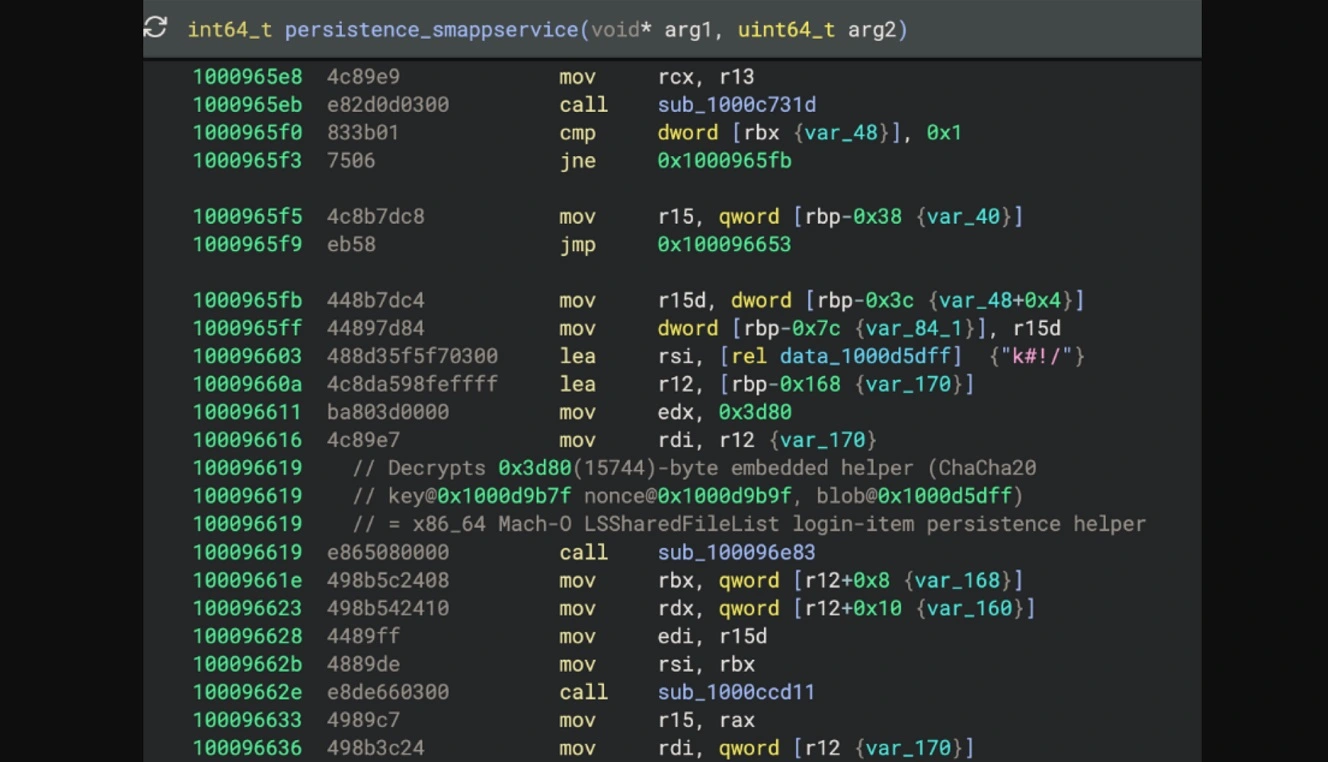
Given that wallet addresses all look the same at first glance, it might take some time for a breached user to realize where they are sending the money to.
If you want to learn more about how PamStealer establishes persistence and the technical analysis of the section that follows, read the full Iru report.
PamStealer takes malware coding, seeds, encryption, and obfuscation to the next level
On another note, compared to other stealers that have some level of encryption and code obfuscation, PamStealer appears to be at a level higher.
The malware is described in VirusTotal’s analysis as “heavily obfuscated.” This not only makes it more challenging for experts who are left to decrypt the malware’s processes and connections but also for the average user. This is especially true for those who are not code-fluent, leaving them with highly technical reports that are hard to read.
PamStealer can also detect if it is running on virtual machines and other environments used by cybersecurity researchers. This obfuscation is intended to improve the efficacy of PamStealer’s financially driven campaigns, as well as avoid analysis.
Who or what is PamStealer impersonating now? Here’s how it breaches your Mac.
The way this PamStealer campaign breaches your Mac is unknown. Iru came across the malware through their telemetry, not through online findings.
On VirusTotal, the malware sample file name is listed as localfile~.x64. The term x64 points to Mac Intel systems, while the term ‘localfile’ is typically associated with privacy-first local file apps, as well as plugin paths, or temporary/system architecture markers used in software deployments and container builds (like Visual Studio or CMake), and found on open-source repositories like GitHub.
Impersonation of these resources, heavily used by Mac developers, aligns with macOS stealers’ prime targets: developers and tech enterprise professionals are perceived by cybercriminals as individuals whose Macs contain valuable data.
The sample Iru analyzed was an unsigned executable.
Previous PamStealer campaigns worked your Script Editor to gain your trust
In previous campaigns, PamStealer impersonated the clipboard manager Maccy. In that campaign, PamStealer used the built-in Script Editor to present to users what appears to be a tech-savvy, legitimate install.
Click on the image below to see, up close, exactly what the PamStealer campaign looks like on your Mac screen when it loads your Script Editor with malicious scripts.
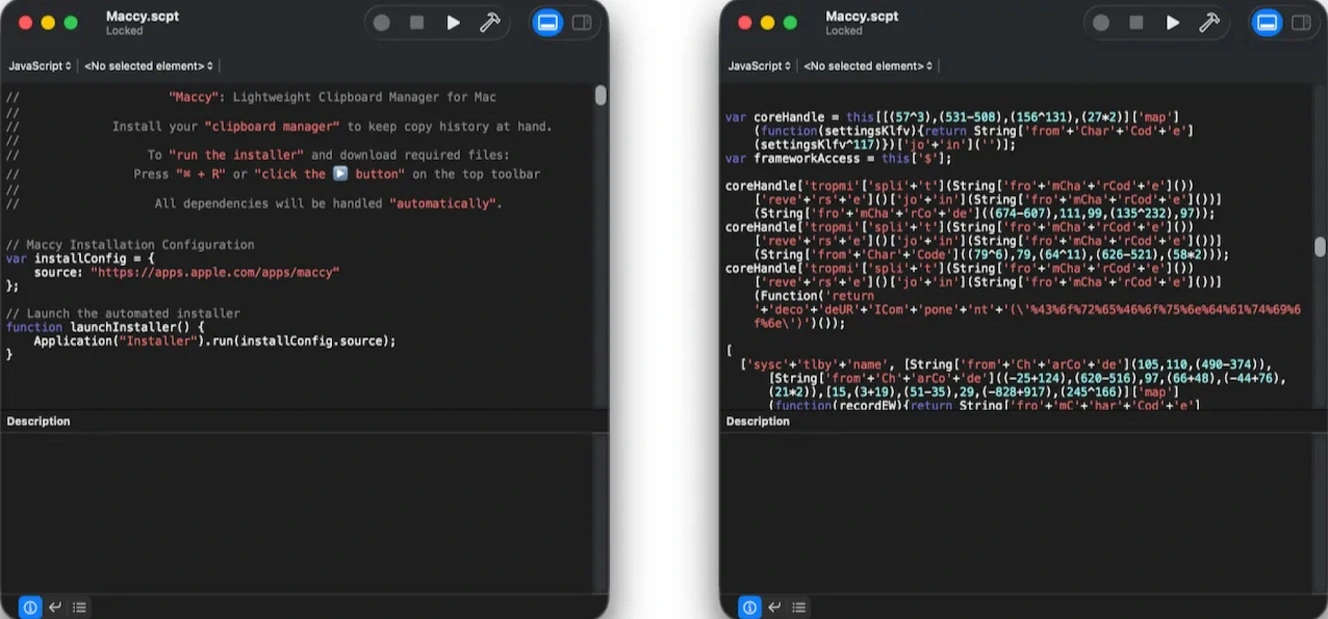
ClickFix attackers use the Script Editor that is found on all Macs because it is a macOS-native tool, building trust and making infection rates more successful. Attackers can automate, for example, an online Download button on a fake malicious page so that when you click on it, your Script Editor automatically opens on your screen, populated with malicious scripts dressed up as legitimate installers.
If you hit the play button on the Script Editor, the attack unfolds. Never hit play on your Script Editor unless you have checked the entire code and know it is safe. This includes scrolling all the way down to the very bottom because hackers often hide the malicious scripts under thousands of blank lines.
How to stay safe from PamStealer and similar Mac malware
This new version of PamStealer was first scanned in early September and shows a technical evolution and sophisticated code designed to fly under the radar. Here are some tips and advice to avoid this type of malware.
Think twice before typing in your password, especially immediately after an install
At the risk of sounding like a broken record, we’re going to say it again. Stealers need your password to access the data they will steal from your Mac. They will prompt you for your password immediately after your install or during the cyberattack, sometimes more than once, to gain access to different resources.
Never type in your password unless you are sure the request and the app requesting it are legitimate. System-level apps and password managers, for example, might require your password, but more lightweight apps that do not require these kinds of privileges should not.
Do I really have to check all Mac Terminal scripts? All of them? Like, for real?
For the average user, spotting a ClickFix attack may actually be easier than it is for developers. This is because for most users, copying and pasting a script into their Mac Terminal is something they never do. For developers, however, who spend hours working in environments where copying scripts on their Mac Terminal is a daily routine, ClickFix can be a nightmare because checking every script without missing a single one is… challenging, to say the least.
Some red-flag commands to spot ClickFix attacks include curl, bash, base64, and strings that look like random gibberish of words and letters. Variations of ClickFix include spoofing and typosquatting, where the encoded string of numbers and letters is replaced with a spoofed address or something that looks legit.
It’s worth noting that Iru did not document this PamStealer update in any ClickFix campaign, but got the malware through telemetry. Again, not online.
Get Moonlock. It’s the key layer of your Mac’s defense.
There is a lot to check when it comes to cybersecurity awareness and leading a safe digital life. It’s hard to keep up. But leveling up your Mac security tech is a good idea and can give you some backup and peace of mind.
The Moonlock antivirus app ships with several features that combine to build layers of a Mac’s defense. The Malware Scanner and Real-Time Protection run on a constantly updated malware database, which means you get protection from old threats and newly emerging ones.

Real-Time Protection will run silently in the background and check everything you interact with, including all Terminal scripts (yes, those that Script Editor runs as well).
Real-Time Protection also checks emails and online downloads. If it finds anything, it will let you know and move it to Quarantine, where you can check the threats your Mac encountered at your leisure.
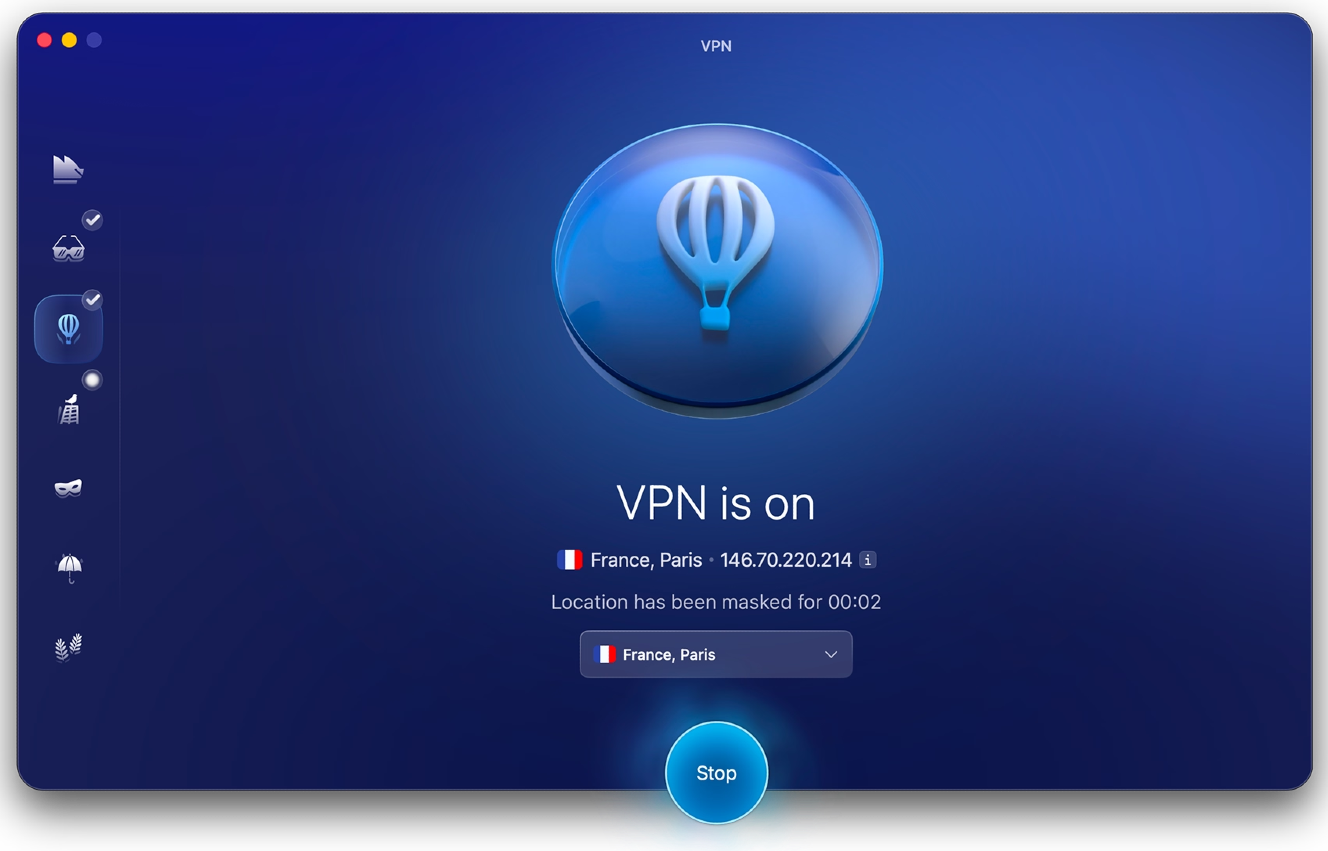
To add layers of security, Moonlock ships with a built-in VPN for safe browsing, a Scam Detector that checks for scams and phishing in any text or email, and a Security Advisor, which helps you build safe digital habits at your own pace.
You can check out and try Moonlock for free for 7 days. See how it feels on your end.
Final thoughts
To wrap things up, PamStealer was already a quite advanced malware when it first popped up, and now it has been updated. It can check passwords using macOS tech, hide and conceal what it does from researchers and security tools with some level of ability, and goes straight for your most valuable data and crypto. Lucky for you, being aware of PamStealer puts you one step ahead of others.
This is an independent publication, and it has not been authorized, sponsored, or otherwise approved by Apple Inc. Mac and macOS are trademarks of Apple Inc.