
If you recently downloaded the Maccy app, you may have unknowingly done so from a fake site, and there is a chance your Mac is infected with a new stealer. Cybercriminals are impersonating the clipboard manager app Maccy to breach your computer with PamStealer. Here’s how it works and how to keep safe.
Meet PamStealer: How it spreads, how it infects your Mac, and where it got its name
The Moonlock mid 2026 macOS threat report found that the most popular macOS malware today is adware (65.2%), and stealers represent a smaller percentage of threats. However, learning how stealers work can help you spot a cyberattack before it begins.
The newly discovered stealer PamStealer is a great place to start because the malware and its capabilities are similar to those of other stealers, despite minor variances. Jamf Threat Labs discovered this new stealer after analyzing a malware sample.
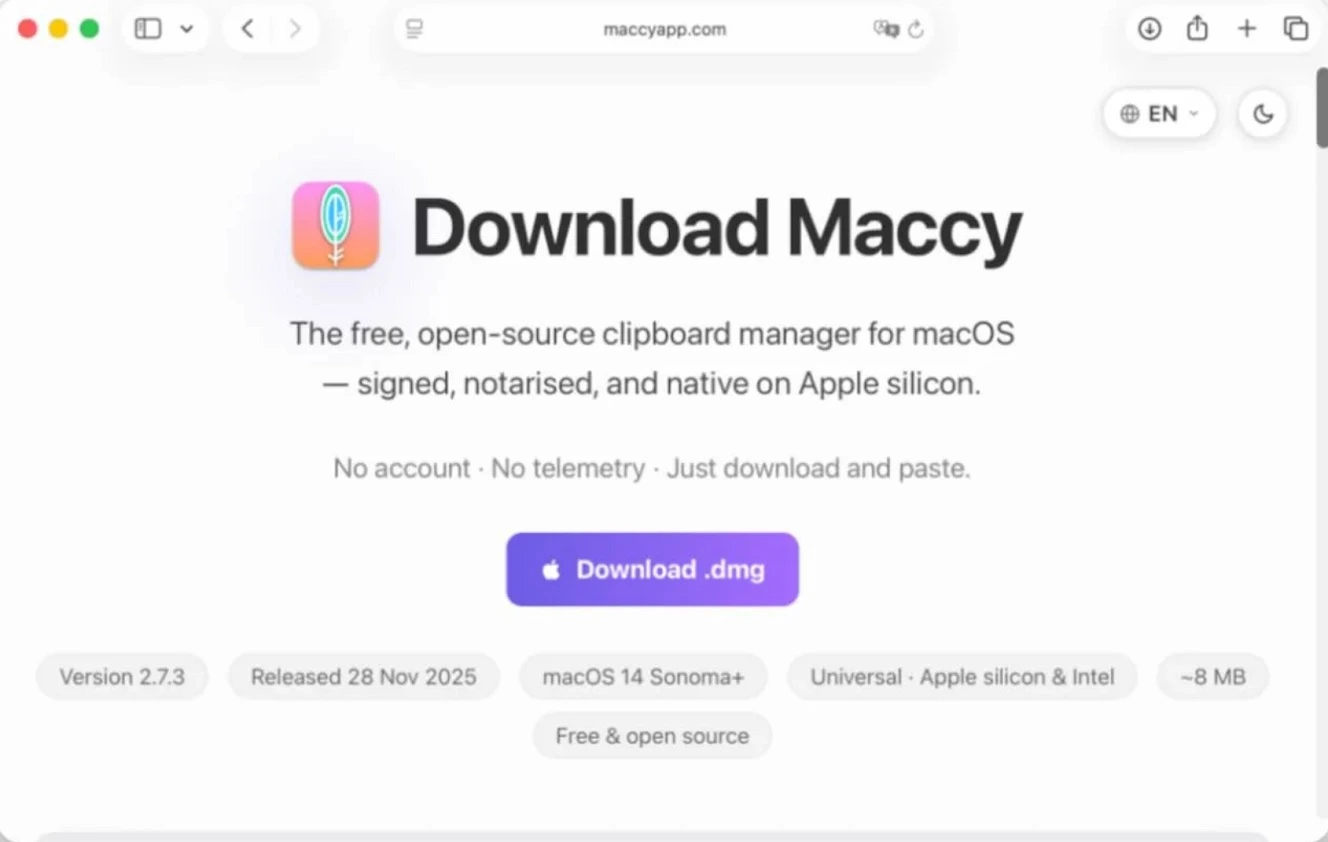
Cybercriminals who are using this stealer are impersonating Maccy, the popular, free, open-source clipboard manager. If you are unfamiliar with clipboard managers, these apps can save whatever you type, copy, and paste on your clipboard, allowing developers to shortcut their way through daily work.
When users landed on this fake Maccy website and clicked on “Download,” they got a file that eventually installed a Rust-based Mach-O infostealer on their Macs. This stealer can extract credentials, clipboard data, browser data, and data from crypto browser extensions.
PamStealer also has the ability to remain hidden and set up a communication channel with the attacker-controlled infrastructure to exfiltrate the data it steals.
How PamStealer breaches your Mac
The malware first breaches your Mac as a .dmg file. This initial .dmg file that users download from fake Maccy sites fetches a payload from the attackers’ online infrastructure that installs a fake Mac app like the Finder app. The fake app, in turn, fetches another payload: the Rust-based stealer.
Jamf called this stealer PamStealer because it uses fake password request notifications that use your Mac’s built-in Pluggable Authentication Modules (PAM) to check if the password you type is in fact your real password.
As a side note, when you get password request notifications on your Mac from apps or processes that ask you for your password to do things, like accessing your files, these passwords can be checked in 3 ways by your macOS: Authorization OpenDirectory, PAM API, or Services APIs. This stealer uses the PAM API method to check for passwords, which is how it got its name.
The fake Maccy website that Jamf noted in its report has been active since at least May, according to first scan data from VirusTotal.
There is only one real Maccy website, www.maccy.app. The fake site identified by Jamf in their report, maccyapp[.]com, is currently down, but there are several other fake Maccy sites.
There are several active Maccy fake sites
When trying to understand how PamStealer was luring users to this fake site (ads, SEO, or other means), we came across several Maccy impersonators.
These include maccymanager[.]app, maccy[.]org, and maccymanager[.]com. Recently, on Maccy’s official GitHub account, a user raised the alarm that the site maccymanager[.]app was infecting users with backdoors and luring them by using sponsored Google Ads. The home page of maccymanager[.]app was live when we checked it but hosted a clipboard manager user’s guide site.
Another user on the official Maccy GitHub page also recently flagged the site macy[.]org as fake and said it was “part of a broader investigation into a network of impersonation sites targeting open-source projects.” The user added that many of these sites share the same infrastructure and template. We checked the site and found that while its Homepage was not live, other subpages like its About Us or Contact Us pages were still live, indicating that the infrastructure is still in place.
![The site maccymanger[.]com, also impersonating Maccy. Image: Screenshot Moonlock.](https://moonlock.com/2026/07/maccymanger.com_.webp)
Another site we came across is maccymanager[.]app. This site ranked high in Google search and DuckDuckGo searches when we typed “Maccy – macOS clipboard manager,” luring users via SEO poisoning.
What to know about the fake download sites
VirusTotal data showed other similarities between maccymanager[.]com and the site Jamf analyzed in their report, such as the same rare Registrant Company, recent creation dates, and other similarities.
![A screenshot of the fraudulent site maccymanager[.]com ranking high in search results.](https://moonlock.com/2026/07/delivered-via-SEO-Poisoning-final-result-of-first-page-on-Google.webp)
So, what does all this mean?
It means there are several Maccy impersonation sites out there in the wild, and some could potentially be linked to Mac malware. And they are using online Google ads and SEO poisoning to redirect online traffic to attacker-controlled infrastructure.
This is just one of multiple instances of popular, open-source Mac tools being spoofed by cybercriminals who seek to steal your data and crypto by using malware.
Using your Script Editor to fetch and stage a Rust stealer
Despite being downloaded as a .dmg file, PamStealer uses techniques seen in ClickFix attacks to trick you into installing the malware yourself. The .dmg file from the fake Maccy site, when double-clicked, will open your Mac-native Script Editor app, populated with fake software install code and hidden malicious scripts.
Running the script on your Script Editor (by clicking on the Run ▶ icon) will kickstart the PamStealer attack.
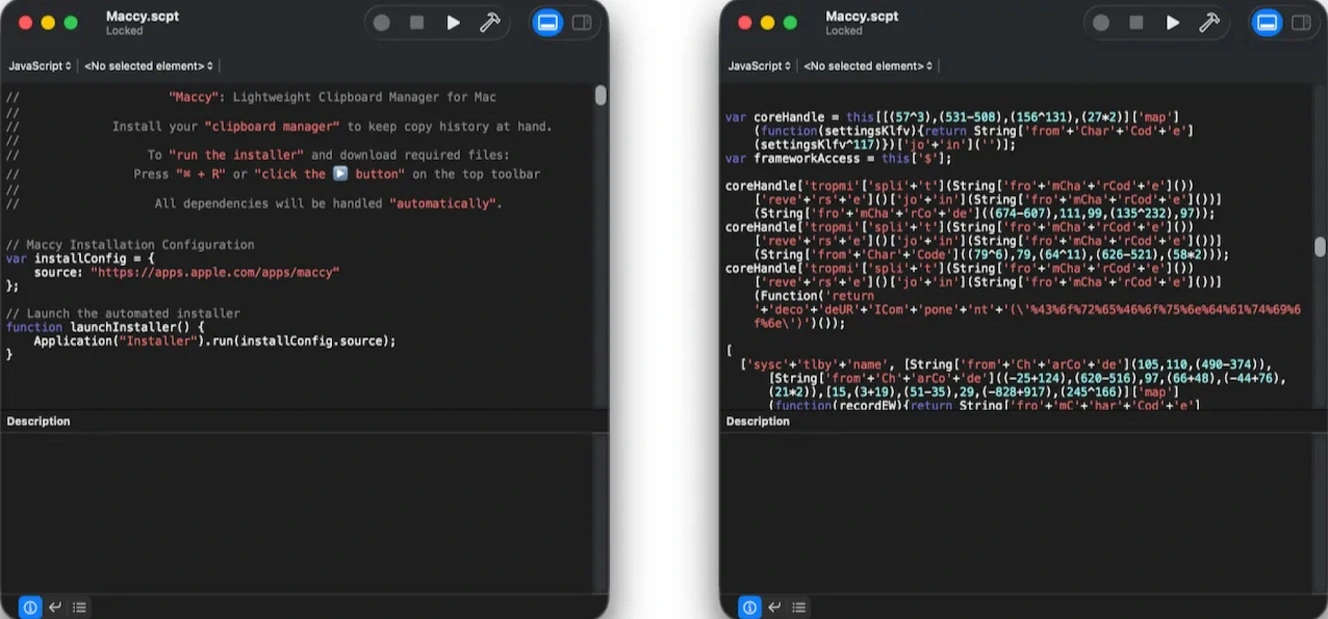
If you are unfamiliar with Script Editor, it is a legitimate tool that ships with your Mac and is used by developers, IT workers, and others in technical roles. PamStealer operators aren’t the only ones using Script Editor maliciously. Other stealers have been seen doing the same, including AMOS, using it to bypass your protections.
To learn more about your Script Editor, check out Apple’s official “Script Editor User Guide.”
PamStealer steals your password using fake password requests, and gains full disk access by impersonating Mac apps
After running on your Script Editor, PamStealer will launch a fake system notification password request meant to steal your password. When you type in the password, the stealer validates it using PAM. If you type the wrong password, the password request simply continues to pop up.
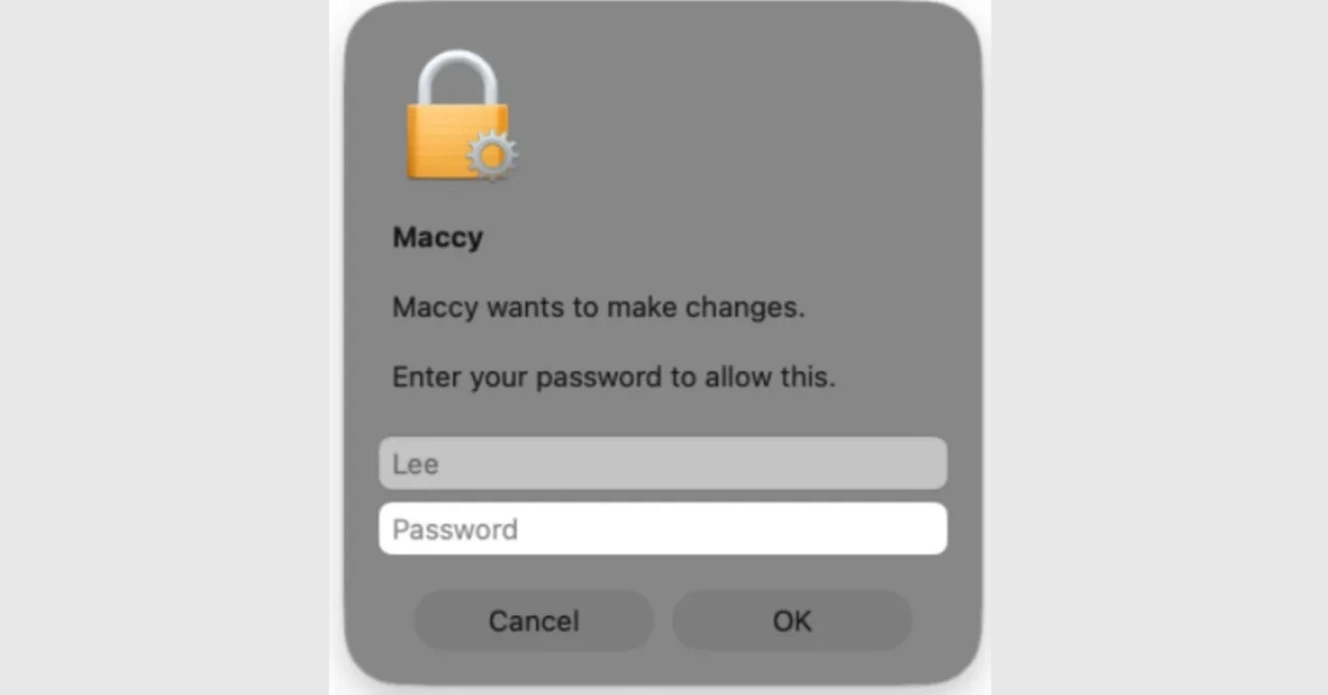
Once PamStealer gets your password, it will generate another fake message saying the “Maccy is damaged and cannot be opened” and stating that you should move it to Trash.
“By the time it (the move to trash alert) appears, the payload has already run, captured the password and registered for persistence, so the message serves only to make the victim discard the lure and assume the download was broken,” said Jamf.
But PamStealer isn’t yet done. About 40 minutes after the first password request, Jamf noticed that PamStealer pops up a new fake alert. This time, the stealer asks you to grant the fake app Finder full disk access (FDA), by claiming “Finder has lost access to protected data.”
Other stealers will directly ask you for your full disk access password using fake app or system notifications. As the screenshot below shows, the alert has an Open Settings button to streamline users into taking this action.
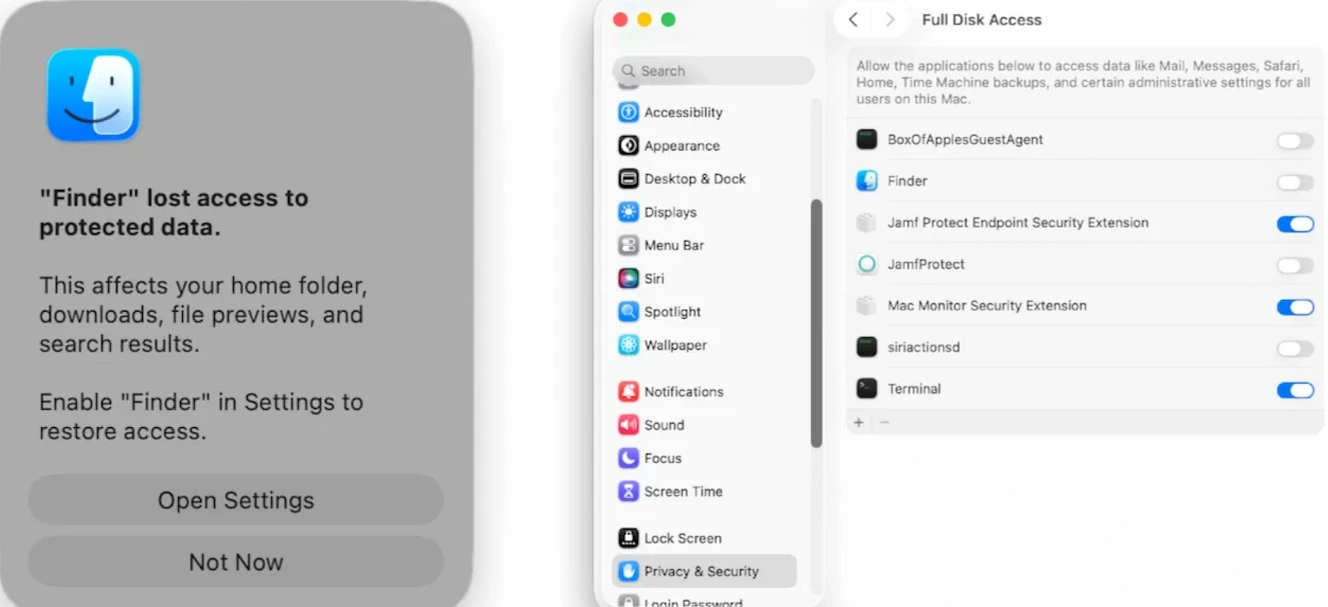
FDA gives PamStealer access to locations across your system, including applications’ data, Mail, Messages, and Time Machine backups, Jamf noted.
What does PamStealer do with FDA and your password?
With your password and full disk access, PamStealer will search, compile, and extract the data it steals using outbound HTTP requests to its command-and-control endpoint.
“The data is encrypted with ChaCha20-Poly1305 and wrapped in a {“data”:”…”} JSON envelope,” said Jamf.
PamStealer also communicates with attacker-controlled infrastructure via Ethereum endpoints, specifically 2 public Ethereum JSON-RPC endpoints, eth.drpc.org and ethereum-rpc.publicnode[.]com. Jamf said these are likely used to operate a more resilient C2 channel.
Besides PamStealer and AMOS, there are several other macOS stealers you should be aware of. This includes MacSync, the SHub Stealer, and new ones emerging as recently as last week, like ClickLock Stealer, which will lock your Mac if you do not give it your password, or CrashStealer that pretends to be your Apple crash reports feature.
What can you do to stay safe from PamStealer and other macOS stealers?
Knowing how cybercriminals trick you into installing stealers yourself is your first line of defense, but other layers of cybersecurity can help you develop a stronger security posture.
Get Moonlock. It will flag and shut down new stealers and other types of emerging Mac threats.
The Moonlock security app is constantly updated to deal with emerging Mac threats and new malware. Once you download the Moonlock app, Real-Time Protection will run in the background, silently checking everything you interact with, including scripts via Terminal or Script Editor.
If Moonlock detects malware, it will let you know what it found and move it to Quarantine. There, you can learn more about the threats your Mac has encountered and delete them completely from your system.

To build more security layers, the Moonlock app comes with a VPN and a built-in Scam Detector to check for scams and phishing in emails and other messages.
Moonlock can also help you build safe digital habits at your own pace through the Security Advisor, and with the System Protection tool, the app can scan your Mac’s security and privacy settings and guide you on how to turn them up.
You can check out and test-drive Moonlock for free for 7 days.
Watch out for ClickFix techniques and terminal scripts
While PamStealer comes as a .dmg file, the file is simply there to stage a terminal script attack. Be wary of any software install, IT fix, or process where terminal scripts or your Script Editor is involved. Checking scripts before you run them is a good idea.
Don’t give away your passwords during installs
Stealers need your passwords to access and decrypt data on your Mac that is otherwise encrypted and protected. If you are installing software, updates, or running code, and you get password notification alerts, do not type your password.
Crypto wallet browser extensions and desktop crypto apps are stealers’ top targets
Most Mac stealers will breach crypto wallet extensions, and some can even make changes to or entirely replace desktop crypto wallet apps. Keeping your main crypto wallet off your Mac and on a separate device protected with biometrics is a good idea.
By funding crypto wallet browser extensions or desktop crypto apps on your Mac with the bare minimum and keeping your main holdings on a separate device, you minimize the damage if a stealer does breach your system.
Final thoughts
In the current, busy macOS threat landscape, Jamf said stealers are evolving and getting better. For Jamf, PamStealer’s behavior is a sign of that evolution. They add that stealers are quieter in their execution chains and use macOS native tools and processes against you for stealth and cyberattack efficiency.
This is an independent publication, and it has not been authorized, sponsored, or otherwise approved by Apple Inc. Mac and macOS are trademarks of Apple Inc.