




Cybercriminals are targeting Mac users with fake crypto wallet sites. A new threat campaign has been impersonating Blue Wallet, a popular crypto wallet used by millions of users. While Blue Wallet itself has not been hacked, this technique is commonly used to spread Mac malware that targets your crypto. Let’s dive in to learn how it works and how to keep safe.
An unidentified macOS stealer goes after your crypto and browser extensions
If you downloaded Blue Wallet from update-bluewallet[.]com between May 26 and June 1, your Mac is likely compromised with macOS malware. Malwarebytes recently reported that cybercriminals were using the fake site update-bluewallet[.]com, which resembles the legitimate Blue Wallet site, bluewallet.io, to spread a macOS stealer that focuses on crypto wallet heists, developers’ credentials, and shopping browser extensions, among other data.

Would your Mac stop this attack?
The campaign uses a new ClickFix technique version that automatically opens your built-in Mac Script Editor and is filled with malicious code to breach your computer. This is the fourth time we have seen the macOS Script Editor being used to deliver malware in just a couple of months.
While the Script Editor ClickFix technique used in this campaign slightly varies from those we have seen before in this trend, it still stands out. This one simplifies the infection chain, making the attack more successful. Bottom line: It’s harder for you to spot.
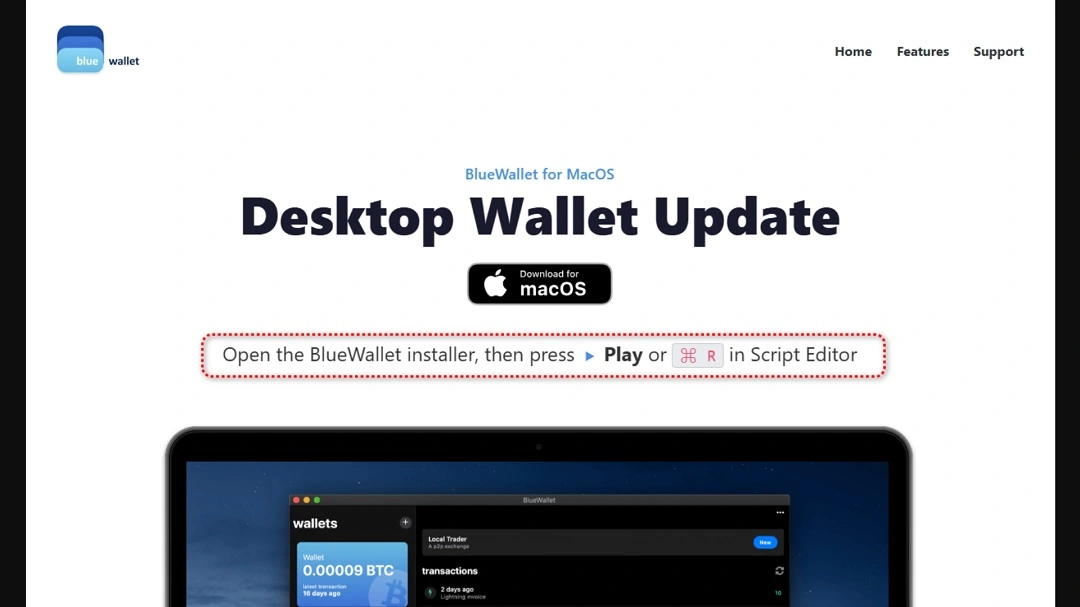
This is what the threat looks like from the user’s point of view:
- You search online for Blue Wallet (or other popular software downloads).
- You get top-of-page sponsored or organic results that look legit, so you click on one of those.
- You land on a website that looks like the official Blue Wallet site.
- You click on “Download” for macOS. You get a button to “Install-Execute” or, in this case, a simplified ClickFix instruction.
- If you click on the “Install-Execute” button or follow the simple instructions, the Script Editor on your Mac opens up filled with malicious code that attempts to pass as an official legitimate installation.
- Instructions will tell you to “Hit on ‘Play’ or ‘⌘R’ on your Script Editor.”
- If you follow the instructions, your Mac will be infected with a stealer.
Mac stealers are constantly changing. Here’s why that matters to Mac users.
While Malwarebytes did not identify the stealer being distributed in this campaign, it behaves quite similarly to other stealers, targeting your crypto wallets and data. Specifically, this unidentified macOS malware resembles MacSync in some ways, but it also has some additional features we have not seen before.
Most notably, this stealer is coded to go after browser-extension data related to shopping and productivity tools, including Honey, CapitalOne Shopping, Rakuten, CamelCamelCamel, Grammarly, Evernote, Notion Clipper, Todoist, and Google Keep.
Other technical aspects are also notable. This stealer uses the old-school Telegram bot technique as a channel to drop malware into your Mac, as well as to exfiltrate the data it steals.
Variations and similarities with other Mac stealers
The use of Telegram bots is not uncommon, but in recent macOS ClickFix stealer campaigns, we have typically seen the use of malicious domains instead of Telegram bots for these functions.
“The attacker is using a single Telegram channel as both the exfiltration drop and the control channel,” Malwarebytes reported. “It is cheap, scalable, encrypted, and blends into ordinary HTTPS traffic.”
Similarities with other stealer malware exist. Like other stealers, this one will prompt you for your system password once installed and aggressively targets crypto data on your Mac.
Why do these technical variations matter to Mac users? Stealers that target macOS users are not set in stone. In fact, technical differences, even among the same stealer malware, make it harder for your Mac’s security tools and the cybersecurity community to catch up with these campaigns.
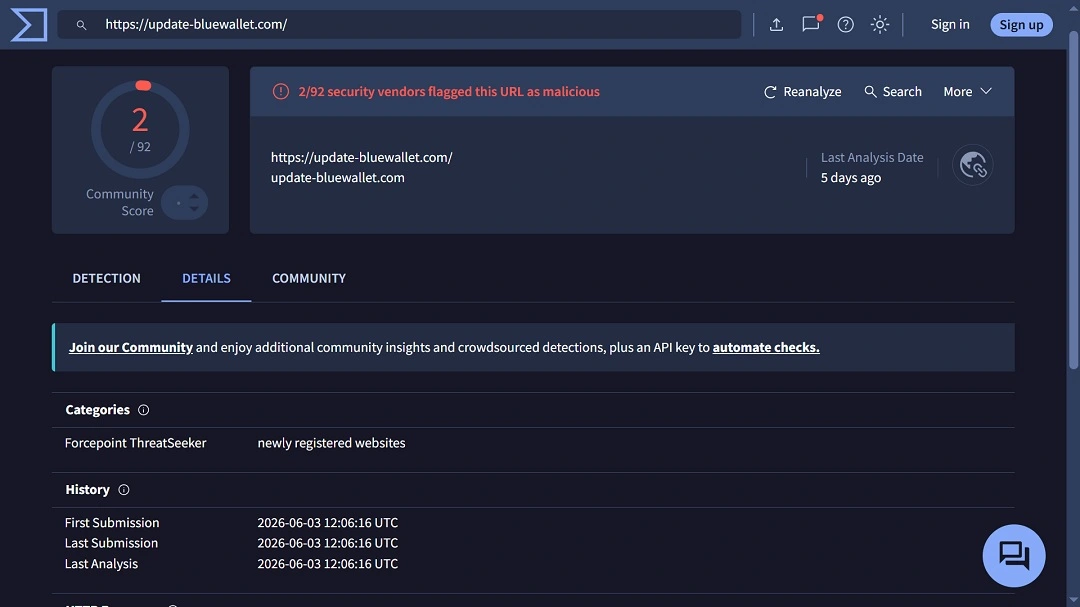
The malicious site, update-bluewallet[.]com, was only live for a couple of days. It is unknown how many people downloaded the associated malware. Our checks show the fake site is no longer reachable. This shows how quickly malicious infrastructure can pop up and disappear.
What does this stealer do?
The stealer associated with this fake Blue Wallet site is aggressive. It will:
- Extract history, cookies, login data, and bookmarks from a wide range of browsers, including Chrome, Brave, Edge, Vivaldi, Opera, Firefox, and (yes) Safari
- Target your desktop wallet applications, including Electrum, Electrum-LTC, Exodus, Atomic Wallet, Ledger Live, Trezor Suite, Bitcoin Core, Litecoin Core, DashCore, Dogecoin Core, Coinomi, Monero, Sparrow, Armory, BlueWallet, Zengo, Trust Wallet, Binance Desktop, and Tonkeeper
- Go after your crypto browser-extension wallets across several ecosystems, including:
- Bitcoin: Xverse, Leather, UniSat, Alby, and Wizz
- Solana: Phantom, Solflare, Backpack, Nightly, MagicEden, Sollet, and Slope
- EVM wallets: MetaMask, Trust Wallet, OKX, Coinbase Wallet, Rabby, Zerion, Rainbow, SafePal, Bitget, Ronin, and XDEFI
- Cosmos: Keplr, Station, and Cosmostation
- Other ecosystems: Yoroi, Lace, Petra, Martian, Suiet, Talisman, SubWallet, Braavos, and Temple
- Target several password managers, including LastPass, 1Password, Dashlane, Bitwarden, Keeper, RoboForm, NordPass, Enpass, StickyPassword, TrueKey, Passbolt, and Buttercup
- Look for 2FA and authenticator tool data, including Google Authenticator, Authy, Duo, Microsoft Authenticator, 2FAS, and FreeOTP
- Copy data from Telegram Desktop and Discord, including Discord Canary and Discord PTB
- Go after developer and cloud tools, including credentials and configuration files from AWS, SSH keys, GnuPG, Kubernetes, and Shell and Git files
- Copy your local Apple Notes database
- Target shopping and productivity browser extensions, including Honey, CapitalOne Shopping, Rakuten, CamelCamelCamel, Grammarly, Evernote, Notion Clipper, Todoist, and Google Keep.
- Scan Desktop, Documents, and Downloads for files with extensions including .txt, .pdf, .docx, .doc, .rtf, .wallet, .key, .keys, .seed, .kdbx, .pem, and .env, under a size cap
- Compile, zip, and extract your data via a Telegram bot, breaking the data up into 49 MB chunks to stay under Telegram’s 50 MB upload limit
How to stay safe from macOS stealers
As mentioned, macOS stealers are abundant and are currently prevailing. Cybercriminals constantly update their malware and their social engineering techniques, aiming to trick users into bypassing their Mac’s built-in defenses. Fortunately, a mixture of cybersecurity awareness and good tech tools can help you build a stronger defense.
Get Moonlock. It can catch stealers as they evolve.
The Moonlock security app was built to catch what your Mac misses. The app is constantly updated to deal with new stealers and other macOS threats as they evolve.
Once you download the Moonlock app, it will run silently in the background, checking every file you interact with for suspicious signatures (even Terminal scripts). If the app finds anything, it will let you know and move the threat to Quarantine, where you can review it on your own time.
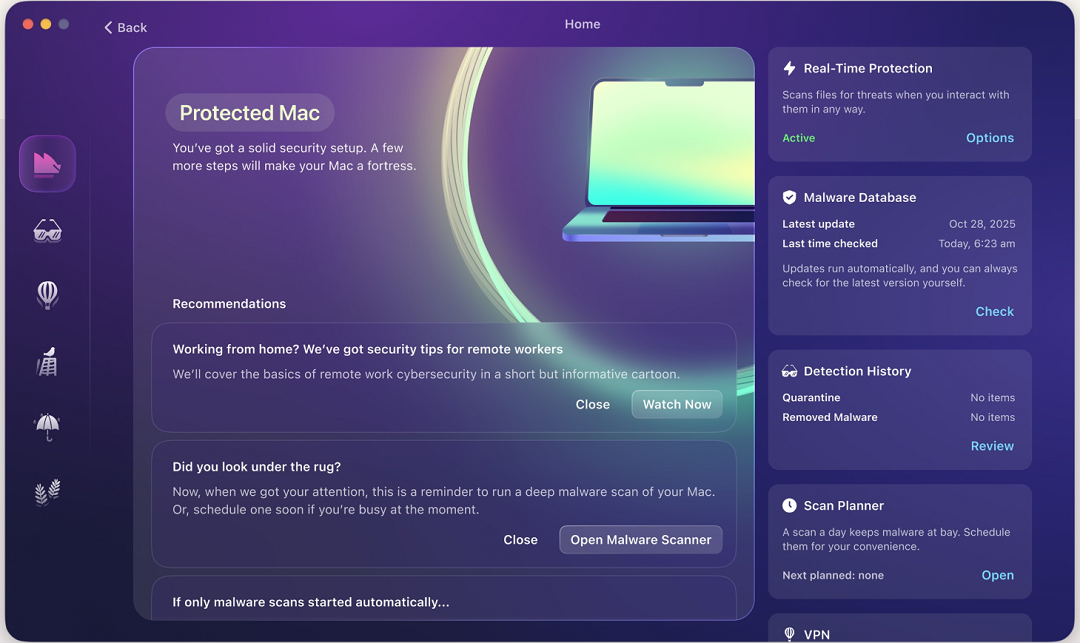
The Moonlock app also comes with a built-in VPN for safe browsing, and it can guide you through how to turn up your default Mac privacy and security configurations to the highest levels. Plus, it offers tips and advice to build safe digital habits through the Security Advisor.
You can check out and test-drive Moonlock for free for 7 days.
Do not type in your system password after a software install
The stealer discovered by Malwarebytes will, like other stealers, ask you for your system password once it is installed. It needs this password to access your data, which is otherwise protected by your Mac’s security. Never type in your system password after a software install.
Keep your main crypto wallet off your Mac
If you keep your main crypto wallet away from your Mac on a separate device, like your smartphone, even if cybercriminals breach your computer, they cannot access your main wallet. Lock that separate device, as well as your main crypto wallet, with biometrics for enhanced protection.
Final thoughts
Mac stealers today rely on misplaced trust and deception to breach your Mac. Once they’re in, they will go straight for your most valuable data, including your financial details and crypto. Learn more about how these campaigns work, and level up your tech security stack to mitigate the risk of stealers.
This is an independent publication, and it has not been authorized, sponsored, or otherwise approved by Apple Inc. Mac and macOS are trademarks of Apple Inc.





