



ClickFix is the most popular technique used by cybercriminals to breach Mac computers with stealer malware. Usually consisting of fake sites that trick users into copying and pasting a malicious command into their Mac terminal, ClickFix is evolving and becoming a new monster.
Automated ClickFix dark web toolkits now allow cybercriminals to create hundreds of ClickFix pages simultaneously. They can customize what users see on their screen and orchestrate the entire attack chain. Combined with dark web ad tools and web traffic redirect tools, ClickFix campaigns can spread broadly, reaching a significantly higher number of Mac users today.

Don’t fall victim to a ClickFix attack
In this report, we look into the new ClickFix toolkit Corium, along with other ClickFix toolkits that emerged this year. We’ll learn how they work, why they matter to you, and how you can stay safe.
Let’s dive in.
Corium, a new ClickFix toolkit, hits the dark web market
On November 9, Hudson Rock reported that a new ClickFix toolkit was being promoted and sold on the dark web forum Exploit[.]in. While Corium is not the first ClickFix toolkit, it stands out for several reasons.
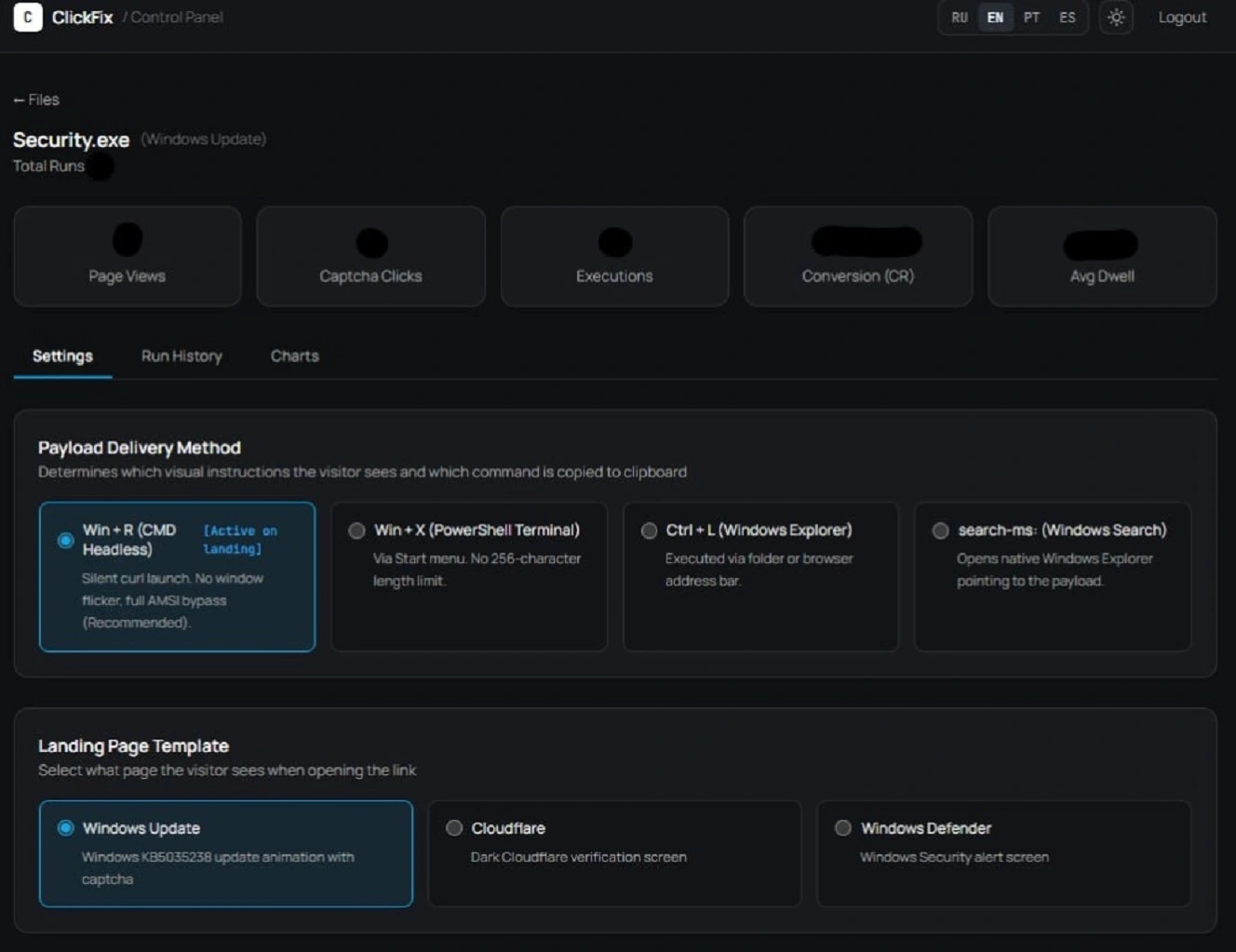
Compared to other ClickFix toolkits, Corium appears to be more user-friendly. This makes it more accessible to a larger number of operators who may not have the technical skills to use sophisticated malware kits.
On the other hand, the developer and promoter of Corium, known as Cassiopedia, claims this toolkit has macOS support. It’s a claim that experts question.
Finally, besides orchestrating the entire ClickFix attack chain, which other ClickFix toolkits do, Corium offers another feature that stands out. Using this feature, cybercriminals can hijack legitimate websites and turn them into part of a ClickFix delivery pipeline.
Dark web seller says Corium supports macOS, but is that true?
In its report on Corium, Hudson Rock says that several of the capabilities that the developer is promoting “remain unverified.” This includes, Hudson Rock says, “the seller’s claims regarding macOS support.”
All of the screenshots of Corium’s control panel clearly show that the tool is coded to breach Windows-running devices. We asked the experts whether it was Windows-only.
“The seller claims macOS support, but nothing in the screenshots backs that up, so I’d treat it as a Windows tool until someone shows otherwise,” Daniel Kelley told us. Kelley is a Senior Security Researcher with Varonis, a US-based cybersecurity company.
Kelley explained that every delivery method shown for Corium is a Windows one. This includes the Run dialog, the Win+X menu, the File Explorer address bar, the search-ms protocol, and DLL hijacking variants.
“The lure themes include Windows Update and Defender SmartScreen,” Kelley adds.
Aimee Simpson, Director of Product Marketing at Huntress, agreed.
“Looking at the advertisement and screenshots Hudson Rock published, it certainly looks this way (Windows-only),” Simpson told us.
“The delivery methods, like the Run dialogue, the Windows Terminal, and File Explorer’s address bar, are all Windows features,” Simpson adds.
“While the seller claims macOS support, I’d take it with a grain of salt (even Hudson Rock says the claim is unverified),” says Simpson. “Personally, I’d call it Windows-focused for now.”
Can Corium easily expand to Mac?
If Corium is Windows only, why should you, a Mac user, be concerned? The reason is simple: Corium is part of a broader trend in which ClickFix toolkits are emerging to scale cyberattacks that target Mac users. Plus, updating Corium to target Mac computers is technically something that can be done in a short time. Historically, malware tools sold on the dark web tend to offer cross-platform capabilities.
Kelley says Corium could “probably” expand to macOS. “A ClickFix page is just a lure and a command on the clipboard,” says Kelly.
“The fake CAPTCHA pages, the campaign tracking, and the website embed don’t care what operating system the visitor is on, and the panel already records each visitor’s OS,” he adds.
Kelley explains that supporting Macs means swapping the PowerShell command for a Terminal one and changing the instructions on screen.
Corium features shown in screenshots that are unique to Windows, such as the Run dialog and search-ms, wouldn’t carry over in a Mac Corium version, Kelley explains.
Kelley notes that the seller seems to be using Corium as a brand across other products, too. “On the same forum(s) they’re also selling a Tron crypto drainer and a seed phrase checker with auto-withdraw, both under the Corium name,” says Kelley.
“So, this looks like a developer building out a product line, not a one-off tool,” Kelley adds.
ClickFix tools, malicious DMGs, and directing web traffic to lure users
What could carry over or be added to Corium is web traffic integration and features that allow for redirects to malicious sites that host malicious, stolen, Apple-signed fake DMG install files.
The PasteSwitch operation, active since May of this year, was responsible for hijacking the legitimate HBO Max Reddit account. It recently impersonated Claude Code and ChatGPT, and it’s not just using ClickFix techniques. It’s combining them with Apple-signed, malicious DMGs. This means users do not even have to copy and paste anything into their Mac Terminal. Instead, they just download a trojanized version of a fake popular app (DMG file), which passes all of macOS’s built-in Gatekeeper checks because the DMG is Apple-signed by a legitimate developer.
To distribute Apple-signed DMGs, cybercriminals steal Apple ID developer accounts, forge them, or create malicious Apple ID accounts.
Additionally, as mentioned, ClickFix toolkits and panels are usually combined with dark web traffic tools used in campaigns to direct users to ClickFix sites via online ads or SEO poisoning. Integration of ad and web traffic tools into ClickFix panels or toolkits would take the orchestration of ClickFix attacks even further.
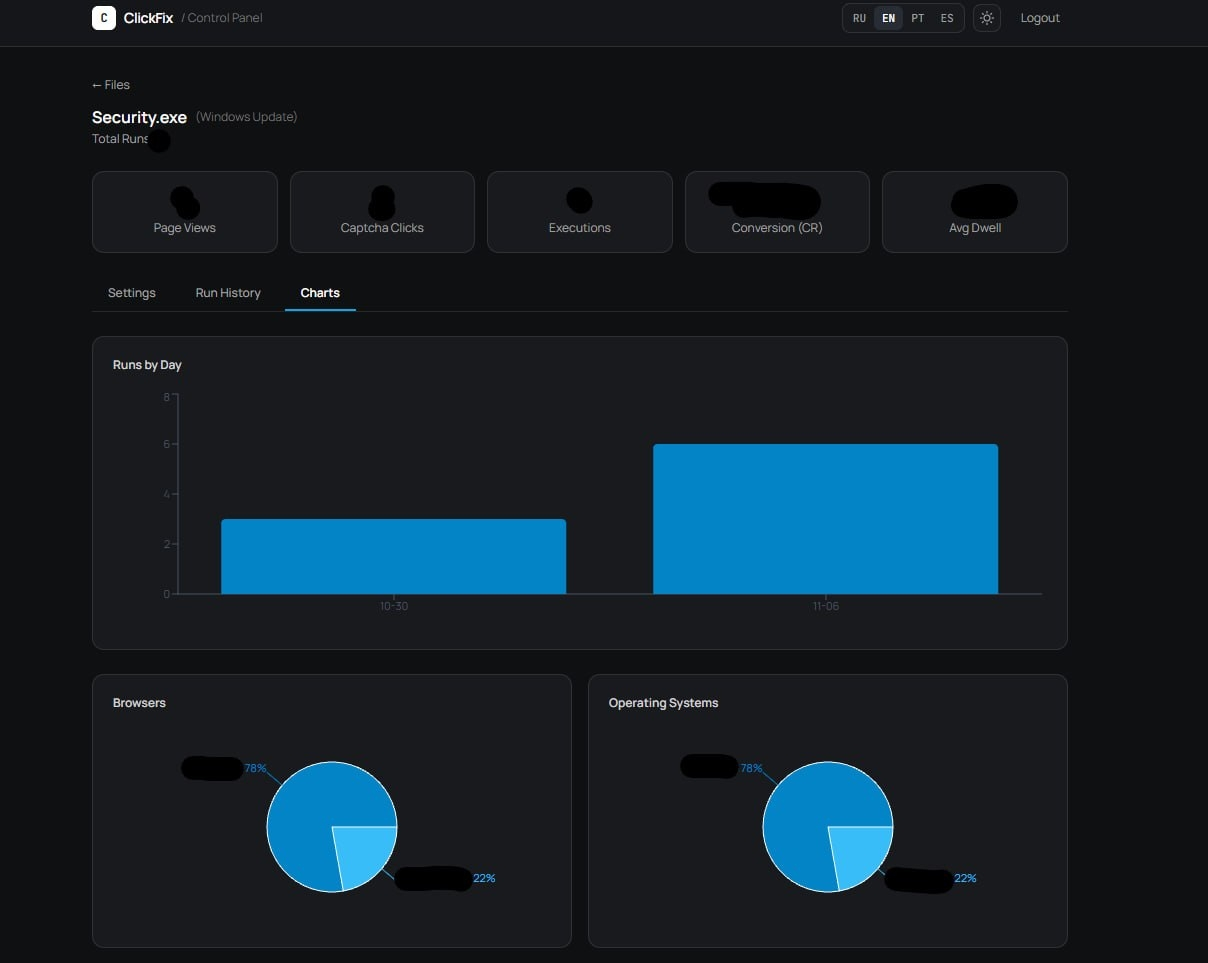
Corium screenshots show that the tool allows operators to monitor the stats of their ClickFix campaigns and get information on its activity, including what OS users who reached these ClickFix sites are using, what browser they are using, total page views, CAPTCHA clicks, executions, conversions, and other common metrics used to measure campaigns.
Corium also has a tab where operators can add the “Traffic Source,” highlighting Telegram, Forums, and Google as traffic sources. This feature, however, appears to be only a note for campaigns so far. This means Corium cannot be used to orchestrate the web traffic component of a ClickFix operation.
How easy is it for non-technical operators to use Corium?
As mentioned, making malware that is easy to use makes a dark web tool more accessible and potentially more widely used. This means it may eventually impact Mac users down the line.
According to Kelley, it is very easy for non-technical operators to use Corium, based on the screenshots.
“The operator uploads a payload, picks a lure theme such as a Cloudflare check or a Windows Update prompt, and chooses how the victim will be tricked into running the command,” Kelley explains. They add a domain and a Telegram chat for alerts. Then, they either send traffic to the landing page or paste one line of JavaScript into a website they control, he adds.
“After that, they watch the dashboard for views, clicks, and executions,” says Kelley.
Corium’s single-line JavaScript feature can be used to hijack websites
The other Corium feature that stands out is the feature that allows operators to code and include a single JavaScript line into the HTML code of any website (before the </body> tag).
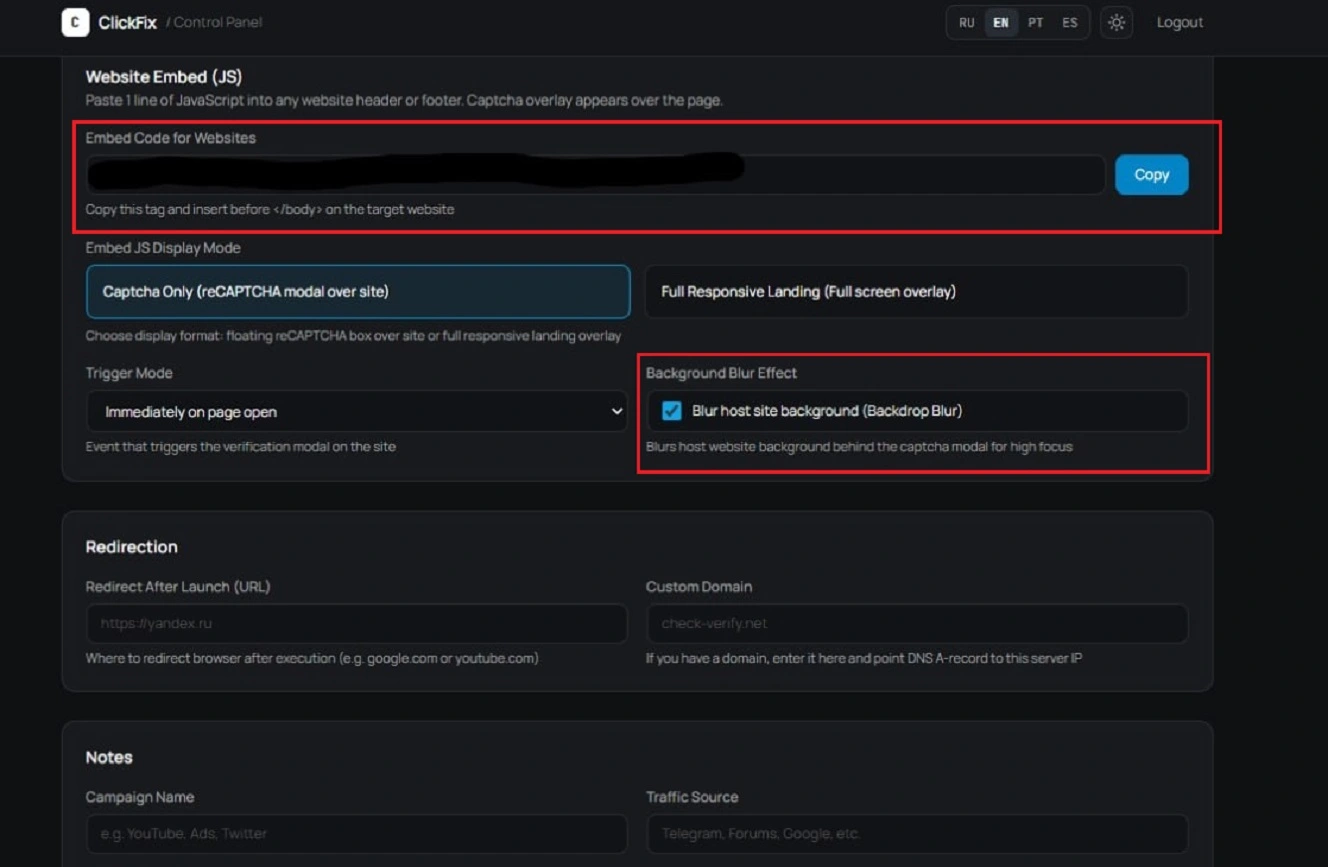
This one-line, JavaScript-embedding Corium module forces visitors to get a fake verification prompt displayed on top of the site. The fake verification prompt is coded to blur out the original site in the background.
Kelley explains that visitors could get the prompt on a website they already trust.
“It’s an interesting part of what they’re selling because it really lets hacked websites suddenly become a delivery channel for malware,” says Kelley.
“A common technique we see is attackers hacking legitimate websites and then using those websites to infect visitors,” says Kelley. “This feature basically makes that easy.”
A common technique we see is attackers hacking legitimate websites and then using those websites to infect visitors.
Daniel Kelley, Senior Security Researcher at Varonis
Besides the ability to hijack sites, including trusted sites, this feature also allows cybercriminals to launch ClickFix campaigns without ever creating fake sites, simplifying their work.
Instead of building a fake page and driving traffic to it, the attacker adds the script to a site they’ve compromised. The prompt then shows up on top of the real page, Kelley explains.
“Visitors are on a site they already trust, which makes them more likely to follow the instructions,” he adds.
Dark web ClickFix tools that emerged in 2026
Corium is a tool that is not emerging in isolation. It is part of a broader dark web trend. ClickFix toolkits or unified ClickFix control panels are being built and sold to automate and orchestrate ClickFix campaigns.
“In 2026, several ClickFix tools have emerged that are notable,” says Simpson from Huntress.
SOCRadar, for example, reports that an actor called GlowComa sells the Icarus ClickFix panel. It delivers payloads through copy-and-paste terminal commands, alongside a macOS stealer called ICMacOS, Simpson explains.
In this instance, the stealer will go after browser data and keychain content. A later version has added remote access, Simpson adds.
ICMacOS has recently evolved from a Mac stealer into a remote-access trojan.
“Another (ClickFix tool) was also reported by Hudson Rock,” says Simpson. Reported on ErrTraffic in December 2025, “it sold for about $800.”
This isn’t Mac-specific, but it identifies each visitor’s operating system and serves a matching payload, which reportedly means Atomic Stealer (AMOS) for macOS, Simpson added.
How to stay safe from ClickFix attacks
There are several things that need to happen for a ClickFix attacker to breach your Mac computer. The following are tips and technical tools that can help you stay away, prevent, and shut down ClickFix attacks.
The ClickFix funnel’s first gate is usually ads or search engine results
The first stage of a ClickFix attack is how attackers get you to the site where a ClickFix malware delivery stage is hosted. Today, they are usually sponsored ads on networks like Google Ads.
Another popular ClickFix first gate is SEO poisoned results. You search for something you want to download or fix (like a Mac cleaner, AI app, developer resources, or an app update). But your search engine’s organic results are “poisoned.” This means page one includes results that direct you to malicious ClickFix sites.
Your best bet is to adopt a Zero Trust approach to online ads and search engine results. This means treating all ads and results as potentially malicious until verified.
The second ClickFix funnel gate: ClickFix instructions
There are several variations of ClickFix. Most campaigns involve fake sites that include simple step-by-step instructions on how to install software you are interested in via instructions to copy and paste a script into your Terminal.
Other techniques include installation files that include ClickFix instructions. You may be asked to right-click or drag and drop the app into Terminal to install. This bypasses Gatekeeper, the built-in security tool that ships with your Mac and checks all install files for safety.
ClickFix attackers have also used Script Editor, a Mac built-in tool. They have even automated online “Download” buttons to automatically open your Script Editor populated with code and hidden malicious scripts that install stealers if you click on them. Clicking on the “Play” button in this variation leads to a breach.
At least 3 distinct macOS stealer campaigns have used the ClickFix Script Editor technique.
One rule that holds up against all ClickFix variations is to only install, run terminal commands, or hit “Play” on your Script Editor if you have triple-checked the download or command for safety and legitimacy.
The final gate: Shutting down a stealer ClickFix cyberattack in real-time
If, for some reason, something gets past you, the Moonlock antivirus app for macOS can flag, shut down, quarantine, and remove a ClickFix stealer attack from your Mac in real time.
Once installed, Moonlock’s Real-Time Protection will check everything you interact with for threats, suspicious behavior, and malware. This includes emails, downloaded files, and Terminal commands (Script Editor checks included).
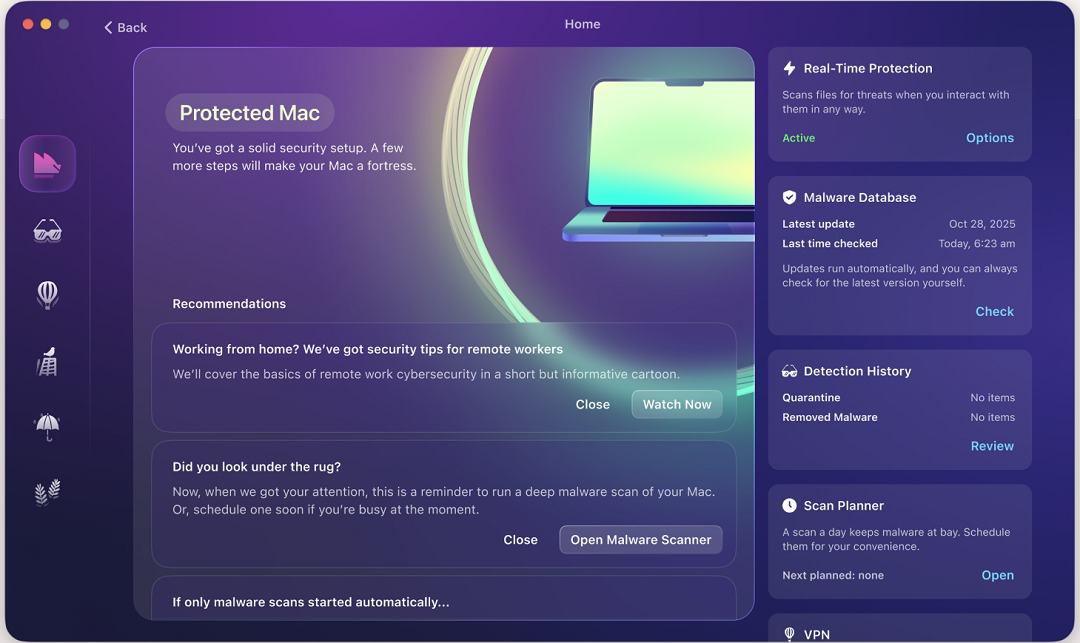
Real-Time Protection is constantly updated, and Moonlock’s Malware Scanner is customizable for speed and depth. This means you get protection from new and old threats, including new ClickFix stealer variants.
If Real-Time Protection flags anything, it will let you know what it is and why it is dangerous. It will then move it to Quarantine, where the threat is fully isolated. You can check out Quarantine in your own time, learn more about the threats your Mac has encountered, and remove them completely from your computer.

The Moonlock app also ships with a built-in VPN for safe browsing, a Scam Detector you can use to check for scams and phishing in any email or text in just a couple of clicks, and features like the Security Advisor, which helps you build safe digital habits at your own pace.
You can check out and test-drive Moonlock for free for 7 days.
Final thoughts
If 2025 was the year when ClickFix gained popularity, 2026 is the year when ClickFix toolkits took the technique to industrial levels. These tools can be used to launch high-volume campaigns, sometimes hundreds of fake sites at a time. They can also customize ClickFix variations, take over legitimate sites, and monitor threat campaigns’ success.
For you, this means more ClickFix. A whole lot more.
Follow the tips in this report to keep away from ClickFix infrastructure and stay on the safe side of things out in the wild.
This is an independent publication, and it has not been authorized, sponsored, or otherwise approved by Apple Inc. Mac and macOS are trademarks of Apple Inc.