Apple Pay is one of the most flexible and secure payment methods you can use for online and in-person purchases in lieu of credit cards. But just because it has built-in fraud warnings doesn’t mean scammers can’t exploit a loophole here or there.
Scammers who target your Apple Pay will make sure you’re unable to get your money back. So spotting the warning signs early is your best bet.
What is an Apple Pay scam?
An Apple Pay scam is any deceptive act that aims to trick you into sending out a payment via Apple Pay to the scammer. Some scams entail taking over your account or stealing your linked credit cards. Typically, scammers target Apple’s wallet service for NFC purchases because the transactions are fast and widely trusted by Apple ecosystem users.
Some scams instead target Apple Cash, Apple’s peer-to-peer (P2P) money transfer service. With Apple Cash, scammers usually rely on shady social engineering tactics to pose as a trustworthy individual or even a friend asking to borrow a 20.
So, can you get scammed on Apple Pay? And how?
Unfortunately, you can still be scammed despite Apple Pay’s strong security features. Scammers are unlikely to hack into your account, but they could trick you into approving a payment or revealing your Apple Account verification code.
There are countless ways to run an Apple Pay scam, including:
- Apple Pay text scams, phishing messages, or fake Apple Support calls
- Fake online storefronts
- Account takeover using stolen credentials
- Seemingly-legitimate Apple Cash requests
How common are Apple Pay scams?
The Federal Trade Commission (FTC), which handles scams that target consumers, doesn’t list Apple Pay-specific scam rates. However, the category of “payment app or service” fraud is one of the most common types of scams.
In 2024, the FTC recorded just over 2.6 million fraud reports, with close to 90,000 of them being related to payment apps and services. The losses attributed to this type of scam totaled $391 million, the second-highest only after credit card scams.
As for attempted scams, in 2025, Apple was able to prevent more than $2.2 billion in fraudulent transactions using its payment services, terminating over a billion scammy accounts.
What is an Apple Cash scam, and how does it work?
As previously noted, an Apple Cash scam is slightly different from an Apple Pay scam. Since Apple Cash is a P2P US-only service, scammers often impersonate friends or relatives, leveraging an urgent reason for a payment. They can also pose as individual online retailers selling goods on Facebook Marketplace, for example.
While a full-scale account takeover is still a possibility, most Apple Cash scams involve tricking the victim into authorizing the transfer themselves, through Messages or Wallet, sending the money directly to the scammer. This is because “legitimate” Apple Cash transactions, meaning ones authorized by you, can’t be reversed, so the scammer gets to keep your money.
10 common Apple Pay scams to watch out for in 2026
While Apple Pay has a lot of built-in protections against fraudulent transactions, they’re far from perfect. Not to mention that scammers in 2026 are now using AI to help them with impersonations and fake purchase receipts.
Understanding the most common tactics can help you recognize the warning signs of an Apple Pay scam before approving a payment.
Fake Apple Pay alert texts or emails
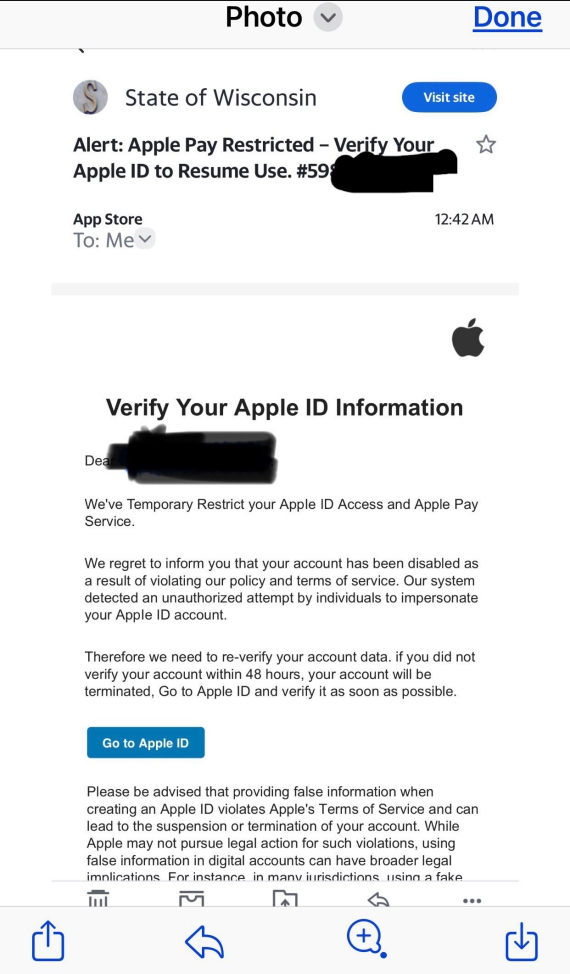
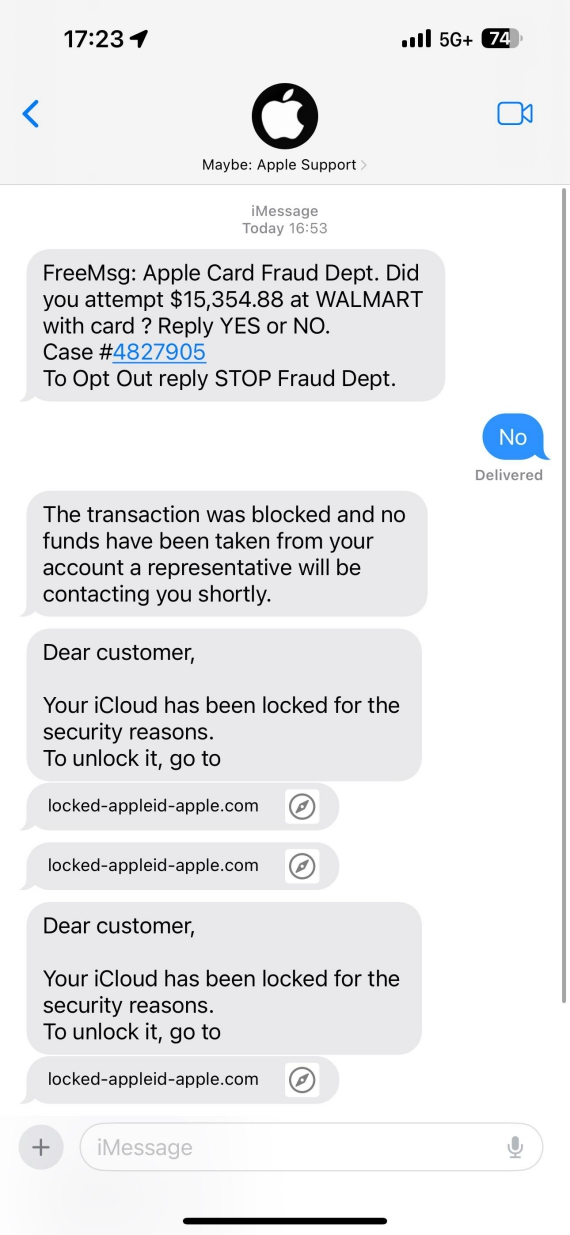
Keep in mind that Apple will not send you unsolicited SMS payment alerts with links in them. Scammers may send legitimate-looking “Unverified Apple Pay Usage” warnings from numbers they obtained through breaches or smishing. Clicking through one of these notifications often leads to credential theft.
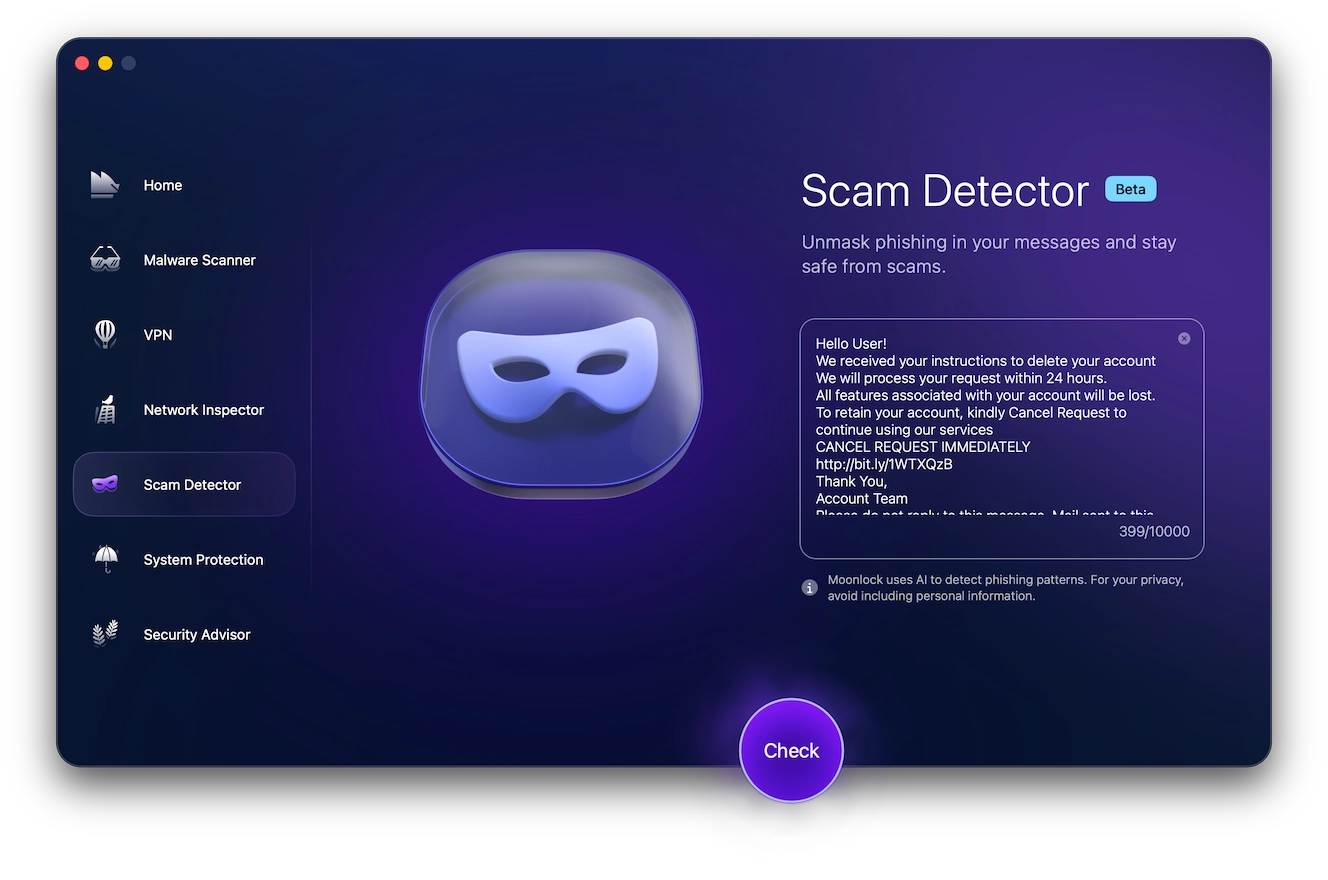
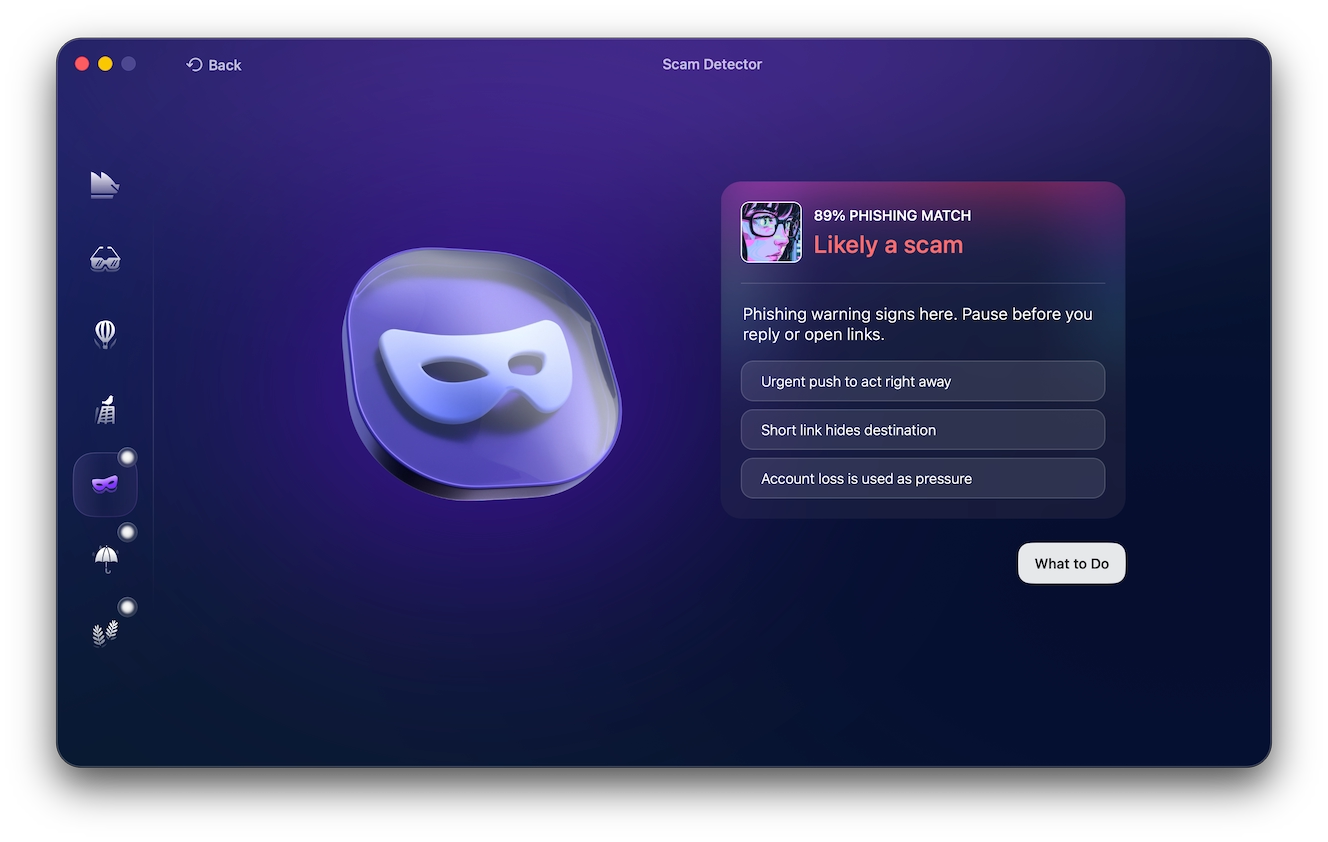
If you’re ever unsure about a message, utilize a security tool such as Moonlock’s Scam Detector. Here’s how it works:
- Download Moonlock and take advantage of the 7-day free trial.
- Open Moonlock and go to the Scam Detector tool.
- Paste the message into the text box and click Check.
Moonlock will analyze the content of the message for telltale scam tactics and social engineering tricks, and report on the probability that the message is associated with a scam. It will also supply you with recommendations on how to proceed.
Overpayment or fake refund scam
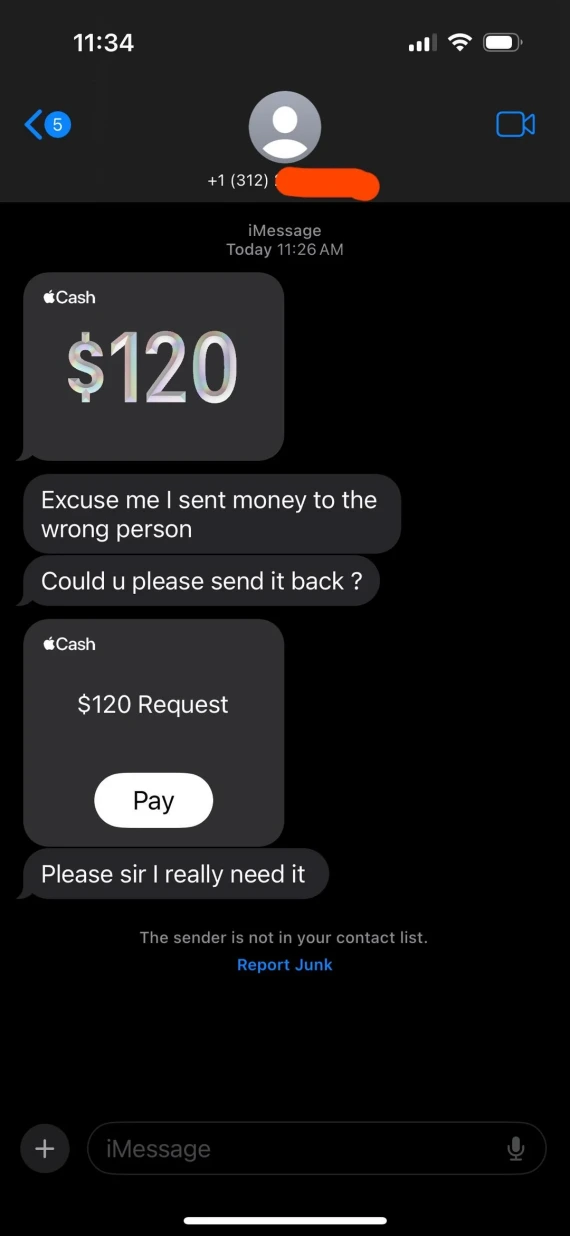
In this type of scam, a stranger will “accidentally” overpay you through Apple Cash and then pressure you to return the excess part of the payment. On r/Scams on Reddit, users have reported that scammers use stolen cards or compromised accounts, so the original payment ends up getting reversed. Your “refund,” meanwhile, was authorized on your end, so it doesn’t get reversed.
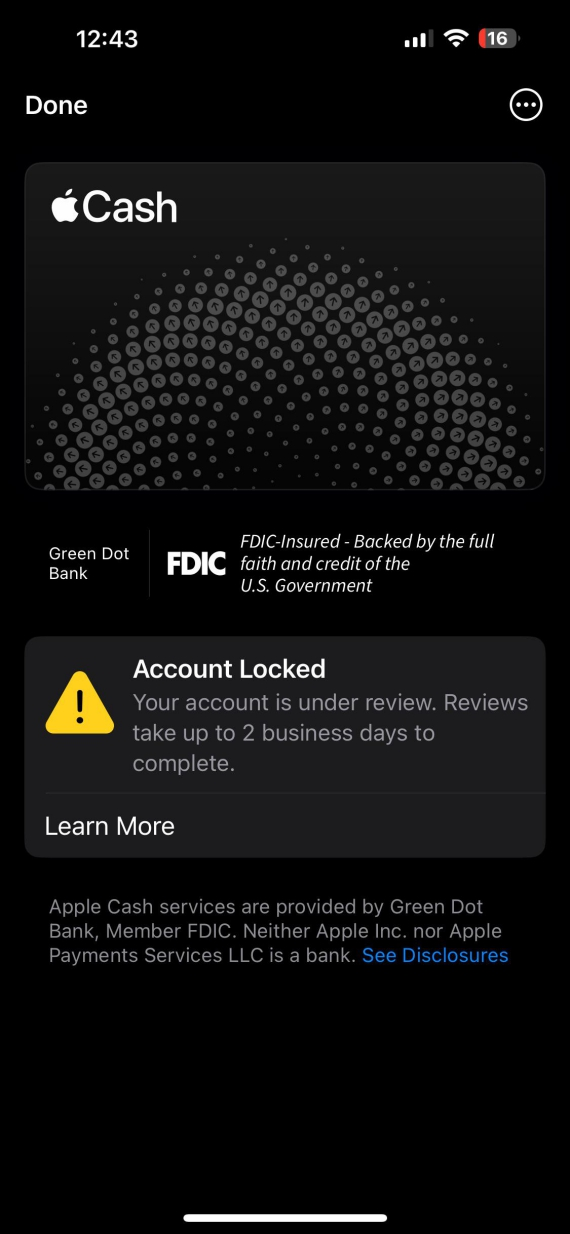
You can avoid this type of scam by choosing the option to Manually Accept Payments on your Apple Cash account. Simply open the Wallet app, then tap your Apple Cash card. Tap the More button, followed by Card Details. After you enable Manually Accept Payments or Automatically Accept Payments, you’ll have 7 days to accept any incoming payment.
Fake payment confirmation
In some scams, the attacker sends an edited screenshot of a payment confirmation notification, claiming an Apple Pay or Apple Cash payment was completed. They do this hoping that you will release goods or issue a refund before checking your balance. For example, a buyer shows a “Payment Sent” image, but no money arrives.
Look for inconsistencies in the invoice, like cropped screenshots, spelling errors, or pixelated and off-center logos. You can also double-check your Apple Wallet or bank account to see whether the transaction actually took place.
Fake Apple Support phone calls
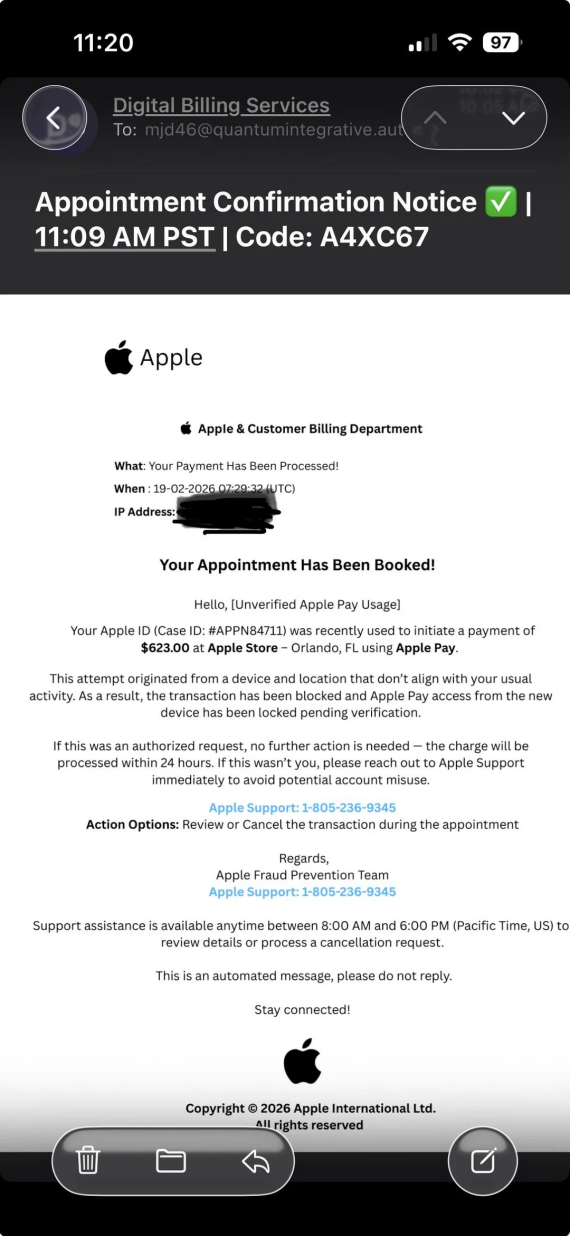
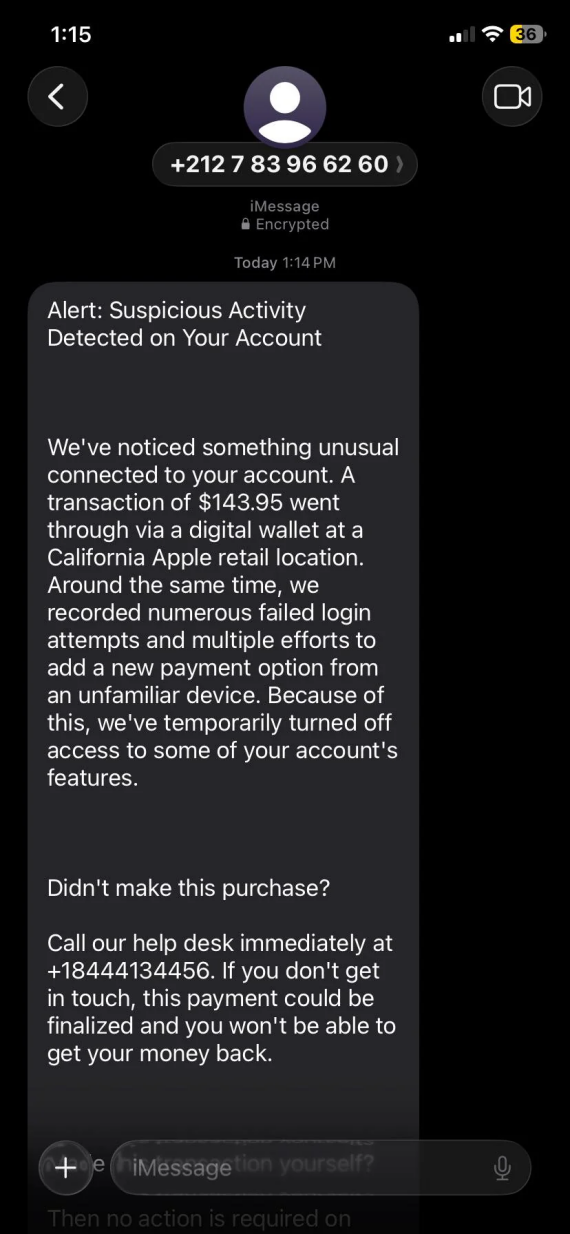
In February 2026, a campaign of fake Apple Pay alerts was reported that lured victims using fake Apple support numbers. Impersonating Apple support employees, the scammers claimed that a $143.95 purchase on the target’s account was blocked, then asked for payment details or a verification code. Sometimes, they requested complete remote access through software like AnyDesk or TeamViewer.
In addition to potential theft, remote access software enables scammers to install malware on your Mac. As a rule of thumb, treat any unsolicited calls or urgent payment requests with a healthy dose of suspicion. A real Apple Customer Support representative will not contact you unprompted, nor will they ask for your financial details.
To increase your cybersecurity posture, consider using a dedicated cybersecurity solution like Moonlock.
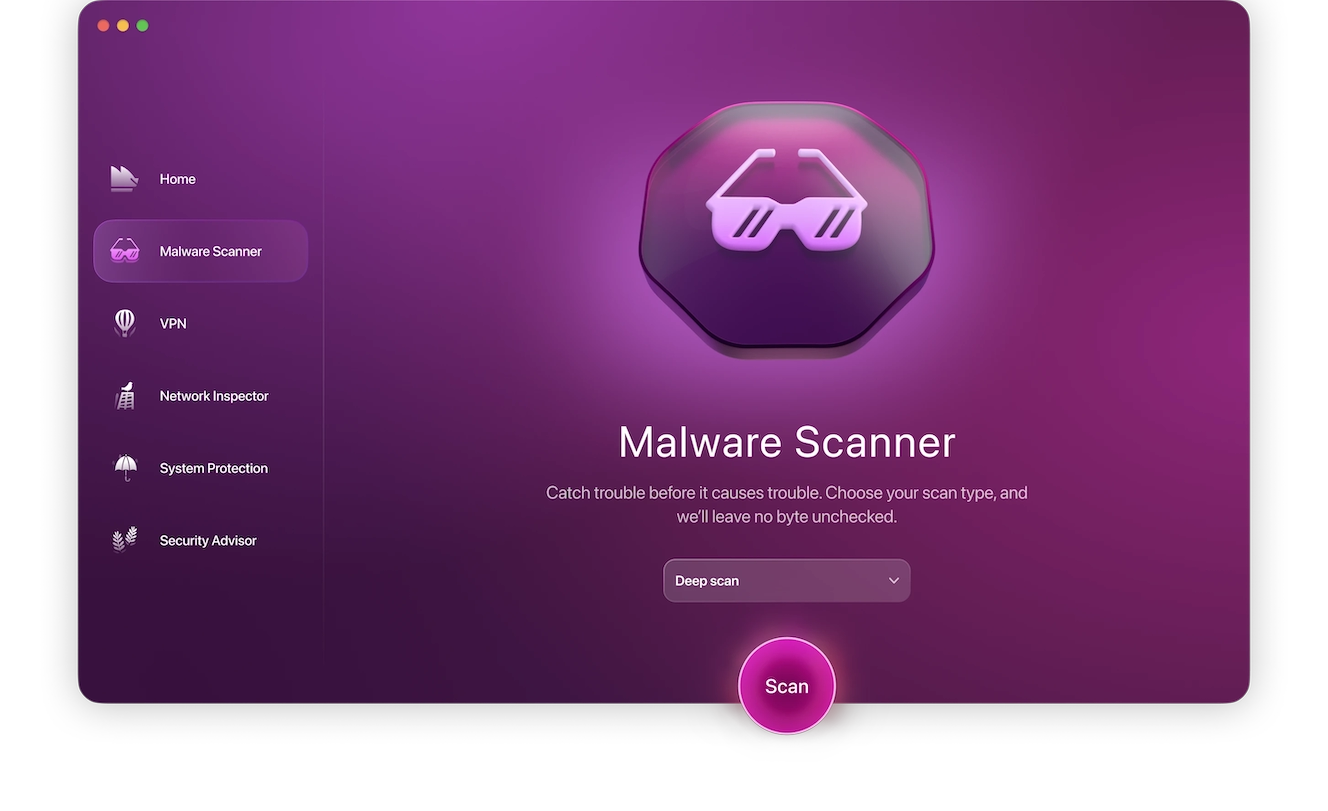
To scan your device for malware:
- Sign up for a free trial of Moonlock.
- Open Moonlock, then click on Malware Scanner from the left sidebar.
- From the drop-down menu, select your preferred type of scan (Quick, Balanced, or Deep).
- Click Scan.
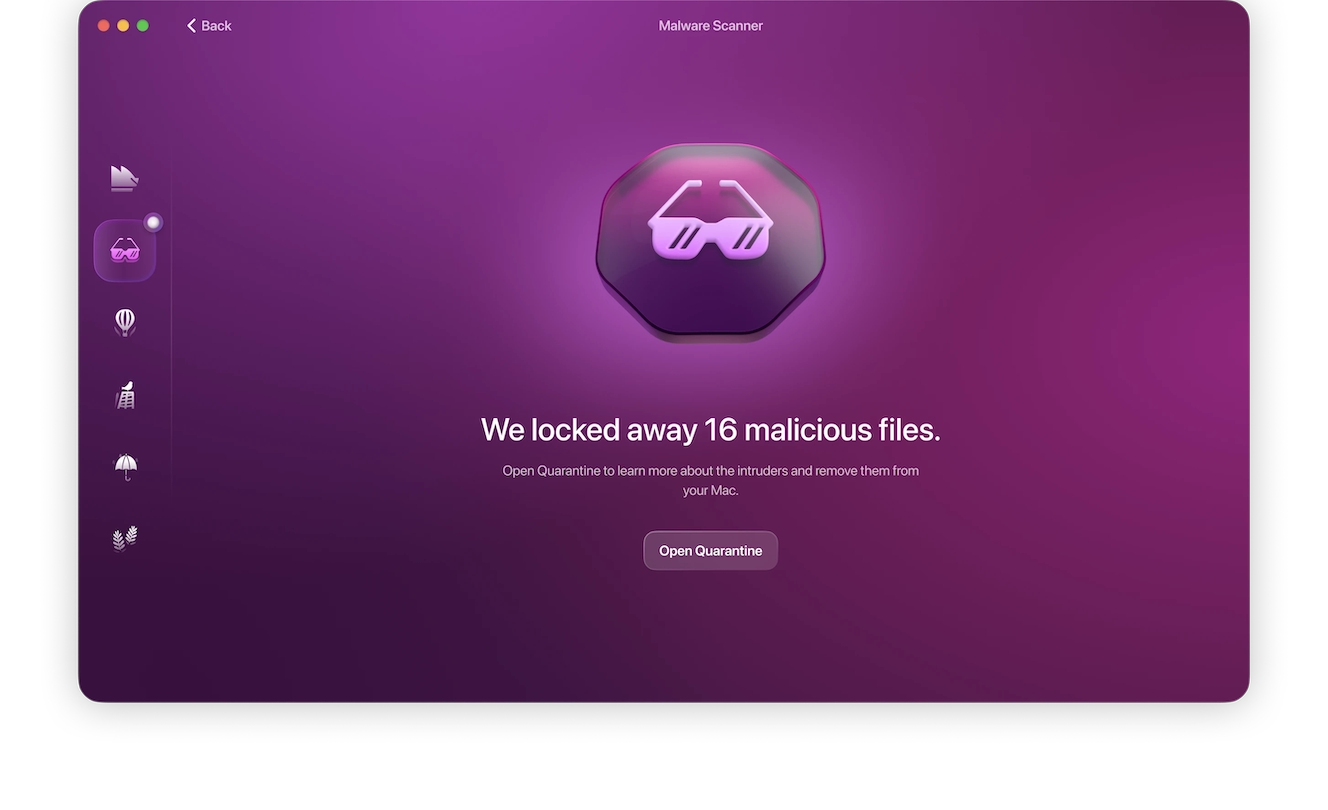
Moonlock will methodically scan through the files on your Mac, looking for anything malicious or suspicious, and immediately isolate it and prepare it for removal.
Online marketplace stolen card scam
A scammer can use a stolen credit card through Apple Pay to buy something online, disputing the transaction only after collecting the product. The payment may then be charged back, leaving the seller without the item or money. In this case, Apple Pay’s seller protection doesn’t apply.
To avoid falling for this type of scam as a seller yourself, look for signs like rushing pickup, overpaying, or a mismatch in the card and buyer details.
Public Wi-Fi/Evil twin attack
Apple Pay scams don’t always target the payment app itself. Sometimes, scammers set up a fake Wi-Fi network that looks trusted, then use it to redirect users to phishing pages, such as fake Apple sign-in pages, so they can capture login credentials.
Look for duplicate network names or names that don’t match. Also, if you find you’re being redirected to Apple login pages or receiving certificate warnings on your browser, immediately disconnect from the network.
SIM-swap attack
In a SIM-swap attack, instead of targeting you directly, the scammer tricks your mobile carrier into transferring your phone number to their SIM card, usually by impersonating you and claiming to have lost your phone. This allows them to intercept calls and verification codes sent to your number, which they can use to reset your password and access your Apple Account.
These attacks can be harder to detect, but keep an eye out for unexpected “No Service” notices from your carrier, unfamiliar login notifications, and verification codes that you didn’t request.
Malicious QR code scam (quishing)
A less-targeted scam is when scammers place fake QR codes on parking meters or restaurant tables, prompting users to make fraudulent payments using Apple Pay or directing them to a fake Apple Account sign-in page.
In some cases, the fake QR sticker looks out of place, leads you to a mismatched URL, or requests unnecessary verification codes. These are all signs that you shouldn’t proceed with the payment.
Gift card payment scam
Instead of a direct payment, a scammer may demand an Apple Gift Card as payment, then ask for the card’s PIN number to redeem the balance. Unlike fraudulent payments made through the app, gift cards can’t be reversed or investigated by Apple, so you and your money will be parted permanently.
Apple Cash payment from a stranger
You receive an unexpected payment from a stranger in your Apple Cash. The stranger then claims the payment was accidental and asks you to refund them the money. Seems reasonable, right? However, the original payment was made using a fake or stolen credit card that will get reversed; meanwhile, the “refund” you sent to them is money that comes straight out of your account for good.
Watch out for unexpected payments from strangers, especially when coupled with a sense of urgency regarding the refund requests.
Does Apple Pay protect you from scams or fraud?
Apple Pay has a lot of safeguards in place to protect you from fraud, but scammers are known for finding their way around them, so a reimbursement is not always guaranteed.
When you pay with a credit or debit card through Apple Pay, you’re retaining your bank’s usual dispute conditions. Apple Card purchases made through Apple Pay can be subject to disputes with Apple’s customer support if you can provide sufficient evidence of fraud. Apple Cash, however, offers far fewer recovery options. Once the P2P payment is accepted, the authorized transfer is final.
Generally speaking, Apple protects you against unauthorized transactions, where someone uses your account without permission to transfer funds. Meanwhile, an authorized transaction scam looks like any other legitimate transaction on your end. Because you were the one to authorize it, there’s very little that Apple or your bank can do to reverse it.
Why is Apple Pay showing a fraud warning?
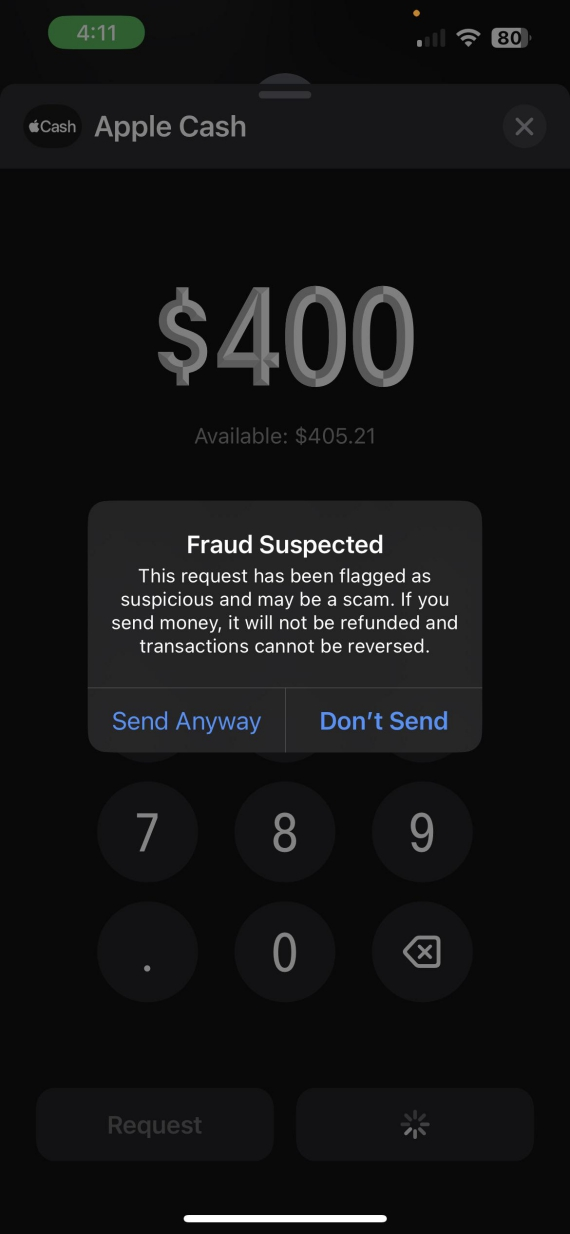
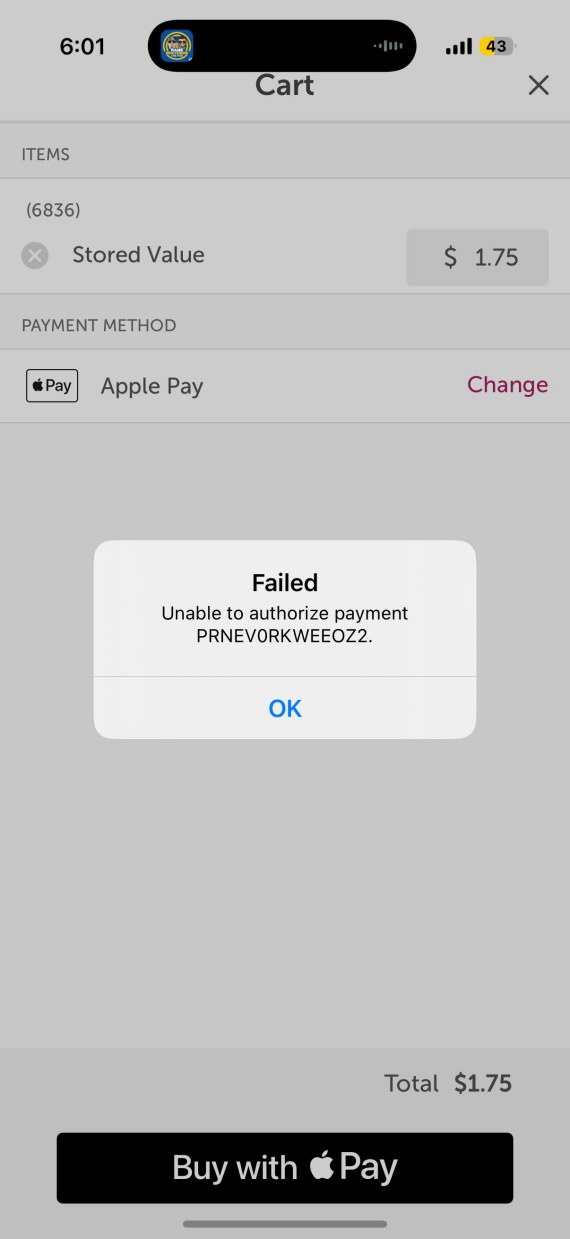
You might notice “Fraud Suspected” or “Failed” pop-ups when you’re about to send a payment. These alerts aren’t proof that the person is a scammer, but this type of alert usually appears when the recipient is outside of your contacts or the transaction amount is outside of your usual activity.
This is your chance to double-check the recipient, confirming the amount and purpose of the transaction. Cancel the transfer if anything seems suspicious.
What to do if you get scammed through Apple Pay
If you get scammed, act immediately. The faster you report the issue, the better your chances are of getting the transaction reversed.
Stop further loss
Lock or freeze the affected card and secure your Apple Account by changing the password and removing any unknown linked devices or services.
Preserve evidence
Take as many screenshots as you can and save the messages, receipts, and transaction details of the scammer before blocking them.
Contact Apple and your bank
Notify your bank if a credit or debit card was involved, and contact Apple Support with the information you’ve gathered on the scammer.
How to report fraud on Apple Pay
Reporting the fraud to Apple remains your best chance of getting your money back, usually within 2 business days. Here’s how to do it:
- On your iPhone, open the Wallet app, tap Apple Card, then tap Transactions.
- Under Latest Card Transaction, tap on the transaction you want to report.
- Tap Report an Issue.
Make sure to only contact Apple through official channels, through the Wallet app or the official website. There are fake fund-recovery services that often pose as Apple Pay Support Agents, but they will only steal your financial information instead of helping you.
Can you get your money back after an Apple Pay scam?
It’s highly unlikely that you’ll get your money back. Unless you can prove that the transaction was unauthorized, the Apple Pay transaction is likely gone for good.
Apple Pay scams: Frequently asked questions
Yes, Apple Pay is a secure Apple product.
Apple Pay has built-in fraud alerts that warn you against sending payments to potential scammers, as well as the ability to reverse unauthorized payments.
Apple may contact you through Wallet app notifications or your Apple Account. They will not call you unexpectedly from unknown numbers or through text messages or emails.
Immediately report the fraudulent transaction to Apple and, if your credit card was involved, to your bank. If you act fast enough, you might get a refund.
Yes, if you don’t have “Manually Accept Payments” enabled in your Wallet app, payments get accepted automatically.
How to protect yourself from Apple Pay scams
There are a few safeguards and precautions that can help you significantly reduce your risk of falling for an Apple Pay scam:
- Never share verification codes.
- Verify unexpected payment requests.
- Avoid suspicious links and QR codes.
- Monitor and report unfamiliar charges.
- Secure your accounts with passwords and 2FA.
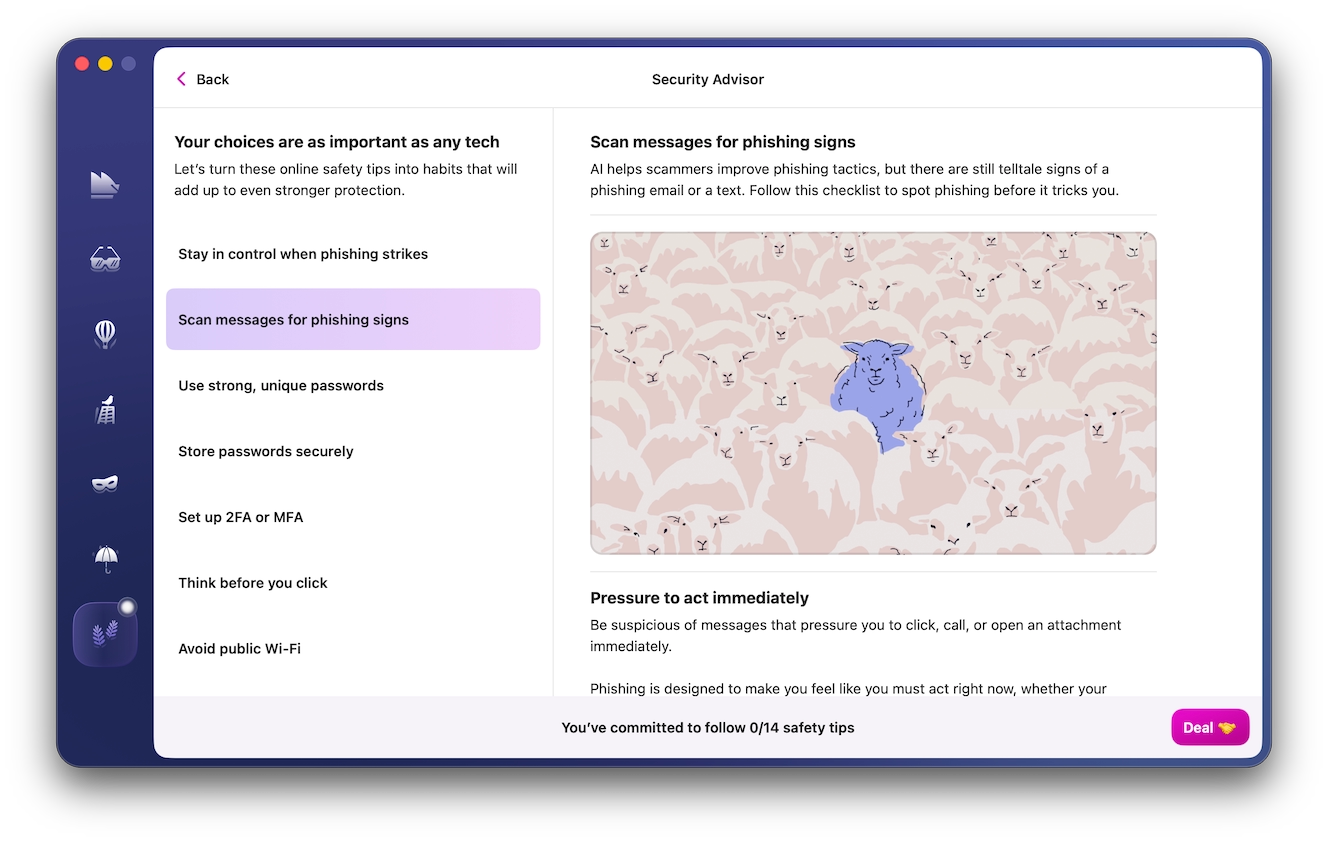
For added safety, consider a dedicated cybersecurity solution. Moonlock’s Security Advisor tool, for example, provides step-by-step recommendations on how to secure your Mac and Apple Account against phishing and account takeover attempts.
With a few clicks, you can optimize your Mac’s security and help protect yourself from Apple Pay scams, as well as a variety of cyberattacks. Try it today with a 7-day free trial.
Apple Pay itself is secure. You don’t have to worry about anyone brute-forcing their way into your account. But scammers often rely on deception and phishing when targeting users. Consequently, it’s important to remain vigilant and double-check any suspicious messages or offers from unknown numbers.
This is an independent publication, and it has not been authorized, sponsored, or otherwise approved by Apple Inc. Mac and Apple Pay are trademarks of Apple Inc.