The world of online scams has changed. Gone are the days of dealing with isolated, low-level scammers manually sending emails and calling you up on the phone. Instead, we are dealing with a highly sophisticated, tech-resourceful, industrialized cybercriminal scamming sector. And it’s generating millions of dollars every year.
Many scams may seem low-value, but they are no joke. Meanwhile, old scams, like the fake Apple Pay scam, already effective, are being modernized for high volume, speed, and efficiency. In this report, we look into a new fake Apple Pay scam. This one uses no text messages and no emails. It happens entirely on your browser. Here’s what you need to know to stay safe.
No email, no text, no SMS. A new fake Apple Pay scam works on your browser and has your phone talking.
Recently, Malwarebytes reported on a new Apple Pay scam that tricks you into calling a fake Apple Support number. From there, you are pressured to give away sensitive information. This scam, unlike other fake Apple Pay scams, which are highly popular among scammers, uses no SMS, text, or email. Instead, everything unfolds when you visit a specific website that puts on a show aimed at convincing you that Apple Pay is flagging a transaction on your phone.
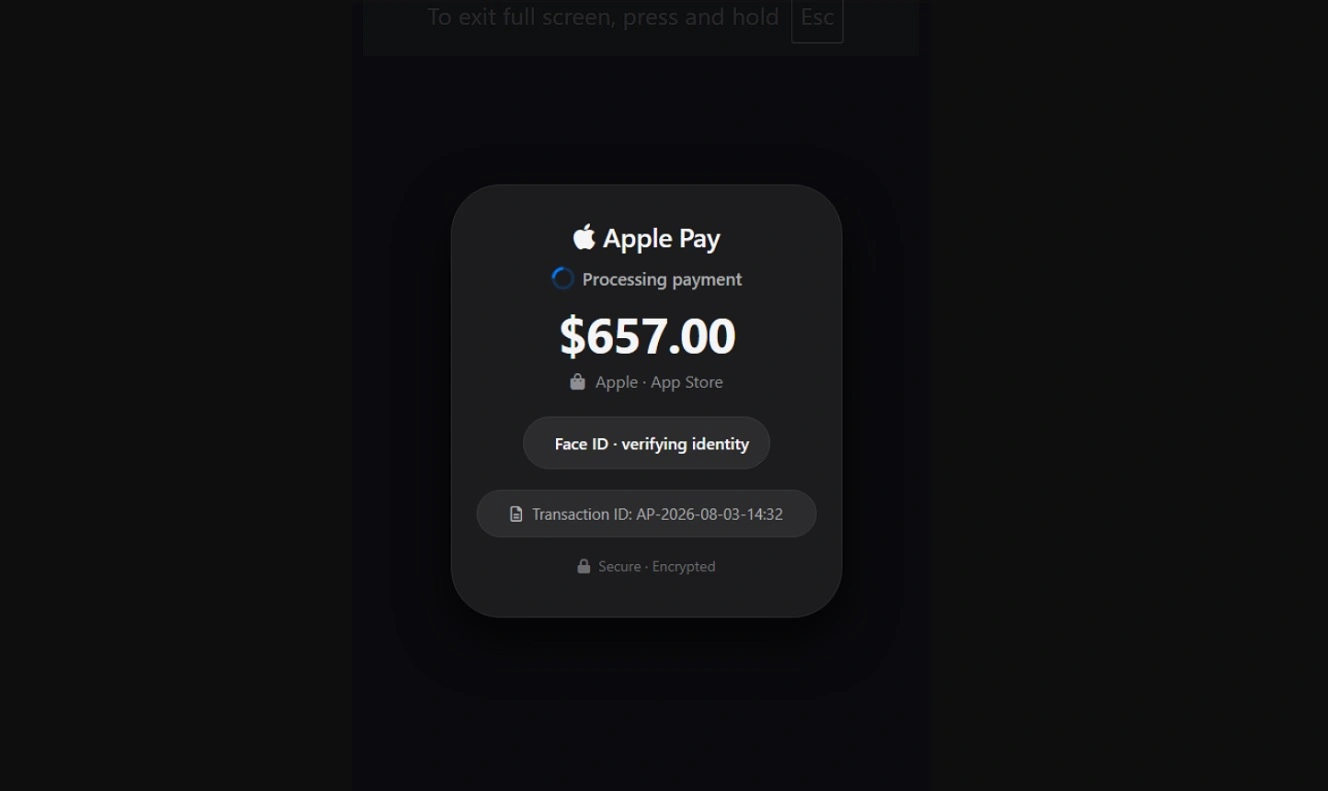
To make things even more convincing, the fake Apple Pay site is coded to access your phone’s audio system and give speech alerts impersonating Apple Pay.
Yes. Your phone will start talking to you, alerting you about a transaction. But none of it is real.
While Malwarebytes did not share the IOCs or websites behind this scam, there are likely several of them. Scammers today use AI not only to replace human scam callers with scamming AI agents taking calls 24 hours a day, 7 days a week, 365 days a year, but also to create sites in bulk to lure users.
Apple Pay scams are nothing new, and there are several variations on them. As mentioned, the scam industry is highly profitable for cybercriminals. Last year, in 2025, Apple shut down $2.2 billion in fraudulent transactions linked to Apple payment services alone. But these numbers only represent the scams that are stopped, not those that are successful.
While there are no official numbers on successful Apple Pay scams, in 2024, the Federal Trade Commission (FTC) recorded just over 2.6 million fraud reports. About 90,000 of those were related to payment apps and services.
Now that you know what sort of threat actors you’re dealing with, let’s look at how this new scam works so you can spot it in the wild.
How does the new fake Apple Pay scam work?
According to Malwarebytes, this new Apple Pay Scam is specifically designed to work on your iPhone. From your point of view, here’s what happens and what you see:
- You land on a website on your phone.
- The website triggers a 100 percent fake Apple Pay web design on your browser. It is then animated with a bogus “Face ID verifying identity” text and a spinning wheel status to try to make you think that you are being charged via Apple Pay.
- A couple of seconds later (2.8 seconds to be exact), the fake Apple Pay alert closes, and a second screen opens.
- The second screen on the browser is a fake Apple Pay transaction receipt. The design includes an amount ($657.00), masked bank card numbers, an authorization code AUTH-8F3A2B1C, a transaction ID AP-2026-08-03-14:32, and a green “Completed” status.
- If you click on the fake Apple Pay transaction, the website (using JavaScript, SpeechSynthesisUtterance, and window.speechSynthesis) accesses your phone’s voice system and speaker.
- It reads the alert out loud, pretending to be Apple. You will hear a voice on your phone say, “Unauthorized charge of 657 dollars from your Apple ID. Please call for support immediately.” Again, none of it is real.
- If you click on the call button, the page automatically opens your phone app with the scammers’ number on it.
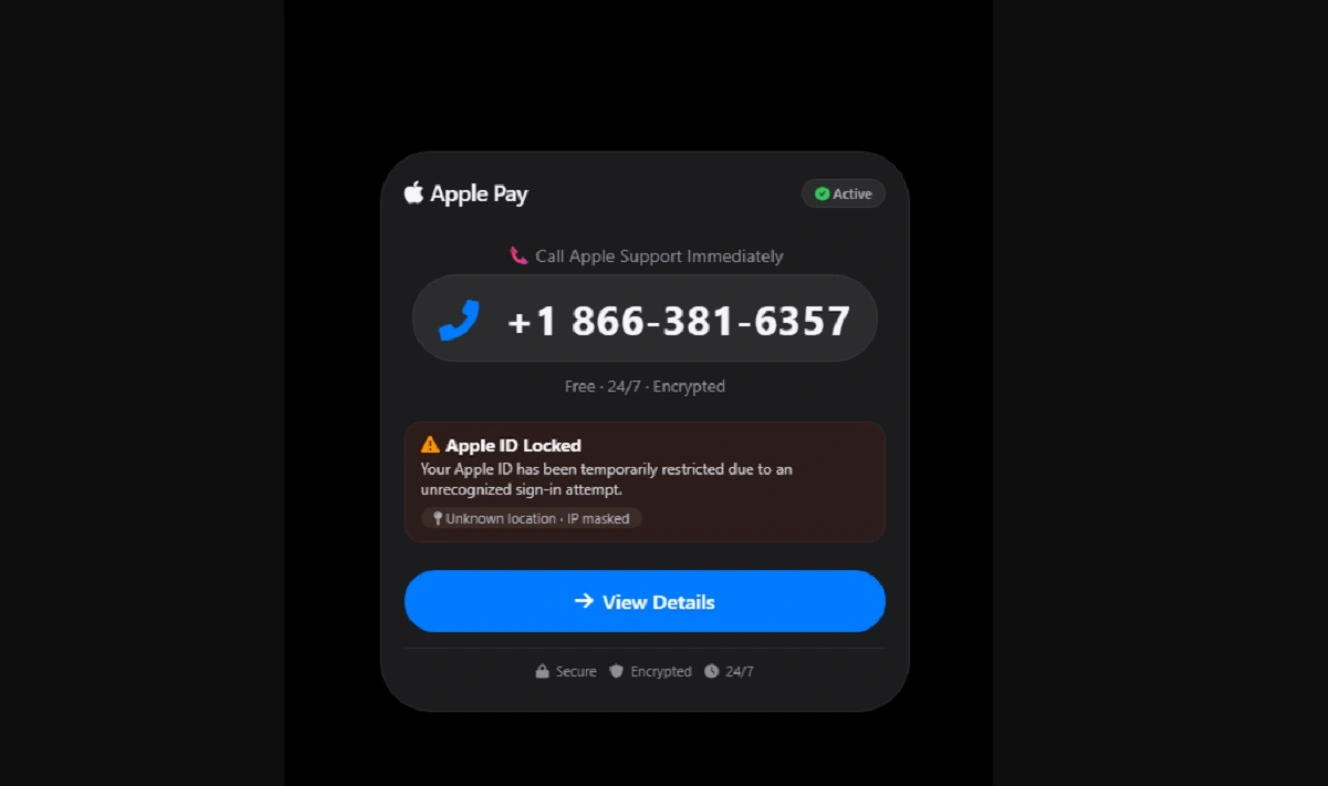
While Malwarebytes did not reveal what happens when you call this fake number, this type of scam usually uses prerecorded messages or scam AI agent callers scripted to steal your sensitive data. You might also get a human scammer on the other end. Either way, the end goal is usually to force you to disclose sensitive information or use fake “verify your ID” processes to break into your accounts.
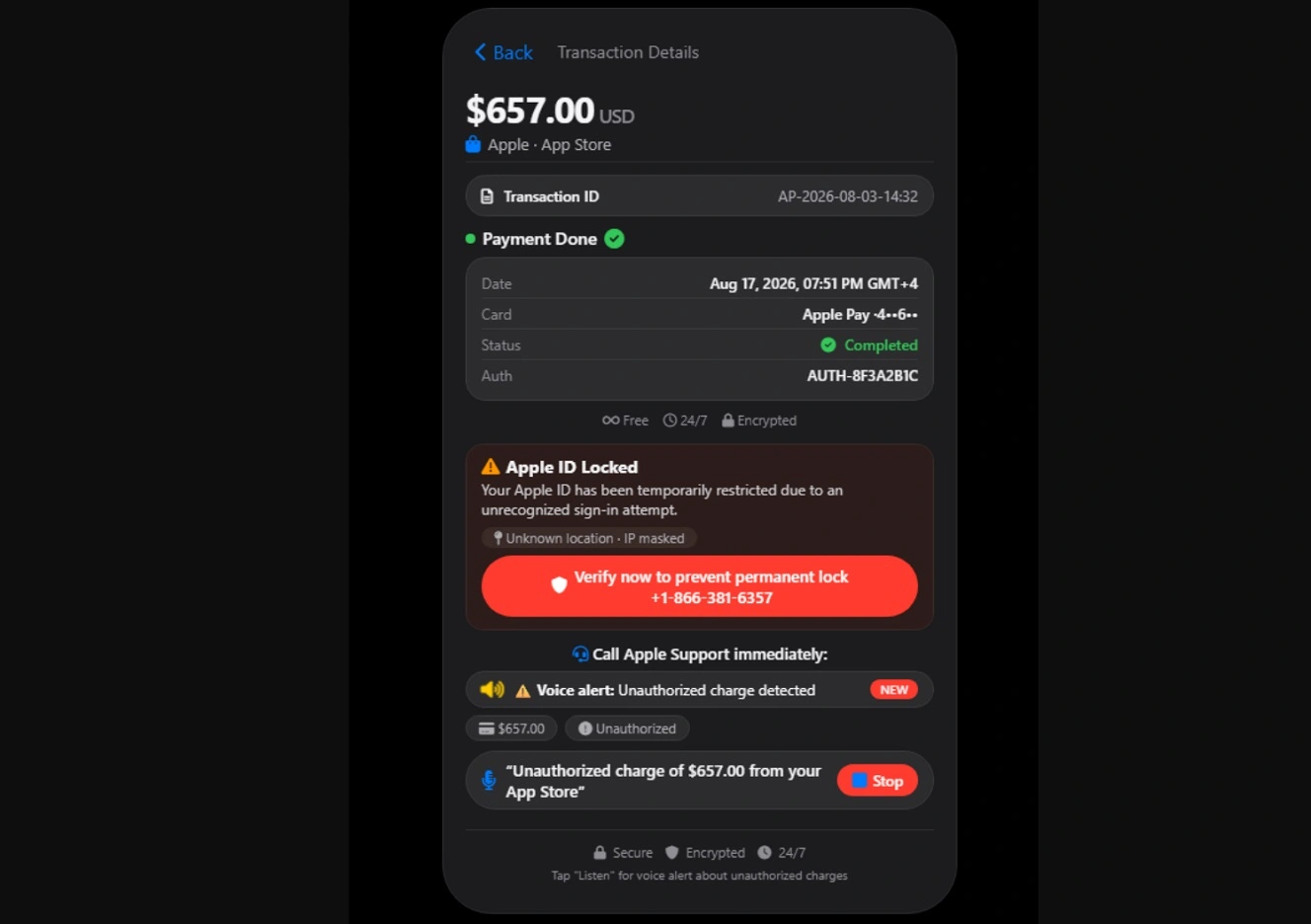
The way this website is coded, including the voice commands and other innovative social engineering functions — for example, navigating back on the site to exit the scam triggers an even more panic-inducing warning — is a sign of how much more difficult it is becoming for users to navigate fake Apple Pay scams.
What we found when we looked for the fake Apple Pay site
We searched online for these sites or sites identified in this campaign using details shared by Malwarebytes, such as fake authorization codes (AUTH-8F3A2B1C), a fake phone number to call (+1 866-381-6957), and other details of the scamming text such as “Your Apple ID has been temporarily restricted due to an unrecognized sign-in attempt.” We got back a high-probability match from the site appstoresupport[.]sbs.
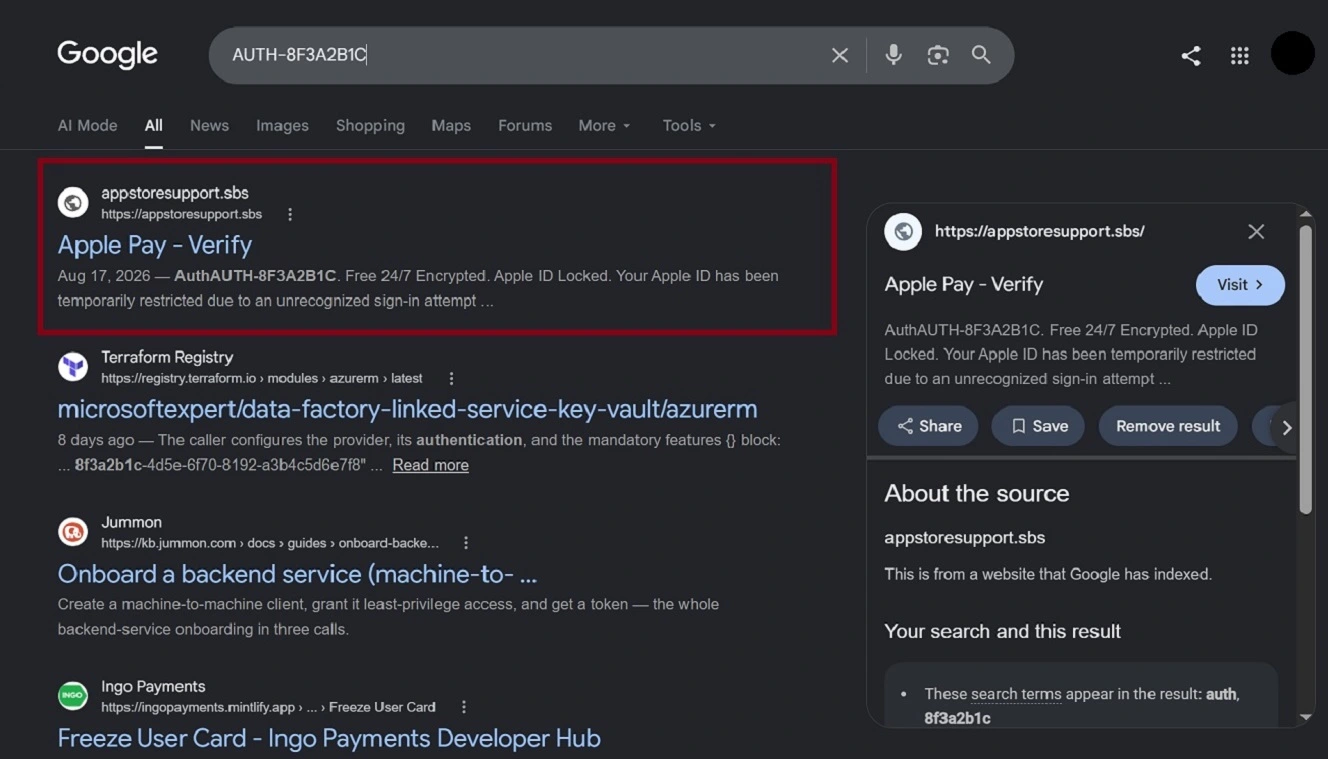
The search engine-indexed title for the site appstoresupport[.]sbs reads “Apple Pay – Verify.” It was down and flagged only by one security vendor on VirusTotal for being a “Malware site.” Additional searches revealed that besides running a $657 fake Apple Pay charge, this site was also indexing a $149 fake Apple Pay scam page, listing a different phone number than the one Malwarebytes reported.
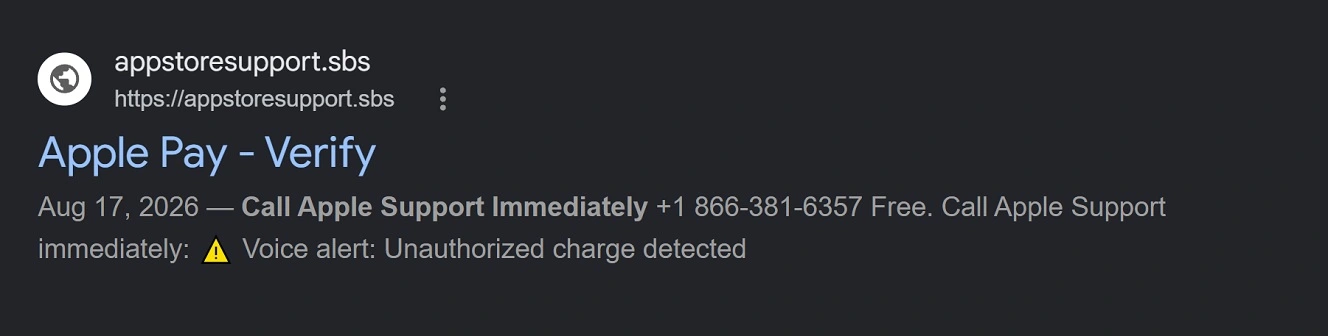
The second phone number is +1 866-381-6357. A check on Malwarebytes’ free phone checker flagged this second number as “Scam.”

We contacted Malwarebytes to get a list of the fake sites that are spreading this fake Apple Pay scam to share with readers so they can avoid them. We have not yet received a response.
How you can stay safe from new and old Apple Pay scams
As scammers embrace AI and work more closely with cybercriminals and the broader malware-as-a-service (MaaS) sector, the volume of scams is going up. Meanwhile, the scamming techniques are becoming more sophisticated. Despite this current scam landscape, you can still do a lot on your end to avoid falling for a scam or taking action when one happens.
Moonlock ships with a Scam Detector and flags malware on your Mac
The Moonlock security app, built to offer you layers of protection for your Mac, ships with a Scam Detector. It will check for phishing and scams in any message, email, or text in just a couple of clicks and tell you if it’s safe or dangerous and why.
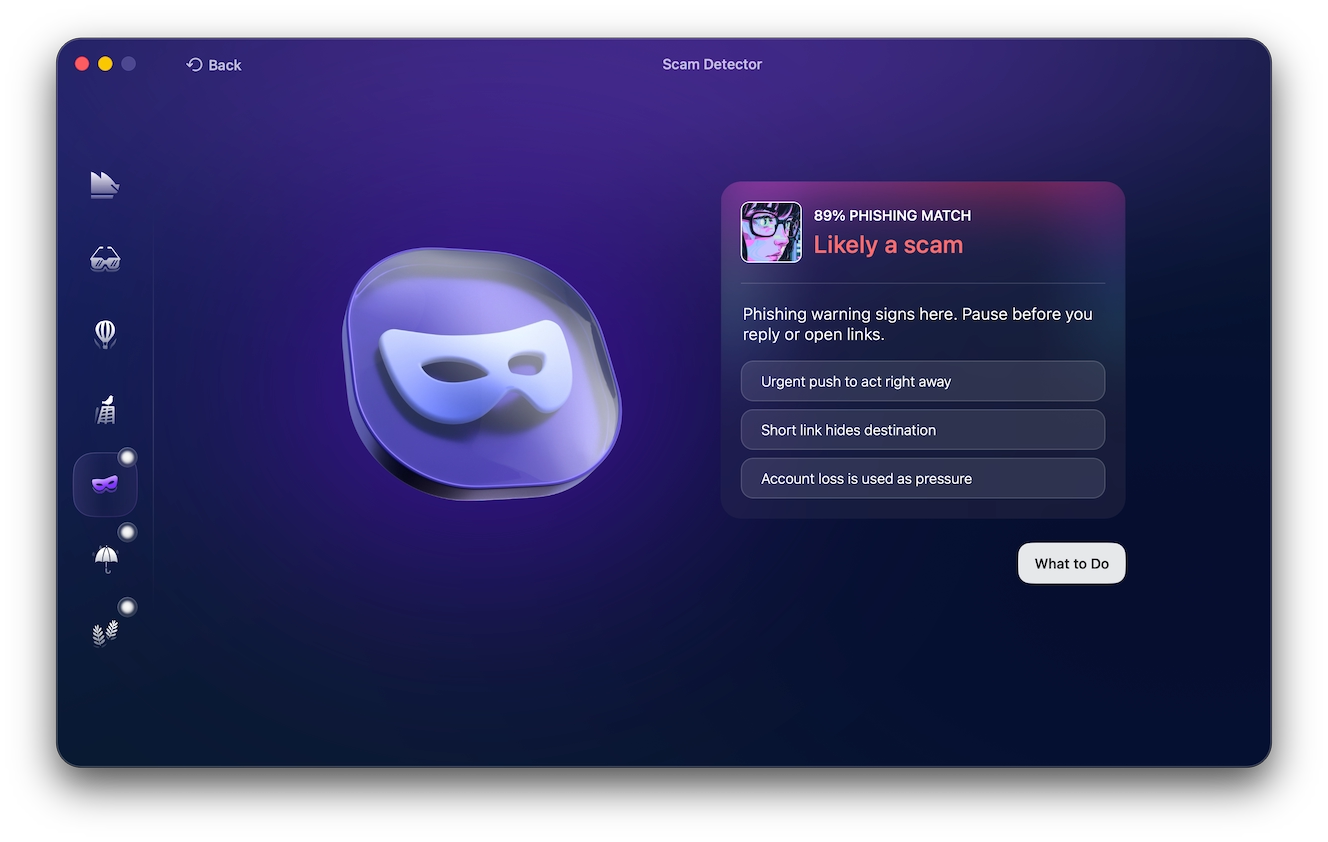
Once you download Moonlock, Real-Time Protection runs in the background of your Mac. It checks everything you interact with for malware threats, including emails, terminal commands, and online activity.
Real-Time Protection will only break your focus if it finds anything amiss. When that happens, it will let you know what it found and why it is dangerous. You can then move the threat to Quarantine or remove it completely from your computer.
To add more layers of protection, the Moonlock app also comes with a Malware Scanner, which can be configured for speed or depth, a built-in VPN for safe browsing, and features like System Protection that guide you on how to turn your Mac’s security settings to the highest levels.

You can test-drive Moonlock for free for 7 days and see for yourself what it can do.
Check those phone numbers when transaction alerts insist that you call
Checking every phone number you interact with can be a bit of a nightmare. Unless, that is, you know which sites can do a rapid phone scam check without asking for your email or credit card information. A good place to start is Malwarebytes’ free phone checker; it’s fast and free.
You can also do an online search for a number if you think it’s a scam and see what comes up. If nothing comes up, or if you cannot verify that the number is linked to a real company or to Apple Support, consider the message a scam. Don’t call it.
It is important to note that even if a phone number comes back clean, scammers use specialized software to spoof authentic phone numbers. There are several documented cases showing how scammers do this. They have even spoofed real Apple Store phone numbers from stores in the US.
Don’t try to verify suspicious alerts. Instead, log in to your actual accounts.
A good idea when confronted with what might be a fake financial transaction alert, whether on your phone or your Mac, is to go into your wallet or Apple Pay account instead of checking the data from a possible scammer.
Check the balance, recent security notifications, and messages. If your main account shows no activity, no matter what a scammer says, you should be covered. You can change your password or enable MFA with biometrics to strengthen your posture.
Do not engage with or underestimate scammers, especially with AI
Scams, especially with AI being used increasingly often, can be hyper-personalized and highly convincing. Those who have been caught on the wrong side of scams, even those with cybersecurity knowledge, will tell you not to underestimate scammers. It’s one thing to read about a scam and how it works. It’s another thing to actually live through one.
The best course of action is to block, mute, report, and ignore the scammers, no matter what they are saying. As mentioned, check everything on your side instead of falling into the scammers’ script.
Report transactions to Apple, your local police, and check out what other users say
To report transactions to Apple, you can follow the steps on their official page, “How to report a transaction issue or dispute a charge to your Apple Card.”
Another good idea is to check out Apple Pay scams reported by users. For example, you can find countless reports on Apple scams written by users at reddit.com/r/Scams. Reading what happened to others can help you build cybersecurity awareness and spot scams before you fall for them.
You should also report Apple Pay scams to your local police, especially if you lost money or handed over sensitive personal or banking information, or if identity theft was involved.
Final thoughts
With social engineering happening inside a browser, the new fake Apple Pay scam discovered by Malwarebytes looks more like what you would see in a macOS stealer campaign than a traditional Apple Pay scam.
Despite this innovation, you can still steer clear of this scam, no matter how sophisticated the website may be. Take the initiative to learn more about how your technology works to avoid scams so you can lead a calmer, safer digital experience.
This is an independent publication, and it has not been authorized, sponsored, or otherwise approved by Apple Inc. Mac, iPhone, and Apple Pay are trademarks of Apple Inc.