How much do you know about a developer before downloading one of their apps from the Apple App Store or Google Play Store? What about how that app handles your data? And overall, how much do you know before clicking on “Install”?
Researchers recently looked into thousands of apps on official stores, and what they found should concern you. Hundreds of apps are not safe.
TechRadar looked into more than 4,000 apps on official app stores and found this
Recently, TechRadar audited more than 4,000 VPN apps on the official Apple App Store and Google Play Store. They found many of these are putting users at risk. Hundreds of them, actually. The finding contradicts what security experts tell us all the time: Only download apps from official stores. Turns out, many apps are a risk.
TechRadar said some developers’ Apple App Store pages redirect users via links to unencrypted pages and use hidden redirects. Some even direct users to abandoned app websites taken over by cybercriminals.
We reached out to TechRadar’s reporter to get more information and a list of the apps Mac users should stay away from, but we have not heard back from them yet.

Are you protected from malware?
While we did not look into every VPN app on these stores to verify TechRadar’s claim, we did look into a couple and found them to be lacking essential transparency. It is not the first time we report on dangerous VPNs and malicious apps hosted on official stores.
Last week, we reported on a vulnerability that allows hackers to swap any app you download on your Mac with a modified one. In June, we covered how Mac users were being targeted with malicious apps that hijack browsers, steal data, and install backdoors. And in January, we covered how malicious VPN extensions can intercept your traffic and steal credentials.
Also, back in December 2025, we reported on VPN browser extensions caught spying on users’ AI chats.
Malicious apps, and apps that steal your data or gather more data than they should, are linked to the data broker industry, where user data is bought and sold in bulk, cybercriminal activities, surveillance, and the commercial spyware sector.
So, what should Mac users know about VPN apps on the Apple App Store?
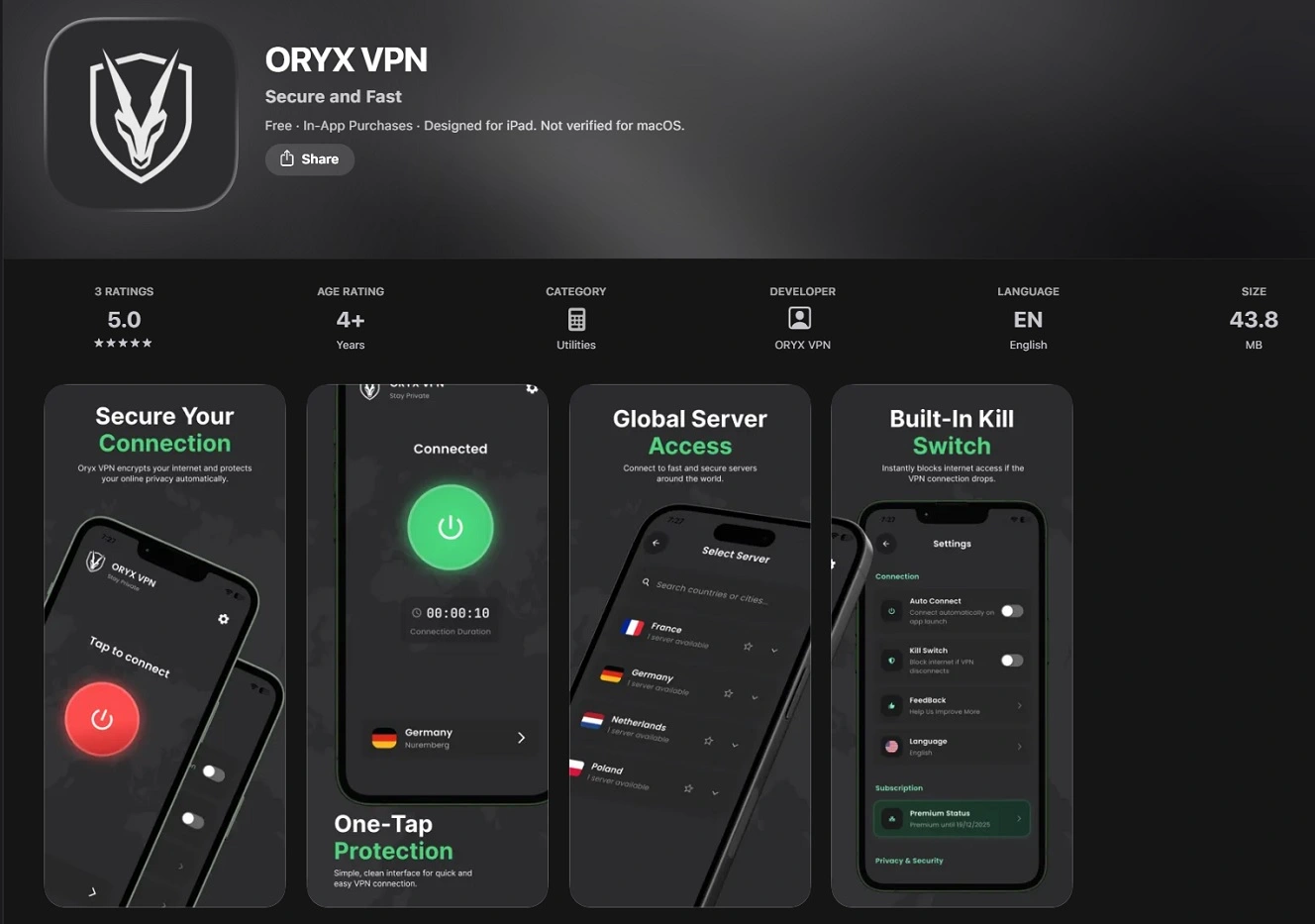
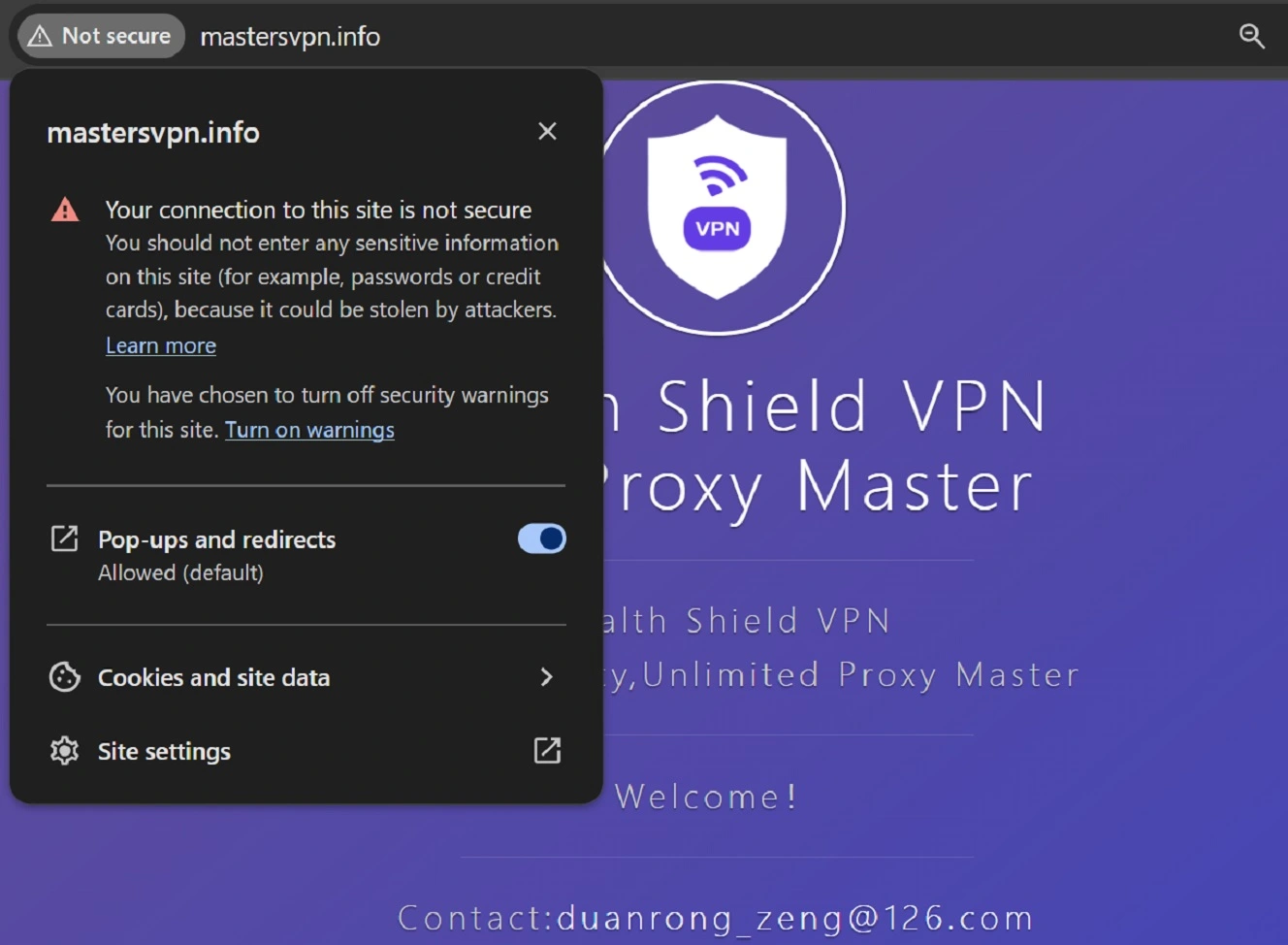
“The biggest concern we found surrounds encryption enforcement,” said TechRadar. “We found that 339 Android links (5.3%) and 188 iOS links (6.8%) use plain, unencrypted HTTP instead of secure HTTPS. This includes massively popular apps like Oryx VPN (which boasts over 1 million downloads) and Stealth Shield VPN.”
Why a VPN app developer would host its main website on an HTTP site, and not a HTTPS site, is a question that is hard to answer. As TechRadar explains, HTTP sites allow network eavesdroppers or man-in-the-middle (MitM) attackers to intercept, manipulate, or inject malicious content into the traffic between you and the developer’s site.
Bottom line: When you visit an app developer’s page and get a warning that the site is not using HTTPS, avoiding it is a good idea.
Other links that represent a risk for you — and, according to TechRadar, are abundant on the Apple App Store and Google Play Store — are shortened URLs. These are made using free online shorteners like shorturl.at or the Yandex-based clck.ru. But shorteners don’t just reduce the number of characters in a link. They also hide the original website to which you will be directed. Clicking on one is like flying blind.
TechRadar also warned that some app developers on these official store pages are linking downloadable PDF files instead of websites in the “Privacy Policy” link. PDF files can easily execute malicious commands on your computer, access your files, and extract (steal) your files.
Even stranger, some app developers are including raw numerical IP addresses instead of websites. “This bypasses domain-based web filtering, SSL certificate validation, and public DNS reputation systems, effectively making connection security impossible to verify,” said TechRadar.
The truth is that the official app stores look great, design-wise, on your Mac or your iPhone, but when it comes to actually providing you with important data you need, things get tricky. Finding app developers’ websites, verifying their privacy policy, and who they are is time-consuming. Links or information that should be in plain sight are usually buried behind scrolls, sub-menus, and end-of-page fine print (things very few of us look at).
Another worrying case, according to TechRadar, is that some app developers abandon their projects completely, leaving their website domains to expire. Cybercriminals then buy up these domains and get traffic from the official app stores. On these fake websites, TechRadar found scareware, as in pop-ups trying to scare you with fake messages that claim “your computer has a Virus!!!” Or “Download this fix” (malware).
Basically, what TechRadar found is one big mess.
“In fact, our audit verified multiple active store listings containing domains that now host fake antivirus pop-ups and ad redirects,” said TechRadar.
“Official links were found pointing to deleted Twitter handles, empty Facebook and Instagram pages, payment portals like Cashpay Iraq, and even Chinese opera sites,” TechRadar said.
A closer look at VPN Stealth Shield reveals a worrying pattern
We took a closer look at the VPN Stealth Shield, highlighted by TechRadar. The official Apple App Store page of this app directs users to MastersVPN at http://mastersvpn[.]info. While we did not find malware linked to it, we didn’t run any malware scans either. What we found is a pattern that repeats across the board. A complete lack of developer transparency, as in no one really knows who made this app.
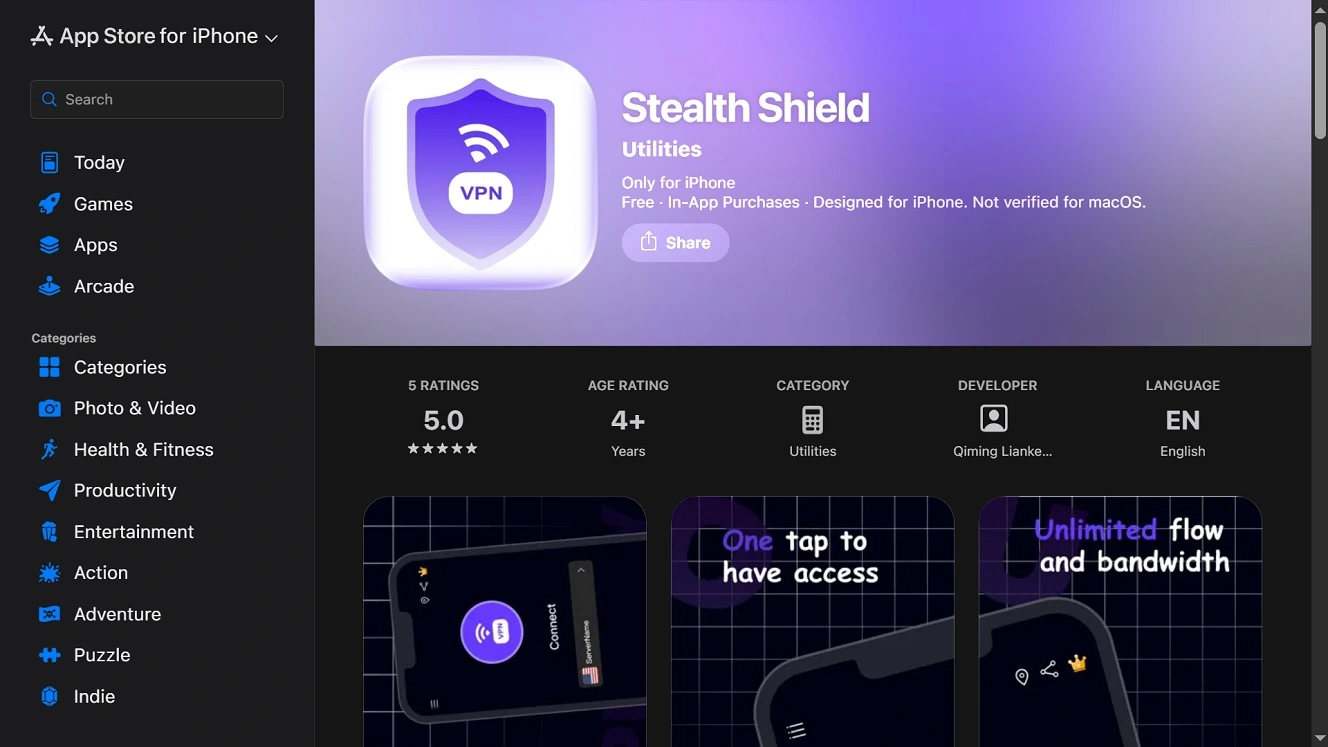
Not knowing who made an app is very common. For example, in this app, the developer is listed as Qiming Lianke Technology Co., Ltd. However, the company has no official website, and no site to confirm its basic business information.
The VPN Stealth Shield app on the Apple App Store provides users with a link to their page, which is hosted on an unsafe HTTP website. While this does not mean the website is malicious, HTTP sites do leave the door open to cybercriminals. An HTTP site (contrary to HTTPS) can be used to steal your passwords, emails, credit cards, or other data.
Besides the VPN app, the Developer Qiming Lianke Technology Co., Ltd also offers users a Health Manager app, Travel Translator app, and a QR Code Reader. Other than that, little is known about Qiming Lianke Technology Co., Ltd.
In the E.U., where developers on the Apple App Store must comply with the E.U. Digital Services Act, the developer Qiming Lianke Technology Co., Ltd listed itself as a “non-trader” by saying: “Qiming Lianke Technology Co., Ltd has not identified itself as a trader for this app.” This means they have not published a registered corporate address, business phone number, or commercial entity homepage, as the image below shows.
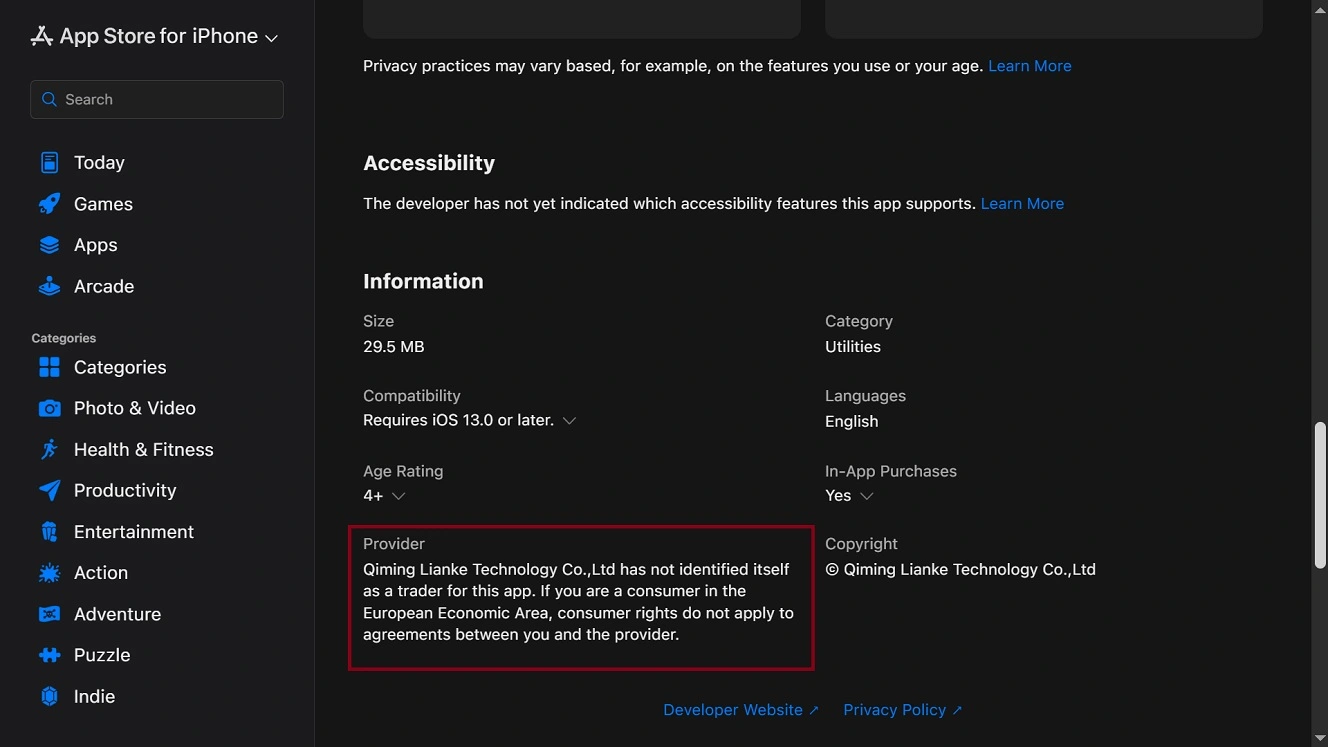
If a developer lists an app as “Trader” in the E.U., the business data of the developer is verified by Apple, including legal business address, phone number, and official email on the App Store listing. When a developer ticks the “Non-Trader” box, they bypass all these checks. This option claims the app was built for “fun, or as a hobby,” or “is non-commercial.”
While all of this does not mean the VPN app from Qiming Lianke Technology Co., Ltd. (listed as appropriate for users aged 4 or older and therefore appropriate for children) is malicious. However, the lack of transparency is notable and unfortunately not uncommon.
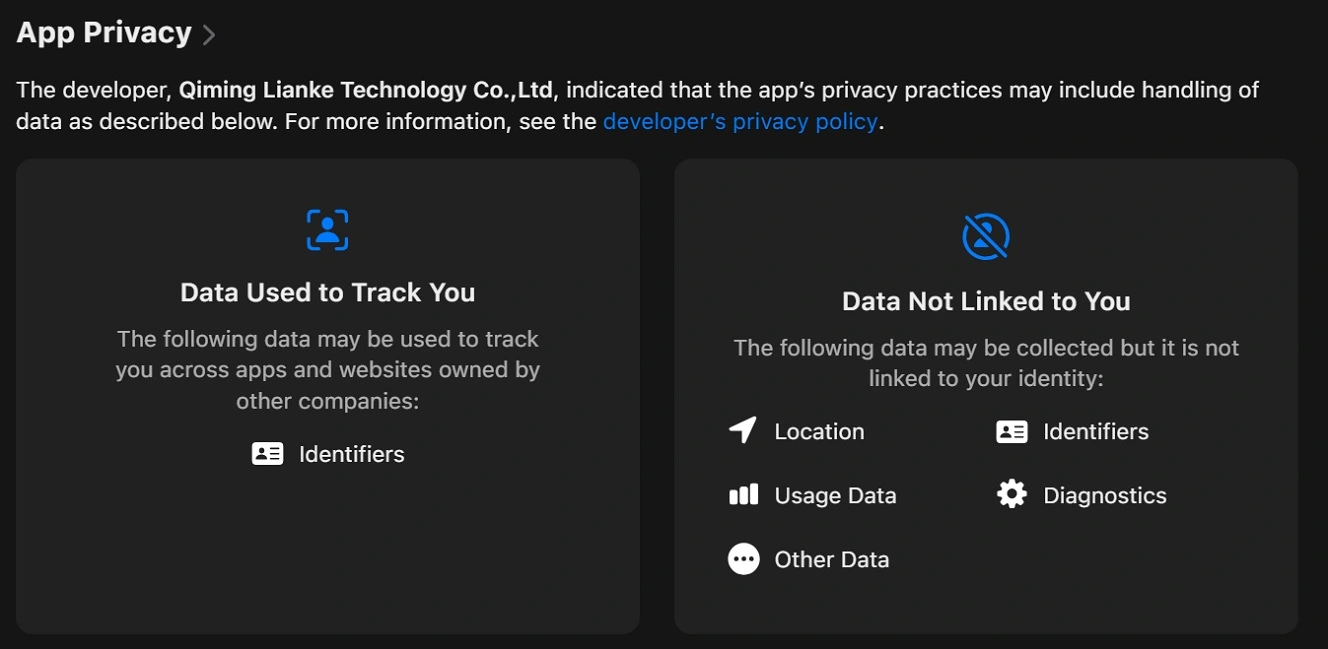
We also checked the app Oryx VPN, which, out of 4,000 audited apps, TechRadar highlights in its report for some reason. But, besides unverified tech facts regarding how the developer says the VPN works and technical wording in its privacy policy that suggests the app might collect user data, we found nothing. This leaves us wondering why TechRadar decided to highlight Oryx VPN, which has more than 1 million downloads, out of all the 4,000-plus apps in its audit. To stay on the safe side, maybe verify it yourself or stay away from it.
How to stay safe from suspicious and malicious apps
There are several things you can do to stay safe from malicious and suspicious apps that either collect data and sell it or pose a cyber threat to you. The following are some simple but effective tips and suggestions.
It’s a pain, but you have to check the developer and the Privacy Policy
We get it. When you need an app, you just want to download it and run it on your phone, and the last thing you want is to go through a Privacy Policy or check who made it and what other users say. But unfortunately, the risk today of not taking this time to check at least the basics is too high. Verify the developer. Pausing and taking the time to check if an app is safe is a good idea.
Report apps that are shady or malicious to Apple and your community
If you had a bad experience with an app or know of an app or a developer that is painting outside the lines (in a bad way), report it. Share it with your online community or on platforms like Reddit, GitHub, or social media. You can help others stay clear of it and turn a bad experience into a shareable moment.
You should also report the app to Apple.
Don’t assume apps on official stores are safe
Developer IDs can be fabricated from thin air or stolen. Accounts can be taken over. Malicious and suspicious apps can get past Apple’s security guardrails. Keeping this in mind is important. Don’t assume something is safe just because it’s on an official app store.
Get Moonlock. It will flag suspicious and malicious apps and stop them in their tracks.
The Moonlock security app, through Real-Time Protection, will check everything you interact with for malware and suspicious behavior. This includes apps you download online. Real-Time Protection and the Malware Scanner in the Moonlock app run on a constantly updated malware database that includes new and old threats.
If Real-Time Protection finds anything, it will let you know and move the threat to Quarantine. In Quarantine, you can learn more about the malware your Mac encountered on your own time. You can also discover why they are dangerous and remove them completely from your computer.

The Moonlock app also ships with a built-in VPN and a Scam Detector that can flag scams and phishing emails and texts. And, through the Security Advisor, the app will help you build safe digital habits.

Check it out for yourself. Test-drive Moonlock for free for 7 days and see how it feels on your end.
Final thoughts
Shady app developers and criminals are well aware of the massive volume of apps that are out there. They use this to their advantage, hiding in plain sight in the crowd. Therefore, the classic “only download apps from official stores” now needs a little bit of rephrasing.
Don’t skip checking the Privacy Policy of an app before you install it on your device. It will tell you if the app is collecting your data and what it is doing with it. Furthermore, looking into who actually made the app, whether they have solid websites, what other users say, and whether or not they can be trusted is the best way to go, even if that means taking the long way home.
This is an independent publication, and it has not been authorized, sponsored, or otherwise approved by Apple Inc. Mac and macOS are trademarks of Apple Inc.